
KLIM KLIM Chroma
KLIM Chroma Wireless Gaming Keyboard
Manuale d'uso
Brand: KLIM | Model: KLIM Chroma
1. Introduzione
Thank you for choosing the KLIM Chroma Wireless Gaming Keyboard. This manual provides essential information for setting up, operating, and maintaining your new keyboard. Designed for gamers and everyday users, the KLIM Chroma offers instant wireless connectivity, vibrant RGB backlighting, and a durable, spill-resistant design for a superior typing and gaming experience.

Image: The KLIM Chroma Wireless Gaming Keyboard, showcasing its full layout and the compact USB receiver.
2. Contenuto della confezione
Assicurati che tutti gli articoli siano presenti nel pacco:
- 1 x KLIM Chroma Wireless Gaming Keyboard
- 1 x ricevitore wireless USB
- 1 cavo di ricarica USB
- 1 x Manuale utente (questo documento)
3. Guida all'installazione
3.1. Collegamento della tastiera
The KLIM Chroma keyboard offers instant plug-and-play connectivity without the need for additional drivers.
- Locate the USB wireless receiver, typically stored in a compartment on the underside of the keyboard.
- Plug the USB wireless receiver into an available USB port on your computer, gaming console, or compatible device.
- Turn on the keyboard using the power switch, usually located on the top edge or underside.
- The keyboard should automatically connect to the receiver within a few seconds. You are now ready to use your KLIM Chroma keyboard.

Image: Illustrates the keyboard's plug-and-play functionality, emphasizing instant connection without drivers.
3.2. Ricarica della tastiera
The KLIM Chroma features a built-in rechargeable battery. To charge the keyboard:
- Connect the smaller end of the provided USB charging cable to the charging port on the keyboard.
- Collegare l'estremità più grande del cavo di ricarica USB a una fonte di alimentazione USB (ad esempio, una porta USB del computer, un adattatore da parete USB).
- An indicator light on the keyboard will typically show the charging status. The battery takes approximately 4-6 hours for a full charge.
- A full charge provides up to 17 hours of continuous use with backlighting, or significantly longer without backlighting.

Image: Highlights the keyboard's long-lasting rechargeable battery, capable of up to 17 hours of use.
4. Istruzioni per l'uso
4.1. Accensione/spegnimento
To conserve battery life, always turn off the keyboard when not in use. The power switch is located on the top right edge of the keyboard.
- Per accendere la tastiera, spostare l'interruttore in posizione "ON".
- Slide the switch to the "OFF" position to power off the keyboard.
4.2. Controllo della retroilluminazione RGB
The KLIM Chroma keyboard features vibrant RGB backlighting to enhance your experience. Please note that the colors are not customizable, but you can cycle through various modes and adjust brightness.
- FN + RGB: Press these keys simultaneously to cycle through different lighting modes (e.g., static, breathing).
- FN + Pagina su/Pagina giù: Adjust the brightness of the backlighting.
- FN + +/-: Regola la velocità degli effetti di illuminazione dinamici.
- FN + On/Off (light icon): Turn the backlighting on or off.

Image: Shows the keyboard illuminated with its impressive RGB lighting effects, adding visual appeal to any setup.
4.3. Combinazioni di tasti funzione (tasto FN)
The FN key allows access to multimedia controls and other functions:
| Combinazione | Funzione |
|---|---|
| Tasto F1 | Lettore multimediale |
| Tasto F2 | Abbassa il volume |
| Tasto F3 | Alza il volume |
| Tasto F4 | Muto |
| Tasto F5 | Fermare |
| Tasto F6 | Traccia precedente |
| Tasto F7 | Riproduci/Pausa |
| Tasto F8 | Traccia successiva |
| Tasto F9 | |
| Tasto F10 | Web Navigatore |
| Tasto F11 | Il mio computer |
| Tasto F12 | Calcolatrice |
4.4. Compatibilità
The KLIM Chroma Wireless Gaming Keyboard is widely compatible with various operating systems and devices, including:
- PC (Windows XP/Vista/7/8/10/11)
- Sistema operativo Mac
- PlayStation 4 (PS4)
- PlayStation 5 (PS5)
- Xbox Uno
- Serie Xbox X/S
- Laptops, Smart TVs, Tablets (with USB port)

Image: Visual representation of the keyboard's broad compatibility across various gaming platforms and operating systems.
5. Manutenzione e cura
To ensure the longevity and optimal performance of your KLIM Chroma keyboard, follow these care guidelines:
- Pulizia: Use a soft, dry cloth to wipe down the keyboard. For deeper cleaning, a slightly damp è possibile utilizzare un panno imbevuto di sapone neutro, assicurandosi che nessun liquido penetri negli interruttori a chiave o nei componenti interni.
- Resistenza alle fuoriuscite: The keyboard is designed to be spill-resistant. In case of accidental spills, immediately power off the keyboard, disconnect it, and allow it to dry completely before re-using. Do not submerge the keyboard in water.
- Cura della batteria: Avoid fully discharging the battery frequently. For best battery life, charge the keyboard when the low battery indicator appears. Store the keyboard in a cool, dry place if not used for extended periods.
- Magazzinaggio: Store the USB receiver in its designated compartment on the keyboard's underside when not in use to prevent loss.

Image: Depicts the keyboard's ultra-durable and spill-resistant design, highlighting its resilience against accidental liquid exposure.
6. Risoluzione Dei Problemi
If you encounter issues with your KLIM Chroma keyboard, try the following solutions:
- La tastiera non risponde:
- Assicurati che la tastiera sia accesa.
- Verificare che il ricevitore USB sia collegato saldamente a una porta USB funzionante.
- Ensure the keyboard is charged. Connect the USB cable to charge it.
- Prova a collegare il ricevitore USB a un'altra porta USB.
- Riavvia il computer o il dispositivo.
- Retroilluminazione non funzionante:
- Assicurarsi che la tastiera sia accesa e carica.
- Press FN + On/Off (light icon) to toggle the backlighting.
- Adjust brightness using FN + Page Up/Page Down.
- Keys not registering or delayed input:
- Ensure the keyboard is within the wireless range (up to 30 feet) of the receiver.
- Verificare la presenza di possibili interferenze da parte di altri dispositivi wireless.
- Assicurarsi che la batteria non sia eccessivamente scarica.
7. Specifiche tecniche
Detailed specifications for the KLIM Chroma Wireless Gaming Keyboard:
| Caratteristica | Specificazione |
|---|---|
| Frequenza senza fili | 2.4 GHz |
| wireless Range | Fino a 10 metri (30 piedi) |
| Connettività | USB Receiver (Plug & Play) |
| Tipo di batteria | Ricaricabile (incluso) |
| Capacità della batteria | 2000 mAh |
| Tempo di ricarica | Circa 4-6 ore |
| Battery Life (with lights) | 17 ore (uso continuo) |
| Battery Life (without lights) | Fino a 42 ore |
| Voltage | 3.7 Volt |
| Durata della vita della chiave | 10 milioni di battute |
| Tipo di tastiera | Tastiera da gioco a membrana |
| Numero di chiavi | 104 |
| Retroilluminazione | RGB (non-customizable colors) |
| Modalità di sospensione | Si attiva dopo 60 secondi di inattività |
| Dimensioni (L x P x A) | 17.32 x 5.67 x 1.14 pollici (440 x 144 x 29 mm) |
| Peso | 1.32 libbre (599 g) |
| Sistema operativo supportato | Windows XP/7/8/10/11, macOS, Linux |
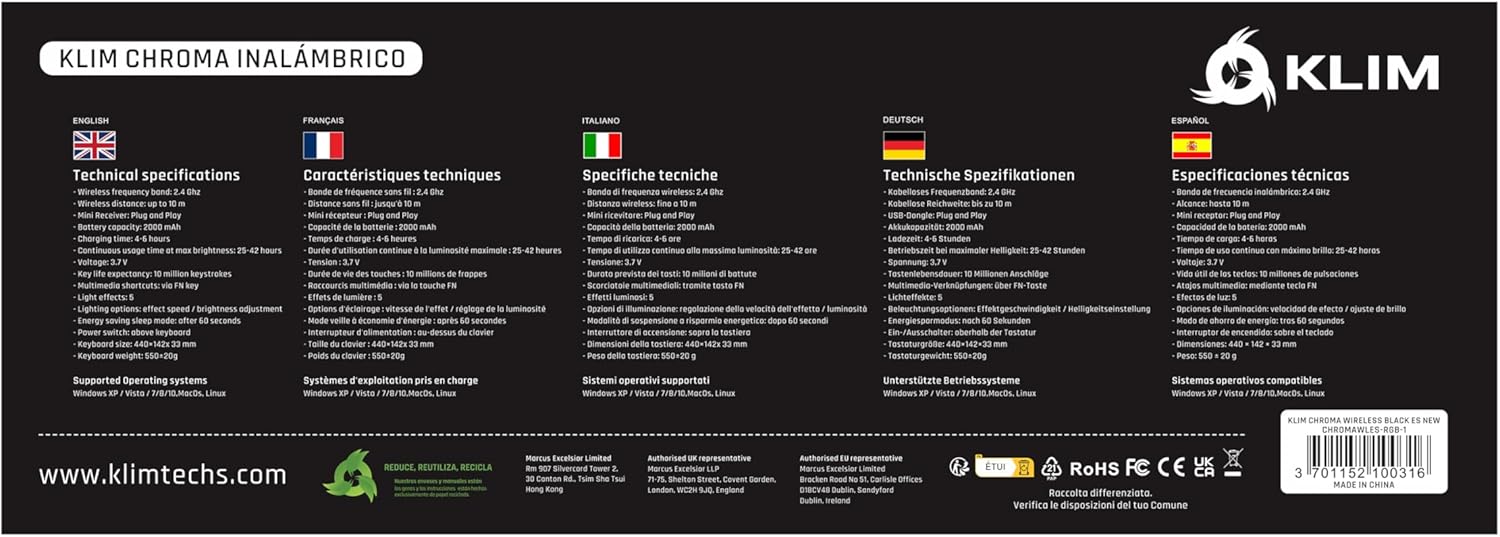
Image: The product packaging displaying technical specifications and features in various languages.
8. Garanzia e supporto
KLIM stands behind the quality of its products. The KLIM Chroma Wireless Gaming Keyboard comes with a Garanzia di 5 anno contro i difetti di fabbricazione.
For technical support, warranty claims, or any questions regarding your product, please visit the official KLIM websito o contattare il loro servizio clienti:
- Websito: www.klimtechs.com
- E-mail: Refer to the support section on the KLIM websito per le informazioni di contatto più aggiornate.
Please have your product model (KLIM Chroma) and ASIN (B07FLJ9DWJ) ready when contacting support.
Ask a question about this manual
Ask about setup, troubleshooting, compatibility, parts, safety, or missing instructions. Manuals+ will review the question and use this page’s manual context to help answer it.