
1. Introduzione
Grazie per l'acquistoasing the sainlogic GBlife PT3378 Wireless Weather Forecast Station. This device provides accurate indoor and outdoor temperature and humidity readings, weather forecasts, moon phases, and atmospheric pressure. It features a clear display, a wireless outdoor sensor, and a convenient USB charging port. Please read this manual carefully to ensure proper setup and operation.
2. Contenuto della confezione e informazioni sul prodottoview
2.1 Contenuto della confezione
- GBlife PT3378 Main Unit (Weather Station Display)
- Sensore esterno wireless
- Adattatore di alimentazione per unità principale
- Manuale d'uso
2.2 Prodotto finitoview
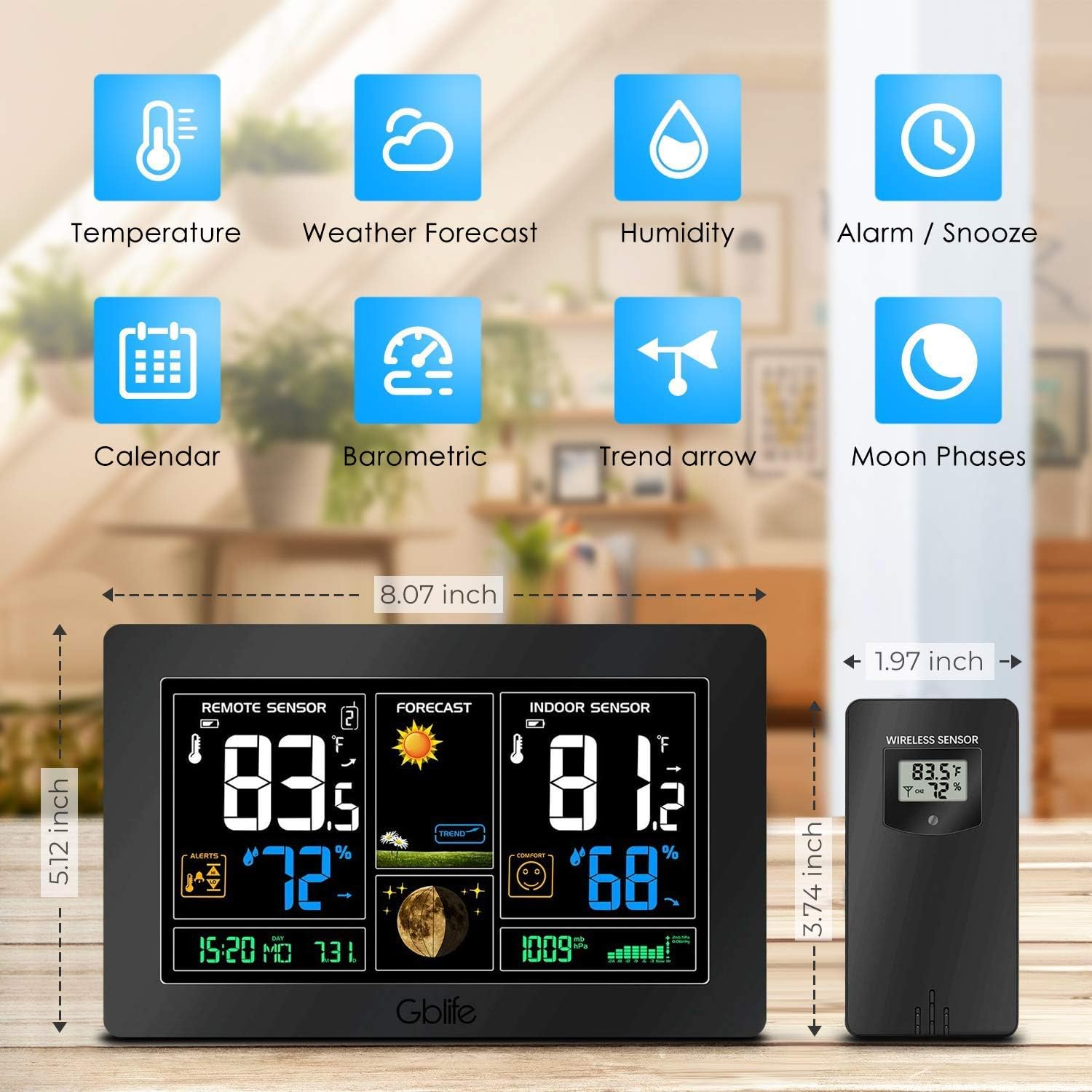
Immagine 2.1: Sopraview of the GBlife PT3378 Weather Station highlighting its main features including temperature, weather forecast, humidity, alarm/snooze, calendar, barometric pressure, trend arrow, and moon phases.

Immagine 2.2: Dettagliato view of the GBlife PT3378 display showing remote temperature, remote humidity, time/date, weather forecast, weather trend, moon phase, indoor temperature, indoor humidity, comfort level, and atmospheric pressure. The image also labels the side buttons for time setting, alarm clock, up/down, alert setting, brightness adjustment, max/min value, and mute.
3. Guida all'installazione
3.1 Alimentazione dell'unità principale
- Connect the provided power adapter to the DC 5V port on the back of the main unit.
- Collega l'adattatore a una presa a muro standard. Il display si illuminerà.
- Optionally, insert 3 x AAA batteries (not included) into the battery compartment for backup power in case of power outage.
3.2 Installing Batteries in the Wireless Outdoor Sensor
- Aprire il vano batteria sul retro del sensore wireless.
- Inserire 2 batterie AA (non incluse), rispettando la polarità corretta (+/-).
- Chiudere bene il vano batterie.
3.3 Abbinamento del sensore
The main unit and wireless sensor should automatically pair upon initial power-up. If pairing does not occur:
- Ensure both the main unit and sensor have power.
- Press and hold the 'CH' button on the main unit for 3 seconds to initiate a search for the outdoor sensor.
- La temperatura e l'umidità esterne dovrebbero apparire sul display dell'unità principale.
3.4 Posizionamento del sensore

Immagine 3.1: Illustration of wireless data transmission between the indoor receiver (main unit) and the remote outdoor sensor. The sensor should be placed outdoors within range of the main unit.

Immagine 3.2: The main unit can be placed on a table or mounted on a wall. The outdoor sensor is shown mounted on an exterior wall, indicating suitable placement for outdoor readings.
Place the wireless outdoor sensor in a dry, shaded location away from direct sunlight and precipitation to ensure accurate readings. The transmission range is up to 50 meters (150 feet) in an open area. The main unit can be placed on a tabletop using its integrated stand or mounted on a wall.
4. Istruzioni per l'uso
Il mio profilo
Il display dell'unità principale fornisce una panoramica completaview of weather conditions:
- Sensore remoto: Visualizza la temperatura e l'umidità esterne.
- Previsione: Shows weather forecast icons (sunny, cloudy, rainy, etc.) and weather trend.
- Sensore interno: Displays indoor temperature and humidity, along with a comfort level indicator.
- Ora dell'appuntamento: Ora e data attuali.
- Fase lunare: Fase lunare attuale.
- Pressione atmosferica: Lettura attuale della pressione atmosferica.
4.1 video: A short demonstration of the GBlife PT3378 Weather Station's display features, including outdoor temperature/humidity, weather forecasts, moon phase, comfort level, and atmospheric pressure. This video provides a visual guide to the station's various readings.
4.2 Impostazione di data e ora
Refer to the 'Time Setting' button (labeled '1' in Image 2.2) on the side of the main unit. Press this button to enter time/date setting mode. Use the 'Up' and 'Down' buttons to adjust values and the 'Time Setting' button again to confirm and move to the next setting.
4.3 Funzione sveglia
Use the 'Alarm Clock' button (labeled '2' in Image 2.2) to set and activate alarms. Follow similar steps as time setting to adjust alarm time.
4.4 Regolazione della luminosità

Immagine 4.1: The weather station display showing adjustable backlight brightness. High brightness is suitable for daytime viewing, while low brightness is ideal for night to avoid dazzling.
The display features adjustable backlight brightness. Use the 'Brightness Adjustment' button (labeled '6' in Image 2.2) to cycle through different brightness levels to suit your environment, from bright daytime viewing to a dimmer setting for night.
4.5 porta di ricarica USB

Immagine 4.2: The GBlife PT3378 weather station with a smartphone connected to its USB output port for charging. The station provides 5V, 1A output for charging compatible devices.
The main unit includes a USB output port (5V, 1A) for charging compatible devices such as smartphones. Connect your device's USB charging cable to this port.
5. Specifiche
| Caratteristica | Dettaglio |
|---|---|
| Dimensioni del prodotto | Dimensioni: 20.5 x 13 x 3 cm |
| Peso | 600 grammi |
| Fonte di alimentazione (unità principale) | AC Adapter (included), 3x AAA batteries (backup, not included) |
| Fonte di alimentazione (sensore esterno) | Batterie 2x AA (non incluse) |
| Intervallo di temperatura interna | Temperatura: da 0°C a 60°C |
| Intervallo di temperatura esterna | Temperatura ambiente -40°C – 60°C |
| Precisione della temperatura | ± 1°C |
| Portata di trasmissione wireless | Fino a 50 metri (150 piedi) in area aperta |
| Tecnologia di connettività | USB, senza fili |
| Caratteristiche speciali | Indoor/Outdoor Sensor, Waterproof (sensor), USB Charging Port |
6. Manutenzione
- Pulire il display e l'unità con un panno morbido e asciutto. Non utilizzare detergenti abrasivi o solventi.
- Ensure the outdoor sensor is kept in a dry, shaded location to prolong its lifespan and maintain accuracy.
- Sostituire le batterie del sensore esterno e dell'unità principale (se si utilizza un backup) quando sul display compare l'indicatore di batteria scarica.
7. Risoluzione Dei Problemi
- Nessuna lettura della temperatura/umidità esterna:
- Assicurarsi che il sensore esterno abbia batterie nuove e che si trovi nel raggio d'azione dell'unità principale.
- Press and hold the 'CH' button on the main unit to re-establish connection.
- Check for any obstructions between the sensor and the main unit.
- Letture della temperatura imprecise:
- Ensure the outdoor sensor is not in direct sunlight or exposed to extreme weather conditions.
- Verify that the main unit is not placed near heat sources or air conditioning vents.
- Il display è scuro o vuoto:
- Controllare che l'adattatore di alimentazione sia collegato correttamente.
- If using backup batteries, ensure they are fresh.
- Adjust the backlight brightness using the dedicated button.
8. Garanzia e supporto
The sainlogic GBlife PT3378 Wireless Weather Forecast Station includes a 45-day money-back guarantee and an 18-month customer service warranty. For any questions or support needs, please contact sainlogic customer service.