
Introduzione
This manual provides essential instructions for setting up, operating, and maintaining your Optoma W335 WXGA DLP Professional Projector. Designed for business presentations, classrooms, and home use, this projector delivers bright, clear images with a long lamp life. Please read this manual thoroughly before use to ensure optimal performance and safety.
Impostare
Disimballaggio e ispezione iniziale
Carefully remove the projector and all accessories from the packaging. Verify that all components listed in the 'What's in the Box' section are present and undamaged.
- W335 projector
- Cavo di alimentazione
- Remoto
- Batteria
Posizionamento
The Optoma W335 is portable, weighing less than 7 pounds, making it easy to move between rooms. For optimal viewing, place the projector on a stable, flat surface. Ensure adequate ventilation around the unit to prevent overheating.

Image: The Optoma W335 projector showing its compact size and dimensions (12.44" width, 9.2" depth, 4.27" height).
The projector features adjustable legs for easy height and angle adjustments, allowing you to find the perfect screen area for projection. This helps in achieving a level and properly aligned image.
Connettività
The W335 offers a variety of input options for connecting to different devices:
- HDMI: Per video e audio digitali ad alta definizione.
- VGA: For analog video connections, commonly used with computers.
- Video composito: Per video in definizione standard.
- Ingresso/uscita audio: Per collegare sorgenti audio esterne o altoparlanti.
- USB Power Out (5V/1.0A): For powering external devices like streaming sticks.
- RS232: Per l'integrazione del sistema di controllo.
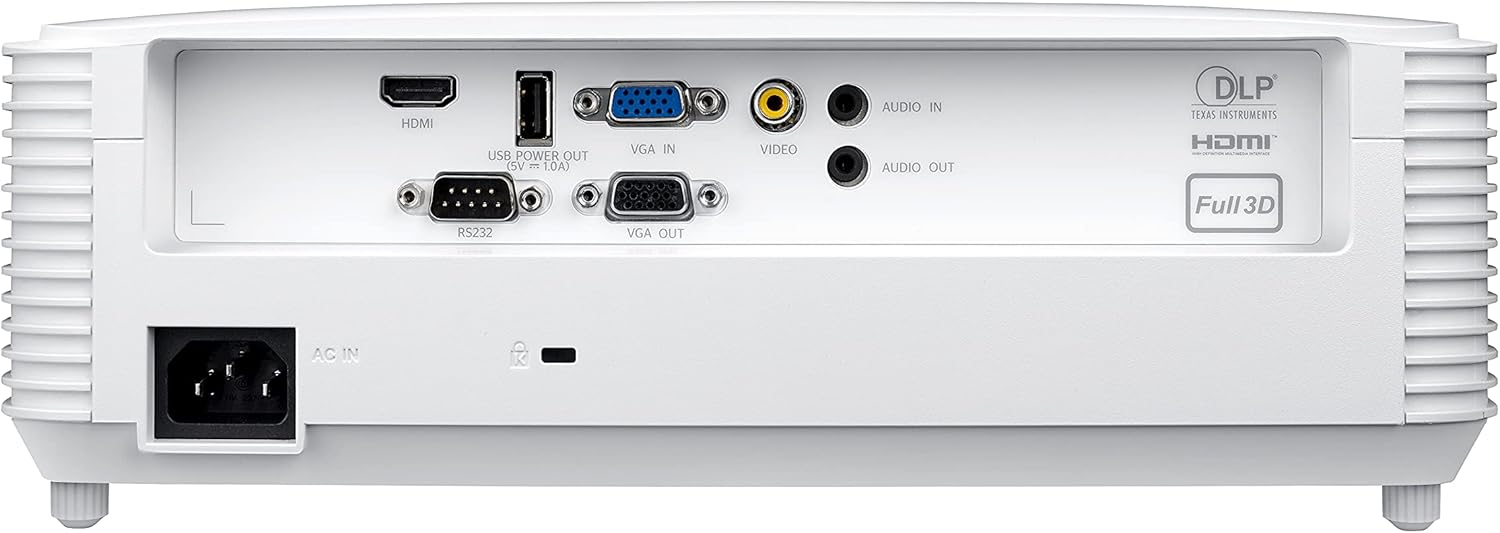
Image: Rear panel of the Optoma W335 projector, clearly showing the HDMI, VGA In, VGA Out, Video, Audio In, Audio Out, RS232, and USB Service Only ports.
Connect your source device (e.g., laptop, Blu-ray player) to the appropriate input port on the projector. Ensure the power cord is securely connected to the projector and a power outlet.
Istruzioni per l'uso
Accensione/spegnimento
Press the power button on the projector's control panel or the remote control to turn the unit on or off. Allow a few moments for the projector to warm up or cool down.

Immagine: in alto view of the Optoma W335 projector, highlighting the control panel with power, menu, and navigation buttons, along with focus and zoom rings.
Regolazione dell'immagine
- Messa a fuoco: Ruotare l'anello di messa a fuoco sull'obiettivo per rendere l'immagine più nitida.
- Ingrandisci: Use the zoom ring to adjust the image size without moving the projector.
- Correzione trapezoidale: The W335 supports vertical keystone correction to square the image if the projector is not perfectly perpendicular to the screen. This can be adjusted via the on-screen menu.
The projector delivers vibrant and sharp WXGA resolution (1280 x 800) images with a 22,000:1 contrast ratio, suitable for various environments including well-lit rooms due to its 3,800 lumens brightness.
Audio
An integrated 10-watt speaker provides room-filling audio. For enhanced sound, connect external speakers to the Audio Out port.
Manutenzione
Lamp Vita
Il proiettore lamp has a life of up to 15,000 hours, providing many years of use with minimal maintenance. When the lamp reaches the end of its life, a warning indicator will appear, and the lamp will need to be replaced. Refer to the full user manual for detailed lamp istruzioni per la sostituzione.
Pulizia
- Lente: Use a soft, lint-free cloth and lens cleaning solution to gently clean the projector lens.
- Esterno: Pulisci l'esterno casincon un panno morbido e asciutto. Evitare detergenti abrasivi o solventi.
- Prese d'aria: Controllare e pulire regolarmente le prese d'aria per garantire un flusso d'aria adeguato ed evitare il surriscaldamento. Utilizzare una spazzola morbida o aria compressa per rimuovere la polvere.
Risoluzione dei problemi
- Nessuna immagine:
- Ensure the projector is powered on and the source device is connected and active.
- Controllare la selezione della sorgente di ingresso sul proiettore.
- Verificare che tutti i cavi siano collegati saldamente.
- Immagine sfocata:
- Regolare la ghiera di messa a fuoco sull'obiettivo.
- Assicurarsi che il proiettore sia alla distanza corretta dallo schermo.
- Use keystone correction if the image is distorted.
- Nessun suono:
- Controllare le impostazioni del volume sia sul proiettore che sul dispositivo sorgente.
- Assicurarsi che gli altoparlanti esterni (se utilizzati) siano correttamente collegati e alimentati.
- Verify the audio cable connection.
- Surriscaldamento del proiettore:
- Assicurarsi che le prese d'aria siano libere e non ostruite.
- Utilizzare il proiettore in un'area ben ventilata.
- If the issue persists, power off the projector and allow it to cool down before restarting.
Specifiche
| Caratteristica | Dettaglio |
|---|---|
| Dimensioni del prodotto | 9.6 x 12.4 x 3.9 pollici |
| Peso dell'articolo | 6.61 libbre |
| Numero modello articolo | W335 |
| Marca | Optoma |
| Usi consigliati | Affari, Istruzione |
| Caratteristica speciale | Lancio corto |
| Tecnologia di connettività | HDMI, VGA |
| Risoluzione dello schermo | Risoluzione 1280 x 800 (WXGA) |
| Luminosità | 3800 lumen |
| Rapporto di contrasto | 22,000:1 |
| Lamp Vita | Fino a 15,000 ore |
| Altoparlante integrato | 10 watt |
| Rapporto di lancio | 1.55 – 1.73:1 |
Garanzia e supporto
For detailed warranty information and technical support, please refer to the official Optoma website or the documentation included with your product. You can also contact Optoma customer service directly for assistance.
Visitare il Optoma Store on Amazon per ulteriori informazioni sul prodotto.