
1. Introduzione
This manual provides detailed instructions for the setup, operation, and maintenance of your DIERYA DK68 60% Wireless Mechanical Gaming Keyboard. Please read this manual thoroughly before using the product to ensure proper functionality and to maximize your user experience.

Image 1.1: DIERYA DK68 keyboard highlighting its main features.
2. Contenuto della confezione
Verificare che tutti gli articoli siano presenti nel pacco:
- DIERYA DK68 60% Wireless Mechanical Gaming Keyboard
- Cavo da USB-C a USB-A
- Estrattore per tasti
- Manuale dell'utente (questo documento)
3. Prodotto finitoview
The DIERYA DK68 is a compact 60% mechanical keyboard designed for versatility and performance. It features a 68-key layout, tri-mode connectivity, RGB backlighting, and durable mechanical switches.
Caratteristiche principali:
- Connettività Tri-Mode: Supporta Bluetooth 5.0, connessioni wireless a 2.4 GHz e connessioni cablate USB-C.
- Layout compatto a 68 tasti: Risparmia spazio sulla scrivania senza perdere le chiavi essenziali.
- Clicky Blue Mechanical Switches: Provide tactile feedback and an audible click, ideal for typing and gaming.
- Retroilluminazione RGB: Customizable lighting with multiple modes and brightness levels.
- N-Key Rollover e Anti-Ghosting: Garantisce la registrazione accurata di più pressioni simultanee dei tasti.
- Batteria da 3000 mAh: Batteria ricaricabile a lunga durata per un utilizzo wireless prolungato.
- Tasti Double-Shot: Durable and fade-resistant keycaps.
- Design ergonomico: Features two-stage adjustable feet and anti-slip pads for comfortable and stable use.

Image 3.1: Details of the Clicky Blue Mechanical Switches.

Image 3.2: Ergonomic features including double-shot keycaps, adjustable feet, and anti-slip pads.
4. Impostazione
The DK68 keyboard offers three connection modes: wired, 2.4GHz wireless, and Bluetooth. Choose the mode that best suits your device and needs.
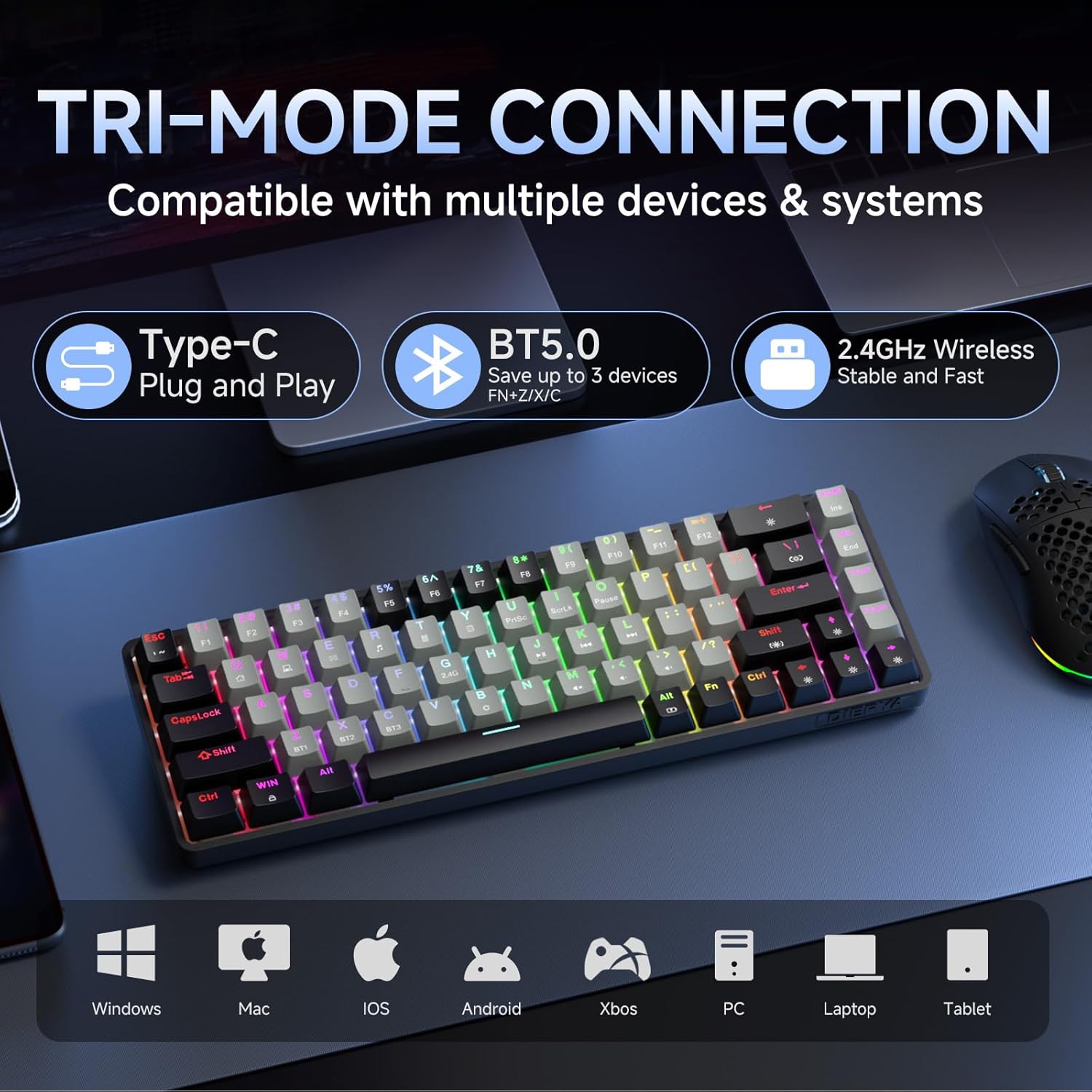
Image 4.1: Tri-mode connectivity and device compatibility.
4.1 Connessione cablata (USB-C)
- Collegare il cavo USB-C in dotazione alla porta USB-C della tastiera.
- Collegare l'estremità USB-A del cavo a una porta USB disponibile sul computer.
- The keyboard will automatically be recognized and ready for use. The keyboard will also charge in this mode.
4.2 Connessione wireless a 2.4 GHz
- Locate the 2.4GHz USB receiver (usually stored in a compartment on the keyboard or included separately).
- Collega il ricevitore USB da 2.4 GHz a una porta USB disponibile sul tuo computer.
- Accendi la tastiera. La tastiera dovrebbe connettersi automaticamente al ricevitore.
- Se la connessione non viene stabilita, premere Fn + 2.4G (usually indicated by a specific keycap legend) to activate 2.4GHz pairing mode.
4.3 Connessione Bluetooth
La tastiera supporta la connessione fino a tre dispositivi Bluetooth.
- Assicurati che la tastiera sia accesa.
- Premere e tenere premuto Fn + BT1, Fn + BT2, O Fn + BT3 for 3-5 seconds until the corresponding key (BT1, BT2, or BT3) flashes rapidly. This indicates pairing mode.
- Sul tuo dispositivo (computer, tablet, smartphone), apri le impostazioni Bluetooth e cerca nuovi dispositivi.
- Select "DIERYA DK68" (or similar name) from the list of available devices to pair.
- Once paired, the BT key will stop flashing and remain steadily lit.
- Per passare da un dispositivo Bluetooth associato all'altro, premere semplicemente Fn + BT1/BT2/BT3.
5. Istruzioni per l'uso
5.1 Controllo della retroilluminazione RGB
The DK68 features dynamic RGB backlighting with multiple modes and customization options.
- Fn + Backspace: Attiva/disattiva la retroilluminazione.
- Fn + Shift: Switch between different lighting colors (for static modes).
- Fn + \|: Scegli tra 20 diverse modalità di illuminazione.
- Fn + ↓: Diminuire la luminosità.
- Fn + ↑: Aumenta la luminosità.
- Fn+←: Decrease lighting speed (for dynamic modes).
- Fn + →: Increase lighting speed (for dynamic modes).

Image 5.1: RGB Backlighting control key combinations.
5.2 Combinazioni di tasti funzione
Due to its compact 60% layout, many functions are accessed via the Fn tasto combinato con altri tasti.
- Fn + F1-F12: Access multimedia and system functions (e.g., volume, media control). Specific functions are often indicated by secondary legends on the keycaps.
- Fn + Win: Tasto Blocca/Sblocca Windows.
- Fn+P: Stampa schermo.
- Tasto funzione + [: Casa.
- Fn+]: FINE.
- Fn +;: Pagina su.
- Fn + ': Pagina giù.
- Fn + Invio: Inserire.
- Fn + Canc: Eliminare.
- Fn + Barra spaziatrice: Check battery indicator (when wired, it pulsates blue while charging).
5.3 Ricarica
The keyboard is equipped with a 3000mAh rechargeable lithium battery.
- Connect the keyboard to a USB power source using the provided USB-C cable.
- The spacebar will typically indicate charging status (e.g., pulsating blue).
- A full charge provides approximately 12 hours of use with backlighting on, or up to 333 hours with backlighting off.
- The keyboard features an auto-stop function after 3 minutes of inactivity to conserve battery.

Immagine 5.2: Informazioni sulla durata della batteria e sulla ricarica.
6. Manutenzione
Una corretta manutenzione garantisce la longevità e le prestazioni della tastiera.
- Pulizia dei tasti: Utilizzare l'estrattore per tasti in dotazione per rimuovere con attenzione i tasti. Pulirli con un panno morbido e asciutto.amp panno e sapone neutro se necessario. Assicurarsi che siano completamente asciutti prima di riattaccarli.
- Pulizia del corpo della tastiera: Use a soft, dry cloth to wipe down the keyboard body. For dust between keys, use compressed air.
- Evitare i liquidi: Do not expose the keyboard to excessive moisture or liquids. If spills occur, immediately disconnect the keyboard and allow it to dry completely before reuse.
- Magazzinaggio: Conservare la tastiera in un luogo fresco e asciutto, lontano dalla luce solare diretta e da temperature estreme.
7. Risoluzione Dei Problemi
If you encounter issues with your DIERYA DK68 keyboard, refer to the following common solutions:
- La tastiera non risponde:
- Ensure the keyboard is charged. Connect it via USB-C cable to check if it works in wired mode.
- For wireless modes, ensure the keyboard is powered on and correctly paired (2.4GHz receiver plugged in, or Bluetooth paired to the correct channel).
- Prova a riavviare il computer o il dispositivo.
- Problemi di connessione Bluetooth:
- Assicurati che il Bluetooth sia abilitato sul tuo dispositivo.
- Forget the keyboard in your device's Bluetooth settings and re-pair it.
- Assicurarsi che nessun altro dispositivo interferisca con il segnale Bluetooth.
- 2.4GHz wireless lag or disconnection:
- Ensure the 2.4GHz receiver is plugged into a direct USB port, not a hub.
- Avvicinare la tastiera al ricevitore.
- Avoid placing large metal objects between the keyboard and receiver.
- RGB backlighting not working:
- Premere Fn + Backspace to ensure backlighting is turned on.
- Aumentare la luminosità utilizzando Fn+↑.
- I tasti non vengono registrati correttamente (ghosting):
- The keyboard features N-Key rollover, so this should be rare. Ensure no debris is under the keycap.
- If the issue persists, try resetting the keyboard (refer to manufacturer's website for specific reset procedures if available).
8. Specifiche
| Caratteristica | Specificazione |
|---|---|
| Modello | DK68 |
| Disposizione | 68 tasti (60% compatto) |
| Tipo di interruttore | Interruttori meccanici Clicky Blue |
| Forza di attuazione | 60gf (±15gf) |
| Keystroke Travel | 2.3mm (±0.6mm) |
| Cambia durata | 50 milioni di clic |
| Connettività | Bluetooth 5.0, wireless a 2.4 GHz, USB-C cablato |
| Retroilluminazione | RGB (20 modalità) |
| Capacità della batteria | Polimero di litio da 3000 mAh |
| Durata della batteria (luce accesa) | Circa 12 ore |
| Durata della batteria (luce spenta) | Circa 333 ore |
| Sospensione automatica | 3 minuti di inattività |
| Rollover chiave | Rollover N-chiave |
| Dimensioni (L x P x A) | 372 x 115 x 51 mm (14.65 x 4.53 x 2.01 pollici) |
| Peso | 820 g (1.79 libbre) |
| Sistema operativo compatibile | Windows, macOS, Linux, iOS, Android |

Immagine 8.1: Dimensioni della tastiera.
9. Garanzia e supporto
DIERYA products are designed for reliability and performance. For warranty information and technical support, please refer to the official DIERYA websito o contattare direttamente il servizio clienti.
- Ufficiale Websito: Visita lo Store DIERYA su Amazon
- Assistenza clienti: Fare riferimento alle informazioni di contatto fornite sulla confezione del prodotto o sul sito ufficiale websito di supporto.
Conservare la prova d'acquisto per eventuali richieste di garanzia.