
Introduzione
This manual provides instructions for the installation, operation, and maintenance of your Audiovox ELEAUDAX80EXT Wireless Extension. This device is designed to expand the functionality of compatible Audiovox phone models, specifically the AX8001, AX8001E, and AX8101AM, by providing an additional wireless handset.
Contenuto della confezione
Prima di procedere con l'installazione, verificare che tutti gli articoli siano presenti nella confezione.
- Audiovox ELEAUDAX80EXT Wireless Extension Unit
- Adattatore di alimentazione (se applicabile)
- Batteria ricaricabile (preinstallata o separata)
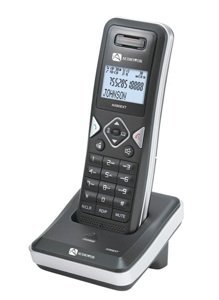
Image: The Audiovox ELEAUDAX80EXT Wireless Extension Unit. This image displays the compact design of the extension handset.
Impostare
- Caricare la batteria: If the battery is not pre-installed, insert it into the extension unit according to the markings. Place the extension unit on its charging cradle (if included) or connect the power adapter directly to the unit and a power outlet. Allow the unit to charge for at least 12-16 hours before initial use.
- Register the Extension:
- Ensure your main Audiovox phone base (AX8001, AX8001E, or AX8101AM) is powered on.
- On the main phone base, locate and press the "Register" or "Page" button. Hold it until the indicator light on the base begins to flash (refer to your main phone's manual for exact instructions).
- While the base is in registration mode, on the ELEAUDAX80EXT extension unit, navigate to the "Menu" and select "Register Handset" or a similar option. Follow the on-screen prompts.
- Once registration is successful, the extension unit will display a confirmation message, and the indicator light on the base will stop flashing.
- Prova di connessione: Make a test call from the extension unit to ensure proper functionality.
Istruzioni per l'uso
Effettuare una chiamata
- Sollevare il ricevitore o premere il tasto PARLARE pulsante.
- Componi il numero di telefono desiderato.
- Premere il tasto PARLARE button again or place the handset back on the cradle to end the call.
Rispondere a una chiamata
- Quando squilla il telefono, sollevare la cornetta o premere il tasto PARLARE pulsante.
- Per terminare la chiamata, premere il tasto FINE button or place the handset back on the cradle.
Intercom Function (if supported by base unit)
- Premere il tasto CITOFONO pulsante.
- Dial the number of the extension you wish to call (e.g., "2" for the second handset).
- Premere PARLARE to initiate the intercom call.
Manutenzione
- Pulizia: Pulire l'unità con un panno morbido, damp stoffa. Non utilizzare prodotti chimici aggressivi o detergenti abrasivi.
- Cura della batteria: For optimal battery life, avoid fully discharging the battery frequently. Keep the unit on its charger when not in use.
- Magazzinaggio: Se si conserva l'unità per un periodo prolungato, rimuovere la batteria e conservarla in un luogo fresco e asciutto.
Risoluzione dei problemi
| Problema | Soluzione |
|---|---|
| Nessun segnale di linea / Impossibile effettuare chiamate |
|
| Il portatile non si carica |
|
| Scarsa qualità delle chiamate / Statico |
|
Specifiche
- Numero modello: ELEAUDAX80EXT
- Compatible Base Units: Audiovox AX8001, AX8001E, AX8101AM
- Dimensioni (L x P x A): 20 x 40 x 30 millimetri
- Peso: 20 grammi
- Codice UPC: 044476082719
Garanzia e supporto
For specific warranty information and technical support, please refer to the documentation included with your original Audiovox phone system or visit the official Audiovox websito. Conservare la ricevuta d'acquisto come prova d'acquisto per eventuali reclami in garanzia.
For further assistance, please contact Audiovox customer service.