
Modello M110
Logitech M110 Wired USB Silent Mouse User Manual
Model: M110 (Part Number: 910-005490)
1. Introduzione
The Logitech M110 Wired USB Silent Mouse provides a comfortable, reliable, and quiet computing experience. Designed for both PC and Mac users, this ambidextrous mouse features silent buttons, offering a 90% noise reduction compared to traditional mice, while maintaining the familiar click feel. Its plug-and-play functionality ensures easy setup without the need for software installation.

Figura 1.1: Top-down view of the Logitech M110 Silent Mouse, showcasing its symmetrical design and scroll wheel.
2. Contenuto della confezione
Verifica che tutti gli articoli siano presenti nella confezione del prodotto:
- Logitech M110 Wired USB Silent Mouse
- Documentazione utente
3. Istruzioni per l'installazione
The Logitech M110 mouse is designed for simple plug-and-play installation. No additional software or drivers are required.
- Collegare il cavo USB: Individua una porta USB disponibile sul tuo computer (PC o Mac).
- Insert the USB Connector: Plug the USB connector of the Logitech M110 mouse firmly into the USB port.
- Riconoscimento del sistema: Your operating system will automatically detect and install the necessary drivers for the mouse. This process typically takes a few seconds.
- Inizia l'uso: Una volta riconosciuto, il mouse è pronto per l'uso immediato.

Figura 3.1: The Logitech M110 mouse in use, demonstrating its wired connection and comfortable fit.
4. Utilizzo del mouse
The Logitech M110 features a standard three-button design with a scroll wheel, providing intuitive control for various tasks.
- Pulsante sinistro del mouse: Utilizzato per selezionare gli elementi, aprire files, and executing commands. The silent click mechanism reduces audible noise by over 90% while retaining tactile feedback.
- Pulsante destro del mouse: Used to access contextual menus and additional options. This button also features silent click technology.
- Rotella di scorrimento:
- Scorrimento: Ruota la rotellina verso l'alto o verso il basso per navigare tra i documenti, web pagine e applicazioni.
- Clic centrale: Pressing the scroll wheel acts as a middle click button, often used for opening links in new tabs or other application-specific functions.

Figura 4.1: Angolato view of the Logitech M110, highlighting the primary buttons and scroll wheel.
5. Caratteristiche principali
- Clic silenziosi: Experience a quiet working environment with over 90% noise reduction on button clicks, without compromising the familiar click feel.
- Design ambidestro: The symmetrical shape of the M110 mouse is designed to fit comfortably in both right and left hands, ensuring ergonomic use for all users.
- Tracciamento ottico: Enjoy smooth and precise cursor control with 1000 DPI optical tracking, suitable for various surfaces.
- Affidabilità cablata: A stable USB wired connection ensures consistent performance without concerns about battery life or wireless interference.
- Collega e usa: No software installation required; simply plug the USB cable into your computer and start using the mouse immediately.
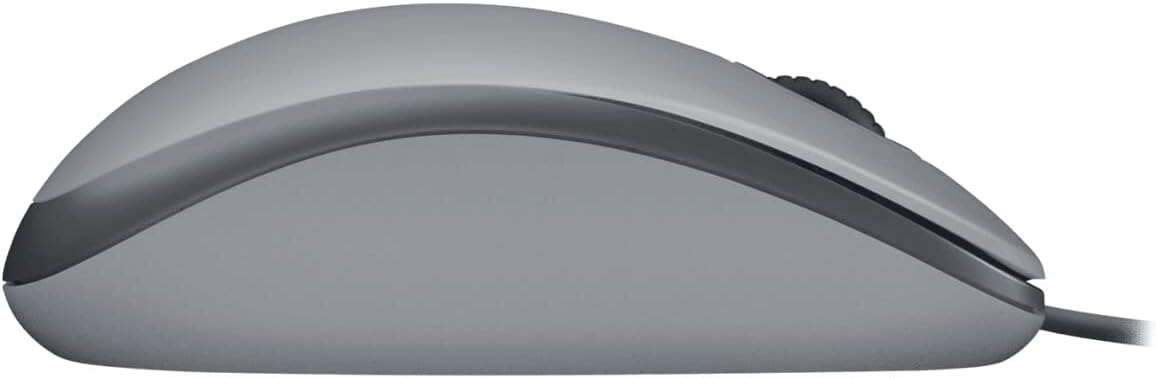
Figura 5.1: Lato profile of the Logitech M110, illustrating its comfortable, ambidextrous design.
6. Specifiche tecniche
| Marca | Logitech |
| Modello | Numero di modello: M110 |
| Numero di parte | 910-005490 |
| Tecnologia di connettività | USB cablato |
| Tecnologia di rilevamento del movimento | Ottico |
| DPI (punti per pollice) | 1000 DPI |
| Caratteristica speciale | Silent Buttons (90% noise reduction) |
| Progetto | Ambidextrous, Full-Size |
| Sistemi operativi compatibili | Windows, macOS, Linux |
| Peso dell'articolo | 3.17 once (90 grammi) |
| Dimensioni del prodotto (LxWxH) | 4.96 x 3.27 x 7.87 pollici (12.6 x 8.3 x 20 cm) |
| Colore | Grey (as reviewed, other colors available) |
7. Manutenzione
To ensure optimal performance and longevity of your Logitech M110 mouse, follow these simple maintenance guidelines:
- Pulizia: Utilizzare un panno morbido e privo di lanugine leggermente dampened with water or an electronics-safe cleaning solution to wipe the surface of the mouse. Avoid harsh chemicals or abrasive materials.
- Sensore ottico: Periodically inspect the optical sensor on the underside of the mouse for dust or debris. Use a soft brush or compressed air to gently clean the sensor area if necessary.
- Cura del cavo: Evitare di piegare o torcere eccessivamente il cavo USB. Conservare il mouse in modo che il cavo non venga schiacciato o danneggiato.
8. Risoluzione Dei Problemi
If you encounter issues with your Logitech M110 mouse, try the following troubleshooting steps:
- Il mouse non risponde:
- Assicurati che il cavo USB sia collegato saldamente a una porta USB funzionante del tuo computer.
- Prova a collegare il mouse a una porta USB diversa.
- Riavvia il computer.
- Movimento irregolare del cursore:
- Pulisci il sensore ottico sul lato inferiore del mouse.
- Ensure you are using the mouse on a suitable surface. Highly reflective or transparent surfaces may affect tracking performance. A mouse pad is recommended.
- Pulsanti o rotellina di scorrimento non funzionanti:
- Verificare che il mouse sia collegato correttamente.
- Test the mouse on another computer to determine if the issue is with the mouse or the computer's settings.
9. Garanzia e supporto
The Logitech M110 Wired USB Silent Mouse typically comes with a Garanzia hardware limitata di 3 anni. For detailed warranty information, please refer to the warranty card included with your product or visit the official Logitech support websito.
For further assistance, technical support, or to access drivers and software (if applicable), please visit the Logitech support websito: support.logi.com.
Ask a question about this manual
Ask about setup, troubleshooting, compatibility, parts, safety, or missing instructions. Manuals+ will review the question and use this page’s manual context to help answer it.