
Introduzione
Grazie per l'acquistoasing the VTech VT1091 Cordless Phone. This manual provides essential information for setting up, operating, and maintaining your new phone. Please read these instructions carefully to ensure proper use and to fully benefit from its features.
Contenuto della confezione
Prima di iniziare, assicurati che tutti gli articoli siano presenti nel pacco:
- Ricevitore cordless
- Unità di base
- Adattatore di alimentazione per unità base
- Cavo della linea telefonica
- Batterie ricaricabili (preinstallate o separate)
- Manuale dell'utente (questo documento)
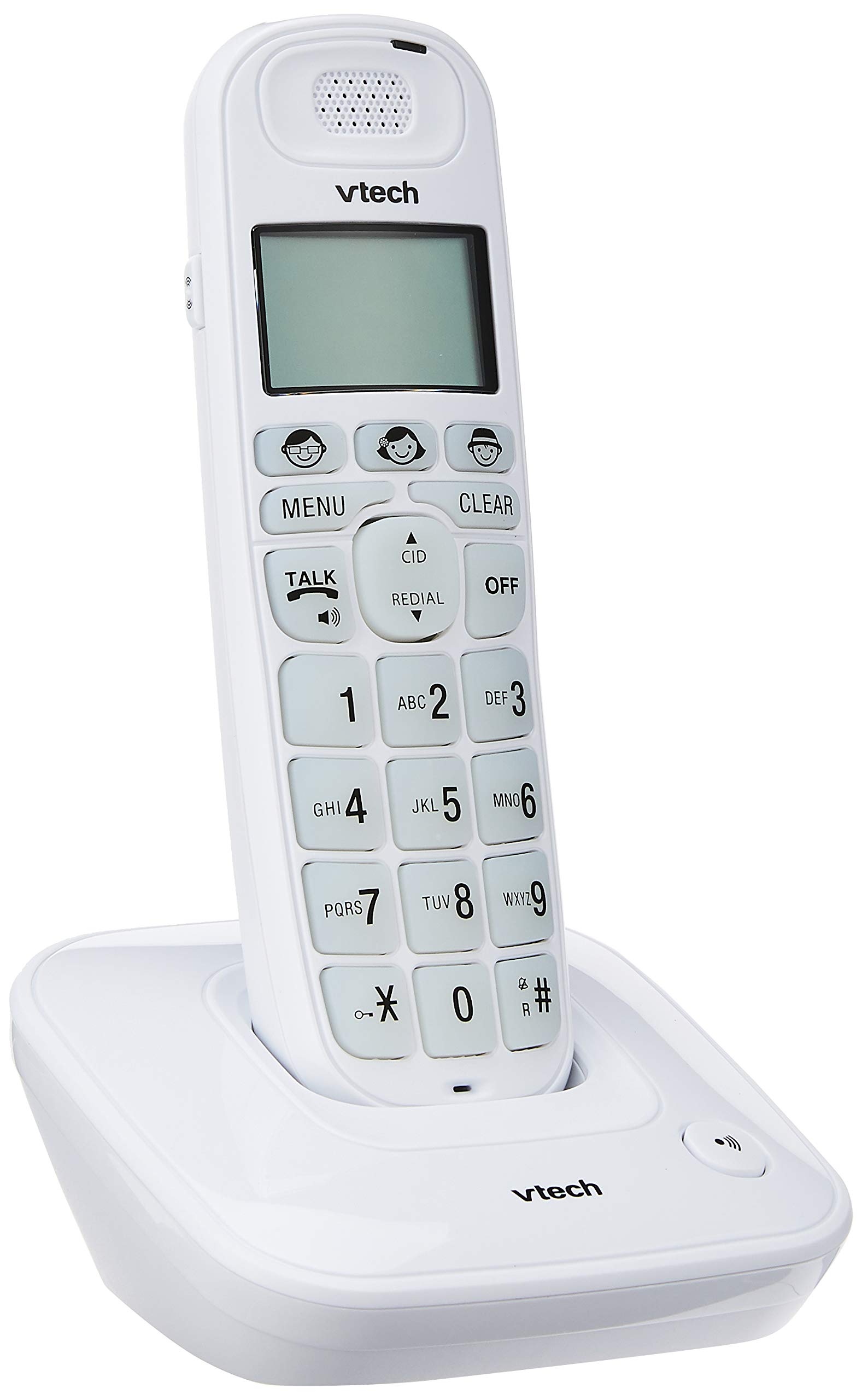
Image: The VTech VT1091 cordless phone handset resting in its base unit, showing the front view of the keypad and screen.
Impostare
1. Installazione della batteria
- Individuare il coperchio del vano batteria sul retro del telefono.
- Per aprire, far scorrere il coperchio verso il basso.
- Inserire le batterie ricaricabili in dotazione, rispettando la polarità corretta (+ e -).
- Riposizionare il coperchio del vano batterie.
2. Collegamento dell'unità base
- Collegare un'estremità del cavo della linea telefonica alla presa TEL LINE sul retro dell'unità base.
- Collegare l'altra estremità del cavo della linea telefonica alla presa telefonica a muro.
- Connect the small end of the power adapter to the DC IN jack on the back of the base unit.
- Collegare l'estremità grande dell'adattatore di alimentazione a una presa elettrica standard.

Immagine: Posteriore view of the VTech VT1091 base unit, showing the ports for the telephone line cord and the power adapter.
3. Caricare il portatile
Place the handset on the base unit with the display facing forward. The handset will begin charging. For optimal battery performance, allow the handset to charge for at least 16 hours before initial use.

Immagine: Lato view of the VTech VT1091 cordless phone handset securely placed in its charging base.
Caratteristiche principali
- Amplificazione: Amplification of incoming sounds by up to 30 decibels.
- Ultra-low Radiation Mode: Operates with reduced radiation levels.
- BOOSTER Button: One-touch button for easy sound amplificazione.
- Tastiera grande: Big buttons with backlit keypad for improved visibility.
- Display LCD retroilluminato: Large display with orange backlight.
- Ricevitore vivavoce: Per comunicazioni a mani libere.
- Page/Handset Locator: Helps locate a misplaced handset.
- Auto Answer/Keypad Lock: Convenient call handling and security features.
- Alarm/Secrecy: Includes alarm function and call secrecy feature.
- GAP Compliant: Compatible with other GAP-enabled DECT devices.
- Rubrica telefonica: 20 name and number entries.
- ID chiamante: Displays the last 10 caller numbers.
- Ricomposizione: Stores the last 5 numbers dialed.
- Melodie della suoneria: 10 selectable ringer melodies (5 polyphonic and 5 standard).
- Durata della batteria: Approximately 10 hours talk time / 100 hours standby time.
- Pulsanti di memoria: 3 one-touch memory buttons.
- Chiamata rapida: 8 number (2-9) speed dial memories.
- Compatibile con gli apparecchi acustici: Designed for use with hearing aids.
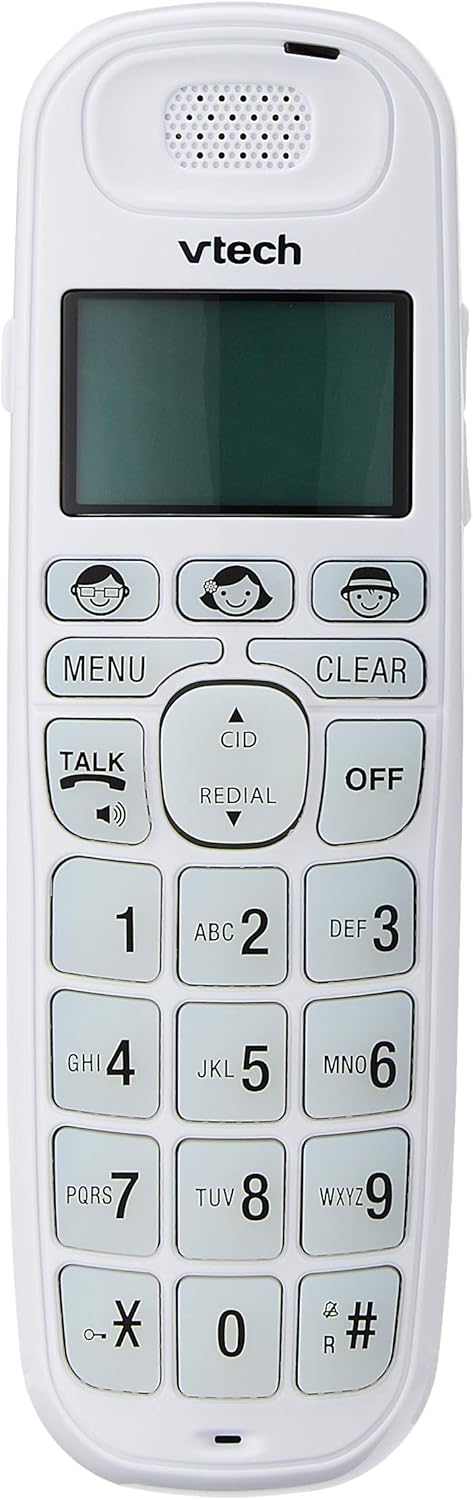
Image: Close-up of the VTech VT1091 handset, highlighting the large backlit keypad, LCD display, and dedicated function buttons.
Istruzioni per l'uso
Effettuare una chiamata
- Premere il tasto PARLARE pulsante per ottenere il segnale di linea.
- Componi il numero di telefono desiderato.
- Per terminare la chiamata, premere il tasto SPENTO pulsante o riposizionare il ricevitore sull'unità base.
Rispondere a una chiamata
Quando squilla il telefono, premere il tasto PARLARE pulsante per rispondere alla chiamata.
Utilizzo del vivavoce
Durante una chiamata, premere il tasto PARLARE button again (with the speaker icon) to activate the speakerphone function. Press it again to switch back to the earpiece.
Regolazione del volume
Durante una chiamata, utilizzare il UP E GIÙ arrow buttons on the side of the handset to adjust the earpiece or speakerphone volume.
Elenco telefonico
- Premere il tasto MENU pulsante.
- Navigate to "Phonebook" using the arrow buttons and press MENU per selezionare.
- Follow the on-screen prompts to add, edit, or delete entries.
Funzione di ricomposizione
Premere il tasto RICOMPOSIZIONE pulsante per view a list of the last 5 dialed numbers. Use the arrow buttons to select a number and press PARLARE comporre il numero.
ID chiamante
When the phone rings, the caller's number (if available) will be displayed on the screen. Press the CID pulsante per riview the caller ID list. Use the arrow buttons to scroll through entries.
BOOSTER Function
Durante una chiamata, premere il tasto dedicato RINFORZATORE button (if available, often integrated with volume or a specific key) to instantly amplify the incoming audio by up to 30 decibels. Press again to deactivate.
Localizzatore del portatile
To locate a misplaced handset, press the PAGINA button on the base unit. The handset will ring.
Manutenzione
Pulizia
Pulire il portatile e l'unità base con un panno morbido e asciutto.amp cloth. Do not use cleaning sprays or abrasive cleaners, as these can damage the finish or electrical components.
Cura della batteria
- Only use the supplied rechargeable batteries.
- Se il telefono non verrà utilizzato per un periodo prolungato, rimuovere le batterie per evitare perdite.
- Non smaltire le batterie nel fuoco.
Risoluzione dei problemi
| Problema | Soluzione |
|---|---|
| Nessun tono di linea |
|
| Il portatile non si carica |
|
| Scarsa qualità del suono |
|
| ID chiamante non visualizzato |
|
Specifiche
| Marca | VTech |
| Modello | VT1091 |
| Tipo di telefono | Senza fili |
| Colore | Bianco |
| Materiale | Plastica |
| Fonte di alimentazione | Elettrico con cavo (per unità base) |
| Tipo di combinatore | Tastiera singola |
| Tipo di sistema di risposta | Digital (Note: This model's primary features do not highlight an integrated answering machine, but refers to general digital phone capabilities.) |
| Operazione multilinea | Separare |
| Tempo di conversazione telefonica | 10 ore |
| Tempo di standby del telefono | 100 ore |
| ID chiamante | SÌ |
| Codice UPC | 735078026569 |

Image: The VTech VT1091 cordless phone in its base, with a measurement overlay indicating a height of 8.3 inches (21 cm).
Garanzia e supporto
This VTech VT1091 Cordless Phone comes with a Garanzia del produttore locale (Singapore) di 2 anno. For warranty claims or technical support, please refer to the contact information provided with your purchase documentation or visit the official VTech Singapore websito.
Per ulteriore assistenza, contattare il servizio clienti VTech.