
Jensen JWM40
Jensen JWM40 DVD/USB/AUX/BT Stereo
Manuale d'uso
Introduzione
The Jensen JWM40 is a versatile entertainment system designed to bring home entertainment luxuries to various settings, including recreational vehicles. This stereo unit offers a wide range of audio and video playback options, ensuring a comprehensive media experience.
Key features of the JWM40 include:
- Bluetooth streaming audio (A2DP) and control (AVRCP) for wireless connectivity.
- Front USB port supporting MP3/WMA playback for digital media files.
- Slot-type DVD/CD-R/RW player compatible with MP3 discs.
- Integrated AM/FM tuner with 30 station presets (18 FM, 12 AM).
- Front AUX A/V input (3.5mm) for connecting external audio/video devices.
- Two independent speaker zones for flexible audio distribution.
- Two speaker outputs and one rear RCA audio input/output.
- One RCA composite video output for connecting to an external display.
- White LED backlit LCD panel with blue LED buttons for clear visibility.
- Clock with alarm and sleep timer functions.
- Remote control included for convenient operation.
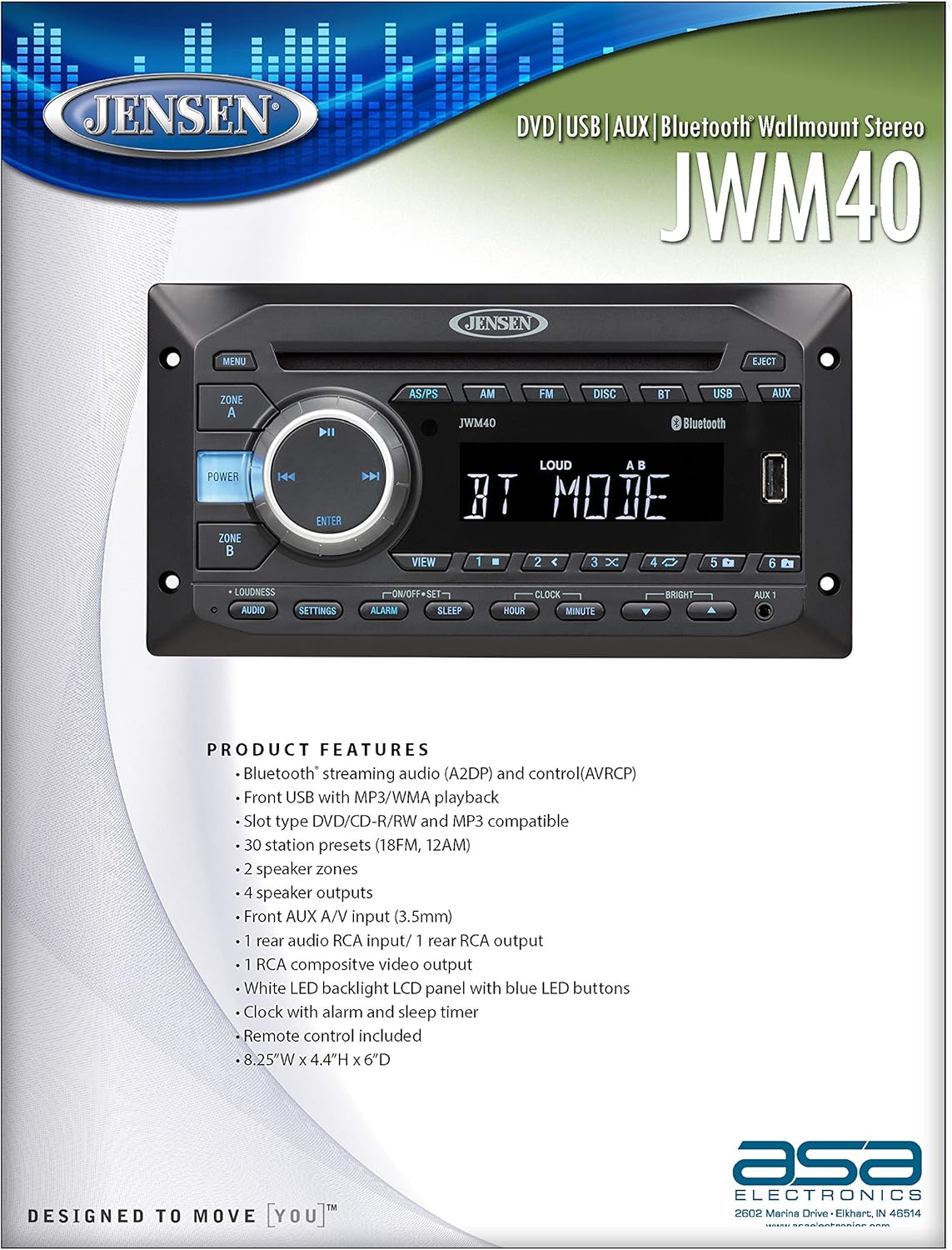
Immagine: Frontale view of the Jensen JWM40 stereo unit, highlighting its key product features and specifications on an accompanying document.
Configurazione e installazione
Cosa c'è nella scatola
The Jensen JWM40 package typically includes the following components:
- Jensen JWM40 DVD/USB/AUX/BT Stereo Unit
- Telecomando
- Cablaggio elettrico
- Hardware di montaggio (viti, staffe)
- User Manual (this document or a more comprehensive version)
Note: Contents may vary slightly. Please check your product packaging for the exact list of included items.
Montaggio e dimensioni
The JWM40 is designed for wall-mount installation. Ensure adequate space and proper ventilation around the unit. Refer to the diagram below for precise dimensions to facilitate installation planning.

Image: Technical drawing showing the front, top, and side dimensions of the Jensen JWM40 stereo unit, along with detailed specifications.
The product dimensions are approximately 4.33 x 8.19 x 3.39 inches (H x W x D).
Collegamenti elettrici
Connect the power, speaker, and auxiliary cables according to the wiring diagram provided in the full installation guide (not included in this manual). Ensure all connections are secure and correctly polarized to prevent damage to the unit or speakers. The unit operates on a 12V DC (2-Wire) power system.
Istruzioni per l'uso
Questa sezione fornisce una panoramicaview of the JWM40's controls and basic operation. For detailed instructions on specific functions, refer to the comprehensive user manual.

Immagine: Primo piano view of the Jensen JWM40 stereo's front panel, showing the display, control buttons, and input ports.
Controlli del pannello frontale
- Pulsante di accensione: Premere per accendere o spegnere l'unità.
- Pulsante MENU: Accedi alle impostazioni e alle opzioni del sistema.
- ZONE A/B Buttons: Select and control independent speaker zones.
- Rotary Encoder (with ENTER): Navigate menus and adjust volume. Press ENTER to confirm selections.
- Playback Controls (Play/Pause, Skip/Fast Forward/Rewind): Controlla la riproduzione multimediale.
- Source Buttons (AS/PS, AM, FM, DISC, BT, USB, AUX): Seleziona la sorgente audio desiderata.
- EJECT Button: Eject a disc from the DVD/CD slot.
- Porta USB: Collega i dispositivi USB per la riproduzione multimediale.
- AUX 1 Input (3.5mm): Collegare dispositivi audio/video esterni.
- LOUDNESS Button: Toggle loudness compensation for enhanced bass and treble at low volumes.
- SETTINGS Button: Access audio and system settings.
- ALARM/SLEEP/HOUR/MINUTE Buttons: Control clock, alarm, and sleep timer functions.
- BRIGHT Buttons: Regola la luminosità del display.
- Preimpostazioni numeriche (1-6): Store and recall radio stations or direct track selection.
Funzionamento di base
- Accensione/spegnimento: Premere il tasto ENERGIA pulsante.
- Selezione della fonte: Press the corresponding source button (e.g., FM, DISCO, BT, USB, AUSILIARIO).
- Regolazione del volume: Ruotare la grande manopola centrale.
- Accoppiamento Bluetooth: Selezionare BT mode, then search for "JWM40" on your Bluetooth device and pair.
- Riproduzione disco: Insert a DVD or CD into the slot. Playback will begin automatically.
- Riproduzione USB: Inserire un'unità USB nel USB port. The unit will automatically detect and play compatible media files.
Manutenzione
Proper maintenance ensures the longevity and optimal performance of your Jensen JWM40 stereo.
- Pulizia: Use a soft, dry cloth to clean the unit's exterior. For stubborn marks, dampBagnare leggermente il panno con acqua. Evitare l'uso di prodotti chimici aggressivi, abrasivi o solventi.
- Cura del disco: Maneggiare i dischi tenendoli per i bordi. Mantenerli puliti e privi di graffi. Conservare i dischi nelle loro custodie quando non vengono utilizzati.
- Ventilazione: Assicurarsi che le aperture di ventilazione dell'unità non siano ostruite per evitare il surriscaldamento.
- Disconnessione dell'alimentazione: If the unit will not be used for an extended period, disconnect it from the power source.
Risoluzione dei problemi
This section addresses common issues you might encounter with your JWM40 stereo. If the problem persists after attempting these solutions, contact customer support.
| Problema | Possibile causa | Soluzione |
|---|---|---|
| Nessun potere | Collegamento elettrico allentato; fusibile bruciato; batteria del veicolo scarica. | Check power wiring; Replace fuse if necessary; Charge vehicle battery. |
| Nessun suono | Volume too low; Mute function active; Loose speaker connections; Incorrect source selected. | Aumentare il volume; Disattivare la modalità silenziosa; Controllare il cablaggio degli altoparlanti; Selezionare la sorgente audio corretta. |
| Disc will not play/eject | Disco inserito in modo errato; Disco danneggiato; Malfunzionamento dell'unità. | Ensure disc is inserted correctly; Try a different disc; Consult support if issue persists. |
| Il Bluetooth non si connette | Device not in pairing mode; JWM40 not in BT mode; Interference. | Ensure both devices are in pairing mode; Select BT source on JWM40; Move closer to unit. |
| Scarsa ricezione radio | Antenna non collegata; Area con segnale debole; Interferenza. | Check antenna connection; Try tuning to a stronger station; Move vehicle to a better reception area. |
Specifiche
Detailed technical specifications for the Jensen JWM40 DVD/USB/AUX/BT Stereo.
| Caratteristica | Specificazione |
|---|---|
| Produttore | Gensen-Giuseppe |
| Modello | Il JWM40 |
| Peso dell'articolo | 3.2 libbre |
| Dimensioni del prodotto (A x L x P) | 4.33 x 8.19 x 3.39 pollici |
| Sistema di alimentazione | 12V DC (2-Wire) |
| Volume di eserciziotage Gamma | Da 10 V a 16 V |
| Intervallo di temperatura di esercizio | Da -4°C a 149°C (da -20°F a 65°F) |
| Intervallo di temperatura di conservazione | Da -22°C a 158°C (da -30°F a 70°F) |
| Massima umidità relativa | 95% |
| Tecnologia di connettività | Ausiliario, Bluetooth, USB |
| Tipo di controllore | Telecomando |
| Dispositivi compatibili | Smartphone, Altoparlante |
| Tipo di connettore | Jack da 3.5 mm, USB |
| Modalità di uscita audio | Stereo |
| Configurazione del canale audio surround | 2.0 |
| Codifica video | Formato MPEG-2 |
| Colore | Nero |
| Caratteristica speciale | Compatto |
| CD Skip Threshold (Random Freq. Profile) | 1.6 grammi |
| Compatible CD Formats | CD, CD-R, R/W, MP3, DVD, DVD+/- RW |
| Potenza in uscita (RMS) | 24 Watt totali |
| Distorsione armonica totale | 1% |
| Certificazioni normative | FCC Parte 15B |
Garanzia e supporto
For information regarding the product warranty, please refer to the warranty card included with your purchase or visit the official Jensen websito. I termini e le condizioni della garanzia possono variare.
If you require technical assistance, troubleshooting beyond what is covered in this manual, or service, please contact Jensen customer support. Contact details can typically be found on the manufacturer's websito o nella confezione del prodotto.
Nota: conservare la ricevuta d'acquisto come prova d'acquisto per eventuali reclami in garanzia.
Ask a question about this manual
Ask about setup, troubleshooting, compatibility, parts, safety, or missing instructions. Manuals+ will review the question and use this page’s manual context to help answer it.