
1. Introduzione
This manual provides detailed instructions for the proper installation, operation, and maintenance of your Roadstar RD8410N and RD8200N TV Tuner and TV Antenna. Please read this manual thoroughly before using the product to ensure safe and efficient operation. Keep this manual for future reference.
2. Informazioni sulla sicurezza
- Garantire l'alimentazione voltage corrisponde ai requisiti specificati sul dispositivo.
- Non esporre il dispositivo a pioggia, umidità o temperature estreme.
- Evitare di posizionare il dispositivo vicino a fonti di calore o alla luce diretta del sole.
- Non aprire il casing of the TV tuner; refer all servicing to qualified personnel.
- Keep the antenna away from high-voltage power lines and other electrical hazards.
- Scollegare l'adattatore di alimentazione durante i temporali o quando non viene utilizzato per lunghi periodi.
3. Contenuto della confezione
Si prega di controllare il contenuto della confezione all'apertura. Se qualche articolo risulta mancante o danneggiato, contattare il rivenditore.
- Roadstar TV Tuner (RD8410N or RD8200N)
- Antenna TV
- Adattatore di alimentazione
- Telecomando (se incluso nel tuo modello)
- Manuale dell'utente (questo documento)
4. Prodotto finitoview
Familiarize yourself with the components of your Roadstar TV Tuner and Antenna.
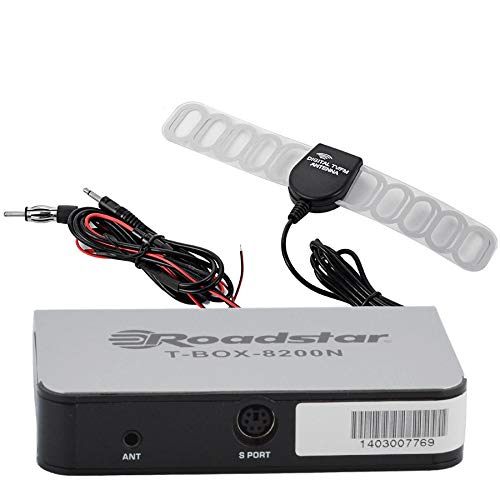
Figure 1: Roadstar T-BOX-8200N TV Tuner
This image displays the Roadstar T-BOX-8200N TV Tuner. It is a compact, silver-grey rectangular device with black side panels. The front face prominently features the "Roadstar" logo and the model name "T-BOX-8200N". On the right side, two ports are visible: one labeled "12V" for power input and another labeled "ANT" for antenna connection. This device is designed to receive and process television signals.
4.1. TV Tuner Ports and Indicators
- ANT Input: Connects to the TV antenna for receiving broadcast signals.
- Ingresso 12 V CC: Si collega all'adattatore di alimentazione fornito.
- (Other ports like HDMI Out, USB, AV Out may be present depending on specific model variant. Refer to your device for exact port configuration.)
4.2. TV Antenna
The included TV antenna is designed to capture terrestrial broadcast signals. Its performance may vary based on location, signal strength, and obstacles.
5. Impostazione
5.1. Connecting the TV Tuner
- Collegare l'antenna: Plug the antenna cable into the "ANT" input port on the Roadstar TV Tuner.
- Collegamento alla TV: Use an appropriate cable (e.g., HDMI, AV) to connect the TV tuner's output port to an available input port on your television. Note the input port you use (e.g., HDMI 1, AV 2).
- Connetti alimentazione: Insert the small end of the power adapter into the "12V DC" input port on the TV tuner. Plug the other end of the power adapter into a standard electrical outlet.
5.2. Positioning the TV Antenna
- Place the antenna in a location with minimal obstructions, ideally near a window or high up.
- Experiment with different antenna positions to find the best signal reception.
- Avoid placing the antenna near large metal objects or other electronic devices that may cause interference.
6. Istruzioni per l'uso
6.1. Accensione iniziale e scansione dei canali
- Turn on your television and select the correct input source (e.g., HDMI 1, AV 2) that the TV tuner is connected to.
- The TV tuner should power on automatically or can be turned on using its power button or remote control.
- Follow the on-screen prompts for initial setup. This typically includes selecting your language and country.
- Initiate an "Auto Scan" or "Channel Search" from the TV tuner's menu. This process will scan for available digital television channels. This may take several minutes.
- Once the scan is complete, the tuner will save the found channels, and you should be able to view loro.
6.2. TV di base Viewing
- Use the remote control's channel up/down buttons to navigate through channels.
- Use the volume buttons on your TV's remote control to adjust audio levels.
- Access the menu to adjust settings, view program guides (EPG), or manage channels.
7. Manutenzione
7.1. Pulizia
- Assicurarsi che il dispositivo sia scollegato prima della pulizia.
- Wipe the exterior of the TV tuner and antenna with a soft, dry cloth.
- Non utilizzare detergenti liquidi, spray o prodotti chimici abrasivi.
7.2. Conservazione
- Se si conserva il dispositivo per un periodo prolungato, scollegarlo dall'alimentazione e conservarlo in un luogo fresco e asciutto.
- Tenerlo lontano dalla luce solare diretta e da temperature estreme.
8. Risoluzione Dei Problemi
| Problema | Possibile causa | Soluzione |
|---|---|---|
| Nessun potere | Adattatore di alimentazione non collegato o presa difettosa. | Ensure power adapter is securely connected to the tuner and a working electrical outlet. |
| No signal / "No Channel" message | Antenna not connected, poor antenna position, or no channels scanned. |
|
| Poor picture quality / pixelation | Weak signal, interference, or antenna position. |
|
| Nessun suono | TV volume muted or too low, incorrect audio settings. |
|
9. Specifiche
Nota: le specifiche sono soggette a modifiche senza preavviso.
- Modello: Roadstar RD8410N, Roadstar RD8200N
- Tipo di prodotto: TV Tuner and Antenna Package
- Tipo di sintonizzatore: Digital Terrestrial Television (DTT)
- Ingresso volumetage: 12 V CC (tramite adattatore di alimentazione incluso)
- Tipo di antenna: Passive or Active (depending on specific antenna model)
- Connettività: ANT In, 12V DC In, (e.g., HDMI Out, USB, AV Out - specific to model)
- ASIN: B07GXJPR3R
- Marca: Stella della strada
10. Garanzia e supporto
Per informazioni sulla garanzia e assistenza tecnica, consultare la documentazione fornita con l'acquisto o contattare il rivenditore. Conservare la prova d'acquisto per eventuali reclami in garanzia.