
1. Introduzione
The Renogy Rover 40A MPPT Solar Charge Controller is designed to optimize the power output from your solar panels to efficiently charge your battery bank. Utilizing Maximum Power Point Tracking (MPPT) technology, it ensures maximum energy harvest from your solar array. This controller is compatible with 12V/24V DC systems and supports various battery types including AGM, Gel, and Lithium. It features an LCD screen for system information display and offers remote monitoring capabilities via an optional Bluetooth module.
2. Caratteristiche principali
- Inseguimento del punto di massima potenza (MPPT): Ensures optimal power extraction from solar modules, achieving up to 99% tracking efficiency and 98% conversion efficiency.
- Volume del sistema automaticotage Rilevamento: Rileva automaticamente la tensione del sistema 12V/24V DCtages (Lithium batteries require manual setting).
- Display LCD informativo: Provides real-time solar charging and battery operation information, customizable parameters, and error codes.
- 4-S avanzatotage Ricarica: Offers Bulk, Boost, Float, and Equalization charging for lead-acid batteries, and 2-stage charging (Bulk and Boost) with lithium reactivation for lithium batteries.
- Protezione completa del sistema: Features self-diagnosis functions to protect against reverse polarity, overcharging, over-discharging, short circuits, and reverse current.
- Monitoraggio remoto: Equipped with an RS232 communication port for connection to the Renogy BT-1 Bluetooth module, enabling monitoring via the Renogy DC Home app.
3. Prodotto finitoview

Davanti view of the Renogy Rover 40A MPPT Solar Charge Controller.

The LCD screen and multiple LEDs display system operating information, including battery voltage, charging status, and error codes.

Posteriore view showing the product label with model and version number (e.g., V010408).

The RS232 port allows communication with an optional Renogy BT-1 Bluetooth Module for remote monitoring.
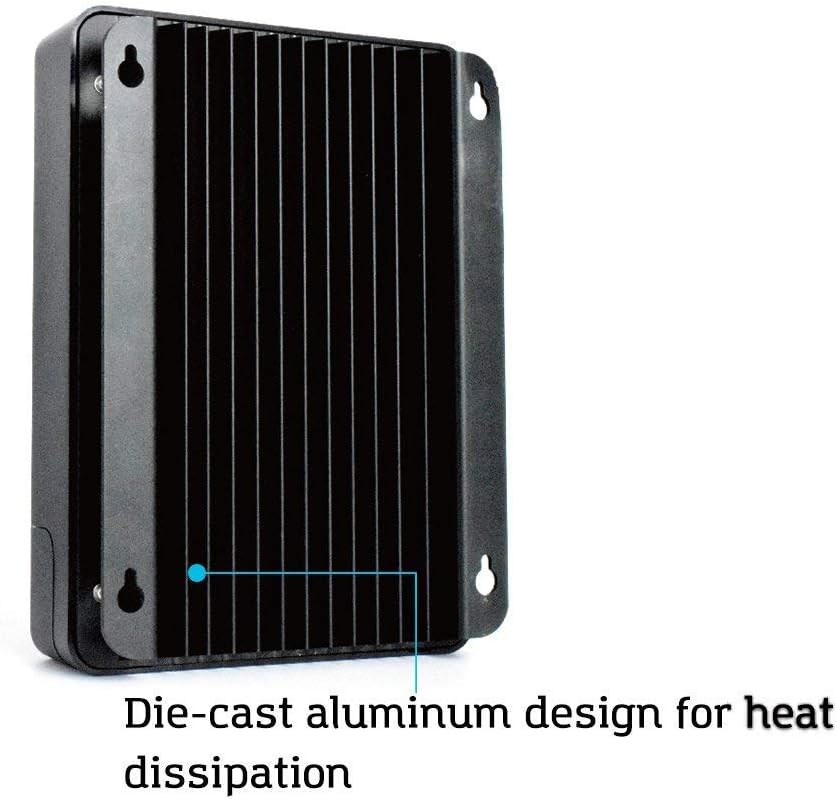
Die-cast aluminum design with fins for efficient heat dissipation, ensuring optimal performance and longevity.

The Renogy BT-1 Bluetooth Module, used for wireless monitoring of the charge controller via a mobile app.
4. Configurazione e installazione
4.1 Precauzioni di sicurezza
- Assicurarsi che tutti i collegamenti siano ben saldi per evitare collegamenti allentati che potrebbero causare calore eccessivo.
- Install the controller indoors in a well-ventilated area, away from direct sunlight, high temperatures, and water.
- Connect the battery first, then the load, and finally the solar panel. Disconnect in the reverse order.
- Use appropriate circuit breakers or fuses for the battery, solar panel, and load circuits.
4.2 Montaggio del controller
Mount the controller vertically on a solid surface, ensuring adequate airflow around the unit for heat dissipation. Maintain a minimum clearance of 6 inches (15 cm) above and below the controller.
4.3 Sequenza di cablaggio
- Connect the battery to the controller's BAT+ and BAT- terminals. Observe correct polarity.
- Connect the DC load to the controller's LOAD+ and LOAD- terminals (if applicable). Observe correct polarity.
- Connect the solar panel to the controller's PV+ and PV- terminals. Observe correct polarity.
- If using the BT-1 Bluetooth module, connect it to the RS232 port.
5. Istruzioni per l'uso
5.1 Display LCD e funzioni dei pulsanti
The integrated LCD screen displays various system parameters such as battery voltage, corrente di carica, volume del pannello solaretage, and load status. Use the buttons below the screen to navigate through the display menus and adjust settings.
- Pulsanti SU/GIÙ: Navigate through display screens and adjust parameter values.
- Pulsante INVIO: Confirm selections or enter setting modes.
- Pulsante ESC: Exit setting modes or return to the previous screen.
5.2 Selezione del tipo di batteria
The controller automatically detects 12V/24V systems. For lithium batteries, the battery type must be manually selected through the LCD menu to ensure proper charging algorithms. Refer to the detailed manual for specific steps on setting battery parameters.
5.3 Remote Monitoring (with BT-1 Module)
Once the BT-1 Bluetooth module is connected, download the Renogy DC Home app on your smartphone. Pair your device with the controller to monitor real-time system data, view historical performance, and adjust certain parameters remotely.
6. Manutenzione
Una manutenzione regolare garantisce la longevità e le prestazioni ottimali del regolatore di carica solare.
- Controllare le connessioni: Controllare periodicamente tutti i collegamenti elettrici per assicurarsi che siano saldi e privi di corrosione.
- Pulizia: Mantenere il controller pulito e privo di polvere e detriti. Utilizzare un panno asciutto per la pulizia.
- Ventilazione: Ensure that the area around the controller remains unobstructed to allow for proper heat dissipation.
- Aggiornamenti del firmware: Controlla il Renogy websito per eventuali aggiornamenti firmware disponibili per il tuo controller.
7. Risoluzione Dei Problemi
If you encounter issues with your Renogy Rover 40A MPPT Solar Charge Controller, refer to the following common troubleshooting steps:
- Nessun display/alimentazione: Controllare i collegamenti della batteria e assicurarsi che la batteria sia carica.tage si trova all'interno del campo operativo.
- Nessuna ricarica: Verify solar panel connections, ensure panels are receiving adequate sunlight, and check for any shading. Confirm solar panel voltage è superiore al volume della batteriatage.
- Carico non funzionante: Check load connections, ensure the load is not exceeding the controller's rated current, and verify load settings on the LCD.
- Codici di errore: Consult the detailed manual for a list of specific error codes displayed on the LCD and their corresponding solutions.
- Problemi di connettività Bluetooth: Ensure the BT-1 module is properly connected, Bluetooth is enabled on your device, and you are within range.
8. Specifiche
| Attributo | Valore |
|---|---|
| Modello | MPPT 40A+BT |
| Marca | Renogia |
| Colore | Nero |
| Voltage | 12 Volt (CC) |
| Dimensioni del prodotto (LxWxH) | 23.8L x 17.3L x 72.5A cm |
| Materiale | Plastica |
| Codice UPC | 816360029649 |
| Numero di parte | RNG-CTRL-RVR40-BT-DE |
| Componenti inclusi | Regolatore di carica con modulo Bluetooth |
| Paese di origine | Cina |
| Tipo di visualizzazione | LCD |
| Peso dell'articolo | 2.45 chilogrammi |
9. Garanzia e supporto
Renogy products are backed by a limited warranty. For detailed warranty information, product registration, and technical support, please visit the official Renogy websito o contattare il servizio clienti. Conservare la ricevuta d'acquisto per eventuali reclami in garanzia.
For further assistance, please refer to the contact information provided on the Renogy official websito: www.renogy.com