
Introduzione
This manual provides detailed instructions for the installation, operation, and maintenance of your VTech DS6151-11 2-Line Cordless Phone System, which includes the DS6151-11 base unit and up to four DS6101-11 accessory handsets. This system features DECT 6.0 technology for clear communication, a 2-line operation capability, and an integrated digital answering system.
Contenuto della confezione
Verifica che il pacco contenga i seguenti articoli:
- 1 x DS6151-11 Cordless Base Unit with Cordless Handset
- 4 x DS6101-11 Cordless Handsets
- 5 caricabatterie per cellulare
- 2 x AC Power Adapters (for base and chargers)
- 2 x Telephone Line Cords
- 9 x AAA Rechargeable Batteries (for handsets)
- Manuale dell'utente (questo documento)
Impostare
1. Installazione della batteria
Each cordless handset requires three AAA rechargeable batteries. Follow these steps to install them:
- Aprire il coperchio del vano batterie sul retro del portatile.
- Insert three AAA rechargeable batteries, observing the correct polarity (+ and - markings).
- Chiudere saldamente il coperchio del vano batterie.
2. Collegamento dell'unità base
Collegare l'unità base alla linea telefonica e alla presa di corrente:
- Collegare un'estremità del cavo della linea telefonica alla presa TEL LINE sul retro dell'unità base.
- Collegare l'altra estremità del cavo telefonico a una presa telefonica a muro.
- Plug the small end of the AC power adapter into the POWER jack on the back of the base unit.
- Collegare l'estremità grande dell'adattatore di alimentazione CA a una presa elettrica standard.
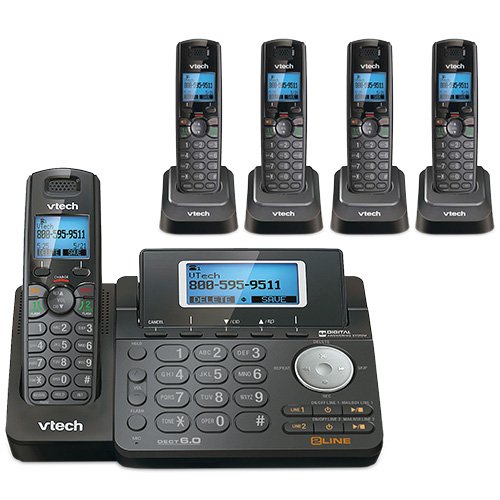
Figura 1: VTech DS6151-11 Base Unit. This image shows the main base unit with its keypad, LCD screen, and digital answering system controls. The base unit is dark gray with silver buttons and a blue backlit screen displaying "VTech 800-595-9511".
3. Ricarica dei cellulari
Place each handset into its respective charger. The CHARGE indicator on the handset will illuminate, indicating it is charging. Allow at least 16 hours for the batteries to fully charge before initial use.

Figura 2: VTech DS6101-11 Handset in Charging Cradle. This image displays a cordless handset securely placed in its compact charging cradle. The handset is dark gray with a black keypad and a VTech logo on the cradle.
Istruzioni per l'uso
Effettuare e ricevere chiamate
- Per effettuare una chiamata: Premere LINEA 1 or LINEA 2, quindi comporre il numero. In alternativa, comporre prima il numero e poi premere LINEA 1 or LINEA 2.
- Per rispondere a una chiamata: When the phone rings, press any key from LINEA 1, LINEA 2, O PARLARE.
- Per terminare una chiamata: Premere SPENTO oppure riposizionare il portatile nel caricabatterie.
- Vivavoce: Durante una chiamata, premere il tasto ORATORE pulsante per passare alla modalità vivavoce. Premerlo nuovamente per tornare alla modalità cornetta.
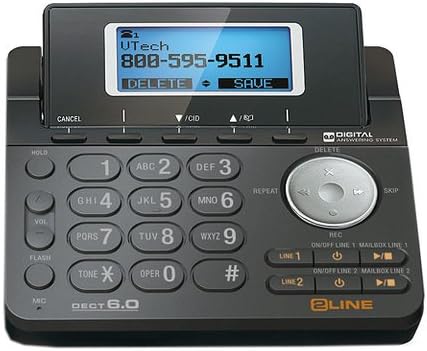
Figura 3: VTech DS6101-11 Cordless Handset. This image shows the full cordless handset, highlighting its ergonomic design, keypad, and display screen. The handset is dark gray with a black keypad and a blue backlit screen.
ID chiamante e avviso di chiamata
This system supports Caller ID and Call Waiting services. To use these features, you must subscribe to them through your telephone service provider.
- Caller ID Display: Incoming call information (name and number) will appear on the handset's LCD screen.
- Chiamata in attesa: Se sei impegnato in una chiamata e ne arriva un'altra, sentirai un tono. Premi FLASH per passare da una chiamata all'altra.
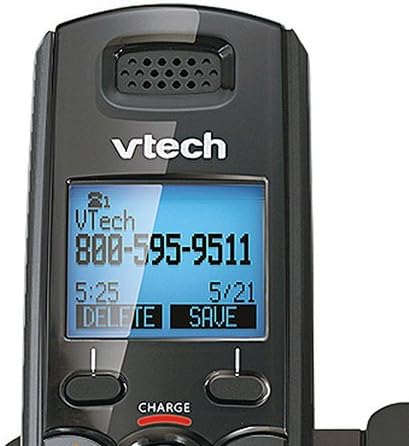
Figura 4: VTech DS6101-11 Handset LCD Screen. A close-up view of the handset's blue backlit LCD screen, displaying caller information such as "VTech 800-595-9511" along with time and date. The screen shows options like "DELETE" and "SAVE".
Elenco telefonico
The system can store up to 50 names and numbers in its phonebook directory. Refer to the detailed instructions in the full user manual for adding, editing, and deleting entries.
Regolazione del volume
Durante una chiamata, premere il tasto VOL button on the side of the handset or the VOL buttons on the base unit to adjust the listening volume.
Handset Locator / Paging
To locate a misplaced handset, press the PAGINA button on the base unit. All registered handsets will ring.
Sistema di risposta digitale
The VTech DS6151-11 base unit includes a digital answering system with approximately 13 minutes of recording time. It features a dedicated mailbox for each line.
- Accensione/spegnimento: Utilizzare il ON/OFF LINEA 1 E ON/OFF LINEA 2 buttons on the base unit to activate or deactivate the answering system for each line.
- Riproduzione dei messaggi: Premere il tasto RIPRODUCI/ARRESTA button on the base unit to listen to messages. Use the SALTARE E RIPETERE buttons to navigate messages.
- Retrieving Messages Remotely: You can access your messages from an outside line using a remote access code. Refer to the full manual for detailed instructions on setting up and using remote access.
Manutenzione
Pulizia
Pulisci le superfici del telefono con un panno morbido eamp cloth. Do not use cleaning sprays or harsh chemicals. Avoid getting moisture into any openings.
Cura della batteria
To ensure optimal battery life, always return the handset to its charger when not in use. If the phone will be unused for an extended period, remove the batteries to prevent leakage.
Risoluzione dei problemi
If you experience issues with your phone system, try the following common solutions:
- Nessun segnale di linea:
- Ensure the base unit's power adapter is securely plugged into an electrical outlet.
- Verify that the telephone line cord is properly connected to both the base unit and the wall jack.
- Prova la presa a muro con un altro telefono funzionante.
- Scarsa qualità del suono:
- Avvicinare il ricevitore all'unità base.
- Assicurarsi che non vi siano oggetti metallici di grandi dimensioni o altri dispositivi elettronici che interferiscono con il segnale.
- Check for fully charged batteries in the handset.
- Il portatile non si carica:
- Assicurarsi che il portatile sia correttamente inserito nel caricabatterie.
- Verificare che l'adattatore di alimentazione del caricabatterie sia collegato a una presa elettrica funzionante.
- Pulire i contatti di ricarica sia sul portatile che sul caricabatterie con un panno asciutto.
- Il sistema di risposta non registra:
- Check if the answering system for the respective line is turned ON.
- Ensure there is sufficient recording time available (13 minutes total).
For more detailed troubleshooting, please refer to the comprehensive user manual or visit the VTech support websito.
Specifiche
| Caratteristica | Specificazione |
|---|---|
| Marca | VTech |
| Numeri di modello | DS6151-11 (Base), DS6101-11 (Handset) |
| Tipo di telefono | Senza fili |
| Tecnologia | DECT 6.0 (1.9GHz) |
| Numero di linee | Funzionamento a 2 linee |
| Espandibilità | Fino a 12 telefoni |
| Tipo di sistema di risposta | Digitale |
| Capacità di registrazione | 13 minuti |
| ID chiamante / Chiamata in attesa | Yes (Subscription required) |
| Elenco telefonico | 50 Name/Number Stations |
| Display | Ampio display LCD retroilluminato |
| Tastiera | Tastiera retroilluminata |
| Batterie | Sono necessarie 9 batterie ricaricabili AAA (3 per apparecchio) |
| Materiale | Plastica |
| Colore | Nero |
| Codice UPC | 650415512850 |
| ASIN | B07H291DZ5 |
Garanzia e supporto
Per informazioni sulla garanzia, supporto tecnico o per acquistare accessori, visitare il sito ufficiale VTech website or contact VTech customer service. Keep your purchase receipt as proof of purchase for warranty claims.
VTech Official Store: VTech on Amazon