
1. Introduzione
This manual provides detailed instructions for setting up and operating your NETVIP 300Mbps WiFi Extender. This device is designed to extend the coverage of your existing wireless network, eliminating Wi-Fi dead zones and improving signal strength in areas with weak reception. It supports both Repeater and Access Point (AP) modes, offering flexible solutions for your networking needs.
2. Prodotto finitoview
Familiarize yourself with the components of your NETVIP WiFi Extender:
- Indicatori LED: Display the device's status, including power, Wi-Fi signal, and WPS activity.
- Pulsante WPS: Per una connessione rapida e sicura al router tramite Wi-Fi Protected Setup.
- Porta LAN: Used for connecting wired devices or for setting up the device in Access Point mode.
- Spina di alimentazione: Per collegare il dispositivo a una presa elettrica.
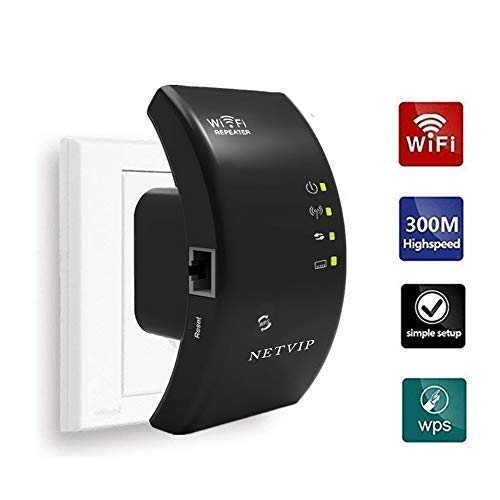
Immagine 2.1: anteriore view of the NETVIP 300Mbps WiFi Extender, showing its compact design and key indicators.
3. Istruzioni per l'installazione
The NETVIP WiFi Extender can be configured in two main modes: Repeater Mode and Access Point (AP) Mode.
3.1. Modalità ripetitore (estensione del Wi-Fi esistente)
La modalità ripetitore estende la copertura della rete wireless esistente.
- Accensione: Plug the extender into an electrical outlet near your main router. Wait for the Power LED to light up.
- Connetti all'Extender: On your computer or mobile device, connect to the Wi-Fi network named "Wireless-N" (or similar, check the label on your device). No password is required initially.
- Accedi alla pagina di configurazione: Aprire un web browser e inserisci l'indirizzo IP predefinito (ad esempio, 192.168.10.1) o nome di dominio (ad esempio, ripetitore.net) fornito nella guida rapida.
- Login: Inserisci il nome utente e la password predefiniti (solitamente "admin" per entrambi, controlla l'etichetta del dispositivo).
- Seleziona la modalità ripetitore: On the setup page, choose "Repeater Mode".
- Ricerca reti: L'extender cercherà le reti Wi-Fi disponibili. Seleziona la tua rete Wi-Fi domestica dall'elenco.
- Inserisci la password: Enter the Wi-Fi password for your home network. You can also set a new SSID (network name) for the extended network or keep it the same.
- Applica impostazioni: Click "Apply" or "Save". The extender will restart.
- Riposizionare l'extender: Una volta riavviato, scollega l'extender e spostalo a metà strada tra il router e la zona senza segnale Wi-Fi. Assicurati che il LED di potenza del segnale indichi una buona connessione al router principale.
- Connetti dispositivi: Connect your devices to the new extended Wi-Fi network.
WPS Setup (Alternative for Repeater Mode)
- Accensione: Collegare l'extender a una presa elettrica vicino al router principale.
- Premere WPS sul router: Premi il pulsante WPS sul router principale.
- Premere WPS sull'Extender: Within two minutes, press the WPS button on the NETVIP WiFi Extender.
- Attendi la connessione: The WPS LED on both devices should blink and then become solid, indicating a successful connection.
- Riposizionare l'extender: Move the extender to an optimal location.
3.2. Access Point (AP) Mode (Creating a New Wi-Fi Network)
La modalità AP converte una connessione Internet cablata in una rete wireless.
- Accensione: Collegare l'extender a una presa elettrica.
- Connessione tramite Ethernet: Connect an Ethernet cable from your main router's LAN port to the LAN port on the NETVIP WiFi Extender.
- Connetti all'Extender: On your computer or mobile device, connect to the Wi-Fi network named "Wireless-N" (or similar).
- Accedi alla pagina di configurazione: Aprire un web browser e immettere l'indirizzo IP predefinito o il nome di dominio.
- Login: Immettere il nome utente e la password predefiniti.
- Seleziona modalità AP: On the setup page, choose "AP Mode".
- Configura le impostazioni Wi-Fi: Set a new SSID (network name) and a strong Wi-Fi password for your new wireless network.
- Applica impostazioni: Click "Apply" or "Save". The extender will restart.
- Connetti dispositivi: Connect your devices to the newly created Wi-Fi network.
4. Istruzioni per l'uso
Once configured, the NETVIP WiFi Extender operates automatically. Ensure it is plugged into a power outlet and the LED indicators show normal operation.
- Posizionamento ottimale: For best performance in Repeater Mode, place the extender where it receives a strong signal from your main router (indicated by the signal LED) and can still provide coverage to the desired area. Avoid placing it near large metal objects, microwaves, or other sources of interference.
- Stato LED:
- LED di potenza: Se è acceso, indica che è acceso.
- LED Wi-Fi: Solid indicates Wi-Fi is active. Blinking indicates data transfer.
- LED WPS: Solid indicates a successful WPS connection. Blinking indicates WPS pairing in progress.
- Connessione cablata: In either mode, the LAN port can be used to connect a single wired device (e.g., a desktop computer, gaming console, or smart TV) to the network, providing a stable wired connection.
5. Manutenzione
Regular maintenance helps ensure optimal performance and longevity of your device.
- Pulizia: Pulire delicatamente il dispositivo con un panno morbido e asciutto. Non utilizzare detergenti liquidi o spray.
- Aggiornamenti del firmware: Periodically check the NETVIP official website for any available firmware updates. Updating firmware can improve performance, add new features, or fix bugs. Follow the instructions provided with the firmware update carefully.
- Ripristino del dispositivo: If you encounter persistent issues or wish to reconfigure the device from scratch, you can perform a factory reset. Locate the reset button (usually a small pinhole) on the device, press and hold it for 5-10 seconds with a paperclip until the LEDs flash. This will restore the device to its factory default settings.
6. Risoluzione Dei Problemi
If you experience issues with your NETVIP WiFi Extender, refer to the following common problems and solutions:
- Cannot access the setup page (192.168.10.1 or repeater.net):
- Ensure your device is connected to the extender's default Wi-Fi network (e.g., "Wireless-N").
- Prova un'altra web browser.
- Cancella la cache e i cookie del browser.
- Restart the extender and your computer/mobile device.
- Perform a factory reset on the extender.
- Nessun accesso a Internet dopo la configurazione:
- In Repeater Mode, ensure the extender is receiving a strong signal from your main router. Relocate it closer if necessary.
- Verify that the Wi-Fi password entered during setup for your main router is correct.
- In AP Mode, ensure the Ethernet cable is securely connected between the extender and your main router, and that your main router has internet access.
- Riavviare sia il router principale sia l'extender.
- Bassa velocità di Internet:
- Optimal placement is crucial. The extender should be positioned where it can receive a good signal from the router and transmit effectively to your devices.
- Avoid interference from other electronic devices (microwaves, cordless phones).
- Assicurati che il router principale fornisca una velocità adeguata.
- Check for firmware updates for the extender.
- La connessione si interrompe frequentemente:
- Check for signal interference or obstacles.
- Assicurarsi che l'extender non si surriscaldi.
- Try changing the Wi-Fi channel on your main router to avoid congestion.
- Perform a factory reset and reconfigure the extender.
7. Specifiche
| Marca | NETVIP |
| Standard di comunicazione wireless | 802.11b, 802.11g, 802.11n |
| Velocità di trasferimento dati | Fino a 300 Mbps |
| Modalità operative | Ripetitore, punto di accesso (AP) |
| Dispositivi compatibili | Router, Alexa Devices |
| Caratteristica speciale | WPS Function, LAN Port |
| Dimensioni del prodotto | 4.33 x 2.36 x 2.76 pollici |
| Peso dell'articolo | 5.6 once |
8. Garanzia e supporto
NETVIP products are designed for reliability and performance. For specific warranty information, please refer to the warranty card included with your product or visit the official NETVIP websito.
If you require technical assistance or have questions not covered in this manual, please contact NETVIP customer support through their official websito o le informazioni di contatto fornite al momento dell'acquisto. Si prega di tenere a portata di mano il modello del prodotto e i dettagli dell'acquisto quando si contatta l'assistenza.