
1. Introduzione
This manual provides essential information for the safe and efficient operation of your Zerone 10.8V-12V Lithium Battery Charger. This charger is designed for use with 10.8V to 12V Lithium-Ion batteries, offering quick and reliable charging. Please read this manual thoroughly before first use and retain it for future reference.

Image 1: The Zerone 10.8V-12V Lithium Battery Charger, showing its compact design and universal compatibility label.
2. Istruzioni di sicurezza
Always observe the following safety precautions to reduce the risk of electric shock, fire, or serious injury:
- Leggi tutte le istruzioni: Prima di utilizzare il caricabatterie, leggere tutte le istruzioni e le avvertenze sul caricabatterie, sulla batteria e sul prodotto che utilizza la batteria.
- Solo per uso interno: Non esporre il caricabatterie alla pioggia o all'umidità.
- Volume correttotage: Garantire l'alimentazione voltage corrisponde al volumetage specificato sulla targhetta dei dati tecnici del caricabatterie.
- Evitare danni: Non utilizzare il caricabatterie se ha subito un forte urto, è caduto o è stato danneggiato in altro modo. Portarlo a un tecnico qualificato.
- Ventilazione: Do not block any ventilation openings. Ensure adequate airflow around the charger during operation.
- Scollegare quando non in uso: Always unplug the charger from the power outlet before attempting any maintenance or cleaning, and when not in use.
- Use specified batteries: Only charge batteries specifically designed for this charger. Charging other battery types may cause them to burst, leading to personal injury and damage.
- Non cortocircuitare: Non cortocircuitare mai i terminali della batteria.
- Tenere lontano dai bambini: Questo apparecchio non è destinato all'uso da parte di persone (bambini compresi) con ridotte capacità fisiche, sensoriali o mentali, o prive di esperienza e conoscenza, a meno che non siano supervisionate o abbiano ricevuto istruzioni riguardanti l'uso dell'apparecchio da una persona responsabile della loro sicurezza.
3. Contenuto della confezione
Verificare che tutti gli articoli siano presenti e in buone condizioni:
- 1 x Zerone 10.8V-12V Lithium Battery Charger
- 1 x Manuale utente
4. Caratteristiche del prodotto
The Zerone 10.8V-12V Lithium Battery Charger offers the following key features:
- Compatibilità universale: Specifically designed for 10.8V to 12V Lithium-Ion batteries.
- Indicatore LED: Built-in LED display provides intuitive monitoring of battery status.
- Gestione intelligente della ricarica: Utilizes a 'first in, first charged' system and protects against overload.
- Ricarica rapida: Capable of charging a 12V Lithium-Ion 1.5Ah battery in approximately 50 minutes.
- Wide Model Compatibility: Compatible with models such as DC10WD, DC10SB, DC10WC, BL1015, BL1016, BL1021B, and BL1041B.

Image 2: The charger displaying its compatibility with various battery models, including DC10WD, DC10SB, DC10WC, BL1015, BL1016, BL1021B, and BL1041B.
5. Impostazione
Per configurare il caricabatterie, segui questi passaggi:
- Disimballare il caricabatterie: Carefully remove the charger and all components from the packaging.
- Connettiti all'alimentazione: Plug the charger's power cord into a standard 100V-260V AC electrical outlet. The charger's LED indicator will flash green once to confirm power connection.
- Preparare la batteria: Ensure the battery to be charged is clean and free from debris.
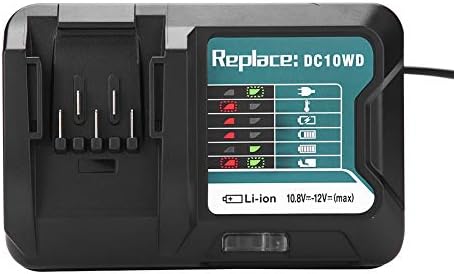
Image 3: The Zerone charger with its integrated power cord, ready for connection to an electrical outlet.
6. Istruzioni per l'uso
Per caricare una batteria:
- Inserire la batteria: Align the battery with the charger's slot and slide it in until it clicks securely into place.
- Ricarica del monitor: The LED indicator will show the charging status. Refer to the "LED Indicator Guide" section for detailed explanations of the light patterns.
- Ricarica completata: Once the battery is fully charged, the LED indicator will show a solid green light.
- Rimuovere la batteria: Press the release button on the battery (if applicable) and slide it out of the charger.
- Scollegare il caricabatterie: Scollegare il caricabatteria dalla presa di corrente quando non è in uso.

Image 4: The Zerone charger with a compatible lithium-ion battery inserted, ready for charging.
7. Guida agli indicatori LED
The charger features an LED display to communicate the battery's status:
| Spia luminosa | Stato |
|---|---|
| Verde lampeggiante | Charger is plugged in and ready. |
| Rosso lampeggiante | Battery is in cooling mode. Charging will begin once the battery temperature is within the optimal range. |
| Red Sustained Light | Battery is currently charging (0-100%). |
| Green Sustained Light | Charging is completed. The battery is fully charged. |
| Red and Green Flashing | Indicates a defective battery pack or charger. |

Immagine 5: Un primo piano view of the charger's LED indicator panel, detailing the meaning of each light pattern for battery status.
8. Manutenzione
Proper maintenance ensures the longevity and performance of your charger:
- Pulizia: Scollegare il caricabatterie dall'alimentazione prima di pulirlo. Utilizzare un panno asciutto e morbido per pulire l'esterno del caricabatterie. Non utilizzare acqua o detergenti chimici.
- Magazzinaggio: Conservare il caricabatterie in un luogo asciutto e fresco, lontano dalla luce solare diretta e dall'umidità.
- Ispezionare regolarmente: Periodically inspect the charger and its cord for any signs of damage. If damage is found, discontinue use and seek professional repair.
9. Risoluzione Dei Problemi
Se riscontri problemi con il caricabatterie, fai riferimento ai seguenti problemi comuni e alle relative soluzioni:
- Il caricabatterie non si accende:
- Ensure the power cord is securely plugged into both the charger and a working electrical outlet.
- Controllare la presa di corrente con un altro dispositivo per verificare che funzioni.
- Battery not charging (Red Flashing LED):
- The battery may be too hot or too cold. Allow the battery to reach room temperature before attempting to charge again. Charging will automatically resume once the temperature is optimal.
- Battery not charging (Red and Green Flashing LED):
- This indicates a defective battery or charger. Try charging a different, known-good battery. If the issue persists, the charger may be faulty. If only the original battery causes this, the battery is likely defective.
- Ricarica lenta:
- Assicurarsi che la batteria sia completamente inserita nel caricabatterie.
- Verify that the battery is compatible with this charger.
Se questi passaggi non risolvono il problema, contattare l'assistenza clienti.
10. Specifiche
| Specificazione | Dettaglio |
|---|---|
| Numero di modello | Zeronegfvetp6dn8-01 |
| Ingresso volumetage | 100 V-260 V CA, 50-60 Hz |
| Volume di uscitatage | 10.8 V-12 V (CC) |
| Dimensioni del prodotto | 4.72 x 1.97 x 5.91 pollici |
| Peso dell'articolo | 11.6 once (0.33 chilogrammi) |
| Produttore | Zerone |
| Tipi di batterie compatibili | 10.8V-12V Lithium-Ion (e.g., BL1015, BL1016, BL1021B, BL1041B) |
| Modelli di caricabatterie compatibili | DC10WD, DC10SB, DC10WC |

Immagine 6: Il fondo view of the Zerone charger, showing its input/output specifications and model number.
11. Garanzia e supporto
For warranty information or technical support, please refer to the documentation provided with your purchase or contact Zerone customer service through the retailer where the product was purchased. Keep your purchase receipt as proof of purchase.