
Introduzione
This manual provides instructions for the safe and efficient operation of your Xech T2S Multifunctional Desk Lamp. The T2S combines an LED desk lamp with a Bluetooth speaker, a pen stand, and a plant pot holder, designed for versatile use in various indoor environments.

Immagine: Oltreview of the Xech T2S Multifunctional Desk Lamp highlighting its primary features.
Caratteristiche del prodotto
- Scrivania LED Lamp: Energy-efficient LEDs provide flicker-free illumination with adjustable brightness levels.
- Altoparlante Bluetooth: Integrated wireless speaker for audio playback.
- Opzioni multimediali: Supports TF Card, USB Drive, and built-in FM Radio for diverse audio sources.
- Pen Stand Holder: Convenient storage for pens and other stationery.
- Plant Pot Holder: Designed to hold small plants or succulents, includes a micro greens starter kit.
- Batteria ricaricabile: Provides up to 6 hours of lighting, depending on intensity.
- Collo di cigno flessibile: Consente il posizionamento regolabile della luce.
- Controllo touch: Intuitive touch sensor for power and brightness adjustment.
- Colourful RGB Light: Ambient RGB lighting feature.
Contenuto della confezione
Assicurarsi che tutti gli articoli siano presenti al momento dell'apertura della confezione:
- Xech T2S Table Lamp con altoparlante
- Cavo di alimentazione (USB)
- USB Manual (This document)
Impostare
1. Ricarica iniziale
Before first use, fully charge the device. Connect the provided USB power cable to the DC5V port on the lamp and to a compatible USB power adapter (not included) or computer USB port. The charging indicator light will show charging status (specific indicator behavior not detailed in product info, assume standard red/blue or off when full).
2. Posizionamento
Posizionare la lamp on a stable, flat surface. The anti-skid pads on the base help ensure stability. Ensure the flexible gooseneck is positioned as desired for optimal lighting.

Image: Features like flexible gooseneck, anti-skid pads, and RGB light.
3. Plant Pot Usage
The base includes a plant pot holder. If using for plants, ensure proper drainage. The device features a water drainage hole at the bottom. Use the provided micro greens starter kit or your preferred small plant.

Image: Plant pot holder with a plant and the water drainage hole.
Istruzioni per l'uso
1. Lamp Operazione
- Accensione/spegnimento: Locate the touch sensor on the lamp base (often marked with a sun icon). Tap the sensor to turn the lamp acceso o spento.
- Regola luminosità: Con la lamp on, tap the touch sensor repeatedly to cycle through the three adjustable brightness levels (Bright, Brighter, Brightest).
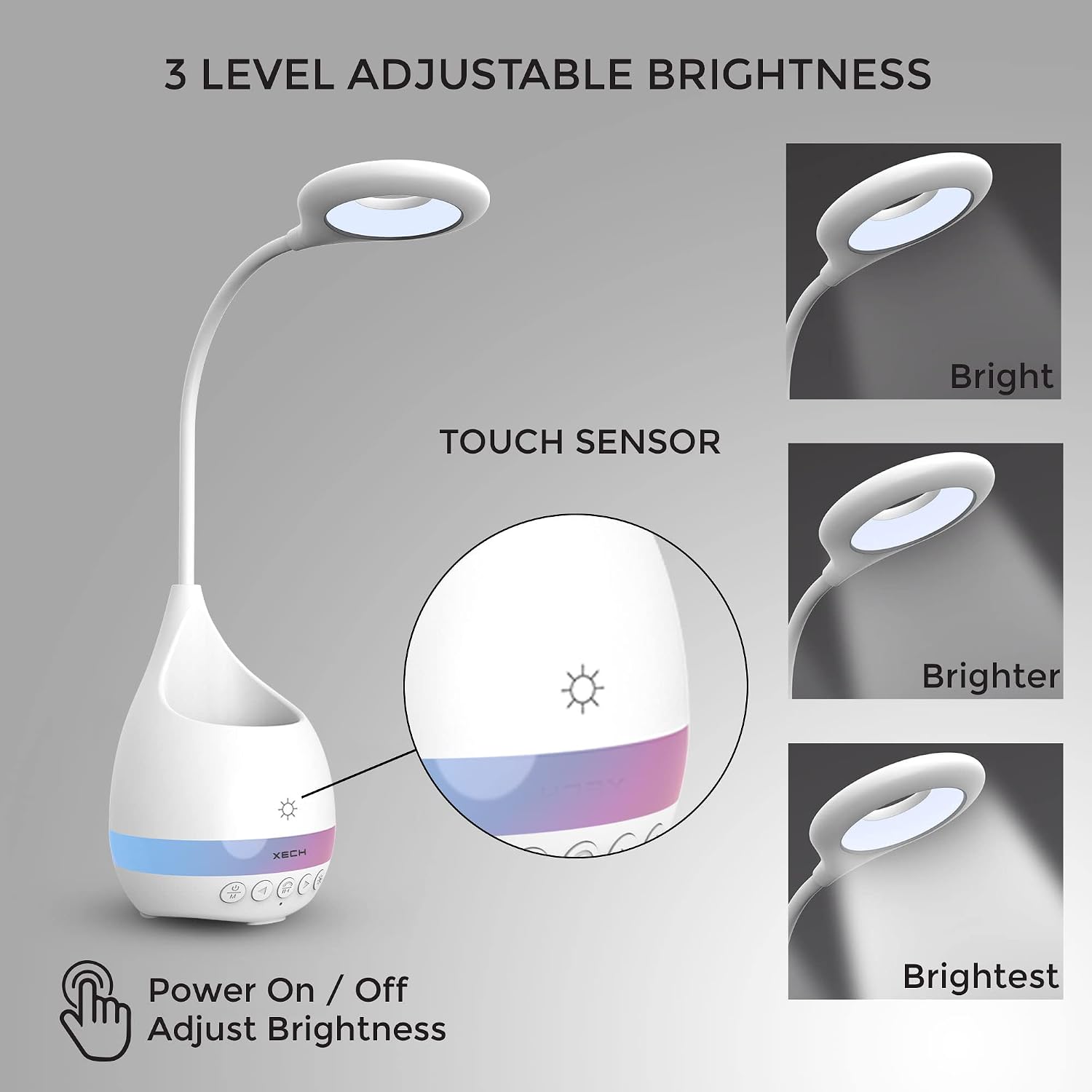
Image: Touch sensor for lamp control and three brightness levels.
2. Funzionamento dell'altoparlante
The speaker controls are located on the front of the lamp base.

Image: Multimedia options including TF Card, Wireless, USB, FM Radio, and AUX ports.
- Power On/Off Speaker: Press and hold the Power/Mode button (often marked with a power icon and 'M') to turn the speaker on or off.
- Accoppiamento Bluetooth:
- Turn on the speaker. It will automatically enter Bluetooth pairing mode (indicated by a flashing light or audio prompt).
- Sul tuo dispositivo (smartphone, tablet, ecc.), attiva il Bluetooth e cerca i dispositivi disponibili.
- Select "Xech T2S" (or similar name) from the list to pair. A confirmation sound will indicate successful pairing.
- TF Card/USB Drive Playback: Insert a TF card or USB drive into the respective slot. The speaker will automatically detect and play audio files. Use the control buttons for playback (play/pause, next/previous track).
- FM Radio: Press the Mode button to switch to FM Radio mode. Use the next/previous track buttons to scan for stations.
- Controllo del volume: Use the volume buttons (often marked with +/- or arrow icons) to adjust the audio volume.
- Controllo della luce RGB: Il lamp features a colorful RGB light band. Specific controls for this light are typically integrated with the speaker controls. Refer to the physical buttons for a dedicated RGB light button or a long press on the mode button.
Manutenzione
- Pulizia: Pulisci la lamp con un panno morbido e asciutto. Non utilizzare detergenti abrasivi o solventi.
- Cura della batteria: To prolong battery life, avoid fully discharging the battery frequently. Recharge the lamp regolarmente, anche se non in uso costante.
- Plant Pot: If using for plants, ensure the drainage hole is clear to prevent water accumulation. Clean the pot regularly to prevent mold or residue buildup.
Risoluzione dei problemi
| Problema | Possibile causa | Soluzione |
|---|---|---|
| Lamp non si accende. | Batteria scarica o non carica. | Collegare lamp to a power source using the USB cable and charge fully. |
| Speaker does not pair via Bluetooth. | Altoparlante non in modalità di associazione; Bluetooth disattivato sul dispositivo; dispositivo troppo lontano. | Ensure speaker is on and in Bluetooth mode. Enable Bluetooth on your device and move closer to the lamp. Restart both devices if necessary. |
| Qualità del suono scadente. | Batteria scarica; interferenza; qualità audio sorgente. | Carica il lamp. Move away from other electronic devices. Check the quality of the audio source. |
| Lamp la luminosità è incoerente. | Batteria scarica. | Carica il lamp completamente. |
Specifiche
| Caratteristica | Dettaglio |
|---|---|
| Numero di modello | T2S |
| Dimensioni del prodotto | 11.5D x 11.5W x 42.5H centimetri |
| Peso dell'articolo | 540 grammi |
| Lamp Tipo | Tabella Lamp |
| Tipo di sorgente luminosa | GUIDATO |
| Cosatage | 3 Watt |
| Fonte di alimentazione | Alimentato a batteria (ricaricabile) |
| Voltage | 5 Volt |
| Metodo di controllo | Controllo touch |
| Tecnologia di connettività | Bluetooth |
| Materiale | Acrilonitrile Butadiene Stirene (Plastica) |
| Colore | Bianco |
| Uso interno/esterno | Al chiuso |
Garanzia e supporto
The Xech T2S Multifunctional Desk Lamp viene fornito con un garanzia di un anno dalla data di acquisto.
For warranty claims, technical support, or any inquiries, please contact Xech customer service:
- E-mail: support@xech.com
- Websito: www.xech.com
Conservare la prova d'acquisto per la convalida della garanzia.
