Introduzione
The TUNAI Wand is an aptX Low Latency Bluetooth transmitter designed to wirelessly stream audio from your TV, home stereo, PC, or game console to up to two Bluetooth headphones simultaneously. It features multiple audio input options and aims to provide a synchronized audio-visual experience with minimal delay.
Informazioni sulla sicurezza
- Handle batteries with care. This device does not contain a rechargeable battery and requires external power via Micro USB.
- Avoid using near other wireless devices to prevent potential interference.
- Keep the device in a dry, cool place to ensure optimal performance and longevity.
- Non tentare di smontare o modificare il dispositivo. Ciò potrebbe invalidare la garanzia e causare danni.
Contenuto della confezione

Image: Components included in the TUNAI Wand package.
- TUNAI Wand Bluetooth Transmitter Unit
- Magnet Sticker (for mounting)
- Cavo da 3.5 mm maschio a RCA maschio
- Cavo di ricarica USB (Micro USB)
Prodotto finitoview
Componenti del dispositivo
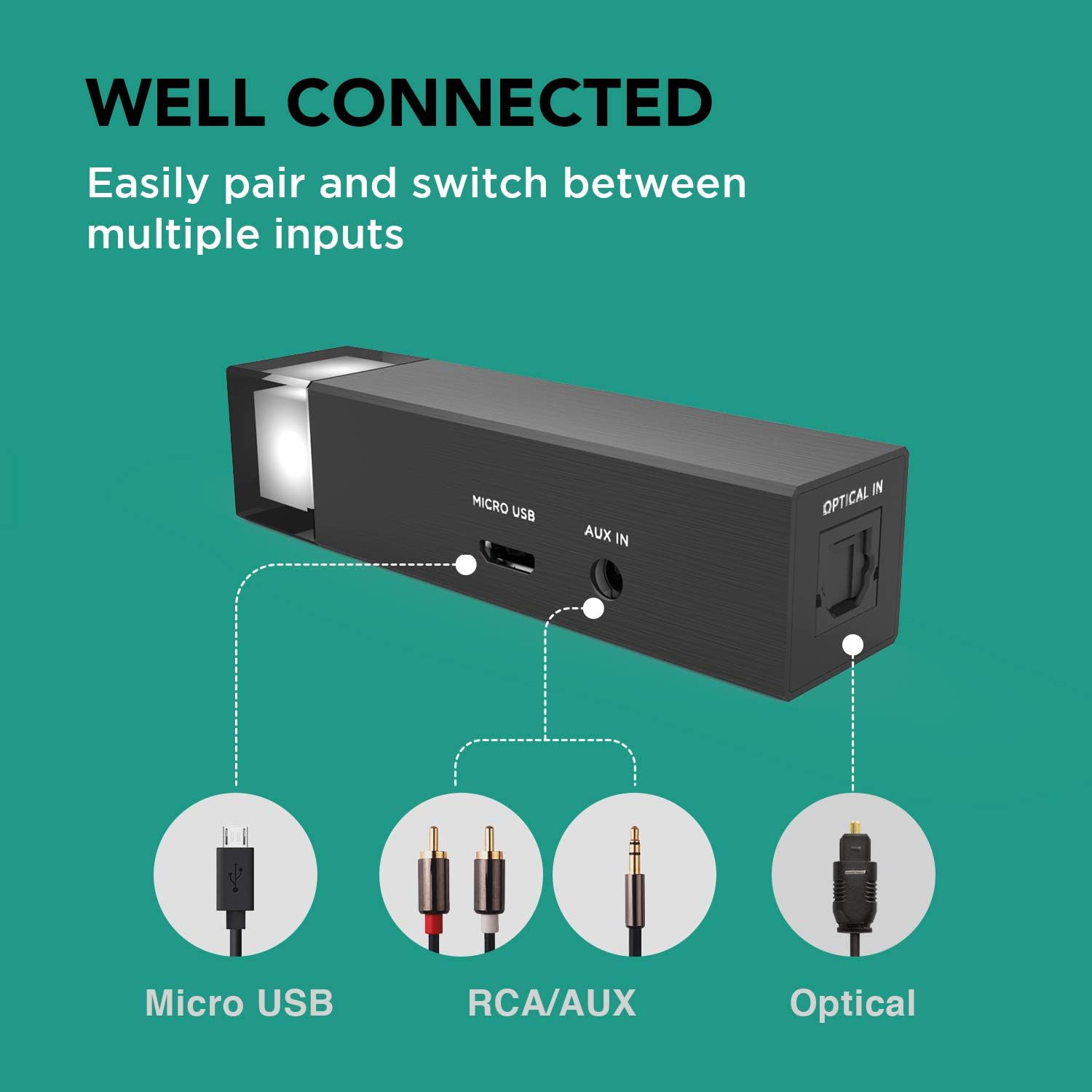
Immagine: Posteriore view of the TUNAI Wand showing input ports.
- Indicatore LED: Displays current input mode and pairing status.
- Porta micro USB: For power supply and USB audio input.
- Porta AUX IN: 3.5mm audio input for analog sources.
- Porta OTTICA IN: Digital audio input for optical sources (SPDIF).
- Pulsante multifunzione: Used for pairing, switching inputs, and other controls.
Caratteristiche principali
- aptX Bassa Latenza: Ensures minimal audio delay for a synchronized audio-visual experience, ideal for TV, movies, and gaming.
- Dual Headphone Connection: Connects to two Bluetooth headphones simultaneously, allowing shared listening.
- Ingressi audio multipli: Supports AUX (3.5mm), USB Audio, and Optical (SPDIF) inputs for broad compatibility with various devices.
- Ampio raggio d'azione: Provides an extended Bluetooth range, allowing freedom of movement while listening.

Image: User enjoying TV audio with aptX Low Latency via TUNAI Wand.

Image: Two individuals sharing audio using the TUNAI Wand.

Image: Input options for the TUNAI Wand.

Image: Illustration of the TUNAI Wand's long range capability.
Impostare
1. Alimentazione del dispositivo
Connect the TUNAI Wand to a power source using the provided Micro USB cable. The device does not have an internal battery and requires continuous power.
2. Collegamento a una sorgente audio
Scegli uno dei seguenti metodi di input in base alla tua sorgente audio:
Ingresso AUX (3.5 mm)
Use the 3.5mm to RCA cable (or a standard 3.5mm audio cable) to connect the Wand's AUX IN port to your audio source's 3.5mm audio output or RCA audio output.
Ingresso audio USB
Connect the Wand's Micro USB port to a USB port on your PC or game console. The device will be recognized as an audio output device.
Optical Input (SPDIF)
Connect an optical audio cable (not included) from your audio source's optical output to the Wand's OPTICAL IN port.
3. Pairing Bluetooth Headphones
- Ensure your Bluetooth headphones are in pairing mode. Refer to your headphone's manual for instructions.
- Press and hold the multi-function button on the TUNAI Wand until the LED indicator flashes rapidly, indicating it is in pairing mode.
- Place the headphones close to the Wand. They should automatically connect. The LED indicator will change to a solid color (specific to the input mode) once connected.
Istruzioni per l'uso
Switching Audio Inputs
Briefly press the multi-function button to cycle through the available audio inputs (AUX, USB, Optical). The LED indicator color will change to reflect the active input:
- Gray/White: Analog (AUX)
- Blu: Ottico
- Orange/Yellow: Micro USB
Connecting a Second Headphone
After the first headphone is connected:
- Mettere la seconda cuffia Bluetooth in modalità di associazione.
- Double-press the multi-function button on the TUNAI Wand. The LED will flash rapidly again.
- The Wand will search for and connect to the second headphone. Once connected, both headphones will receive audio simultaneously.
Risoluzione dei problemi
- Nessuna uscita audio:
- Ensure the Wand is powered on and the LED indicator is lit.
- Verify that the correct audio input is selected (check LED color).
- Confirm that your headphones are properly paired and connected.
- Check the volume levels on both your audio source and headphones.
- For optical input, ensure your TV/source audio output is set to PCM/Stereo, not Bitstream/Dolby Digital.
- Ritardo audio (problemi di sincronizzazione labiale):
- Ensure both your headphones and the Wand support aptX Low Latency. If either device does not, some delay may be present.
- Prova ad associare nuovamente le cuffie.
- Cannot pair headphones:
- Make sure the Wand is in pairing mode (rapidly flashing LED).
- Ensure your headphones are in pairing mode and not connected to another device.
- Move headphones closer to the Wand.
- Restart both the Wand and your headphones.
- Intermittent connection or short range:
- Reduce physical obstacles between the Wand and your headphones.
- Avoid strong Wi-Fi routers or other 2.4GHz wireless devices that may cause interference.
- Ensure the Wand is not placed inside a metal cabinet or enclosure.
Specifiche
| Caratteristica | Specificazione |
|---|---|
| Marca | TONNAI |
| Nome del modello | TUNAI Wand |
| Tecnologia di connettività | Ausiliario, Bluetooth, USB |
| Versione Bluetooth | Bluetooth 5.0 |
| Standard supportati | aptX bassa latenza |
| Ingressi audio | 3.5mm AUX, Micro USB, Optical (SPDIF) |
| Tipo di uscita audio | Bluetooth |
| Fonte di alimentazione | Corded Electric (5V DC via Micro USB) |
| Materiale | Metallo |
| Colore | Nero |
| Numero di canali | 2 (Stereo) |
| Dispositivi compatibili | TV, Home Stereo, PC, Game Consoles (e.g., Desktop) |
Cura e manutenzione
- Pulire il dispositivo con un panno morbido e asciutto. Non utilizzare detergenti liquidi o spray.
- Evitare di esporre il dispositivo a temperature estreme, umidità o luce solare diretta.
- Non far cadere né sottoporre il dispositivo a forti impatti.
- Conservare il dispositivo in un luogo sicuro quando non viene utilizzato.
Garanzia e supporto
For warranty information and technical support, please refer to the official TUNAI websito o contattare il servizio clienti. I termini di garanzia specifici possono variare a seconda della regione e del rivenditore.
Video ufficiale del prodotto
Video: Un oltreview of the TUNAI Wand Long Range AptX Low Latency Bluetooth Transmitter, demonstrating its features and use cases.


