
Introduzione
This manual provides detailed instructions for the operation and maintenance of your BOBLOV BT-S3 Helmet Headset. The BT-S3 is designed for motorcycle communication, offering hands-free calling, music playback, FM radio, and intercom functionality for riders. Please read this manual thoroughly before using the device to ensure proper function and safety.
Contenuto della confezione
Verifica che tutti gli articoli elencati di seguito siano inclusi nel tuo pacchetto:
- 1 x BOBLOV BT-S3 Helmet Intercom Unit
- 1 x Stereo Headphones (with microphone)
- 1 x Mounting Clip & Screws
- 1 x Cacciavite
- 1 cavo di ricarica USB
- 1 x Manuale utente
- 1 x Velcro Pad (for mounting)
- 1 x linea audio

Figura 1: All components included in the BOBLOV BT-S3 package.
Prodotto finitoview
Pulsanti di controllo e porte

Figura 2: BOBLOV BT-S3 control buttons and connection ports.
- Pulsante telefono: Used for answering/ending calls, redialing, and activating voice assistant.
- Volume + Pulsante: Increases volume, navigates forward in music/FM.
- Volume - Pulsante: Decreases volume, navigates backward in music/FM.
- Pulsante di accensione/interfono: Powers the device on/off, initiates/ends intercom, plays/pauses music, activates FM radio.
- Presa per caricabatterie e cuffie: Multi-purpose port for charging and connecting the headset.
- Cable Input Interface: For connecting the headset cable.
Impostare
1. Carica del dispositivo
Before initial use, fully charge the BT-S3 unit. Connect the provided USB cable to the charging port on the device and to a standard USB power adapter (not included). The LED indicator will show charging status. A full charge typically takes approximately 2-3 hours.
2. Installazione dell'auricolare nel casco
The BT-S3 can be installed in various helmet types, including full-face, half-face, and open-face helmets.
- Attach the mounting clip to the side of your helmet using the provided screws and screwdriver, or use the adhesive Velcro pad for a tool-free installation. Ensure the clip is securely fastened.
- Slide the BT-S3 intercom unit onto the mounting clip until it clicks into place.
- Open the helmet's inner lining. Position the stereo headphones inside the helmet, ensuring they are aligned with your ears for optimal sound.
- Route the microphone to a position near your mouth, ensuring it is not obstructed.
- Connect the headset cable to the designated port on the BT-S3 unit.

Figura 3: Helmet mounting clip and unit attachment.
Istruzioni per l'uso
Accensione/spegnimento
- Accensione: Premere e tenere premuto il tasto Pulsante di accensione/interfono for approximately 3 seconds until you hear an audible prompt and the LED indicator lights up.
- Spegni: Premere e tenere premuto il tasto Pulsante di accensione/interfono for approximately 3 seconds until you hear an audible prompt and the LED indicator turns off.
Accoppiamento Bluetooth con il telefono cellulare
- Assicurarsi che il BT-S3 sia spento.
- Premere e tenere premuto il tasto Pulsante di accensione/interfono for approximately 5-7 seconds until the LED indicator flashes red and blue alternately, indicating pairing mode.
- Sul tuo cellulare, attiva il Bluetooth e cerca i dispositivi disponibili.
- Select "BT-S3" from the list of devices. If prompted for a password, enter "0000".
- Una volta effettuato l'accoppiamento, l'indicatore LED lampeggerà lentamente in blu e verrà emesso un tono di conferma.
Funzionalità interfono
The BT-S3 supports full-duplex wireless communication. It allows for 2 riders to intercom simultaneously, with a maximum talking range of 1000 meters. Up to 3 riders can be connected, but only two can actively communicate at any given time. If a third rider wishes to join, one of the active intercom participants must end their conversation.

Figura 4: Intercom connection scenarios.
- Abbinamento delle unità interfono:
- Ensure both BT-S3 units are powered off.
- Su entrambe le unità, tenere premuto il tasto Pulsante di accensione/interfono per circa 5-7 secondi finché gli indicatori LED non lampeggiano alternativamente in rosso e blu.
- Premere brevemente il tasto Pulsante di accensione/interfono on one of the units. The units will search and pair with each other.
- Once paired, the LED indicators will flash blue slowly, and you will hear a confirmation tone.
- Avvio dell'interfono: After pairing, a short press of the Pulsante di accensione/interfono on either unit will initiate an intercom conversation.
- Interfono finale: Una breve pressione del Pulsante di accensione/interfono will end the intercom conversation.
Telefonate
- Rispondi alla chiamata: When a call comes in, the device will automatically answer after a few rings (auto-receiving phone calls feature). Alternatively, short press the Pulsante del telefono per rispondere.
- Termina chiamata: Premere brevemente il tasto Pulsante del telefono per terminare una chiamata attiva.
- Rifiuta chiamata: Premere e tenere premuto il tasto Pulsante del telefono per 2 secondi per rifiutare una chiamata in arrivo.
- Ricomponi l'ultimo numero: Premere due volte il tasto Pulsante del telefono per ricomporre l'ultimo numero chiamato.
Riproduzione musicale
After pairing with your mobile phone, you can stream music to the BT-S3.
- Riproduci/Pausa: Premere brevemente il tasto Pulsante di accensione/interfono per riprodurre o mettere in pausa la musica.
- Traccia successiva: Premere brevemente il tasto Pulsante Volume +.
- Traccia precedente: Premere brevemente il tasto Volume - Pulsante.
Radio FM
The BT-S3 includes an FM radio function.
- Attiva/disattiva FM: Premere due volte il tasto Pulsante di accensione/interfono to activate or deactivate FM radio.
- Stazioni di scansione: While FM is active, short press the Volume + or Volume - pulsanti per cambiare stazione.
GPS Voice Instructions
When paired with a smartphone running a GPS application, the BT-S3 can receive voice instructions directly to your headset.
Manutenzione
- Keep the device dry. Do not expose it to extreme temperatures.
- Pulire l'unità con un panno morbido, damp stoffa. Evitare l'uso di prodotti chimici aggressivi o detergenti abrasivi.
- Assicurarsi che il coperchio della porta di ricarica sia ben chiuso quando non è in carica, per mantenere la resistenza all'acqua.
- Conservare il dispositivo in un luogo fresco e asciutto quando non viene utilizzato per lunghi periodi.
Risoluzione dei problemi
| Problema | Possibile causa | Soluzione |
|---|---|---|
| Il dispositivo non si accende. | Batteria scarica. | Carica completamente il dispositivo. |
| Impossibile effettuare l'associazione con il telefono. | Dispositivo non in modalità di associazione; Bluetooth disattivato sul telefono. | Ensure BT-S3 is flashing red/blue. Enable Bluetooth on phone and search again. |
| Citofono non connesso. | Units not paired or out of range. | Re-pair intercom units. Ensure units are within 1000m range. |
| Poor audio quality / Wind noise. | Posizionamento del microfono; fattori ambientali. | Adjust microphone closer to mouth. The device features DSP cancellation for wind noise. |
| La durata della batteria è inferiore al previsto. | Frequent use of high volume or intercom. | Battery life varies with usage. Ensure full charge before use. |
Specifiche
- Modello: BT-S3
- Connettività: Wireless (Bluetooth)
- Intervallo di interfono: Fino a 1000 metri (tra 2 ciclisti)
- Velocità di lavoro: Fino a 100 Km/h
- Tempo di conversazione: Fino a 8 ore
- Tempo di standby: Fino a 300 ore
- Orario telefonata: Fino a 10 ore
- Tempo di riproduzione musicale: Fino a 6 ore
- Resistenza all'acqua: Water-resistant (fully weather protection)
- Cancellazione del rumore: Wind noise DSP cancellation
- Caratteristiche: Auto-receiving phone calls, FM Radio, Stereo music (A2DP), GPS voice instructions
- Compatibilità del casco: Fits all kinds of helmets (full/half/open face)
- Metodo di controllo: Pulsanti touch
- Jack per cuffie: Jack da 3.5 mm (per il collegamento delle cuffie)
- Codice UPC: 889251631535

Figura 5: Estimated battery performance for various functions.
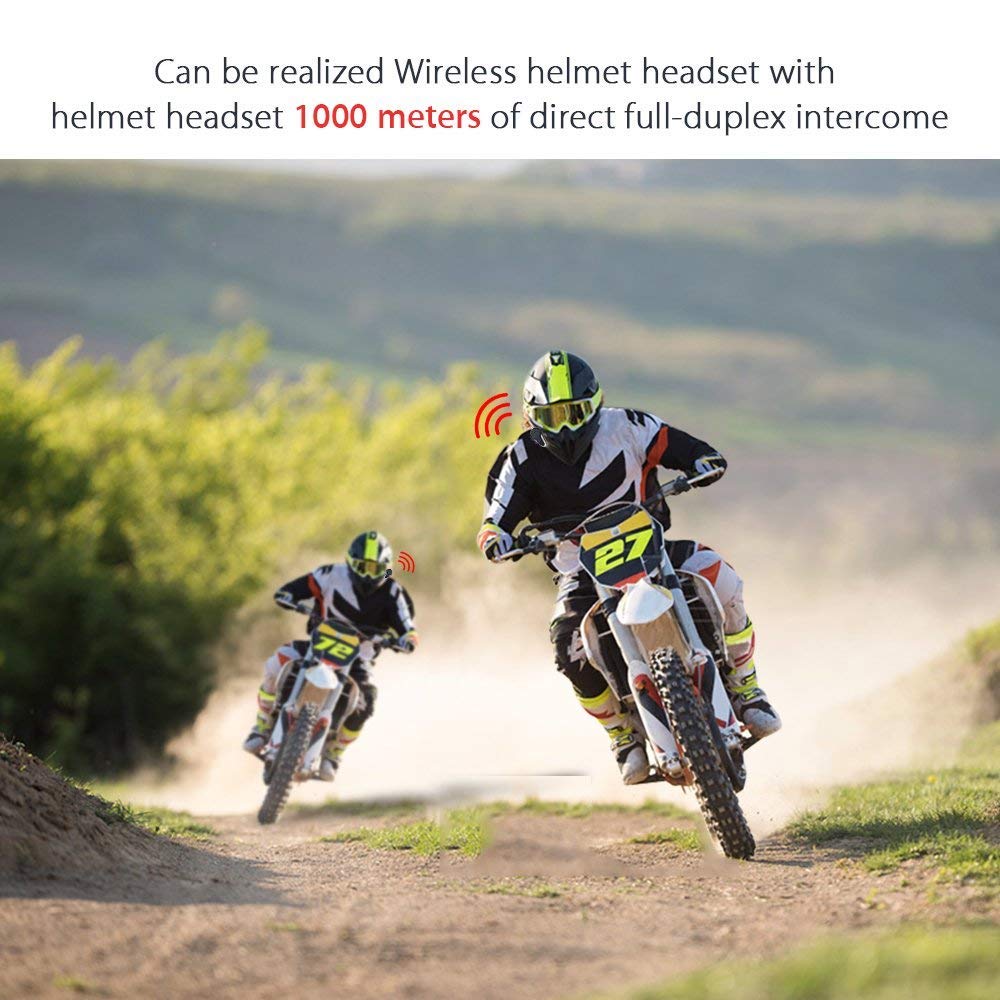
Figura 6: Wireless helmet headset with 1000 meters direct full-duplex intercom.

Figura 7: Versatile applications for the BT-S3 headset, including motorcycling and skiing.
Garanzia e supporto
Specific warranty information is not provided in the product details. For warranty claims, technical support, or further assistance, please contact your retailer or the manufacturer directly. Retain your proof of purchase for any warranty-related inquiries.
Manufacturer: BOBLOV