
1. Introduzione
Thank you for choosing the LECLSTAR Motion Sensor Closet Light. This manual provides essential information for the safe and effective use of your new lighting product. Please read these instructions carefully before installation and operation, and retain them for future reference.
This wireless, battery-operated light features 51 LEDs, motion sensing capabilities, and is designed for various indoor applications such as closets, cabinets, kitchens, and stairs.
2. Informazioni sulla sicurezza
- Non esporre il dispositivo all'acqua o a umidità eccessiva.
- Non tentare di smontare, riparare o modificare la lampada. Ciò invaliderà la garanzia e potrebbe causare danni o lesioni.
- Utilizzare solo il cavo USB in dotazione per la ricarica.
- Evitare l'esposizione diretta degli occhi alla luce LED, poiché può essere molto intensa.
- Tenere fuori dalla portata dei bambini.
3. Contenuto della confezione
Si prega di controllare il pacco per assicurarsi che siano presenti tutti gli articoli:
- 1 x LECLSTAR Motion Sensor Closet Light
- 1 x Magnetic Plastic Bracket
- 2 cuscinetti adesivi 3M
- 4 viti di montaggio
- 1 cavo di ricarica USB
- 1 x Manuale utente
4. Prodotto finitoview
Familiarize yourself with the components of your LECLSTAR Motion Sensor Closet Light.

Figura 1: Product Components. This diagram illustrates the various parts of the light, including the USB charging port, magnetic strip for mounting, LED light board, durable aluminum alloy casing, ON/OFF switch, infrared motion sensor receiver, and protective ABS cover.
- Porta USB: Per caricare la batteria interna.
- Banda magnetica: Allows for easy attachment to magnetic surfaces or the included bracket.
- LED Light Board: Contains 51 bright LEDs for illumination.
- Materiale in lega di alluminio: Provides a durable and lightweight housing.
- Pulsante ON/OFF: Controls the power and operating modes.
- Ricevitore a infrarossi: Detects signals from the remote control (if applicable).
- Copertura in ABS: Protects the LEDs and diffuses light.
5. Configurazione e installazione
The LECLSTAR Motion Sensor Closet Light offers flexible installation options.
5.1 Ricarica prima del primo utilizzo
Before installation, fully charge the light. Refer to Section 6 for detailed charging instructions.
5.2 Opzioni di montaggio
You can install the light using the magnetic plastic bracket with 3M adhesive or screws.
- Adesione magnetica: Peel off the protective film from the 3M adhesive pads and attach them to the magnetic plastic bracket. Press the bracket firmly onto a clean, dry surface where you wish to install the light. The light can then be magnetically attached to the bracket.
- Montaggio a vite: Use the provided screws to secure the magnetic plastic bracket to a desired surface. Once the bracket is securely mounted, attach the light magnetically.

Figura 2: Versatile Installation. This image illustrates the light's adaptability, showing it mounted under a bed, in a kitchen, on a bookshelf, along stairs, inside a wardrobe, and providing illumination for outdoor tasks, highlighting its ease of placement in diverse environments.
5.3 Considerazioni sul posizionamento
- For optimal motion detection, position the sensor ball to face the direction of expected movement.
- When using multiple motion sensor lights, avoid placing them too close together in motion-sensing mode, as they may interfere with each other's sensitivity.
- Ensure the installation surface is clean and dry for secure adhesion.
6. Istruzioni per la ricarica
The LECLSTAR Motion Sensor Closet Light is equipped with a built-in 2400mAh lithium battery.
- Collegare il cavo di ricarica USB in dotazione alla porta USB della luce.
- Collegare l'altra estremità del cavo USB a un adattatore di alimentazione USB standard (non incluso) o alla porta USB di un computer.
- During charging, the indicator light on the device will be blu.
- Una volta completamente carica, la spia luminosa si accenderà rosso.
- Una carica completa richiede in genere circa 4 ore.
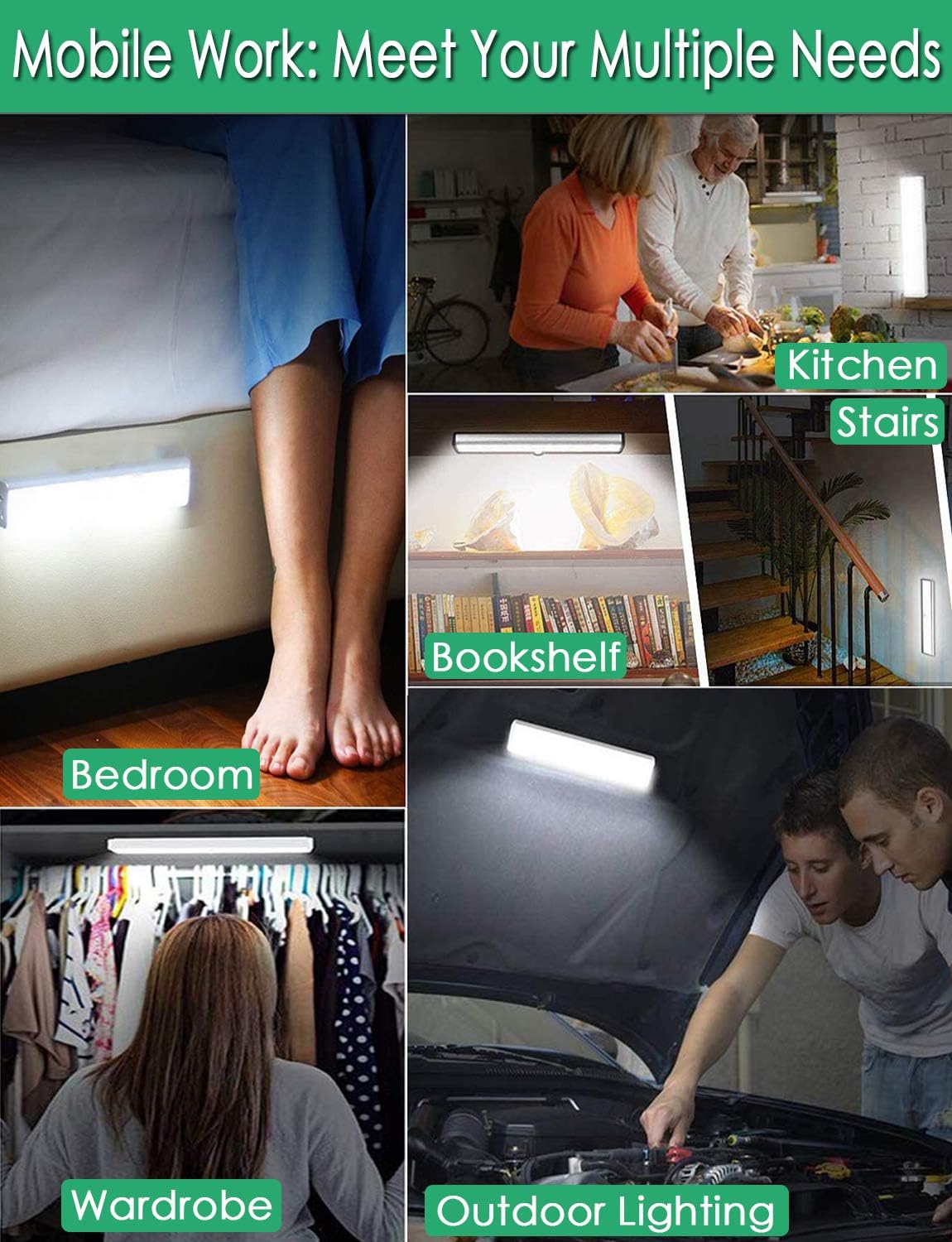
Figura 3: Charging Status. This image demonstrates the charging process, showing the light connected to a power source. The indicator light is red when charging and turns blue when the battery is fully charged, indicating its status clearly.
7. Istruzioni per l'uso
The light features multiple operating modes and can be controlled via its ON/OFF button or an optional remote control.
7.1 Mode Selection (ON/OFF Button)
Locate the ON/OFF button on the side of the light. Toggle the switch to select the desired mode:
- OFF: La luce è completamente spenta.
- SOPRA: La luce rimane accesa ininterrottamente.
- AUTO (Motion Sensor Mode): The light will automatically turn on when motion is detected in a dark environment. It will turn off approximately 30 seconds after no motion is detected.

Figura 4: Motion Sensor Operation. This image demonstrates how the motion sensor works: the light remains off in bright environments, automatically turns on when movement is detected in the dark within a 3-meter, 120-degree range, and then automatically turns off after 30 seconds of inactivity.
7.2 Motion Sensor Details
- Angolo di rilevamento: 120 gradi.
- Distanza di rilevamento: Fino a 3 metri (circa 10 piedi).
- The sensor is designed to activate only in low-light conditions to conserve battery life.
7.3 Remote Control Functions (Optional)
If your model includes a remote control, you can access additional features:

Figura 5: Remote Control Functions. This image displays the remote control, highlighting its various buttons: ON/OFF for power, 'S' for sensor mode, '1', '2', '3' for different light modes or brightness levels, '+' and '-' for adjusting brightness, and '15', '30', '60', '120' for setting a timer.
- ACCESO/SPENTO: Accende o spegne la luce.
- S (Sensor Mode): Attiva la modalità sensore di movimento.
- 1, 2, 3 (Light Modes): Selects different light modes or brightness levels.
- 50%, 100%, +, - (Adjustable Brightness): Regola l'intensità della luce.
- 15, 30, 60, 120 (Timer Function): Sets the light to turn off automatically after a specified duration.
8. Manutenzione
- Pulizia: Pulire la lampada con un panno morbido e asciutto. Non utilizzare detergenti abrasivi o solventi.
- Cura della batteria: To prolong battery life, avoid fully discharging the battery frequently. Charge the light regularly, especially if it will not be used for an extended period.
9. Risoluzione Dei Problemi
- La luce non si accende:
- Assicurarsi che la batteria sia carica.
- Check that the light is switched to the 'ON' or 'AUTO' mode.
- Sensore di movimento non funzionante:
- Ensure the light is in 'AUTO' mode.
- Verificare che la luce ambientale sia sufficientemente bassa da consentire l'attivazione del sensore.
- Check that the sensor is not obstructed and is facing the area of expected movement.
- If multiple motion sensor lights are nearby, they might interfere with each other. Try repositioning them.
- La luce tremola o si attenua inaspettatamente:
- The battery level may be low. Recharge the light.
10. Specifiche
| Modello | B07JRBSJDR |
| Colore chiaro | Bianco puro (6000K) |
| Quantità LED | 51 LED |
| Flusso luminoso | 240lm |
| Motion Detecting Angle | 120 gradi |
| Motion Detecting Distance | Fino a 3 metri (10 piedi) |
| Tempo di vita del LED | Più di 80,000 ore |
| Tipo di batteria | Batteria al litio da 2400 mAh |
| Tempo di ricarica USB | Circa 4 ore |
| Volume di eserciziotage | 4.2V |
| Cosatage | 3W |
| Dimensioni | 15.3 x 0.8 x 0.8 pollici |
| Materiale | Metallo, Plastica |
| Fonte di alimentazione | Alimentato a batteria |
| Caratteristiche speciali | Accensione immediata |
11. Garanzia e supporto
LECLSTAR provides a lifetime warranty for this product. If you encounter any issues or have questions regarding your Motion Sensor Closet Light, please contact the LECLSTAR service team for assistance. Our dedicated support team is ready to help you.
For warranty claims or technical support, please refer to the contact information provided on the product packaging or the official LECLSTAR websito.