
Introduzione
This manual provides instructions for the ALLIMITY AA59-00741A and AA59-00742A replacement remote control. This remote is designed to function as a direct replacement for various Samsung TV models, offering immediate usability without complex setup procedures. Please read this manual thoroughly to understand the remote's features and operation.
Prodotto finitoview
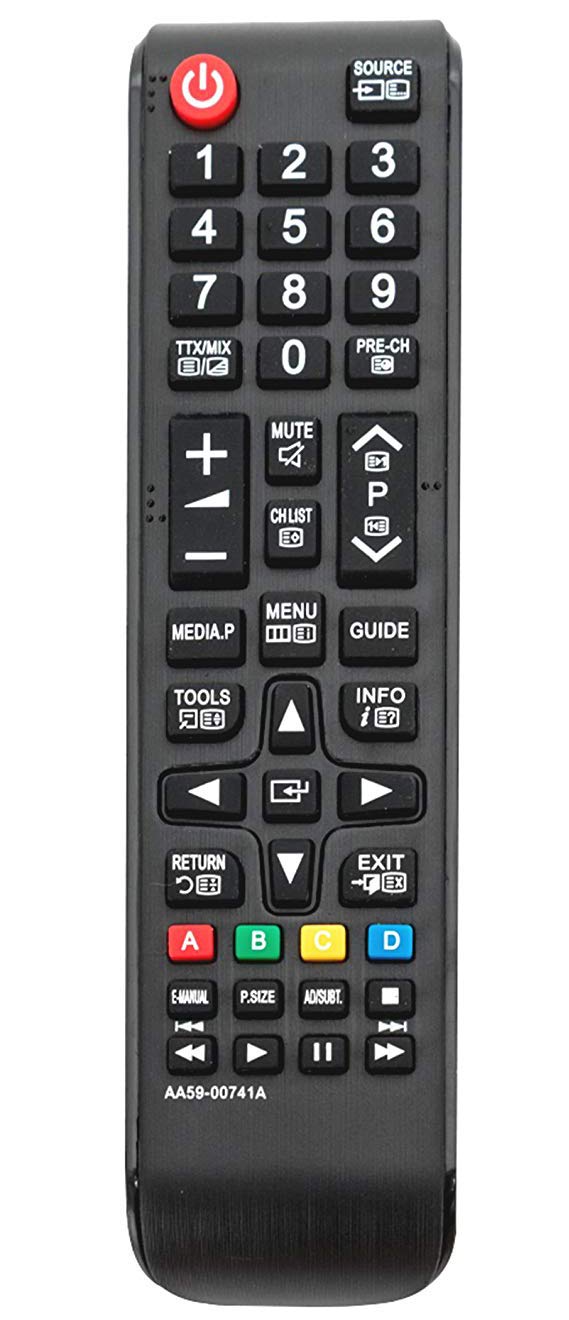
Immagine 1: Davanti view of the ALLIMITY AA59-00741A / AA59-00742A replacement remote control. The remote is black with clearly labeled buttons for power, source, numerical input, volume, channel, menu, navigation, and media playback functions.
The ALLIMITY AA59-00741A / AA59-00742A remote control features a standard layout for ease of use. Key functional areas include:
- Pulsante di accensione (rosso, in alto a sinistra): Accende o spegne la TV.
- Source Button (Top Right): Seleziona le sorgenti di ingresso (HDMI, AV, ecc.).
- Tastierino numerico (0-9): Per l'ingresso diretto del canale.
- Volume su/giù (+/-): Regola il volume audio.
- Canale Su/Giù (P^/P˅): Cambia canale TV.
- Tasto muto: Disattiva l'audio della TV.
- Pulsante Menu: Accede al menu principale del televisore.
- Tasti direzionali (Su, Giù, Sinistra, Destra, Invio): For navigating menus and selections.
- Pulsante di ritorno: Torna alla schermata o al menu precedente.
- Pulsante di uscita: Esce dal menu o dalla funzione corrente.
- Controlli di riproduzione multimediale: Riproduci, Pausa, Stop, Avanti veloce, Riavvolgi.
- Pulsanti colorati (A, B, C, D): For specific functions within certain TV applications or menus.
Impostare
- Installazione della batteria:
Locate the battery compartment on the back of the remote control. Slide the battery cover downwards or outwards to open it.
Inserire due (2) batterie alcaline AAA, assicurandosi che i terminali positivo (+) e negativo (-) siano allineati correttamente con i segni all'interno del vano.
Chiudere il coperchio della batteria facendolo scorrere nuovamente in posizione finché non scatta in posizione.
- Utilizzo iniziale:
This remote control is designed to work with compatible Samsung TV models without any programming or pairing. Once batteries are installed, it is ready for immediate use.
Istruzioni per l'uso
Point the remote control directly at your Samsung TV's infrared receiver for optimal performance. Ensure there are no obstructions between the remote and the TV.
- Accensione/spegnimento: Premere il tasto Energia pulsante una volta.
- Modifica dei canali: Utilizzare il P^ (Canale in alto) o P˅ (Channel Down) buttons. Alternatively, use the numeric keypad to enter a channel number directly.
- Regolazione del volume: Premere il tasto + (Volume su) o - (Volume Down) buttons.
- Audio muto: Premere il tasto Muto button to temporarily silence the TV. Press again to restore audio.
- Selezione della sorgente di input: Premere il tasto Fonte button to cycle through available input sources (e.g., HDMI1, HDMI2, AV).
- Accesso ai menu: Premere il tasto Menu button to open the TV's main menu. Use the directional pad and Entrare pulsante per navigare e selezionare le opzioni.
- Riproduzione multimediale: Use the dedicated media control buttons (Play, Pause, Stop, Rewind, Fast Forward) when watching content from a connected media device or USB.
Manutenzione
- Sostituzione della batteria: Replace batteries when the remote's response becomes sluggish or stops working. Always replace both batteries with new AAA alkaline batteries.
- Pulizia: Pulisci il telecomando con un panno morbido e asciutto. Non utilizzare detergenti liquidi o materiali abrasivi, poiché potrebbero danneggiarlo.
- Magazzinaggio: Conservare il telecomando in un luogo fresco e asciutto, lontano dalla luce solare diretta e da temperature estreme. Se non utilizzato per un periodo prolungato, rimuovere le batterie per evitare perdite.
Risoluzione dei problemi
- Il telecomando non risponde:
Controllare che le batterie siano inserite correttamente, rispettando la polarità corretta.
Sostituisci le vecchie batterie con nuove batterie alcaline AAA.
Assicurarsi che ci sia una linea di vista libera tra il telecomando e il sensore a infrarossi del televisore.
Verify that the remote control model (AA59-00741A / AA59-00742A) is compatible with your specific Samsung TV model.
- Funzionamento intermittente: Spesso indica che la batteria è scarica. Sostituire le batterie.
- Pulsanti specifici non funzionanti: Check for any physical obstructions or debris under the button. If the issue persists after cleaning and battery replacement, the remote may require replacement.
Specifiche
| Caratteristica | Dettaglio |
|---|---|
| Marca | ALLIMITÀ |
| Numeri di modello | AA59-00741A, AA59-00742A |
| Tecnologia di connettività | Infrarossi (IR) |
| Dispositivi compatibili | Various Samsung TV models (refer to product description for full list) |
| Caratteristica speciale | Nessuna programmazione richiesta |
| Tipo di batteria | 2 batterie alcaline AAA (non incluse) |
| Portata massima | Circa 10 metri (33 piedi) |
| Quantità del pulsante | 20 |
Garanzia e supporto
For warranty information or technical support, please refer to the seller's policy on the purchase platform or contact the manufacturer directly. Keep your purchase receipt as proof of purchase.