Introduzione
The Insignia NS-SPBTWAVE2-BK Wave 2 Portable Bluetooth Speaker provides high-quality wireless audio streaming from your compatible devices. Designed for versatility, its robust construction and rubberized feet allow for stable placement in both horizontal and vertical orientations. Enjoy hands-free communication with the built-in speakerphone and extended listening sessions thanks to its 12-hour battery life.
This manual provides essential information for setting up, operating, maintaining, and troubleshooting your speaker. Please read it thoroughly before use and retain it for future reference.
Contenuto della confezione
Assicurarsi che tutti gli articoli siano presenti nel pacco:
- Insignia NS-SPBTWAVE2-BK Wave 2 Portable Bluetooth Speaker
- Cavo di ricarica USB
- 3.5mm Audio Cable (Auxiliary)
- Guida di installazione rapida (o documentazione simile)
Caratteristiche del prodotto
- Connettività wireless: Connects wirelessly to smartphones, tablets, and other Bluetooth-enabled devices.
- Batteria a lunga durata: Features a rechargeable 2,000 mAh battery, providing up to 12 hours of playback on a full charge.
- Microfono incorporato: Enables hands-free calling directly through the speaker.
- Ingresso audio ausiliario: Allows for wired connection to audio devices via a 3.5mm audio cable.
- Posizionamento versatile: Designed to stand securely in both horizontal and vertical positions.
Parti dell'altoparlante
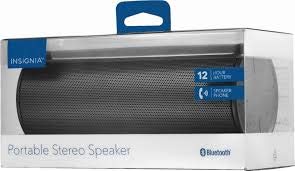
Figura 1: Fronte view of the Insignia Wave 2 Speaker in horizontal orientation.

Figura 2: Verticale view of the speaker, illustrating the power button, charging port, and auxiliary input port at the bottom.
Refer to the images above for the location of key components such as the power button, volume controls, Bluetooth indicator, charging port, and auxiliary input.
Impostare
1. Ricarica dell'altoparlante
- Connect the small end of the USB charging cable to the charging port on the speaker (refer to Figure 2).
- Connect the large end of the USB charging cable to a USB power adapter (not included) or a powered USB port on a computer.
- The charging indicator light will illuminate. Allow approximately 12 hours for a full charge before first use. The indicator light will change or turn off once charging is complete.
2. Accoppiamento Bluetooth
- Ensure the speaker is fully charged. Press and hold the Power button to turn on the speaker. The Bluetooth indicator light will begin to flash, indicating it is in pairing mode.
- On your Bluetooth-enabled device (smartphone, tablet, etc.), navigate to the Bluetooth settings and ensure Bluetooth is enabled.
- Cercare available devices. Select "Insignia Wave 2" from the list.
- Once paired, the Bluetooth indicator light on the speaker will become solid, and you may hear an audible confirmation.
- Se viene richiesta una password, immettere "0000".
3. Auxiliary (Wired) Connection
- Connect one end of the 3.5mm audio cable to the AUX input port on the speaker (refer to Figure 2).
- Collegare l'altra estremità del cavo audio da 3.5 mm al jack delle cuffie o alla porta di uscita audio del dispositivo audio.
- The speaker will automatically switch to auxiliary mode when a cable is detected.
Utilizzo dell'altoparlante
Accensione/spegnimento
- To turn on: Press and hold the Power button until the indicator lights illuminate.
- To turn off: Press and hold the Power button until the indicator lights turn off.
Controllo del volume
- Regolare il volume utilizzando i pulsanti del volume presenti sull'altoparlante.
- You can also control the volume from your connected Bluetooth device or auxiliary audio source.
Chiamata a mani libere
Se connesso tramite Bluetooth, l'altoparlante può essere utilizzato per chiamate in vivavoce:
- Rispondi a una chiamata: Premere una volta il pulsante Riproduci/Pausa/Chiama.
- Terminare una chiamata: Premere una volta il pulsante Riproduci/Pausa/Chiama durante una chiamata.
- Rifiutare una chiamata: Premere e tenere premuto il pulsante Riproduci/Pausa/Chiama.
- Speak clearly towards the speaker's built-in microphone for optimal voice pickup.
Manutenzione
- Pulizia: Per pulire l'esterno dell'altoparlante, utilizzare un panno morbido, asciutto e privo di lanugine. Non utilizzare detergenti liquidi, spray o solventi.
- Cura della batteria: To prolong battery life, avoid fully discharging the battery frequently. Recharge the speaker regularly, even if not in use. Avoid exposing the speaker to extreme temperatures (hot or cold).
- Magazzinaggio: When not in use for extended periods, store the speaker in a cool, dry place away from direct sunlight and moisture.
- Resistenza all'acqua: Questo altoparlante è NON impermeabile. Evitare l'esposizione all'acqua o all'umidità eccessiva.
Risoluzione dei problemi
| Problema | Possibile soluzione |
|---|---|
| L'altoparlante non si accende. | Assicurarsi che la batteria sia carica. Collegare l'altoparlante a una fonte di alimentazione tramite il cavo di ricarica USB. |
| Nessun suono dall'altoparlante. | Check the volume level on both the speaker and the connected device. Ensure the correct input source (Bluetooth or AUX) is selected. Verify the Bluetooth connection or auxiliary cable. |
| Impossibile effettuare l'associazione tramite Bluetooth. | Ensure the speaker is in pairing mode (flashing Bluetooth indicator). Turn off and on Bluetooth on your device. Move the speaker closer to your device. Forget the speaker from your device's Bluetooth list and try pairing again. |
| Qualità del suono scadente o distorsione. | Ensure the speaker is within Bluetooth range (approx. 33 ft / 10 m). Reduce the volume on the source device or speaker. Check for interference from other wireless devices. Try a different audio source or file. |
| Il microfono non funziona durante le chiamate. | Ensure the speaker is properly connected via Bluetooth. Speak directly towards the speaker. Check your phone's call settings to ensure audio is routed to the Bluetooth speaker. |
Specifiche
- Nome modello: Onda 2
- Numero modello: NS-SPBTWAVE2-BK
- Tecnologia di connettività: Bluetooth
- Durata della batteria: Fino a 12 ore
- Tipo di batteria: 1 ione di litio (incluso)
- Tempo di ricarica: Circa 12 ore
- Dimensioni del prodotto: 6.8 x 2.8 x 2.8 pollici (17.3 x 7.1 x 7.1 cm)
- Peso dell'articolo: 1 libbre (0.45 kg)
- Modalità di uscita audio: Stereo
- Rapporto segnale-rumore: 80 dB
- Microfono incorporato: SÌ
- Ingresso ausiliario: Sì (3.5 mm)
- Impermeabile: NO
- Materiale: Plastica
- Codice UPC: 600603230455
Garanzia e supporto
This Insignia NS-SPBTWAVE2-BK Wave 2 Portable Bluetooth Speaker comes with a Garanzia limitata. For specific terms and conditions of your warranty, please refer to the warranty card included with your purchase or visit the official Insignia websito.
Per supporto tecnico, assistenza per la risoluzione dei problemi o reclami in garanzia, contattare il Servizio Clienti Insignia. Le informazioni di contatto sono in genere reperibili sul sito web di Insignia. websito o nella documentazione del prodotto.


