
Introduzione
This manual provides instructions for the Easytry123 replacement remote control, designed for use with various Sanyo LCD HDTV television models. This remote offers essential functions for operating your compatible Sanyo television.
Nota importante:
- This is a replacement remote control. While it provides core functionality, some advanced or specific features of your original Sanyo remote may not be supported.
- Ensure your television model is listed in the compatibility section to guarantee proper function.
Contenuto della confezione
Il pacchetto include:
- 1 x Easytry123 Replacement Remote Control (Model: Easytry4382)
Batteries and an instruction manual are not included with this product.
Impostare
Installazione della batteria
Il telecomando richiede due (2) batterie AA (non incluse) per funzionare. Seguire questi passaggi per installare le batterie:
- Individuare il coperchio del vano batterie sul retro del telecomando.
- Premere la linguetta e far scorrere il coperchio verso il basso per rimuoverlo.
- Insert two AA batteries, ensuring the positive (+) and negative (-) terminals align correctly with the markings inside the compartment. Incorrect installation can prevent the remote from functioning.
- Riposizionare il coperchio del vano batteria finché non scatta in posizione.
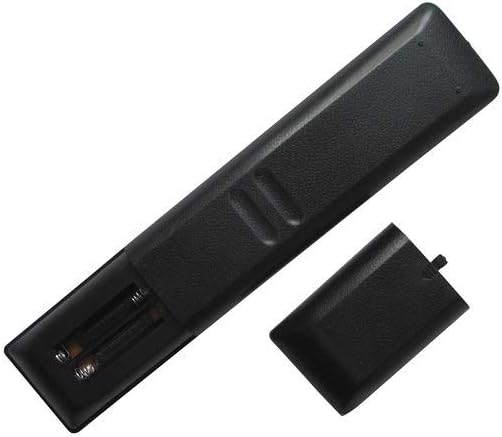
Immagine: Posteriore view del telecomando con il coperchio della batteria aperto, che rivela gli alloggiamenti delle batterie.
Istruzioni per l'uso
Point the remote control directly at your Sanyo television's infrared sensor. Ensure there are no obstructions between the remote and the TV.

Immagine: Frontale view del telecomando, visualizzando tutti i pulsanti.
Funzioni di base
- ENERGIA: Accende o spegne il televisore.
- PULSANTI NUMERICI (0-9): Seleziona direttamente i canali.
- CH +/-: Cambia canale in sequenza.
- VOL +/-: Regola il livello del volume.
- MUTO: Disattiva o ripristina l'audio del televisore.
- INGRESSO: Scorre le sorgenti di input disponibili (ad esempio, HDMI, AV).
- MENU: Accede al menu principale del televisore.
- DIRECTIONAL PAD (Up, Down, Left, Right): Consente di navigare tra le opzioni del menu.
- ACCEDERE: Conferma una selezione nel menu.
- USCITA: Esce dal menu corrente o dalla visualizzazione sullo schermo.
- INFORMAZIONI: Visualizza informazioni sul programma o sull'input corrente.
Funzioni aggiuntive
Depending on your specific Sanyo TV model, the following buttons may provide additional functionality:
- IMMAGINE: Accede alle impostazioni dell'immagine.
- SUONO: Accede alle impostazioni audio.
- SONNO: Imposta un timer per lo spegnimento automatico della TV.
- SUL TIMER: Sets a timer for the TV to turn on automatically.
- PLAY/PAUSE/STOP/REW/FF: Controls for media playback if your TV supports it (e.g., USB media).
- SUB CH: Sub-channel selection.
- RICHIAMO: Ritorna a quello precedente viewed canale.
- AIUTO: Accesses on-screen help.
Manutenzione
Pulizia
Per pulire il telecomando, utilizzare un panno morbido e asciutto. Per lo sporco ostinato, strofinare leggermenteampPulisci il panno con acqua o un detergente delicato e non abrasivo. Evita di utilizzare prodotti chimici aggressivi o materiali abrasivi, poiché potrebbero danneggiare la superficie o i pulsanti del telecomando.
Sostituzione della batteria
Sostituisci le batterie quando la risposta del telecomando diventa lenta o smette di funzionare. Sostituisci sempre entrambe le batterie AA contemporaneamente con batterie nuove. Non mischiare batterie vecchie e nuove o tipi diversi di batterie.
Magazzinaggio
If the remote control will not be used for an extended period, remove the batteries to prevent leakage, which can damage the remote's internal components.
Risoluzione dei problemi
- Il telecomando non risponde:
- Controllare che le batterie siano installate correttamente, rispettando la polarità corretta.
- Sostituisci le vecchie batterie con nuove batterie AA.
- Assicurarsi che ci sia una linea visiva libera tra il telecomando e il sensore a infrarossi del televisore. Rimuovere eventuali ostacoli.
- Try operating the remote closer to the TV.
- Alcune funzioni non funzionano:
- As a replacement remote, it may not support all advanced or specific functions of your original Sanyo remote. Refer to your TV's original manual for specific feature compatibility.
- Verify that your TV model is listed as compatible with this remote.
Specifiche
| Numero di modello | Easytry4382 |
| Marca | Easytry123 |
| Dispositivi compatibili | Sanyo LCD HDTV Televisions (Models: FXVF, FXVB, FXVC, FXVG, FXVL, FXVM, AVM3651, AVM3651G, DS27510, DS27820, DS31820, DS32830, DS32830H) |
| Tecnologia di connettività | Infrarossi (IR) |
| Tipo di controllore | Controllo dei pulsanti |
| Fonte di alimentazione | 2 batterie AA (non incluse) |
Garanzia e supporto
For warranty information and customer support, please refer to the seller or manufacturer directly. This product is typically covered by a limited warranty against manufacturing defects. Keep your purchase receipt as proof of purchase.
For further assistance or inquiries, please contact the Easytry123 customer service or the retailer from whom you purchased this remote control.