
1. Introduzione
The Zerone Sport Action DV Camera is a compact and portable device designed for capturing high-definition video during various outdoor activities. Featuring 1080P and 720P recording options, a 120-degree wide-angle lens, and an IPX-4 waterproof aluminum alloy shell, this camera is built for durability and ease of use. It includes a built-in microphone for audio recording and provides vibration feedback for operational status.
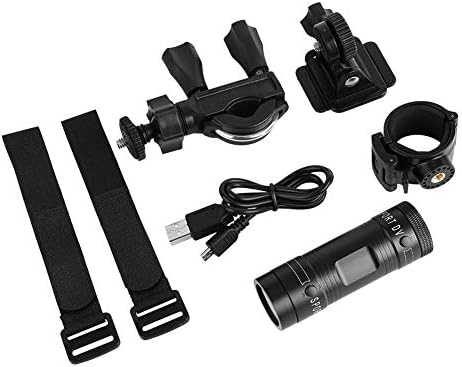
Image 1.1: The Zerone Sport Action DV Camera unit.
2. Informazioni sulla sicurezza
- Non esporre la fotocamera a temperature estreme o alla luce solare diretta per periodi prolungati.
- While the camera features an IPX-4 waterproof rating, it is designed to withstand splashes and light rain. Do not submerge or soak the camera in water.
- Tenere il dispositivo lontano da forti campi magnetici.
- Per evitare danni, utilizzare esclusivamente il cavo di ricarica e l'adattatore di alimentazione specificati.
- Non tentare di smontare o modificare la fotocamera, poiché ciò invaliderebbe la garanzia e potrebbe danneggiarla.
- Quando non la si utilizza, conservare la fotocamera in un luogo fresco e asciutto.
3. Contenuto della confezione
Si prega di controllare il pacco per assicurarsi che siano presenti tutti gli articoli:
- Zerone Sport Action DV Camera Unit
- Cavo di ricarica USB
- Mounting Accessories (e.g., bike mount, helmet mount, strap mounts)
- Batteria ricaricabile (potrebbe essere preinstallata)
- Manuale dell'utente (questo documento)
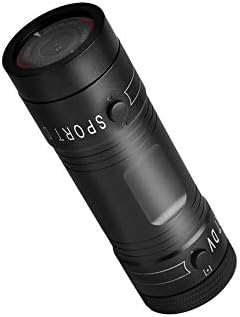
Image 3.1: Contents of the Zerone Sport Action DV Camera package, showing the camera, USB cable, and various mounting options.
4. Fotocamera finitaview
Familiarizzare con i componenti e i comandi della fotocamera.
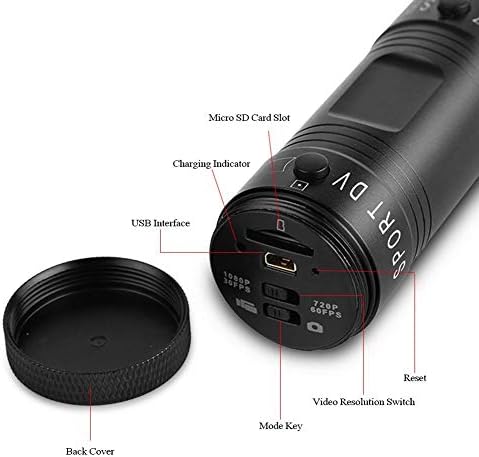
Immagine 4.1: Dettagliata view of the camera's rear end, highlighting the Micro SD card slot, USB interface, charging indicator, mode key, video resolution switch (1080P 30fps / 720P 60fps), and reset button.
- Slot per scheda microSD: Insert your Micro SD card here. A card is required for operation.
- Indicatore di carica: Displays charging status. A red light indicates charging; it turns off when fully charged.
- Interfaccia USB: Per la ricarica e il collegamento al computer.
- Tasto modalità: Used to switch between recording modes (e.g., video, photo).
- Video Resolution Switch: Selects between 1080P 30fps and 720P 60fps recording resolutions.
- Pulsante di reset: Utilizzato per reimpostare il dispositivo se non risponde.
- Power Button (Front): Located on the front side of the camera.
- Record/Stop Button (Back): Located on the back side of the camera.
5. Impostazione
5.1 Caricamento della batteria
- Collegare la fotocamera a una fonte di alimentazione USB (ad esempio, un computer, un adattatore da parete) utilizzando il cavo USB in dotazione.
- IL luce rossa on the back of the camera will illuminate, indicating that it is charging.
- Una volta caricata completamente, la luce rossa si spegnerà.
- Note: If the camera blinks red and blue when plugged in, it indicates that an SD card is not inserted. This is not a charging indicator.
5.2 Inserimento di una scheda Micro SD
A Micro SD card (not included) is required for recording video and photos. The camera supports Micro SD cards up to a certain capacity (check product packaging for maximum supported size, typically 32GB or 64GB for similar devices).
- Svitare il coperchio posteriore della fotocamera.
- Locate the Micro SD card slot (refer to Image 4.1).
- Inserire delicatamente la scheda Micro SD nello slot finché non scatta in posizione. Assicurarsi che la scheda sia orientata correttamente.
- Replace the back cover, ensuring it is securely tightened to maintain water resistance.
5.3 Montaggio della telecamera
The camera comes with various mounting accessories for different applications.
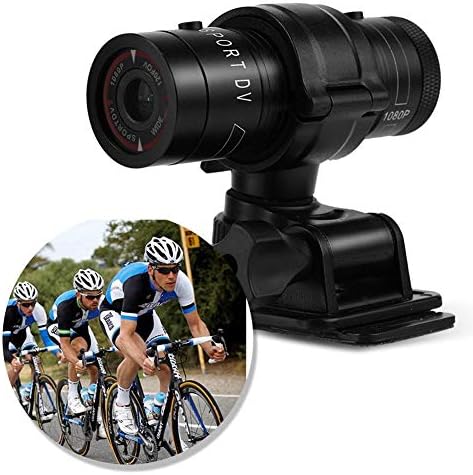
Image 5.1: The camera attached to a bicycle handlebar, demonstrating one of its mounting options.
- Supporto per bici: Utilizzare il clamp mount to attach the camera securely to bicycle handlebars or other tubular structures.
- Supporto per casco: Utilize the adhesive or strap mounts to fix the camera to a helmet.
- Strap Mounts: For attaching to various gear or body parts.
Ensure all mounts are securely fastened before engaging in activities to prevent the camera from falling.
6. Utilizzo della fotocamera
6.1 Accensione/spegnimento
- Per accendere, tieni premuto il tasto Pulsante di accensione (front switch) until the camera vibrates.
- Per spegnere, tenere premuto il pulsante Pulsante di accensione again until the camera vibrates once.
6.2 Selecting Video Resolution
Before recording, select your desired video resolution using the switch on the back of the camera (refer to Image 4.1).
- Fai scorrere l'interruttore su "1080P 30fps" for Full HD video at 30 frames per second.
- Fai scorrere l'interruttore su "720P 60fps" for HD video at 60 frames per second.
6.3 Registrazione video
- Assicurati che la fotocamera sia accesa.
- Premere il tasto Pulsante di registrazione/arresto (back switch) to start recording. The camera will vibrate three times to indicate recording has started.
- Per interrompere la registrazione, premere il pulsante Pulsante di registrazione/arresto again. The camera will vibrate once to indicate recording has stopped.
6.4 Collegamento a un computer
Per trasferire files or access recorded content:
- Assicurarsi che la fotocamera sia spenta.
- Collega la fotocamera al computer utilizzando il cavo USB in dotazione.
- La fotocamera verrà riconosciuta come dispositivo di archiviazione rimovibile.
- You can then access and transfer your video files.
7. Manutenzione
- Pulizia: Utilizzare un panno morbido e asciutto per pulire il corpo macchina. Per l'obiettivo, utilizzare un panno e una soluzione specifici per la pulizia delle lenti. Evitare materiali abrasivi.
- Magazzinaggio: When not in use for extended periods, store the camera in a cool, dry place. Ensure the battery is partially charged (around 50%) to prolong its lifespan.
- Resistenza all'acqua: Regularly check that the back cover is securely tightened to maintain the IPX-4 water resistance. Avoid exposing the USB port or SD card slot to moisture when the cover is open.
- Cura della batteria: Avoid fully discharging the battery frequently. Recharge it when the low battery indicator appears.
8. Risoluzione Dei Problemi
| Problema | Possibile causa | Soluzione |
|---|---|---|
| La fotocamera non si accende. | La batteria è scarica. | Caricare completamente la fotocamera. |
| Camera blinks red and blue, then turns off. | No Micro SD card inserted or card is faulty. | Insert a functional Micro SD card. Ensure it is properly seated. |
| Impossibile registrare il video. | Nessuna scheda Micro SD, scheda piena o errore della scheda. | Inserisci una scheda Micro SD, elimina la vecchia fileoppure formattare la scheda (questa operazione cancellerà tutti i dati). |
| Scarsa qualità video. | Lens is dirty; low light conditions; incorrect resolution setting. | Clean the lens. Ensure adequate lighting. Select 1080P resolution for higher detail. |
| La fotocamera non risponde. | Problema software. | Utilizzare un oggetto sottile (come una graffetta) per premere il Pulsante di reset (vedere Immagine 4.1). |
9. Specifiche
| Caratteristica | Dettaglio |
|---|---|
| Marca | Zerone |
| Numero di modello | Zeronefg3h149y2s |
| Risoluzione di acquisizione video | 1080p (30 fps), 720p (60 fps) |
| Angolo dell'obiettivo | 120-degree A+ grade wide-angle |
| Grado di impermeabilità | IPX-4 (splash-proof) |
| Materiale del guscio | Lega di alluminio |
| Tecnologia del sensore fotografico | CMOS |
| Apertura massima | 1.8 millimetri |
| Tipo di memoria flash | Micro SD (card not included) |
| Formato di acquisizione video | AVI |
| Formato audio supportato | AAC, MP3, PCM, FLAC, or Dolby Digital/AC-3 |
| Tecnologia di connettività | USB |
| Peso dell'articolo | 10.8 once (circa 306 grammi) |
| Dimensioni del prodotto | 11.81 x 6.3 x 5.91 pollici (circa 30 x 16 x 15 cm) |
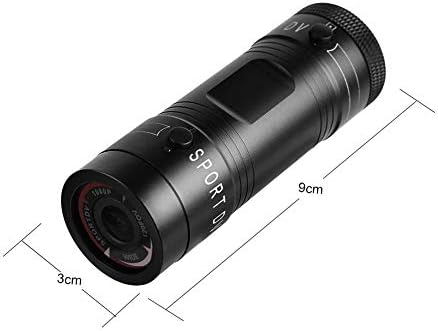
Image 9.1: Physical dimensions of the camera, showing a length of 9cm and a diameter of 3cm.
10. Garanzia e supporto
Per informazioni sulla garanzia e assistenza tecnica, consultare la documentazione fornita con l'acquisto o contattare direttamente il rivenditore/produttore. Conservare la prova d'acquisto per eventuali reclami in garanzia.
Manufacturer: Zerone
For further assistance, you may visit the Zerone Store on Amazon: Zerone Store