
1. Introduzione
The T'nB FM Bluetooth Transmitter (Model FMCT05B) allows you to stream audio from your smartphone or other compatible devices to your car's FM radio. This device features Bluetooth connectivity, a USB port, an SD card slot, and an LCD screen for displaying essential information. Enjoy hands-free calling and versatile music playback directly through your vehicle's sound system.
2. Informazioni sulla sicurezza
AVVERTIMENTO: Use only the power adapter provided with this device. To prevent interference, avoid operating the transmitter in close proximity to other electronic devices.
3. Prodotto finitoview
Familiarize yourself with the components of your T'nB FM Bluetooth Transmitter.
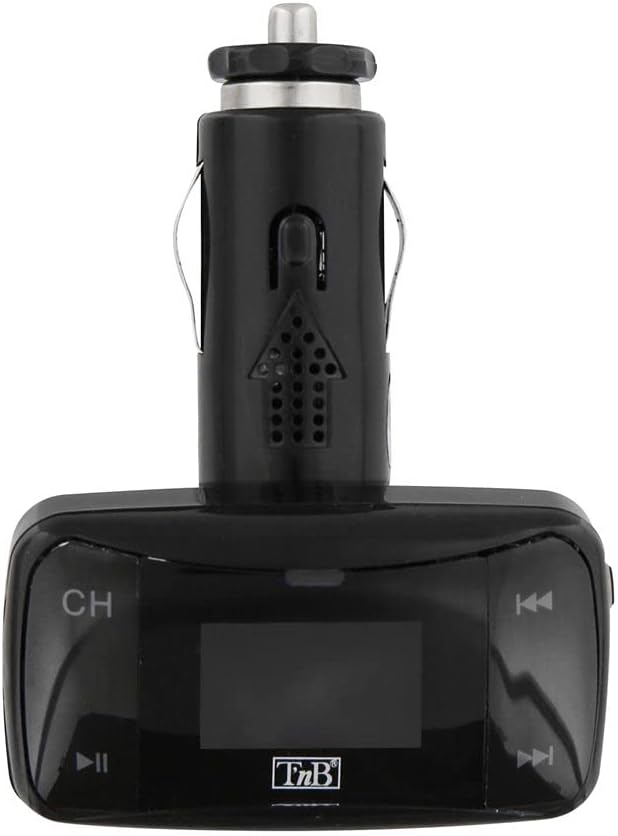
Figura 1: Davanti view of the T'nB FM Bluetooth Transmitter. This image displays the device's LCD screen, 'CH' button for frequency adjustment, and track navigation buttons.

Figura 2: Angolato view of the T'nB FM Bluetooth Transmitter. This perspective shows the device's overall shape, the 12V car socket connector, and the side profile of the control buttons.

Figura 3: 3.5mm AUX Audio Cable. This cable can be used to connect external audio sources to the transmitter's AUX input.
4. Istruzioni per l'installazione
- Inserire il trasmettitore: Plug the T'nB FM Bluetooth Transmitter firmly into your vehicle's 12V power socket (cigarette lighter port). The device's LCD screen should illuminate.
- Sintonizza la tua autoradio: Turn on your car's FM radio and tune it to an unused FM frequency. Choose a frequency that has no strong broadcast signal to minimize interference.
- Frequenza del trasmettitore corrispondente: On the T'nB transmitter, use the 'CH' button or frequency adjustment controls to set the transmitter's FM frequency to match the frequency selected on your car radio. Ensure both frequencies are identical for optimal audio transmission.
- Accoppia tramite Bluetooth:
- Abilita il Bluetooth sul tuo smartphone o dispositivo audio.
- Cercare available Bluetooth devices. The transmitter should appear as "FMCT05B" or a similar name.
- Select the transmitter to pair. Once paired, the device will confirm the connection, and you can begin streaming audio.
5. Istruzioni per l'uso
5.1 Riproduzione di musica
- Streaming Bluetooth: Once paired, play music on your smartphone. The audio will be transmitted to your car's FM radio. Use the transmitter's track navigation buttons (◀◀ / ▶▶) to skip tracks and the play/pause button (▶▌▌) to control playback.
- Riproduzione USB/scheda SD: Insert a USB flash drive or an SD card containing MP3/MP4 audio files into the respective slot on the transmitter. The device will automatically detect and begin playing the audio files. Use the track navigation and play/pause buttons to control playback.
- Ingresso AUX: Connect an external audio device (e.g., MP3 player) to the transmitter's 3.5mm AUX input using the provided cable. Select the AUX input mode on the transmitter if available, or ensure no other media is playing.
5.2 Chiamate in vivavoce
- Risposta / chiusura delle chiamate: When a call comes in, the music will pause. Press the play/pause button (▶▌▌) to answer the call. Press it again to end the call.
- Ricomposizione: Double-press the play/pause button (▶▌▌) to redial the last number called.
- Regolazione del volume: Adjust the call volume using the volume controls on the transmitter or your car's radio.
Display LCD 5.3
The LCD screen displays the current FM frequency, volume level, track number, and song titles (when available from the source).
6. Manutenzione
- Mantenere il dispositivo pulito e asciutto. Utilizzare un panno morbido e asciutto per pulire la superficie.
- Avoid exposing the transmitter to extreme temperatures, direct sunlight, or high humidity.
- Non tentare di smontare o modificare il dispositivo, poiché ciò invaliderebbe la garanzia e potrebbe causare danni.
7. Risoluzione Dei Problemi
- Nessun potere: Ensure the transmitter is securely plugged into the 12V power socket and that the car's ignition is on. Check the car's fuse for the 12V socket if necessary.
- Scarsa qualità audio/disturbo statico:
- Adjust the FM frequency on both the transmitter and your car radio to a different, clear frequency with no strong broadcast signals.
- Ensure the volume on your audio source (smartphone, USB, SD card) is set to an appropriate level.
- Allontanarsi dalle zone con forti interferenze radio.
- Bluetooth non si connette:
- Ensure Bluetooth is enabled on your smartphone and the transmitter is powered on.
- Delete the transmitter from your phone's Bluetooth device list and attempt to pair again.
- Restart both your phone and the transmitter.
- La scheda USB/SD non funziona: Assicurarsi che il supporto sia inserito correttamente e contenga audio compatibile files (MP3/MP4 format). Try a different USB drive or SD card.
8. Specifiche
| Caratteristica | Specificazione |
|---|---|
| Nome del modello | FMCT05B |
| Marca | T'nB |
| Tecnologia di connettività | Bluetooth, USB |
| Fonte di alimentazione | USB (12V DC Car Socket) |
| Standard di comunicazione wireless | Bluetooth |
| Dispositivi compatibili | Speaker, MP3 Player, Car Stereo System, Smartphone, Headset |
| Tipo di supporto | Scheda SD, unità USB |
| Interfaccia Hardware | USB tipo A |
| Metodo di controllo | Tattile (pulsanti) |
| Tipo di uscita audio | FM Radio, Speaker |
| Ingresso audio | AUX da 3.5 mm |
| Voltage | 12 Volt (CC) |
9. Garanzia e supporto
For warranty information or technical support, please refer to the documentation included with your purchase or contact T'nB customer service directly. Contact details can typically be found on the manufacturer's official websito.