
1. Introduzione
This manual provides essential instructions for the safe and efficient use of your KOAMTAC KDC280 Barcode Data Collector. The KDC280 is a compact and versatile device designed for collecting 1D and 2D barcode data, offering flexible connectivity options via Bluetooth and USB. Please read this manual thoroughly before operating the device and retain it for future reference.
2. Informazioni sulla sicurezza
- Non esporre il dispositivo a temperature estreme, umidità o sostanze corrosive.
- Evitare di far cadere o di sottoporre il dispositivo a urti violenti.
- Non tentare di smontare o modificare il dispositivo. Ciò invaliderà la garanzia e potrebbe causare danni.
- Use only the charging cradle and accessories provided or approved by KOAMTAC.
- Tenere il dispositivo lontano da forti campi magnetici.
- Smaltire le batterie secondo le normative locali.
3. Contenuto della confezione
Verify that all items are present in your KDC280 package:
- KOAMTAC KDC280 Barcode Data Collector
- Dongle Bluetooth USB
- Base di ricarica
- Cavo USB
- cordino
- Manuale rapido

Image: The KOAMTAC KDC280 data collector shown with its charging cradle, USB Bluetooth dongle, and lanyard.
4. Prodotto finitoview
The KDC280 is a miniature barcode data collector capable of reading both 1D and 2D barcodes. It features a small display for user feedback and navigation buttons. Its primary function is to scan and store barcode data or transmit it in real-time to a host device via Bluetooth or USB.
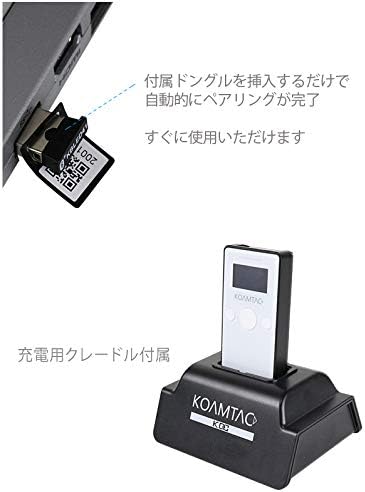
Immagine: un primo piano view of the KDC280 device, its charging cradle, and the USB Bluetooth dongle.
5. Impostazione
5.1. Charging the KDC280
Before initial use, fully charge the KDC280 battery. Place the KDC280 into the charging cradle. Connect the USB cable to the charging cradle and then to a power source (e.g., computer USB port or USB wall adapter). The device's display will indicate charging status.
5.2. Connecting via USB Bluetooth Dongle
For quick and automatic pairing with a host device, use the included USB Bluetooth dongle.
- Insert the USB Bluetooth dongle into an available USB port on your computer or host device.
- Power on the KDC280.
- The KDC280 will automatically detect and pair with the dongle. A confirmation message will appear on the KDC280's display once pairing is successful. The device is then ready for immediate use.

Image: Illustration showing the USB Bluetooth dongle being inserted into a port, enabling automatic pairing with the KDC280. The charging cradle is also visible.
5.3. Connecting via Standard Bluetooth
To connect to a host device without the dongle, follow the standard Bluetooth pairing procedure:
- Assicurati che il Bluetooth sia abilitato sul tuo dispositivo host (ad esempio, smartphone, tablet, computer).
- On the KDC280, navigate to the Bluetooth menu and select 'Pairing Mode'.
- On your host device, search for available Bluetooth devices. Select 'KDC280' from the list.
- Seguire le istruzioni visualizzate sullo schermo per completare il processo di associazione.
6. Operating the KDC280
6.1. Accensione/Spegnimento
- Per accendere: tenere premuto il pulsante di accensione finché il display non si illumina.
- To power off: Press and hold the power button until the 'Power Off' option appears on the display, then confirm.
6.2. Scansione dei codici a barre
- Point the KDC280's scanner window at the barcode.
- Press the scan button. A successful scan will typically be indicated by a beep and/or a green LED light.
- The scanned data will appear on the KDC280's display and/or be transmitted to the connected host device.
6.3. Trasferimento dei dati
When connected via Bluetooth, scanned data is typically transmitted in real-time to the host application. If operating in batch mode (data stored internally), connect the KDC280 via USB to a computer and use the provided utility software to download the stored data.
7. Manutenzione
7.1. Pulizia
- Pulire il dispositivo con un panno morbido, damp stoffa. Non utilizzare prodotti chimici aggressivi o detergenti abrasivi.
- Per ottenere prestazioni di scansione ottimali, assicurarsi che la finestra dello scanner sia pulita e priva di polvere o macchie.
7.2. Cura della batteria
- Evitare di scaricare completamente la batteria frequentemente.
- Se non utilizzato per lunghi periodi, conservare il dispositivo in un luogo fresco e asciutto.
- If the battery performance significantly degrades, contact support for replacement options.
8. Risoluzione Dei Problemi
8.1. Il dispositivo non si accende
- Ensure the battery is charged. Connect the device to the charging cradle and a power source.
- Verificare che il pulsante di accensione sia premuto correttamente.
8.2. Unable to Scan Barcodes
- Check if the scanner window is clean and unobstructed.
- Assicurarsi che il codice a barre non sia danneggiato o stampato male.
- Verify the device is in the correct scanning mode.
8.3. Connection Issues (Bluetooth/USB)
- Bluetooth: Ensure the KDC280 is in pairing mode or already paired. Check Bluetooth settings on the host device. Restart both devices.
- Chiavetta USB: Ensure the dongle is fully inserted and recognized by the host device. Restart the KDC280 and reinsert the dongle.
- Cavo USB: Try a different USB port or cable. Ensure drivers are correctly installed if required by your operating system.
9. Specifiche
| Marca | KOAMTAC |
| Modello | KDC280 |
| Compatibilità codici a barre | Codici a barre 1D e 2D |
| Connettività | Bluetooth, cavo USB |
| Fonte di alimentazione | Alimentato a batteria |
| Accessori inclusi | USB Bluetooth Dongle, Charging Cradle |
10. Garanzia e supporto
For warranty information, technical support, or service inquiries, please refer to the warranty card included with your product or visit the official KOAMTAC websito. I dettagli di contatto per l'assistenza clienti sono in genere disponibili sul sito del produttore websito.