
Introduzione
This manual provides comprehensive instructions for the use and maintenance of your Zerone Replacement Remote Control. Designed as a direct replacement, this remote offers seamless compatibility with various Samsung LCD, LED, and HD TV models, including BN59-00857A, BN59-00865A, and BN59-00942A, without requiring any programming or setup.
Prodotto finitoview
The Zerone Replacement Remote Control is engineered for ease of use and reliable performance. Its ergonomic design ensures a comfortable grip, and its responsive buttons provide precise control over your television.
Caratteristiche principali:
- Compatibilità: Works seamlessly with LCD, LED, and HD TVs including models BN59-00857A, BN59-00865A, and BN59-00942A. Eliminates the need for programming or setup.
- Ergonomic & User-Friendly: Compact 19.1cm design fits comfortably in hand with anti-slip texture. Features an operation indicator light for intuitive nighttime use.
- Prestazioni reattive: Strong signal emission ensures reliable command transmission up to 10 meters. Stable performance for daily home entertainment or presentations.
- Design ad alta efficienza energetica: Requires 2 AAA batteries (not included) for extended use. Auto-sleep mode conserves power during idle periods.
- Sostituzione OEM diretta: Restores full functionality to suitable smart TVs without pairing delays. Ideal for broken or misplaced original remotes.
Disposizione del telecomando:

Figura 1: Fronte view of the Zerone Replacement Remote Control. This image displays the full layout of the remote, including the power button, number pad, volume and channel controls, menu, source, and navigation buttons.

Figura 2: dettagliata view of the remote control's buttons and the infrared (IR) emitter. This image highlights the tactile buttons and the IR window at the top, which transmits signals to the TV.
Impostare
The Zerone Replacement Remote Control is designed for immediate use without complex setup procedures. Simply install the batteries, and it is ready to operate your compatible Samsung TV.
Installazione della batteria:
- Individuare il vano batterie sul retro del telecomando.
- Far scorrere il coperchio del vano batteria verso il basso oppure premere il fermo per aprirlo.
- Inserire due (2) batterie AAA (non incluse) nel vano, assicurandosi che i terminali positivo (+) e negativo (-) siano allineati correttamente con gli indicatori all'interno.
- Chiudere il coperchio del vano batteria facendolo scorrere nuovamente in posizione finché non scatta in posizione.

Figura 3: Posteriore view of the remote control, highlighting the battery compartment. This image shows the location where the battery cover can be removed to insert the AAA batteries.
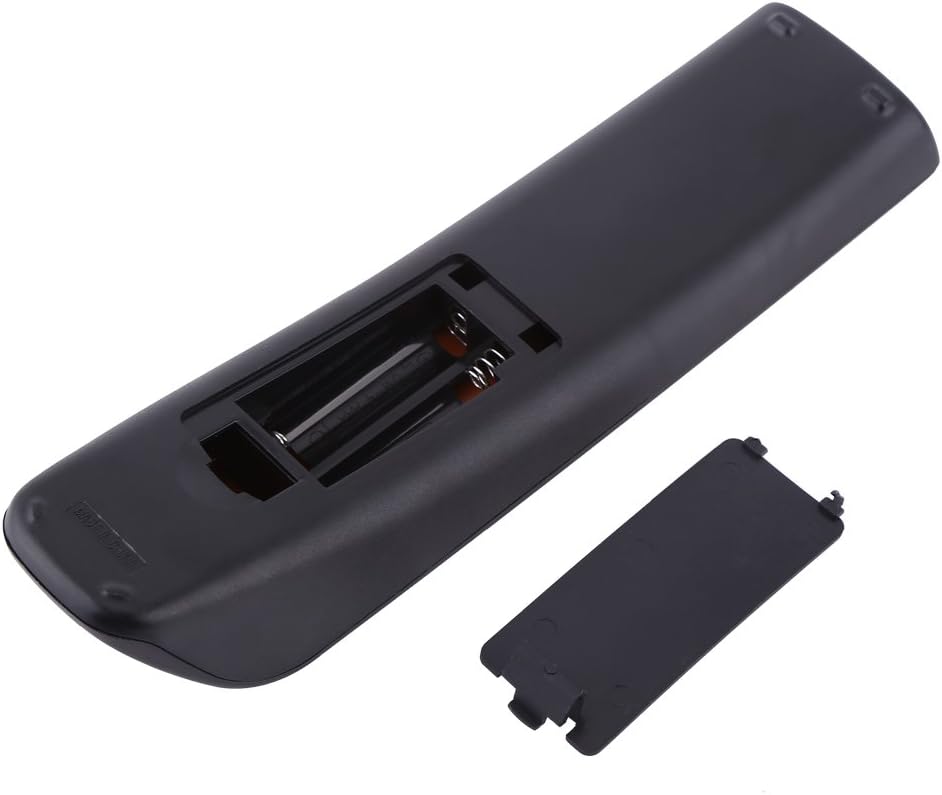
Figure 4: The remote control with its battery compartment open, revealing the slots for two AAA batteries. This view assists in correctly inserting the batteries.
Nota: This remote control does not require any programming or pairing. Once batteries are installed, it is ready to control your compatible Samsung TV.
Istruzioni per l'uso
To operate your TV using the Zerone Replacement Remote Control, point the remote directly at the TV's infrared receiver. Ensure there are no obstructions between the remote and the TV.
Funzioni di base:
- Energia (ENERGIA): Accende o spegne la TV.
- TV: Switches the TV to TV mode.
- Tasti numerici (0-9): Seleziona direttamente i canali.
- Volume (volume +/-): Regola il livello del volume.
- Channel (CH +/-): Cambia canale in su o in giù.
- Muto (MUTE): Disattiva o riattiva l'audio della TV.
- Fonte (FONTE): Seleziona le sorgenti di ingresso (HDMI, AV, Component, ecc.).
- Menù (MENU): Accede al menu principale del televisore.
- Pulsanti di navigazione (Su, Giù, Sinistra, Destra, Invio): Utilizzato per navigare nei menu e confermare le selezioni.
- Uscita (EXIT): Esce dal menu o dalla funzione corrente.
- Ritorno (RITORNO): Ritorna alla schermata o al canale precedente.
- ELENCO CANALI: Visualizza l'elenco dei canali.
- UTENSILI: Accede alle impostazioni rapide o al menu degli strumenti.
- INFORMAZIONI: Visualizza informazioni sul programma o sull'input corrente.
- TAGLIA: Regola le dimensioni/proporzioni dell'immagine.
- MTS: Multi-track sound selection.
- Per conoscenza: Attiva o disattiva i sottotitoli.
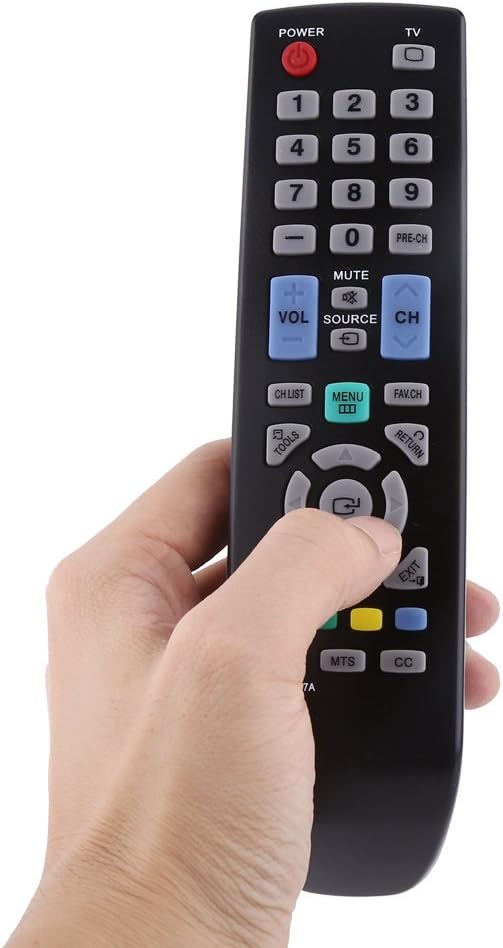
Figure 5: A hand demonstrating the natural grip and button accessibility of the remote control during use.
Manutenzione
Una cura e una manutenzione adeguate prolungheranno la durata del tuo telecomando.
Pulizia:
- Pulire il telecomando con un panno morbido e asciutto.
- Per sporco ostinato, leggermente dampen the cloth with water or a mild, non-abrasive cleaner. Do not use harsh chemicals or abrasive cleaning agents.
- Avoid getting moisture into the battery compartment or any openings.
Sostituzione della batteria:
- Sostituire le batterie quando la risposta del telecomando diventa lenta o smette di funzionare.
- Sostituire sempre entrambe le batterie AAA contemporaneamente.
- Non mischiare batterie vecchie e nuove o diversi tipi di batterie.
- Rimuovere le batterie se il telecomando non viene utilizzato per un periodo prolungato per evitare perdite.
Magazzinaggio:
- Conservare il telecomando in un luogo fresco e asciutto, lontano dalla luce solare diretta e da temperature estreme.
- Evitare di far cadere il telecomando o di sottoporlo a forti urti.
Risoluzione dei problemi
Se riscontri problemi con il telecomando, consulta i seguenti problemi comuni e le relative soluzioni:
| Problema | Possibile causa | Soluzione |
|---|---|---|
| Il telecomando non funziona. | Le batterie sono scariche o inserite in modo errato. | Sostituire le batterie con nuove batterie AAA, assicurandosi della corretta polarità (+/-). |
| Remote is unresponsive or has a short range. | Weak batteries; Obstruction between remote and TV; Remote is too far from TV. | Replace batteries. Remove any objects blocking the line of sight. Move closer to the TV (within 10 meters). |
| Alcuni pulsanti specifici non funzionano. | Sporco o detriti sotto il pulsante; malfunzionamento interno. | Pulisci la superficie del telecomando. Se il problema persiste, potrebbe essere necessario sostituirlo. |
| TV does not respond to remote commands. | TV is off or unplugged; TV's IR receiver is blocked or faulty; Remote is not compatible with the specific TV model. | Ensure TV is powered on. Check for obstructions on the TV's IR receiver. Verify your TV model is listed as compatible (BN59-00857A, BN59-00865A, BN59-00942A). |
Specifiche
Detailed specifications for the Zerone Replacement Remote Control:
| Attributo | Dettaglio |
|---|---|
| Marca | Zerone |
| Numero di modello | Zeronemz476r5kfu |
| Modelli compatibili | BN59-00857A, BN59-00865A, BN59-00942A |
| Fonte di alimentazione | 2 batterie AAA (non incluse) |
| Compatibilità | LCD, LED, HD TVs |
| Colore | Nero |
| Peso | 66 g (2.46 once) |
| Dimensioni (L x P x A) | 19.1 x 5 x 3.5 cm (7.5 x 2 x 1.4 pollici) |
| Tipo | Telecomando |
| Funzione | Telecomando TV |
| Numero massimo di dispositivi supportati | 1 |
| Caratteristica speciale | Ergonomic |

Figure 6: The remote control with its dimensions (length, width, and height) clearly marked in centimeters. This provides a visual reference for the physical size of the device.
Note importanti
- Monitors are not calibrated the same; item color displayed in photos may be showing slightly different from the real object. Please take the real one as standard.
- Please allow 1-3cm error due to manual measurement.