
Introduzione
This manual provides instructions for the Easytry123 replacement remote control, model Easytry4921. This remote is designed to be compatible with various Saba LED and LCD HDTV models, including LED26V11, SBV1943H, SBV2243H, SCB1909W, SCB1910VX, LED32PV412, and S19104DVD. Please read this manual carefully before use to ensure proper operation.
Nota importante:
- This is a replacement remote control. Some advanced functions of your original TV remote may not be supported.
- Ensure your TV model is listed in the compatible models for full functionality.
- Batteries are not included with this remote control.
Impostare
1. Installazione della batteria
Il telecomando richiede due (2) batterie AAA per funzionare. Seguire questi passaggi per installare le batterie:
- Individuare il coperchio del vano batterie sul retro del telecomando.
- Premere la linguetta e far scorrere il coperchio verso il basso per aprire il vano.
- Insert two AAA batteries, ensuring the positive (+) and negative (-) terminals align correctly with the markings inside the compartment. Incorrect installation can prevent the remote from functioning.
- Riposizionare il coperchio del vano batteria finché non scatta in posizione.
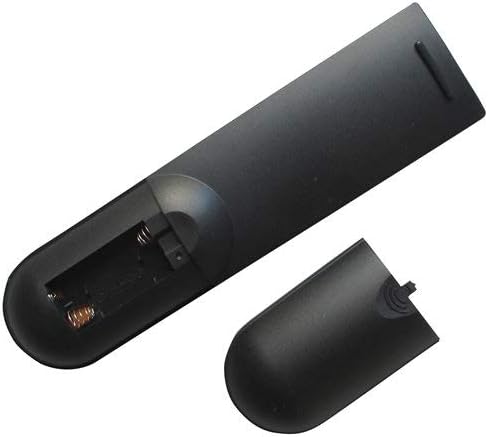
Image: Back of the remote control with the battery cover removed, revealing the battery compartment. This shows where to insert the AAA batteries.

Image: Back of the remote control with the battery cover partially removed, illustrating the correct orientation for battery insertion.
After installing the batteries, the remote control is ready for use. No programming is typically required for this replacement remote.
Istruzioni per l'uso
This remote control operates using infrared (IR) technology. Ensure there is a clear line of sight between the remote control and the TV's IR receiver for optimal performance.
Funzioni di base:
- Pulsante di accensione: Accende o spegne la TV.
- Canale su/giù: Cambia il canale televisivo.
- Volume su/giù: Regola il volume audio del televisore.
- Tasto muto: Disattiva o riattiva l'audio della TV.
- Pulsante Input/Sorgente: Scorre le sorgenti di input disponibili (ad esempio, HDMI 1, AV, Component).
- Tasti numerici (0-9): Seleziona direttamente i canali TV.
- Pulsante Menu: Accesses the TV's on-screen menu.
- Pulsanti di navigazione (Su, Giù, Sinistra, Destra, OK/Invio): Used to navigate through TV menus and confirm selections.
Refer to your television's original user manual for specific functions and menu navigation details, as these may vary by TV model.
Manutenzione
Pulizia del telecomando
Per pulire il telecomando, utilizzare un panno morbido e asciutto. Per lo sporco ostinato, utilizzare un panno leggermente dampen the cloth with water or a mild, non-abrasive cleaner. Do not use harsh chemicals or immerse the remote control in water.
Sostituzione della batteria
Sostituire le batterie quando la risposta del telecomando diventa lenta o smette di funzionare. Sostituire sempre entrambe le batterie contemporaneamente con batterie AAA nuove. Non mischiare batterie vecchie e nuove, o tipi diversi di batterie, poiché ciò potrebbe causare perdite o danni.
Sicurezza della batteria:
- Rimuovere le batterie se il telecomando non verrà utilizzato per un periodo prolungato.
- Smaltire le batterie usate secondo le normative locali.
- Tenere le batterie fuori dalla portata dei bambini.
Risoluzione dei problemi
| Problema | Possibile causa | Soluzione |
|---|---|---|
| Il telecomando non funziona. |
|
|
| Alcune funzioni non funzionano. |
|
|
| Il telecomando funziona a intermittenza. |
|
|
Specifiche
- Modello: Easytry4921
- Marca: Easytry123
- Dispositivi compatibili: Saba LED/LCD HDTVs (LED26V11, SBV1943H, SBV2243H, SCB1909W, SCB1910VX, LED32PV412, S19104DVD)
- Tecnologia di connettività: Infrarossi (IR)
- Tipo di controller: Controllo dei pulsanti
- Fonte di energia: 2 x batterie AAA (non incluse)
- Caratteristica speciale: Design ergonomico
Garanzia e supporto
Information regarding specific warranty terms for this Easytry123 replacement remote control is not provided in the product details. For any support inquiries or further assistance, please contact the seller directly through the platform where the purchase was made.
Please refer to the original product listing or your purchase documentation for any available warranty information.