
1. Introduzione
Welcome to the user manual for your Easytry123 Replacement Remote Control. This manual provides essential information for the proper setup, operation, and maintenance of your new remote. This remote is designed as a replacement for specific Sunstech LCD HDTV TV models. Please note that as a replacement unit, some advanced or unique functions of your original TV remote may not be fully supported. Ensure your TV model is listed in the title for compatibility.
2. Prodotto finitoview
The Easytry123 Replacement Remote Control is an ergonomic, button-controlled device utilizing infrared technology for seamless interaction with compatible Sunstech televisions. Its design focuses on ease of use for common television functions.
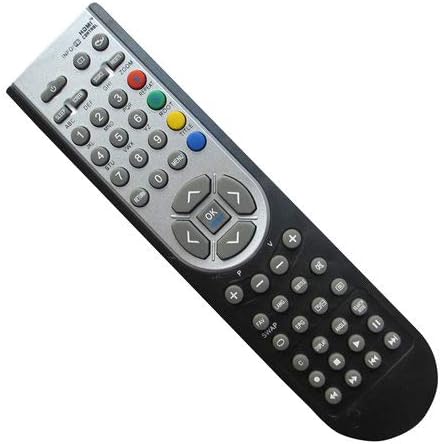
Figura 2.1: Davanti view of the Easytry123 Replacement Remote Control, showing various function buttons including power, number keys, volume, channel, navigation, and menu controls.
3. Impostazione
Your Easytry123 Replacement Remote Control requires two AAA batteries (not included) for operation. Follow these steps to install the batteries:
- Individuare il vano batterie sul retro del telecomando.
- Premere il fermo e far scorrere il coperchio della batteria per rimuoverlo.
- Inserire due batterie AAA, assicurandosi che i terminali positivo (+) e negativo (-) siano allineati correttamente con le marcature all'interno del vano.
- Far scorrere il coperchio della batteria in posizione finché non scatta in modo sicuro.
The remote is now ready for use. No additional programming is typically required for compatible Sunstech TV models.
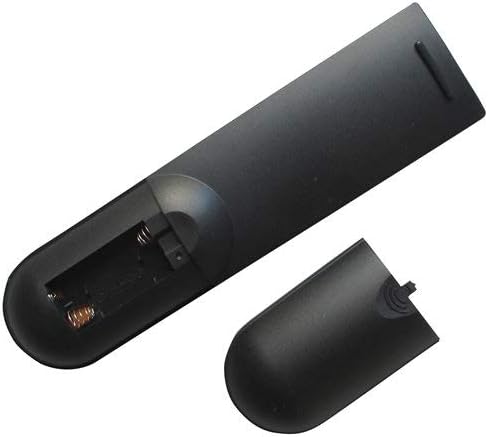
Figura 3.1: Indietro view of the remote control with the battery compartment open, illustrating where to insert the two AAA batteries.
4. Istruzioni per l'uso
This remote control operates using infrared signals. Ensure there is a clear line of sight between the remote and your television's IR receiver. Point the remote directly at the TV for optimal performance.
Funzioni di base:
- Pulsante di accensione: Accende o spegne la TV.
- Tasti numerici (0-9): Seleziona direttamente i canali.
- Volume su/giù: Regola il livello del suono.
- Canale su/giù: Cambia canale in sequenza.
- Pulsanti di navigazione (su, giù, sinistra, destra): Used to navigate menus and on-screen options.
- Pulsante OK/Invio: Conferma le selezioni nei menu.
- Pulsante Menu: Accede al menu principale del televisore.
- Pulsante Input/Sorgente: Passa da una sorgente di ingresso video all'altra (ad esempio, HDMI, AV).
For specific functions not listed, refer to your Sunstech TV's original user manual, as replacement remotes may have varying levels of compatibility for advanced features.
5. Manutenzione
Per garantire la longevità e il corretto funzionamento del telecomando, seguire queste linee guida per la manutenzione:
- Pulizia: Wipe the remote with a soft, dry cloth. Avoid using liquid cleaners or abrasive materials, as they can damage the surface or internal components.
- Sostituzione della batteria: Replace batteries promptly when the remote's responsiveness decreases. Always replace both batteries at the same time with new ones of the same type (AAA). Remove batteries if the remote will not be used for an extended period to prevent leakage.
- Magazzinaggio: Conservare il telecomando in un luogo fresco e asciutto, lontano dalla luce solare diretta, da temperature estreme e da elevata umidità.
- Gestione: Avoid dropping the remote or exposing it to strong impacts, which can damage internal circuitry.
6. Risoluzione Dei Problemi
- Il telecomando non risponde:
- Controllare che le batterie siano inserite correttamente, rispettando la polarità corretta.
- Sostituisci le vecchie batterie con nuove batterie AAA.
- Assicurarsi che non vi siano ostacoli tra il telecomando e il sensore a infrarossi del televisore.
- Verificare che il telecomando sia puntato direttamente verso la TV.
- Alcune funzioni non funzionano:
- As a replacement remote, certain advanced or unique functions specific to your original TV remote may not be supported. This is normal for universal or replacement remotes.
- Verify that your TV model is explicitly listed as compatible with this remote.
7. Specifiche
| Numero di modello | Easytry4915 |
| Marca | Easytry123 |
| Dispositivi compatibili | Television (Sunstech LCD HDTV TV models: 24LEDTIRSABK, TL-EI19HDMKII, TL-I 32 HD-MKWBK, TLEI19HD-MKIIWBK, TLEI22HDMKII) |
| Tecnologia di connettività | Infrarossi |
| Tipo di controllore | Controllo dei pulsanti |
| Batterie richieste | 2 x AAA (non incluso) |
| Caratteristica speciale | Design ergonomico |
8. Garanzia e supporto
Specific warranty details and direct customer support information for the Easytry123 Replacement Remote Control are not provided within the product's general specifications. For any issues or inquiries regarding your remote, please contact the seller or retailer from whom you purchased the product. They will be able to provide assistance or guide you to the appropriate support channels.