
Itek ITMC30V201FHD
Manuale utente del monitor curvo iTek GGC da 30 pollici
Model: ITMC30V201FHD
Benvenuto
Thank you for choosing the iTek GGC 30-inch Curved Monitor. This manual provides essential information for setting up, operating, and maintaining your new monitor. Please read it thoroughly before use to ensure optimal performance and safety.
Importanti istruzioni di sicurezza
Per evitare danni e garantire un funzionamento sicuro, osservare le seguenti precauzioni:
- Non esporre il monitor a pioggia, umidità o temperature estreme.
- Assicurare una ventilazione adeguata attorno al monitor. Non ostruire le aperture di ventilazione.
- Utilizzare solo l'adattatore di alimentazione fornito con il monitor.
- Evitare di posizionare oggetti pesanti sul cavo di alimentazione.
- Disconnect the power plug from the outlet if the monitor will not be used for a long period.
- Non tentare di riparare il monitor da soli. Per qualsiasi intervento di manutenzione, rivolgersi a personale qualificato.
- Pulisci lo schermo del monitor e casincon un panno morbido e asciutto. Evitare l'uso di detergenti abrasivi o solventi.
Contenuto della confezione
Si prega di controllare la confezione per verificare la presenza dei seguenti elementi:
- iTek GGC 30-inch Curved Monitor
- Supporto per monitor (base e collo)
- Adattatore di alimentazione e cavo
- Cavo DisplayPort
- Cavo HDMI
- Manuale d'uso
- Viti per il montaggio del supporto
Prodotto finitoview
The iTek GGC 30-inch Curved Monitor is designed for an immersive viewing experience, ideal for gaming and professional use. It features a WFHD (2560x1080) resolution, a high 200Hz refresh rate, and a rapid 1ms MPRT response time.

Key Performance Highlights
- 200Hz Refresh Rate & AMD FreeSync Technology: Experience ultra-smooth visuals and tear-free gaming with a high refresh rate and adaptive sync technology.

Figure 2: 200Hz Refresh Rate and AMD FreeSync Technology in action. - Flicker-Free & Low Blue Light: Designed to reduce eye strain during prolonged use, providing a more comfortable viewesperienza di acquisizione.

Figure 3: Flicker-Free and Low Blue Light features for eye comfort. - Tempo di risposta MPRT di 1 ms: Minimizes motion blur and ghosting, crucial for fast-paced games and action sequences.

Figure 4: Rapid Refresh Rate and Response Time for smooth visuals. - Display curvo 1800R: The immersive curvature brings the edges of the screen closer to your field of view, enhancing depth perception and reducing distortion.

Figure 5: 1800R Curved Display for an immersive experience.
Impostare
Assemblaggio del supporto
- Estrarre con cautela il monitor e i componenti del supporto dalla confezione.
- Attach the stand neck to the monitor panel using the provided screws. Ensure it clicks securely into place or is fastened tightly.
- Attach the stand base to the stand neck, securing it with the thumb screw or screws from underneath.
- Posizionare il monitor assemblato su una superficie stabile e piana.
Collegamento del monitor
The iTek GGC monitor offers multiple connectivity options for various devices:
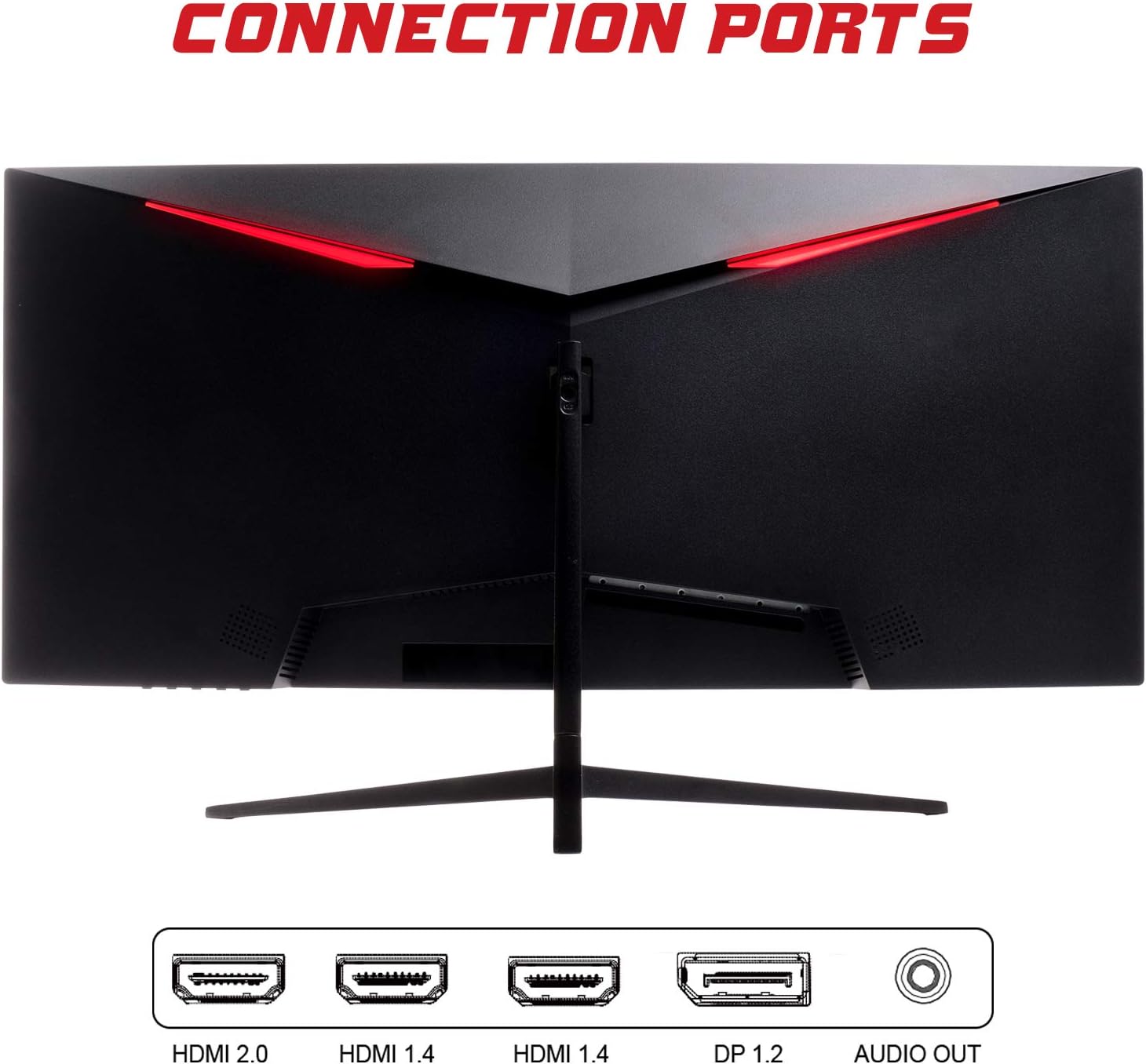
- DisplayPort (DP 1.2): For high-resolution and high-refresh-rate connections to your PC.
- HDMI (HDMI 2.0, HDMI 1.4 x2): Connect to PCs, gaming consoles, and other multimedia devices. HDMI 2.0 supports higher refresh rates at certain resolutions.
- Uscita audio: Collegare altoparlanti esterni o cuffie.
Dopo aver collegato il cavo video, collegare l'adattatore di alimentazione al monitor e poi a una presa di corrente.
Funzionamento del monitor
Accensione/spegnimento
Premere il pulsante di accensione, solitamente situato nella parte inferiore o posteriore del monitor, per accenderlo o spegnerlo. La spia di accensione si accende quando il monitor è acceso.
Menu OSD (On-Screen Display)
The OSD menu allows you to adjust various monitor settings. Use the buttons on the monitor (typically on the back or bottom right) to navigate the menu.
- Impostazioni immagine: Regola luminosità, contrasto, nitidezza e gamma.
- Impostazioni colore: Modifica la temperatura del colore, la tonalità e la saturazione.
- Selezione input: Passa manualmente tra gli ingressi DisplayPort e HDMI.
- Audio: Adjust volume for the audio output.
- Impostazioni di sistema: Access language, OSD timeout, and reset options.
- Caratteristiche di gioco: Enable/disable FreeSync, adjust response time overdrive, and activate crosshair overlays if available.
Manutenzione
Una cura adeguata garantisce la longevità del monitor:
- Prima di procedere alla pulizia, spegnere sempre il monitor e scollegare il cavo di alimentazione.
- Utilizzare un panno morbido e privo di lanugine per pulire delicatamente lo schermo. Per i segni ostinati, strofinare leggermenteampPulire il panno con acqua o con un detergente per schermi delicato e non abrasivo.
- Pulisci il monitor casing con un panno morbido e asciutto.
- Evitare di spruzzare liquidi direttamente sullo schermo o casing.
- Do not use benzene, thinner, ammonia-based cleaners, or abrasive materials.
Risoluzione dei problemi
Se riscontri problemi con il monitor, consulta la seguente tabella per i problemi più comuni e le relative soluzioni:
| Problema | Possibile soluzione |
|---|---|
| Nessun potere | Ensure the power cable is securely connected to the monitor and the power outlet. Check if the power outlet is working. |
| Nessun segnale / Schermo vuoto | Verify the video cable (DisplayPort or HDMI) is firmly connected to both the monitor and your computer. Select the correct input source via the OSD menu. Ensure your computer is powered on and not in sleep mode. |
| Immagine tremolante o instabile | Check the video cable connection. Try a different cable or port. Ensure your graphics card drivers are up to date. Adjust the refresh rate in your computer's display settings. |
| Scarsa qualità dell'immagine (colori sfocati e distorti) | Adjust brightness, contrast, and color settings in the OSD menu. Ensure the display resolution on your computer matches the monitor's native resolution (2560x1080). |
| Nessun suono dall'uscita audio | Check the audio cable connection to your speakers/headphones. Verify the volume setting in the OSD menu and on your computer. Ensure the correct audio output device is selected in your computer's sound settings. |
Specifiche tecniche
| Caratteristica | Specificazione |
|---|---|
| Marca | Itek |
| Modello | ITMC30V201FHD |
| Dimensioni dello schermo | 30 pollici |
| Tipo di pannello | VA |
| Curvatura | R1800 |
| Risoluzione | 2560 x 1080 (WFHD) |
| Proporzioni | 21:9 |
| Frequenza di aggiornamento | Frequenza 200 Hz |
| Tempo di risposta | Tempo di risposta MPRT di 1 ms |
| Luminosità | 350 cd/m² |
| Rapporto di contrasto | 3000:1 |
| Viewangolo di ing | 178° (Orizzontale/Verticale) |
| Connettività | 1x DisplayPort 1.2, 1x HDMI 2.0, 2x HDMI 1.4, Audio Out |
| Caratteristiche speciali | HDR Ready, FreeSync, Low Blue Light, Flicker Free, VESA Mountable |
| Dimensioni del prodotto (con supporto) | Dimensioni: 70.68 x 40.89 x 18.48 cm |
| Peso | 6.9 kg |
Efficienza energetica

For detailed energy consumption information and product registration, please refer to the official EPREL database:
Garanzia e supporto
Your iTek GGC monitor is backed by a manufacturer's warranty. Please retain your proof of purchase for warranty claims.
- Guaranteed Product Support: This product is guaranteed to have support available until at least January 1, 2031.
- For technical support, warranty inquiries, or service requests, please contact iTek customer service through their official websito o le informazioni di contatto fornite con l'acquisto.
Ask a question about this manual
Ask about setup, troubleshooting, compatibility, parts, safety, or missing instructions. Manuals+ will review the question and use this page’s manual context to help answer it.