
1. Introduzione
This user manual provides comprehensive instructions for the setup, operation, and maintenance of your SHARP LC-32HI5012E HD Ready Smart LED TV. Please read this manual thoroughly before using your television to ensure proper functionality and safety.
The SHARP LC-32HI5012E is an 81 cm (32-inch) HD Ready Smart LED TV featuring Active Motion 200 technology for enhanced picture quality and a Triple Tuner for versatile reception options. It includes integrated Wi-Fi and a Harman/Kardon sound system for a complete entertainment experience.
2. Contenuto della confezione
Dopo aver aperto la confezione, verificare che siano presenti tutti i seguenti elementi:
- SHARP LC-32HI5012E Main Unit
- Telecomando (con batterie)
- Manuale dell'utente (questo documento)

Immagine: Frontale view of the SHARP LC-32HI5012E television, displaying a vibrant city skyline on its screen. This image shows the slim bezel design and the central SHARP logo.
3. Impostazione
3.1 Montaggio del supporto
Carefully place the TV screen-down on a soft, flat surface to prevent damage. Attach the two stand feet to the designated slots at the bottom of the TV, securing them with the provided screws. Ensure the stand is firmly attached before proceeding.
3.2 Collegamento delle periferiche
Your TV offers various connection options for external devices:
- Porte HDMI (x3): Collega lettori Blu-ray, console di gioco o decoder.
- Porte USB (x2): Per la riproduzione di contenuti multimediali da unità USB.
- Antenna In (RF): Connect your terrestrial antenna for DVB-T/T2HD reception.
- Sat In: Connect your satellite dish for DVB-S/S2 reception.
- RJ45 (LAN): Per la connessione internet cablata.
- CI+ Port: For conditional access modules (CAM) to view canali criptati.
- Mini Component/YPbPr, Mini AV Composite: Per dispositivi analogici più vecchi.
- Uscita audio ottica digitale: Per il collegamento a sistemi audio esterni.
- Audio out / Headphone: Per cuffie o altoparlanti esterni.

Immagine: Posteriore view of the SHARP LC-32HI5012E television, highlighting the arrangement of various input and output ports for connecting external devices.
3.3 Accensione iniziale e configurazione iniziale
After connecting all necessary cables, plug the power cord into an electrical outlet. Press the power button on the remote control or the TV. The first-time setup wizard will guide you through:
- Selezione della lingua.
- Network connection (Wi-Fi or wired LAN).
- Channel scanning for DVB-C, DVB-S/S2, or DVB-T/T2HD.
- Fuso orario e altre impostazioni di base.
4. Istruzioni per l'uso
4.1 Funzioni TV di base
- Accensione/spegnimento: Utilizzare il pulsante di accensione sul telecomando o sulla TV.
- Controllo del volume: Utilizzare i pulsanti VOL +/-.
- Selezione canale: Use CH +/- or number buttons.
- Sorgente di input: Press the SOURCE button to switch between HDMI, AV, TV, etc.
- Navigazione nel menu: Use arrow keys and OK button to navigate menus.
4.2 Funzionalità della Smart TV
Your SHARP LC-32HI5012E is equipped with integrated Wi-Fi and offers access to various smart features:
- App preinstallate: Access popular streaming services like Netflix and YouTube directly.
- Web Navigatore: Naviga su Internet direttamente dalla tua TV.
- Aquos Net+: Access additional online content and services provided by Sharp.
Assicurati che la tua TV sia connessa a Internet per sfruttare appieno le funzionalità della Smart TV.
4.3 Sistema audio
The integrated Harman/Kardon sound system provides a high-quality audio experience with excellent dynamics and clarity. Adjust audio settings in the TV menu to customize your sound preferences.
5. Manutenzione
5.1 Pulizia dello schermo
Per pulire lo schermo, strofinarlo delicatamente con un panno morbido e privo di lanugine. Per macchie ostinate, strofinare leggermenteampPulisci il panno con acqua o con un detergente specifico per schermi. Non fare spruzzare il liquido direttamente sullo schermo.
5.2 Cura generale
- Tenere il televisore lontano dalla luce solare diretta e da fonti di calore.
- Assicurare un'adeguata ventilazione attorno al televisore.
- Scollegare il televisore dalla presa di corrente durante i temporali o quando viene lasciato incustodito per lunghi periodi.
6. Risoluzione Dei Problemi
If you encounter any issues with your TV, please refer to the following common problems and solutions before contacting support.
| Problema | Possibile causa | Soluzione |
|---|---|---|
| Nessun potere | Power cord unplugged, power outlet issue. | Controllare il collegamento del cavo di alimentazione. Provare una presa diversa. |
| Nessuna immagine, ma l'audio è presente | Incorrect input source, faulty cable. | Verificare la corretta sorgente di ingresso. Controllare i collegamenti dei cavi HDMI/AV. |
| Nessun suono | Volume muted or too low, external audio system issue. | Unmute volume, increase volume. Check external audio connections. |
| Impossibile connettersi al Wi-Fi | Password errata, problema con il router, TV troppo lontana dal router. | Reinserisci la password. Riavvia il router. Avvicina la TV o usa una connessione cablata. |
7. Specifiche
| Caratteristica | Dettaglio |
|---|---|
| Marca | AFFILATO |
| Numero di modello | LC-32HI5012E |
| Tecnologia dello schermo | GUIDATO |
| Risoluzione | HD Ready (1366 x 768 pixel) |
| Diagonale dello schermo | 81.3 cm (32 pollici) |
| Frequenza di aggiornamento | Frequenza 60 Hz |
| Caratteristica speciale | Internet (Smart TV) |
| Servizi Internet supportati | Netflix, YouTube, Browser |
| Tecnologia di connettività | USB, HDMI, LAN, Wi-Fi |
| Sintonizzatori | DVB-C, DVB-S/S2, DVB-T/T2HD |
| Sistema audio | Harman/Kardon |
| Dimensioni del prodotto (L x A x P) | 74 x 49.1 x 18 cm (con supporto) |
| Peso | 4.8 chilogrammi |
| Tipo di montaggio | Montaggio da tavolo |
7.1 Efficienza energetica
The SHARP LC-32HI5012E has an energy efficiency rating of F. For detailed energy consumption information, please refer to the energy label and product information sheet.

Image: Energy efficiency label for the SHARP LC-32HI5012E television, showing its energy class F and power consumption details.
Per maggiori dettagli, visita il database ufficiale EPREL: https://eprel.ec.europa.eu/qr/402565
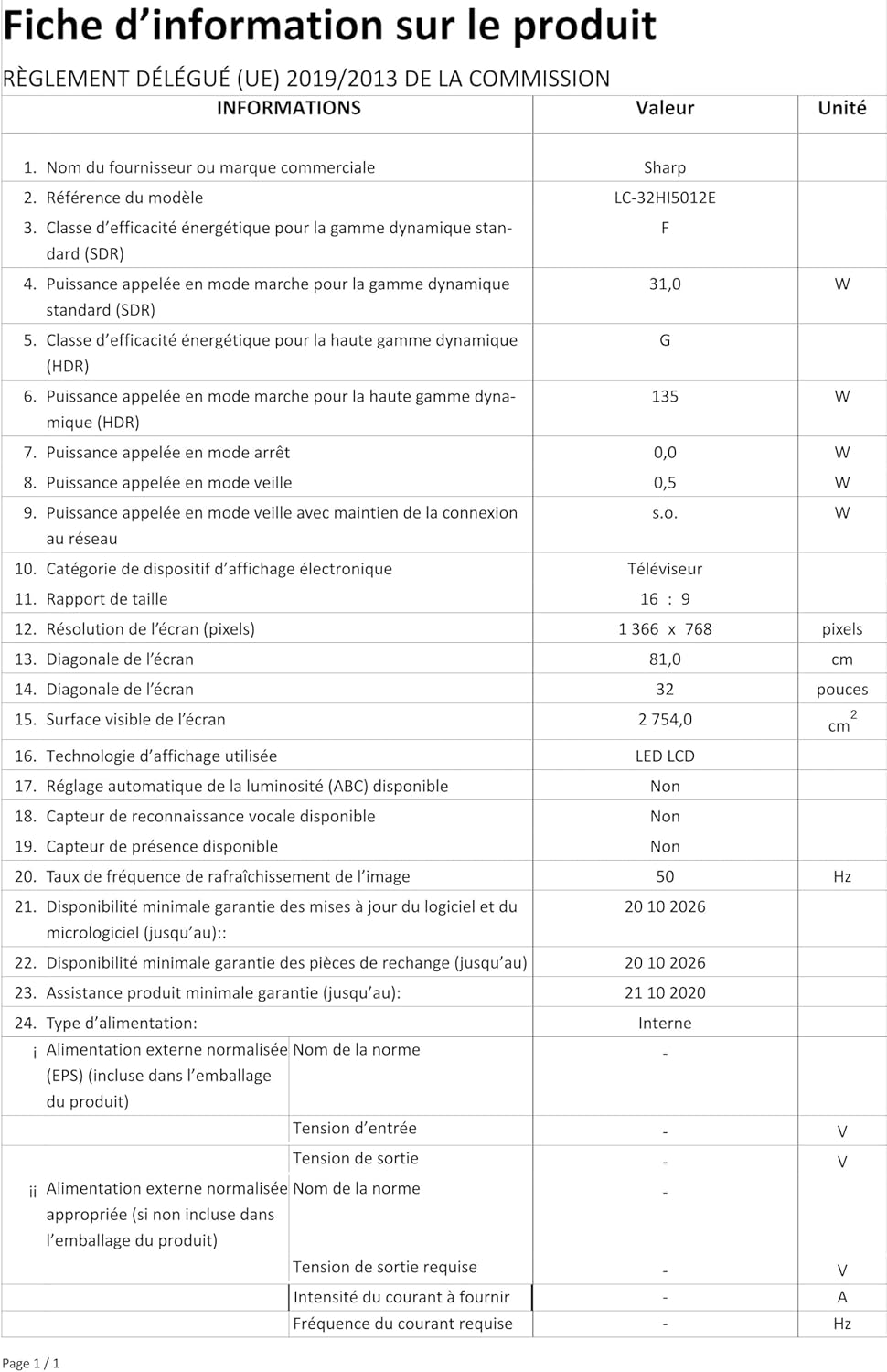
Image: Product information sheet detailing technical specifications and compliance information for the SHARP LC-32HI5012E television.
8. Garanzia e supporto
For warranty information, please refer to the warranty card included with your product or visit the official SHARP websito. Conservare la ricevuta d'acquisto come prova d'acquisto per eventuali reclami in garanzia.
For technical support or service inquiries, please contact SHARP customer service. Contact details can typically be found on the SHARP official websito o nella confezione del prodotto.