
Introduzione
This manual provides essential information for the safe and effective use of your Canon PowerShot SX740 HS Digital Camera. Please read it thoroughly before operating the camera to ensure proper handling and to maximize its features. The Canon PowerShot SX740 HS is a compact digital camera featuring a 20.3-megapixel CMOS sensor, 40x optical zoom, 4K video recording capabilities, and built-in Wi-Fi and Bluetooth connectivity.

Figura 1: Fronte view of the Canon PowerShot SX740 HS Digital Camera with the lens retracted.
Cosa c'è nella scatola
Verifica che tutti i seguenti elementi siano inclusi nel tuo pacchetto:
- Fotocamera digitale Canon PowerShot SX740HS
- NB-13L Lithium-Ion Battery Pack
- CB-2LH Battery Charger
- Cinturino da polso
- Cavo HDMI
- Treppiedi
- SanDisk 64GB SDHC Memory Card
- Premium Camera Case
- High Speed USB Card Reader
Impostare
1. Ricarica e installazione della batteria
- Insert the NB-13L battery into the CB-2LH charger.
- Plug the charger into a power outlet. The charging indicator light will show the charging status.
- Una volta caricata completamente, rimuovere la batteria dal caricabatterie.
- Aprire il coperchio del vano batteria nella parte inferiore della fotocamera.
- Inserire la batteria carica nel vano, assicurandosi che sia orientata correttamente. Chiudere bene il coperchio.
2. Inserimento della scheda di memoria
- Aprire il coperchio dello slot della scheda di memoria, solitamente situato vicino al vano batteria.
- Insert the SDHC memory card with the label facing the front of the camera until it clicks into place.
- Chiudere il coperchio dello slot della scheda di memoria.
3. Accensione iniziale e impostazioni di base
- Premere il pulsante di accensione per accendere la fotocamera.
- Seguire le istruzioni sullo schermo per impostare data, ora e lingua.
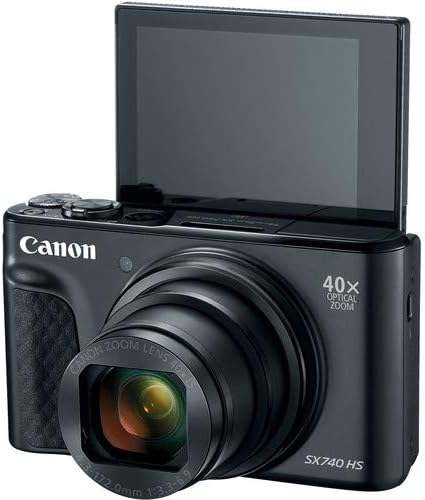
Figura 2: Fronte view of the camera with the LCD screen tilted upwards, ready for use.
Utilizzo della fotocamera
1. Accensione/spegnimento
Premere il tasto ENERGIA pulsante situato nella parte superiore della fotocamera per accenderla o spegnerla.
2. Modalità di scatto
The camera offers various shooting modes. Use the mode dial or menu options to select:
- Modalità automatica: Per un semplice utilizzo "punta e scatta", in cui la fotocamera regola automaticamente le impostazioni.
- Modalità Programma (P): Consente un maggiore controllo sulle impostazioni mentre la fotocamera imposta l'esposizione.
- Modalità scena: Optimized settings for specific scenarios like portraits, landscapes, or night scenes.
- Feature Assistant: Provides on-screen explanations to help you understand and use various camera features.
3. Operazione Zoom
The camera features a 40x optical zoom lens. Use the zoom lever around the shutter button to zoom in (telephoto) or out (wide-angle). Digital zoom can extend the range further, but may reduce image quality.

Figura 3: Fronte view of the camera with the lens extended for zooming.
4. Messa a fuoco
The camera primarily uses autofocus. Point the camera at your subject and half-press the shutter button to focus. The focus frame will appear on the LCD screen. For specific situations, manual focus options may be available in the menu.
5. Registrazione video
To record videos, switch to video mode (if available via a dedicated button or mode dial) or press the dedicated movie recording button. The camera supports 4K video capture. Press the button again to stop recording.
6. Utilizzo dello schermo LCD inclinabile
The 3.0-inch LCD screen can tilt 180 degrees, allowing for easy framing of selfies or shots from various angles. Adjust the screen to your desired position.

Figura 4: Indietro view of the camera, displaying the LCD screen and control layout.
7. Connettività Wi-Fi e Bluetooth
The camera features built-in Wi-Fi and Bluetooth for connecting to compatible mobile devices. Download the Canon Camera Connect app to your smartphone or tablet to transfer images, remotely control the camera, and share photos.
- Enable Wi-Fi or Bluetooth in the camera's menu.
- Open the Canon Camera Connect app on your mobile device and follow the pairing instructions.
Manutenzione
1. Pulizia della fotocamera
- Lente: Use a soft, lint-free cloth or a lens brush to gently remove dust. For smudges, use a specialized lens cleaning solution and cloth. Avoid touching the lens directly with your fingers.
- Schermo LCD: Wipe gently with a soft, dry cloth. Do not use harsh chemicals.
- Corpo macchina fotografica: Use a soft, dry cloth to wipe away dust and dirt.
2. Cura della batteria
- Conservare le batterie in un luogo fresco e asciutto quando non vengono utilizzate.
- Evitare di scaricare completamente la batteria frequentemente per prolungarne la durata.
- Rimuovere la batteria dalla fotocamera se non si intende utilizzarla per un periodo prolungato.
3. Conservazione
When storing the camera for long periods, ensure it is clean, dry, and stored in a protective case to prevent dust and damage. Remove the battery and memory card.
Risoluzione dei problemi
Se riscontri problemi con la tua fotocamera, fai riferimento alle seguenti soluzioni comuni:
- La fotocamera non si accende: Assicurarsi che la batteria sia completamente carica e inserita correttamente. Provare con una batteria carica diversa, se disponibile.
- Errore della scheda di memoria: Check if the memory card is inserted correctly. Format the card (this will erase all data) if the error persists, or try a different compatible SDHC card.
- Le immagini sono sfocate: Ensure the lens is clean. Check your focus settings and make sure the camera has successfully focused on your subject before taking the shot. Use optical image stabilization for handheld shots.
- Problemi di connessione Wi-Fi/Bluetooth: Ensure Wi-Fi/Bluetooth is enabled on both the camera and your mobile device. Restart both devices and try pairing again. Confirm the Canon Camera Connect app is up to date.
- Il flash non si attiva: Check the flash mode settings. Ensure the flash is popped up if it's a manual pop-up type.
For more complex issues or persistent problems, please consult the official Canon support websito o contattare il servizio clienti.
Specifiche
| Caratteristica | Specificazione |
|---|---|
| Nome del modello | Fotocamera PowerShot SX740 HS |
| Risoluzione del sensore fotografico | 20.3 Megapixel |
| Zoom ottico | 40x |
| Formato di acquisizione video | 4K |
| Processore di immagini | Canon DIGIC 8 |
| Connettività | Bluetooth, HDMI, USB, Wi-Fi |
| Tipo di visualizzazione | LCD inclinabile |
| Stabilizzazione dell'immagine | Ottico |
| Tipo di batteria | Ioni di litio (NB-13L) |
| Memoria compatibile | SDHC (up to 64 GB) |
| Scatto continuo | 10 fotogrammi al secondo |
| Supportato File Formato | JPEG, GREZZO |
Garanzia e supporto
Your Canon PowerShot SX740 HS Digital Camera is covered by a manufacturer's warranty. Please refer to the warranty card included with your product for specific terms and conditions. For technical support, service, or additional information, please visit the official Canon weboppure contatta direttamente il servizio clienti Canon. Conserva la ricevuta d'acquisto come prova d'acquisto per eventuali reclami in garanzia.
Risorse online: Canon USA Ufficiale Websito