
1. Introduzione
The Cellularline EASYSPORT GPS is a smartwatch designed for sports enthusiasts, enabling comprehensive monitoring of athletic performance. Its integrated GPS allows tracking of workout routes without needing a smartphone. The ultra-bright touch display ensures clear visibility of settings in various outdoor conditions. With IP68 certification, the Easysport GPS is suitable for use during showering or swimming, making it an ideal companion for achieving fitness goals.
2. Contenuto della confezione
Si prega di verificare che tutti gli articoli siano presenti nel pacco:
- Cellularline EASYSPORT GPS Smartwatch
- Charging Cable / Charging Dock
- Manuale dell'utente (questo documento)
3. Prodotto finitoview
Familiarize yourself with the components of your EASYSPORT GPS smartwatch.
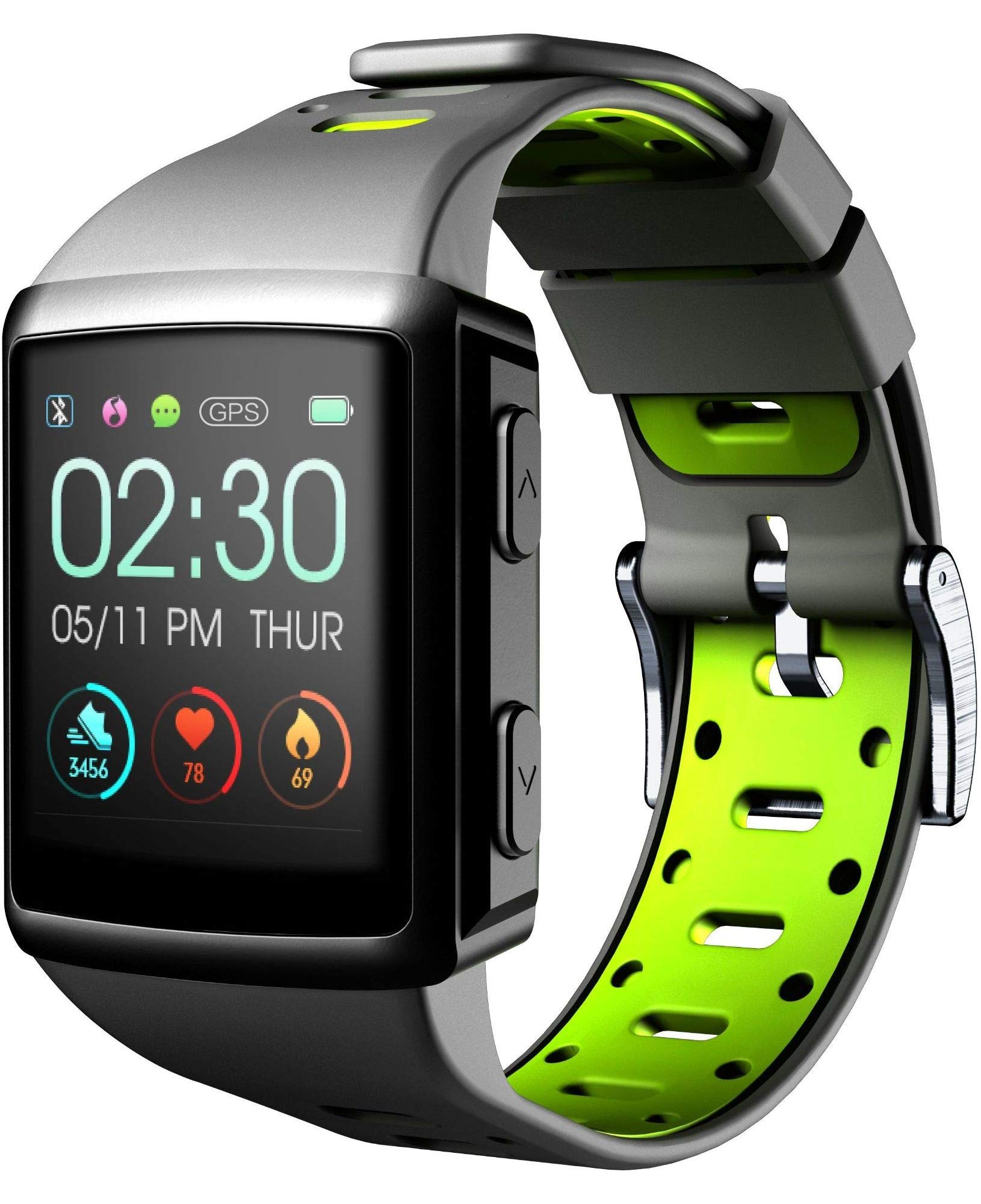
Figura 3.1: Davanti view of the smartwatch display, showing current time, date, and activity metrics like steps, heart rate, and calories burned.

Figura 3.2: Angolato view of the smartwatch, highlighting the sporty lime and black silicone strap and the physical control buttons on the side.

Figura 3.3: Posteriore view of the smartwatch, illustrating the integrated heart rate (HR) sensor designed for continuous monitoring during activities.
4. Impostazione
4.1 Ricarica del dispositivo
Before first use, fully charge your EASYSPORT GPS smartwatch. A full charge typically takes approximately 3 hours.
- Collegare il cavo di ricarica alla base di ricarica.
- Align the smartwatch with the charging dock's contacts until it securely snaps into place.
- Collegare l'estremità USB del cavo di ricarica a un adattatore di alimentazione USB compatibile (non incluso) o alla porta USB di un computer.
- Il display indicherà lo stato di carica.

Figura 4.1: The smartwatch connected to its charging dock, illustrating the charging process.
4.2 Accensione/spegnimento
- Per accendere: Press and hold the power button (usually located on the side) for a few seconds until the screen lights up.
- Per spegnere: Navigate to the settings menu on the smartwatch, locate the "Power Off" option, and confirm. Alternatively, press and hold the power button until a power-off prompt appears, then confirm.
4.3 Associazione con uno smartphone
Per sfruttare appieno il potenziale del tuo smartwatch, associalo allo smartphone tramite Bluetooth.
- Assicurati che il Bluetooth sia abilitato sul tuo smartphone.
- Download and install the companion app for Cellularline EASYSPORT GPS from your smartphone's app store.
- Apri l'app e segui le istruzioni sullo schermo per creare un account o accedere.
- In the app, select "Add Device" or "Pair New Device" and choose "EASYSPORT GPS" from the list of available devices.
- Se richiesto, conferma la richiesta di associazione sia sullo smartphone che sullo smartwatch.
5. Istruzioni per l'uso
5.1 Navigazione touchscreen
The EASYSPORT GPS features a responsive touchscreen for intuitive navigation.
- Scorri verso l'alto/il basso: Scorrere i menu o le notifiche.
- Scorri verso sinistra/destra: Accedi a diversi widget o impostazioni rapide.
- Rubinetto: Seleziona un elemento o conferma un'azione.
- Premere e tenere premuto: È possibile attivare funzioni specifiche o personalizzare i quadranti dell'orologio.
5.2 Tracciamento GPS
The integrated GPS allows you to track your distance and route during outdoor activities without needing your smartphone.
- Start an outdoor activity (e.g., running, cycling) from the sports mode menu on your smartwatch.
- Assicurati di trovarti in un'area aperta per un'acquisizione ottimale del segnale GPS.
- The smartwatch will automatically begin tracking your route and distance.
- Review your activity data, including maps, in the companion app after syncing.
5.3 Heart Rate Monitoring (HR Function)
The smartwatch continuously monitors your heart rate, providing valuable insights into your fitness and workout intensity.
- Ensure the smartwatch is worn snugly on your wrist, with the sensor making good contact with your skin.
- Access the heart rate widget or start a workout to view dati sulla frequenza cardiaca in tempo reale.
- Historical heart rate data can be viewed nell'app complementare.

Figura 5.1: The smartwatch display showing heart rate data (e.g., 78 bpm) along with steps and calories, indicating active monitoring.
5.4 Notifications and Caller ID
Stay connected with full text notifications and caller ID directly on your wrist.
- Once paired with your smartphone, the smartwatch will display incoming call names (Caller ID) and full text of messages from WhatsApp, Twitter, and other social applications.
- Manage notification settings through the companion app on your smartphone.
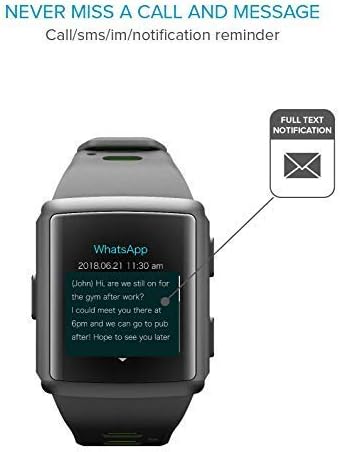
Figura 5.2: The smartwatch screen showing a detailed WhatsApp message notification, demonstrating the full text display feature.
6. Manutenzione
6.1 Water Resistance (IP68 Certified)
The EASYSPORT GPS is IP68 certified, meaning it is resistant to dust and can withstand immersion in water up to 1.5 meters for 30 minutes. This makes it suitable for showering and swimming.
- Rinse the smartwatch with fresh water after exposure to chlorinated or salt water.
- Non premere i pulsanti sott'acqua.
- Avoid exposing the device to hot water, steam, or high-pressure water jets.
- La resistenza all'acqua non è permanente e potrebbe diminuire nel tempo a causa della normale usura.

Figura 6.1: Visual representation of the smartwatch's IP68 certification, showing its suitability for water-related activities like swimming and showering.
6.2 Pulizia
Clean your smartwatch regularly to maintain its appearance and functionality.
- Pulisci lo schermo e il cinturino con un panno morbido eamp, panno privo di pelucchi.
- Non utilizzare prodotti chimici aggressivi o detergenti abrasivi.
- Prima di procedere alla ricarica, assicurarsi che i contatti di ricarica siano puliti e asciutti.
7. Risoluzione Dei Problemi
If you encounter issues with your EASYSPORT GPS smartwatch, try the following solutions:
| Problema | Possibile soluzione |
|---|---|
| Il dispositivo non si accende | Ensure the device is fully charged. Connect it to the charging dock and power source for at least 30 minutes. |
| Impossibile associare allo smartphone |
|
| Il GPS non traccia in modo accurato | Assicurati di trovarti in un'area esterna aperta e con una vista libera view del cielo. Attendi l'acquisizione del segnale GPS prima di iniziare l'attività. |
| Le notifiche non vengono visualizzate |
|
| Heart rate readings are inaccurate | Assicurati che lo smartwatch sia ben aderente al polso, né troppo stretto né troppo largo. Pulisci il sensore sul retro del dispositivo. |
8. Specifiche
| Caratteristica | Dettaglio |
|---|---|
| Nome del modello | Easysport GPS |
| Numero di modello | BTEASYSPORTHRGPSK |
| Marca | Cellularline |
| Tecnologia di connettività | Bluetooth |
| Standard di comunicazione wireless | Bluetooth |
| GPS | GPS integrato |
| Tipo di visualizzazione | Schermo tattile LCD |
| Dimensioni dello schermo | 2 pollici |
| Caratteristica speciale | Touchscreen, Heart Rate Monitor, GPS |
| Livello di resistenza all'acqua | IP68 (impermeabile fino a 1.5 metri) |
| Materiale della fascia | Silicone |
| Colore | Lime, Black |
| Applicazione supportata | GPS (and companion app for notifications/data sync) |
| Dispositivi compatibili | Smartphone |
| Pubblico di destinazione | Unisex Adulto |
9. Garanzia e supporto
The Cellularline EASYSPORT GPS Smartwatch comes with a warranty as specified by the manufacturer. For detailed warranty information and support, please refer to the official Cellularline websito o contattare il loro servizio clienti.
- Tipo di garanzia: Tutta la vita
- For technical support, troubleshooting assistance, or warranty claims, please visit the Cellularline official websito or contact their authorized service center.