
Prodotto finitoview
The Xtrasaver TY-49B is a replacement remote control for select Westinghouse LED HD DVD Combo TV models. It offers full functionality for controlling your television and its integrated DVD player without requiring any programming. This remote is designed to provide a direct replacement experience for your original remote.
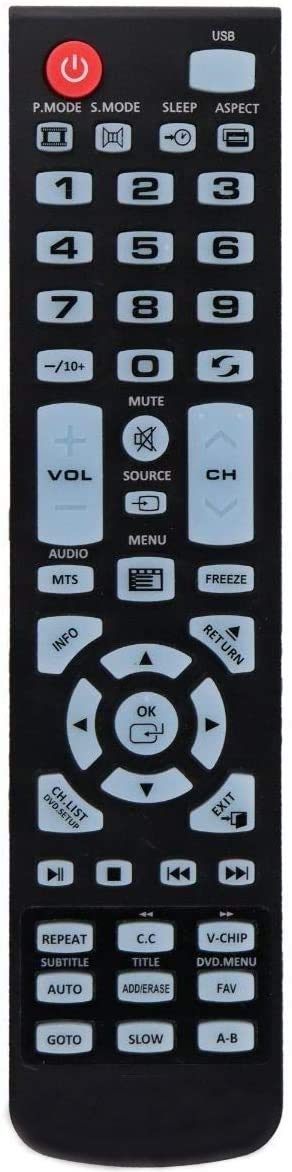
Image of the Xtrasaver TY-49B Replacement Remote Control, showing its black casing e disposizione dei pulsanti.
Compatibilità
This remote control is compatible with the following Westinghouse LED HD DVD Combo TV models:
- WD24HB6101 (24 inch)
- WD32HKB1001 (32 inch)
- WD49FB1018
- WD40HB1170
- WD32HB1120
- WD32HB1390
- WD24HAB101
- WD19HN1108
Impostare
Inserimento delle batterie
Il telecomando richiede due batterie AAA (non incluse).
- Individuare il vano batterie sul retro del telecomando.
- Per aprire il coperchio della batteria, farlo scorrere verso il basso.
- Inserire due batterie AAA, assicurandosi che i terminali positivo (+) e negativo (-) siano allineati correttamente con le marcature all'interno del vano.
- Far scorrere il coperchio della batteria in posizione finché non scatta in modo sicuro.
The remote is ready for use immediately after battery insertion; no programming is required.
Istruzioni per l'uso
The Xtrasaver TY-49B remote provides access to all standard functions of your compatible Westinghouse TV and DVD player.
Funzioni di base
| Pulsante | Funzione |
|---|---|
| ENERGIA | Accende o spegne la TV. |
| INGRESSO / SORGENTE | Cycles through available input sources (e.g., HDMI, AV, DVD). |
| volume +/- | Regola il livello del volume. |
| CH +/- | Cambia il canale televisivo. |
| MUTE | Disattiva o riattiva l'audio della TV. |
| MENU | Accede al menu principale del televisore. |
| PULSANTI DI NAVIGAZIONE (Up, Down, Left, Right, OK/ENTER) | Utilizzato per navigare nei menu e confermare le selezioni. |
| DVD CONTROLS (PLAY, PAUSE, STOP, FF, REW, NEXT, PREV) | Controls DVD playback functions when using the integrated DVD player. |
| PULSANTI NUMERICI (0-9) | Seleziona direttamente i canali o immette valori numerici. |
Manutenzione
Pulizia
To clean the remote control, wipe it with a soft, dry cloth. Do not use liquid cleaners or abrasive materials, as these can damage the remote.
Sostituzione della batteria
Replace batteries when the remote's response becomes inconsistent or stops working. Always replace both batteries at the same time with new AAA batteries. Do not mix old and new batteries or different types of batteries.
Risoluzione dei problemi
| Problema | Possibile soluzione |
|---|---|
| Il telecomando non risponde. | Check if batteries are inserted correctly with correct polarity. Replace batteries if they are old or depleted. Ensure there are no obstructions between the remote and the TV's IR sensor. |
| Pulsanti specifici non funzionanti. | Clean the remote surface and buttons. If the issue persists, replace batteries. If still unresolved, the remote may be faulty. |
| La TV non si accende/spegne. | Ensure the TV is plugged into a power outlet and is not in standby mode. Point the remote directly at the TV's IR sensor. |
Specifiche
- Modello: TY-49B
- Dispositivi compatibili: Westinghouse LED HD DVD Combo Televisions
- Fonte di energia: 2 x batterie AAA (non incluse)
- Colore: Nero
- Dimensioni: Circa 7.8 x 1.89 x 0.87 pollici (20 x 4.8 x 2.2 cm)
- Peso: Circa 8 once (227 grammi) (senza batterie)
- Caratteristica speciale: Design ergonomico
- Numero modello articolo: 689405000831