
1. Introduzione
This manual provides detailed instructions for the Redragon K503 Gaming Keyboard. Please read this guide thoroughly to ensure proper setup, operation, and maintenance of your device. The Redragon K503 is a multimedia gaming keyboard featuring RGB LED backlighting and a comfortable wrist rest, designed for use with Windows and MacOS PC systems.
2. Impostazione
2.1 Contenuto della confezione
- Tastiera da gioco Redragon K503
- Cavo USB (integrato)
2.2 Collegamento della tastiera
- Individua una porta USB disponibile sul tuo computer.
- Collegare il connettore USB della tastiera Redragon K503 alla porta USB.
- Your operating system (Windows or MacOS) should automatically detect and install the necessary drivers. No additional software installation is typically required for basic functionality.
- The keyboard's RGB backlighting will illuminate upon successful connection.
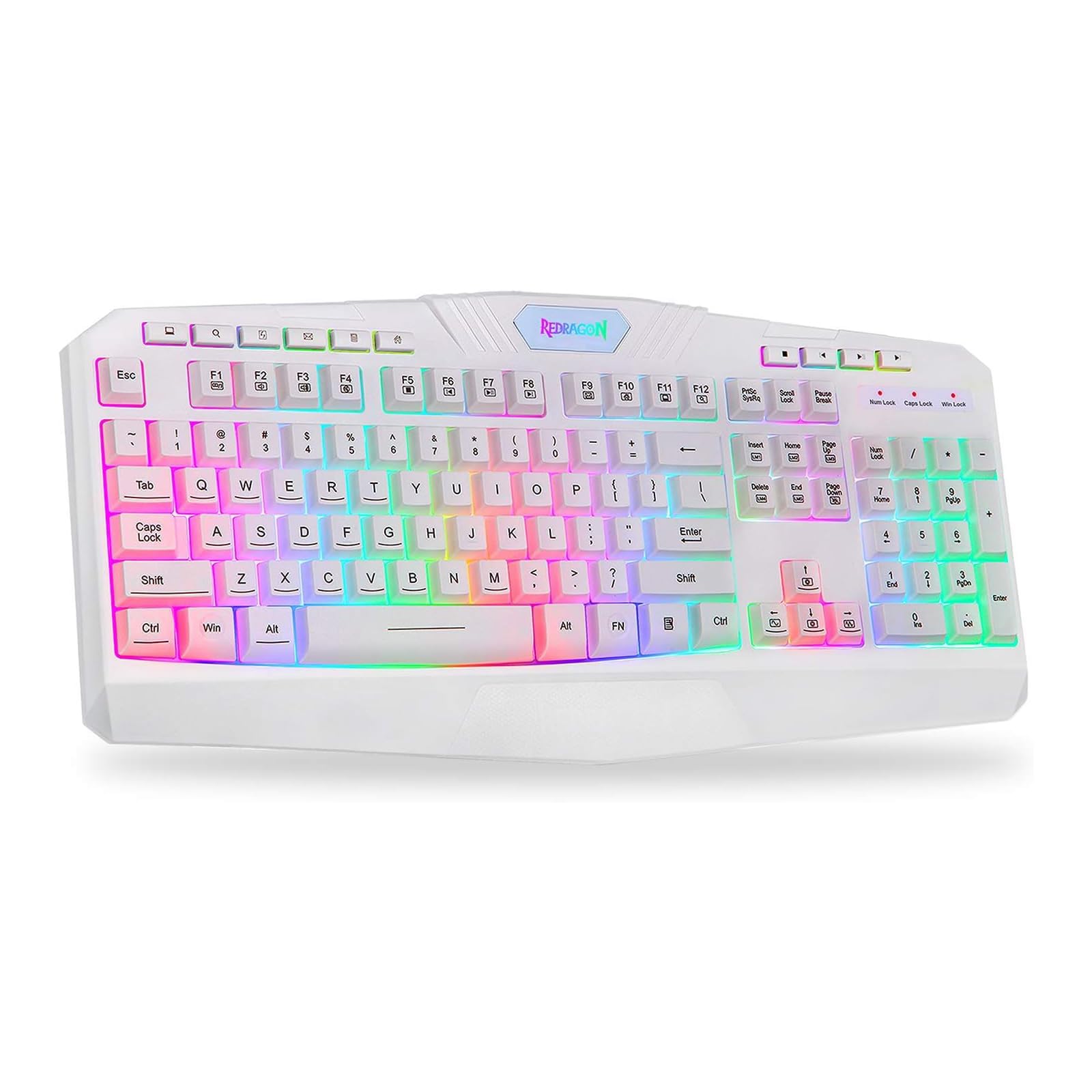
This image shows the Redragon K503 Gaming Keyboard, highlighting its full layout and white finish. The keys feature RGB backlighting, visible around the keycaps.
3. Istruzioni per l'uso
3.1 Funzioni di base
The Redragon K503 functions as a standard QWERTY keyboard for typing and input. All standard keys operate as labeled.
3.2 tasti multimediali
The keyboard includes dedicated multimedia keys for convenient control of media playback and system functions. These keys are typically located above the function keys (F1-F12) or integrated with them via the 'Fn' key. Common functions include:
- Controllo del volume: Increase, decrease, or mute audio.
- Riproduzione multimediale: Riproduci/pausa, stop, traccia precedente, traccia successiva.
- Web Navigatore: Launch default web browser.
- E-mail: Launch default email client.
3.3 RGB LED Backlighting
The K503 features customizable RGB LED backlighting. The lighting modes and brightness can be adjusted directly on the keyboard using specific key combinations. Refer to the keycap legends for specific lighting control keys, often involving the 'Fn' key combined with other function keys (e.g., Fn + Scroll Lock, Fn + Home/End, or dedicated lighting keys).
- Modifica delle modalità di illuminazione: Press the designated key combination to cycle through various lighting effects (e.g., static, breathing, wave).
- Regolazione della luminosità: Use the specified key combination to increase or decrease the backlight intensity.
- Cambiare i colori: Some modes allow for color customization using specific key presses.
4. Manutenzione
4.1 Pulizia della tastiera
Per mantenere prestazioni e aspetto ottimali, pulire regolarmente la tastiera:
- Scollegare la tastiera dal computer prima di pulirla.
- Utilizzare un panno morbido e privo di lanugine leggermente dampPulire i tasti e la superficie con acqua o una soluzione detergente delicata.
- Per rimuovere polvere e detriti tra i tasti, utilizzare aria compressa.
- Do not use harsh chemicals, abrasive cleaners, or immerse the keyboard in liquid.
5. Risoluzione Dei Problemi
5.1 La tastiera non risponde
- Assicurarsi che il cavo USB sia collegato saldamente sia alla tastiera che al computer.
- Prova a collegare la tastiera a una porta USB diversa del computer.
- Prova la tastiera su un altro computer per determinare se il problema riguarda la tastiera stessa o la porta USB/i driver del computer.
- Riavvia il computer.
5.2 Backlighting Not Working or Incorrect
- Check if the backlighting has been turned off or set to the lowest brightness level using the keyboard's lighting control keys.
- Assicurarsi che la tastiera sia collegata correttamente al computer.
- If a specific key's backlight is not working, it may indicate a hardware issue.
5.3 Specific Keys Not Functioning
- Clean around and under the affected keycap to remove any debris that might be obstructing its movement.
- If the issue persists, it may indicate a hardware malfunction.
6. Specifiche
| Marca | Drago rosso |
| Numero di modello | K503W-RGB |
| Tecnologia di connettività | USB |
| Dispositivi compatibili | PC (Windows, MacOS) |
| Descrizione della tastiera | Multimedia |
| Caratteristica speciale | Lighting (RGB LED Backlit) |
| Colore | Bianco |
| Dimensioni del prodotto | 17.6 cm L x 7.9 cm P x 1.2 cm A |
| Materiale | Acrilonitrile-butadiene-stirene |
| Componenti inclusi | Cavo USB |
7. Informazioni sulla garanzia
Redragon products are typically covered by a limited manufacturer's warranty. The specific terms and duration of the warranty may vary by region and retailer. Please retain your proof of purchase for warranty claims. For detailed warranty information, refer to the warranty card included with your product or visit the official Redragon websito.
8. Assistenza clienti
If you encounter any issues not covered in this manual or require further assistance, please contact Redragon customer support. Contact information can usually be found on the official Redragon website or on the product packaging. When contacting support, please have your product model number (K503) and proof of purchase ready.