
Introduzione
This manual provides essential instructions for the safe and efficient operation of your KINGONE K9 Super Bass Portable Bluetooth Speaker. Please read this manual thoroughly before using the device and retain it for future reference.
The KINGONE K9 is a portable Bluetooth speaker featuring powerful stereo sound, multiple input options including Bluetooth, MicroSD, and AUX, and convenient touch controls. It also supports hands-free calling and NFC for easy pairing.
Contenuto della confezione
Assicurarsi che tutti gli articoli siano presenti nel pacco:
- KINGONE K9 Super Bass Portable Bluetooth Speaker
- Cavo di ricarica micro USB
- Cavo audio da 3.5 mm (AUX)
- Manuale dell'utente (questo documento)
Prodotto finitoview
The KINGONE K9 speaker is designed for portability and high-quality audio. Below is an image illustrating the speaker and its packaging.
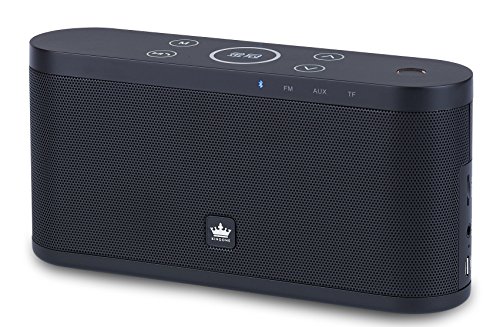
Image: The KINGONE K9 Super Bass Portable Bluetooth Speaker (left) shown next to its metallic-finish packaging (right).
Caratteristiche principali:
- Connettività Bluetooth 4.0: Supports A2DP, AVRCP, HFP, HSP profiles for stable wireless audio streaming.
- Supporto NFC: For quick and easy pairing with compatible devices.
- Molteplici modalità di riproduzione: Bluetooth, MicroSD card, and AUX input.
- Chiamate in vivavoce: Built-in microphone for answering phone calls.
- Controlli touch: Intuitive touch-sensitive buttons for volume, track navigation, and play/pause.
- Suono stereo potente: 2 x 5W output for a rich audio experience.
- Design portatile: Compact dimensions and a 2200mAh battery for extended use.
Controlli e funzioni
The speaker features touch-sensitive controls located on the top panel. Familiarize yourself with these controls for optimal use:
- Pulsante di accensione: Tenere premuto per 3 secondi per accendere/spegnere.
- Pulsante Play/Pausa: Tap to play or pause audio. During a call, tap to answer/end.
- Volume su (+): Tap to increase volume.
- Volume basso (-): Tap to decrease volume.
- Traccia successiva (>>): Tocca per passare alla traccia successiva.
- Traccia precedente (<<): Tocca per andare al brano precedente.
- Pulsante Modalità (M): Tap to switch between Bluetooth, MicroSD, and AUX input modes.
Impostare
1. Ricarica dell'altoparlante
- Collegare il cavo di ricarica Micro USB alla porta di ricarica dell'altoparlante.
- Connect the other end of the USB cable to a DC 5V USB power source (e.g., computer USB port, USB wall adapter).
- La spia di carica si illuminerà.
- La ricarica completa richiede in genere 4-5 ore. La spia luminosa cambierà colore o si spegnerà una volta completata la ricarica.
2. Accensione/Spegnimento
- Per accendere, tenere premuto il pulsante di accensione per circa 3 secondi, finché non si sente un segnale acustico.
- Per spegnere, tenere premuto il pulsante di accensione per circa 3 secondi, finché non si sente un segnale acustico.
3. Accoppiamento Bluetooth
- Assicurati che l'altoparlante sia acceso e in modalità Bluetooth (indicata da un LED blu lampeggiante). In caso contrario, premi il pulsante "M" (Modalità) per passare alla modalità Bluetooth.
- Abilita il Bluetooth sul tuo dispositivo mobile (smartphone, tablet, laptop).
- Cercare available Bluetooth devices. You should see "KINGONE K9" in the list.
- Select "KINGONE K9" to pair. Once paired, the speaker will emit an audible confirmation, and the blue LED will stop flashing and remain solid.
- L'altoparlante si riconnetterà automaticamente all'ultimo dispositivo associato quando viene acceso, se il Bluetooth del dispositivo è attivo e nel raggio d'azione.
4. NFC Pairing (for compatible devices)
- Assicurati che la tecnologia NFC sia abilitata sul tuo smartphone o tablet compatibile.
- Power on the KINGONE K9 speaker.
- Gently tap your NFC-enabled device against the NFC area on the speaker (refer to the speaker's diagram for exact location, usually marked with an NFC logo).
- Your device will prompt you to confirm the pairing. Accept the connection.
5. Collegamento ingresso AUX
- Collegare un'estremità del cavo audio da 3.5 mm alla porta AUX dell'altoparlante.
- Collegare l'altra estremità del cavo audio da 3.5 mm al jack delle cuffie o alla porta di uscita audio del dispositivo audio esterno.
- Premere il pulsante 'M' (Mode) sull'altoparlante per passare alla modalità AUX.
- Audio will now play through the speaker from your connected device. Control playback and volume from your external device.
6. Riproduzione della scheda MicroSD
- Inserire una scheda MicroSD (TF) con audio MP3 files into the MicroSD card slot on the speaker.
- Press the 'M' (Mode) button to switch to MicroSD card mode.
- L'altoparlante inizierà automaticamente a riprodurre l'audio files dalla carta.
- Use the speaker's touch controls for play/pause, next track, and previous track.
Istruzioni per l'uso
Controllo del volume
- Tap the 'Volume Up (+)' button to increase the volume.
- Tap the 'Volume Down (-)' button to decrease the volume.
Track Navigation (Bluetooth/MicroSD modes)
- Tap the 'Next Track (>>)' button to skip to the next song.
- Tap the 'Previous Track (<<)' button to go back to the beginning of the current song or to the previous song.
Chiamata a mani libere
- Quando arriva una chiamata mentre sei connesso tramite Bluetooth, l'altoparlante squilla.
- Tap the 'Play/Pause' button to answer the incoming call.
- Tap the 'Play/Pause' button again to end the call.
- To reject an incoming call, press and hold the 'Play/Pause' button for a few seconds.
Manutenzione
- Tenere l'altoparlante lontano da acqua, umidità e temperature estreme.
- Pulire l'altoparlante con un panno morbido e asciutto. Non utilizzare detergenti abrasivi o solventi.
- Evitare di far cadere l'altoparlante o di sottoporlo a forti urti.
- Quando non lo si utilizza per lunghi periodi, conservare l'altoparlante in un luogo fresco e asciutto e caricarlo periodicamente per preservare la salute della batteria.
Risoluzione dei problemi
- Nessun potere:
- Assicurarsi che l'altoparlante sia completamente carico.
- Controllare che il cavo di ricarica e l'adattatore di alimentazione non siano danneggiati.
- Nessun suono:
- Aumenta il volume sia dell'altoparlante che del dispositivo collegato.
- Ensure the speaker is in the correct input mode (Bluetooth, AUX, MicroSD).
- If using Bluetooth, ensure the device is properly paired and within the 10-meter operating range.
- If using AUX, ensure the 3.5mm cable is securely connected to both devices.
- Disconnessione Bluetooth:
- Avvicina il dispositivo all'altoparlante.
- Assicurati che non ci siano ostacoli tra l'altoparlante e il dispositivo.
- Disattiva e riattiva il Bluetooth sul tuo dispositivo, quindi prova a riassociarlo.
- I controlli non rispondono:
- Assicurarsi che l'altoparlante sia acceso.
- Try restarting the speaker.
Specifiche
| Modello | K9 |
| Versione Bluetooth | 4.0 |
| Bluetooth professionalefiles | A2DP, AVRCP, HFP, HSP |
| Campo di funzionamento | Fino a 10 metri (33 piedi) |
| Potenza di uscita | 2 x 5W (totale 10W) |
| Configurazione del canale | 2.0 stereofonico |
| Opzioni di input | Bluetooth, MicroSD (TF Card), AUX (3.5mm) |
| Capacità della batteria | 2200mAh |
| Ingresso di ricarica | CC 5V (Micro USB) |
| Tempo di ricarica | 4-5 ore |
| Dimensioni (L x P x A) | 22 cm x 12 cm x 15 cm (circa) |
| Peso | 1.5 kg (circa) |
| Metodo di controllo | Tocco |
| Caratteristiche speciali | NFC, Hands-free Calling, Portable |
Informazioni sulla sicurezza
- Do not expose the speaker to direct sunlight, heat sources, or open flames.
- Do not disassemble, repair, or modify the device yourself. This may void the warranty and cause damage.
- Tenere fuori dalla portata dei bambini.
- Smaltire il prodotto e la batteria in modo responsabile, nel rispetto delle normative locali.
- Avoid listening at high volumes for prolonged periods to prevent hearing damage.
Garanzia e supporto
Per informazioni sulla garanzia o assistenza tecnica, consultare la documentazione fornita al momento dell'acquisto o contattare il rivenditore. Conservare la prova d'acquisto per eventuali reclami in garanzia.