
SUDOTACK ST-800
Manuale utente del microfono a condensatore USB per podcast SUDOTACK
Model: ST-800 | Brand: SUDOTACK
1. Introduzione
The SUDOTACK ST-800 USB Condenser Podcast Microphone is designed for high-quality audio capture across various applications, including recording, streaming, gaming, voice-overs, and online meetings. Featuring a 192KHz/24bit professional sound chipset and a cardioid pickup pattern, it delivers clear, crisp sound while minimizing background noise. It offers plug-and-play simplicity with most operating systems, making it a versatile choice for content creators.
2. Cosa c'è nella scatola
Your SUDOTACK ST-800 microphone kit includes the following components:
- ST-800 Condenser Microphone
- Adjustable Boom Arm Stand
- Filtro pop
- Montaggio da Tavolo Clamp
- Supporto antiurto
- 8.2ft USB-B to USB Cable

Image: All components included in the SUDOTACK ST-800 microphone kit, laid out clearly.
3. Istruzioni per l'installazione
Follow these steps for quick and easy setup of your SUDOTACK ST-800 microphone:
- Fissare il supporto antiurto: Securely attach the microphone to the shock mount. The shock mount helps to isolate the microphone from physical vibrations, floor, and stand noise.
- Montare il braccio del braccio: Use the table mounting clamp to attach the adjustable boom arm stand to your desk or table. Ensure it is firmly secured to prevent movement.
- Attach Microphone to Boom Arm: Carefully screw the shock mount (with the microphone attached) onto the threaded end of the boom arm stand.
- Installare il filtro anti-pop: Attach the pop filter to the boom arm. Position it approximately 2-3 inches in front of the microphone to reduce plosive sounds (P's and B's).
- Collegare il cavo USB: Plug the USB-B end of the provided 8.2ft cable into the microphone's port and the USB-A end into an available USB port on your computer (PC, Laptop, PS4/5). The microphone is plug-and-play and typically requires no additional drivers.
- Posiziona il microfono: For optimal sound capture, ensure the side of the microphone with the SUDOTACK logo is facing you directly. This aligns with the cardioid pickup pattern, which is most sensitive to sound from the front.
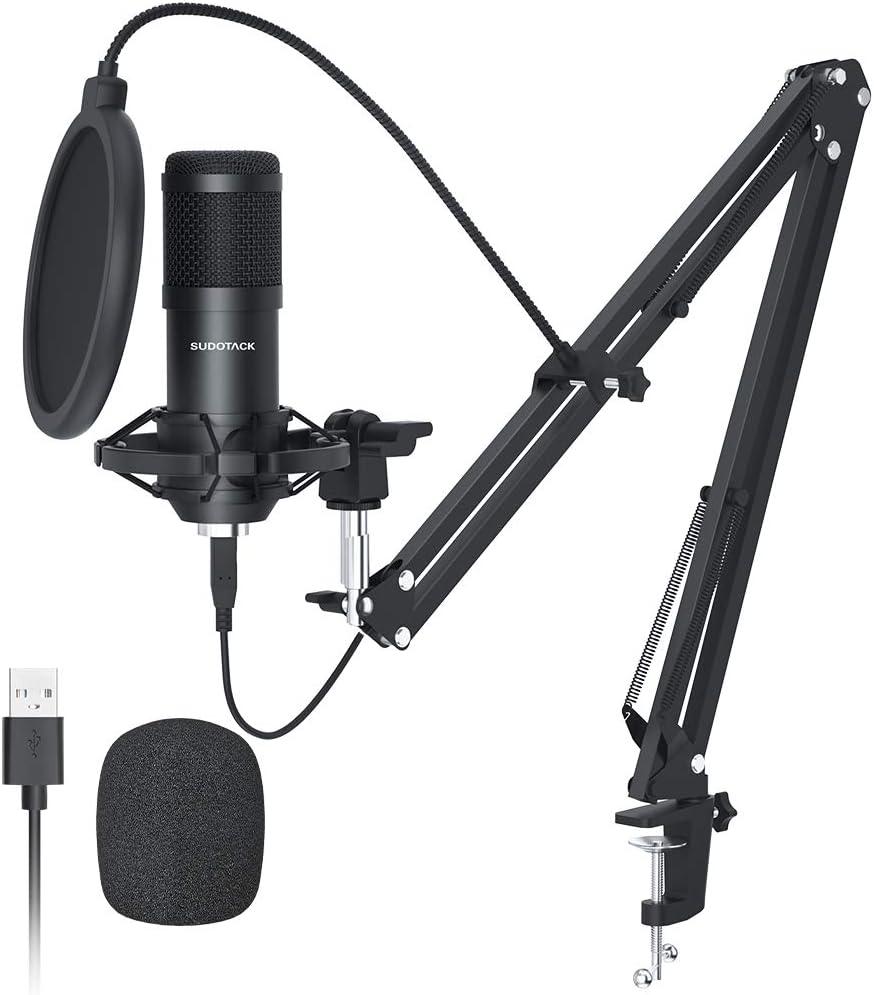
Image: The complete SUDOTACK ST-800 microphone kit, including the microphone, boom arm, pop filter, and USB cable, ready for setup.

Image: Illustration showing the correct (logo side facing user) and incorrect microphone positioning for optimal audio capture.

Image: The microphone connected via USB cable to a laptop, illustrating its plug-and-play functionality with various devices.
4. Istruzioni per l'uso
The SUDOTACK ST-800 microphone is designed for ease of use across a wide range of audio applications.
4.1. Sound Quality and Cardioid Pickup Pattern
The microphone features a 192KHz/24bit professional sound chipset and a 16mm diaphragm, ensuring high-resolution audio with clear and crisp sound reproduction. Its cardioid pickup pattern primarily captures sound from the front of the microphone, effectively minimizing unwanted background noise from the sides and rear. This makes it ideal for vocal recordings, streaming, and voice-overs where clear primary audio is crucial.

Immagine: Primo piano view of the microphone's 16mm diaphragm, highlighting its role in capturing pure and natural sound.

Image: Visual representation of the built-in professional sound chipset, emphasizing high sampling rate and low noise.
4.2. Compatibilità
The ST-800 is compatible with most mainstream operating systems, including Windows and Mac OS. It works seamlessly with PC, desktop computers, laptops, and PlayStation 4/5 consoles. Please note that this microphone is not compatible with XBOX.
4.3. Applicazioni consigliate
This microphone is suitable for a variety of audio pursuits, including:
- Podcasting
- Streaming (Twitch, YouTube)
- Video di YouTube
- Produzione musicale
- Registrazione
- Voice Acting
- Gioco d'azzardo
- Online Meetings (Zoom, Skype, Discord)

Image: Icons representing various platforms and applications like Twitch, Zoom, Audacity, YouTube, and Skype, indicating the microphone's broad utility.
5. Manutenzione
Proper care and maintenance will extend the lifespan and performance of your microphone.
- Pulizia: Use a soft, dry cloth to wipe down the microphone body and stand. Avoid using liquid cleaners or abrasive materials, which can damage the finish or internal components.
- Magazzinaggio: When not in use, store the microphone in a clean, dry place away from extreme temperatures and humidity. Consider disassembling the boom arm for compact storage if needed.
- Gestione: Handle the microphone and its components with care. Avoid dropping or subjecting them to strong impacts, as this can affect performance and durability.
6. Risoluzione Dei Problemi
If you encounter issues with your SUDOTACK ST-800 microphone, refer to the following common problems and solutions:
6.1. Nessuna uscita audio
- Controllare le connessioni: Ensure the USB cable is securely plugged into both the microphone and your computer's USB port. Try a different USB port if necessary.
- Verify Computer Settings: On your computer, go to your sound settings (e.g., Windows: Sound Control Panel > Recording tab; Mac: System Preferences > Sound > Input). Make sure the SUDOTACK microphone is selected as the default input device and that its volume is not muted or set too low.
- Impostazioni applicazione: If using specific software (e.g., OBS, Zoom, Audacity), check the audio input settings within that application to ensure the SUDOTACK microphone is selected.
6.2. Suono distorto o poco chiaro
- Posizionamento del microfono: Ensure the microphone's logo side is facing you directly. The cardioid pattern is directional, and improper positioning can lead to muffled sound.
- Distance from Mouth: Maintain an optimal distance (typically 6-12 inches) from the microphone. Being too close can cause distortion, while being too far can result in low volume and background noise.
- Utilizzo del filtro anti-pop: Ensure the pop filter is correctly positioned to reduce plosives (harsh 'P' and 'B' sounds).
- Rumore ambientale: Minimize background noise in your recording environment. The cardioid pattern helps, but it cannot eliminate all external sounds.
- Livello di ingresso: Adjust the microphone's input level in your computer's sound settings or recording software. Too high a level can cause clipping and distortion.
6.3. Problemi di incompatibilità
- Versione XBOX: As stated, the SUDOTACK ST-800 is not compatible with XBOX consoles.
- Altri dispositivi: Ensure your device supports USB audio input. While compatible with most PCs, laptops, and PS4/5, some older or specialized devices may not support it.
7. Specifiche
| Caratteristica | Specificazione |
|---|---|
| Marca | SUDOTACK |
| Numero di modello | ST-800 |
| Tecnologia di connettività | USB |
| Fattore di forma del microfono | Diaframma |
| Modello polare | Unidirezionale (cardioide) |
| Sensibilità Audio | 32 dB |
| Signal-to-Noise Ratio | 78 dB |
| Gamma di frequenza | 0.03 kHz - 16 kHz |
| Piattaforma hardware | PC, Computer, Laptop, PS4/5 |
| Materiale | Metallo |
| Lunghezza del cavo | 8.2 piedi |
| Dimensioni del prodotto | 17 x 8 x 3 pollici |
| Peso dell'articolo | 2.79 libbre |
8. Garanzia e supporto
SUDOTACK products are manufactured with a commitment to quality. For specific warranty details and support inquiries, please refer to the warranty card included with your product or visit the official SUDOTACK store page on Amazon.
This product is also part of the 'Verified by Transparency' program, ensuring authenticity.
Per ulteriore assistenza, puoi visitare il SUDOTACK Store on Amazon.
Ask a question about this manual
Ask about setup, troubleshooting, compatibility, parts, safety, or missing instructions. Manuals+ will review the question and use this page’s manual context to help answer it.