Introduzione
This manual provides detailed instructions for the installation, operation, and maintenance of your MYPIN CE0318-26 Dual Dash Cam. This device is designed to record high-definition video from both the front and rear of your vehicle, offering enhanced security and documentation for your journeys. Please read this manual thoroughly before use to ensure proper functionality and safety.
Cosa c'è nella scatola
Verifica che tutti gli articoli elencati di seguito siano inclusi nel tuo pacchetto:
- MYPIN CE0318-26 Dual Dash Cam Unit
- Caricabatterie per auto
- Supporto di aspirazione
- Fotocamera posteriore con cavo
- Cavo dati USB
- 3M VHB Adhesive Pads (2x)
- Manuale d'uso
Descrizione del video: This video demonstrates the unboxing of the MYPIN CE0318-26 Dual Dash Cam. It shows the main camera unit, the suction mount, the rear camera with its connecting cable, the car charger, and the user manual. The video highlights the various components included in the package.
Prodotto finitoview
Prendi familiarità con i componenti principali e i comandi della tua dash cam.
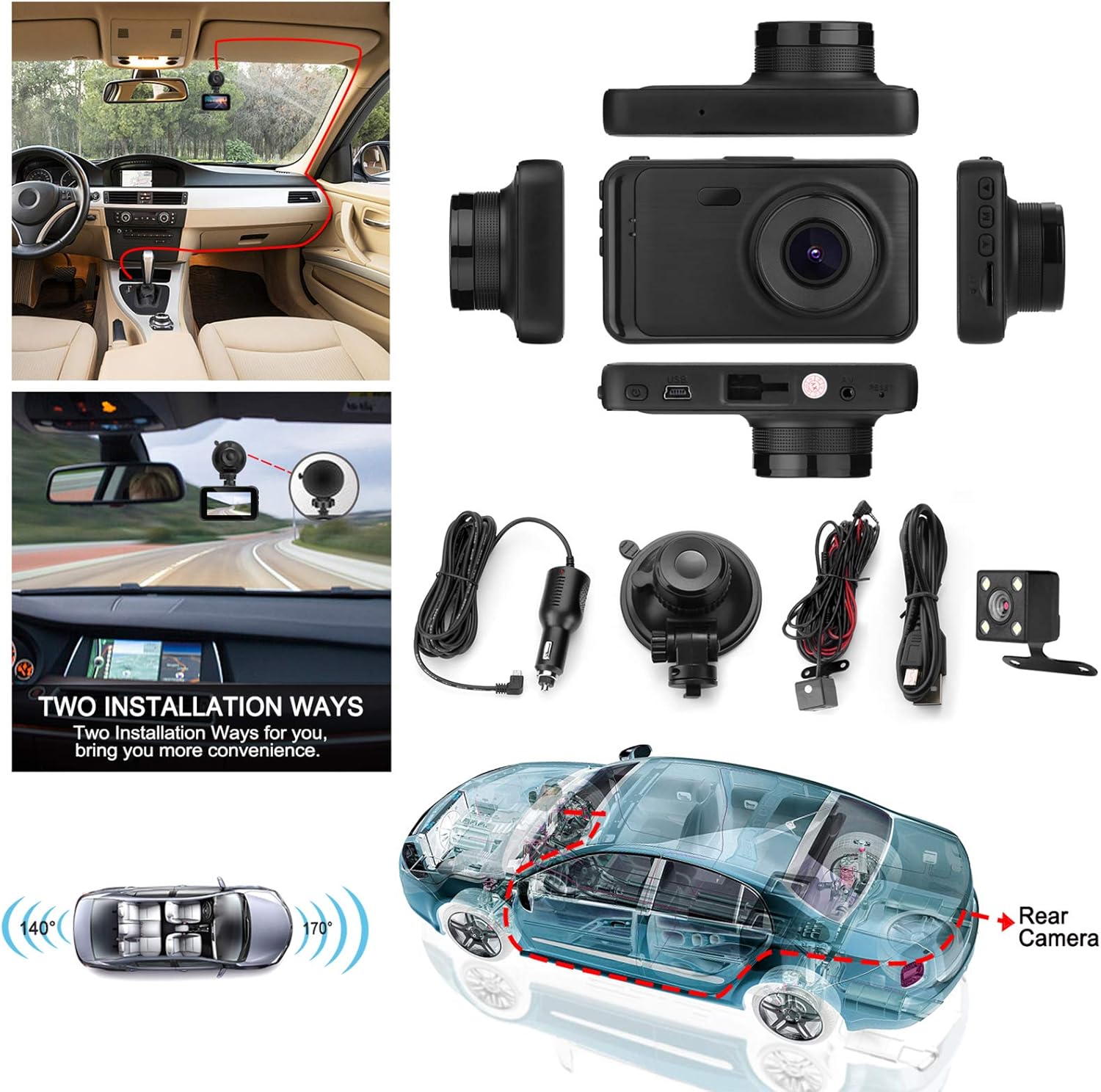
Descrizione dell'immagine: Un overhead view displaying the MYPIN CE0318-26 Dual Dash Cam unit along with its accessories, including the car charger, suction mount, rear camera, and cables. This image illustrates the complete package contents and the camera's physical design.
Funzioni dei pulsanti
The user manual includes a diagram detailing the buttons and ports:
- DIREZIONI: Switches between video recording, still photo, and playback modes.
- SU: Navigates up in menus or zooms in during photo mode.
- OK/REC: Confirms selections, starts/stops recording, or takes a photo.
- GIÙ: Navigates down in menus or zooms out during photo mode.
- MENU: Accede alle impostazioni di sistema.
- Pulsante di accensione: Long press to turn on/off. Short press to turn screen on/off.
Impostare
1. Installing the Micro SD Card
- Assicurarsi che la dash cam sia spenta.
- Insert a Class 10 or higher Micro SD card (up to 32GB, not included) into the Micro SD card slot until it clicks into place.
- Per rimuoverla, spingere delicatamente la scheda finché non scatta fuori.
2. Montaggio della Dash Cam
There are two primary ways to mount the dash cam:
- Supporto a ventosa: Attach the suction cup to a clean, smooth area on your windshield, ensuring it does not obstruct your view. Secure the camera to the mount.
- Supporto adesivo: Use the provided 3M VHB adhesive pads to attach the camera mount directly to your windshield. Ensure the surface is clean and dry for optimal adhesion.
Descrizione dell'immagine: This image illustrates two common installation methods for the dash cam: using a suction cup mount on the windshield and a more permanent adhesive mount. It also shows the routing of the rear camera cable through the vehicle.
3. Collegamento della telecamera posteriore
Connect the rear camera to the main unit using the provided cable. Route the cable discreetly along the vehicle's interior trim to the rear of the car. Mount the rear camera on the rear windshield or license plate area, ensuring a clear view.
4. Collegamento elettrico
Plug the car charger into your vehicle's cigarette lighter socket and connect the mini USB end to the dash cam's USB port. The camera will automatically power on and begin recording when the vehicle starts.
Istruzioni per l'uso
Registrazione video
The dash cam automatically starts recording when powered on. To manually start/stop recording, press the OK/REC button. The 3-inch LCD screen provides a real-time view delle telecamere anteriore e posteriore.

Descrizione dell'immagine: A close-up of the dash cam's 3-inch LCD screen, showing a clear, real-time view of a road with traffic during sunset. This highlights the display quality and user interface.
170 ° Lente grandangolare
The front camera features a 170-degree wide-angle lens, capturing a broad view of the road and minimizing blind spots. This allows for comprehensive coverage of up to three lanes of traffic.

Descrizione dell'immagine: A diagram illustrating the 170-degree wide-angle capability of the front camera, showing how it effectively captures three lanes of traffic from an overhead perspective.
Registrazione in loop
When the memory card is full, the loop recording function automatically overwrites the oldest unlocked video fileper garantire una registrazione continua senza intervento manuale. Importante footagpuò essere bloccato per evitare la sovrascrittura.
Sensore G (blocco di emergenza)
The built-in G-sensor detects sudden movements or impacts (e.g., collisions). When triggered, it automatically locks the current video file, protecting it from being overwritten by loop recording. This ensures critical accident footage è conservato.
Monitor di parcheggio
With the parking monitor feature enabled, the dash cam can act as a 24-hour security camera. If a vibration or impact is detected while the vehicle is parked and the engine is off, the camera will automatically turn on and record a short video. Ensure the dash cam's internal battery has sufficient charge for this function.

Descrizione dell'immagine: An illustration demonstrating the parking monitor feature. It shows a car parked, with icons indicating detection of a potential robbery or parking incident, triggering a 30-second recording.
Night Vision and WDR (Wide Dynamic Range)
The dash cam incorporates IR cut technology for automatic switching to clear night vision mode in low-light conditions. Wide Dynamic Range (WDR) technology enhances image quality by balancing bright and dark areas, providing clearer video footage both day and night.

Descrizione dell'immagine: A split image comparing the dash cam's performance in daylight versus night conditions. It shows clear license plate readability in both scenarios, demonstrating effective night vision capabilities.
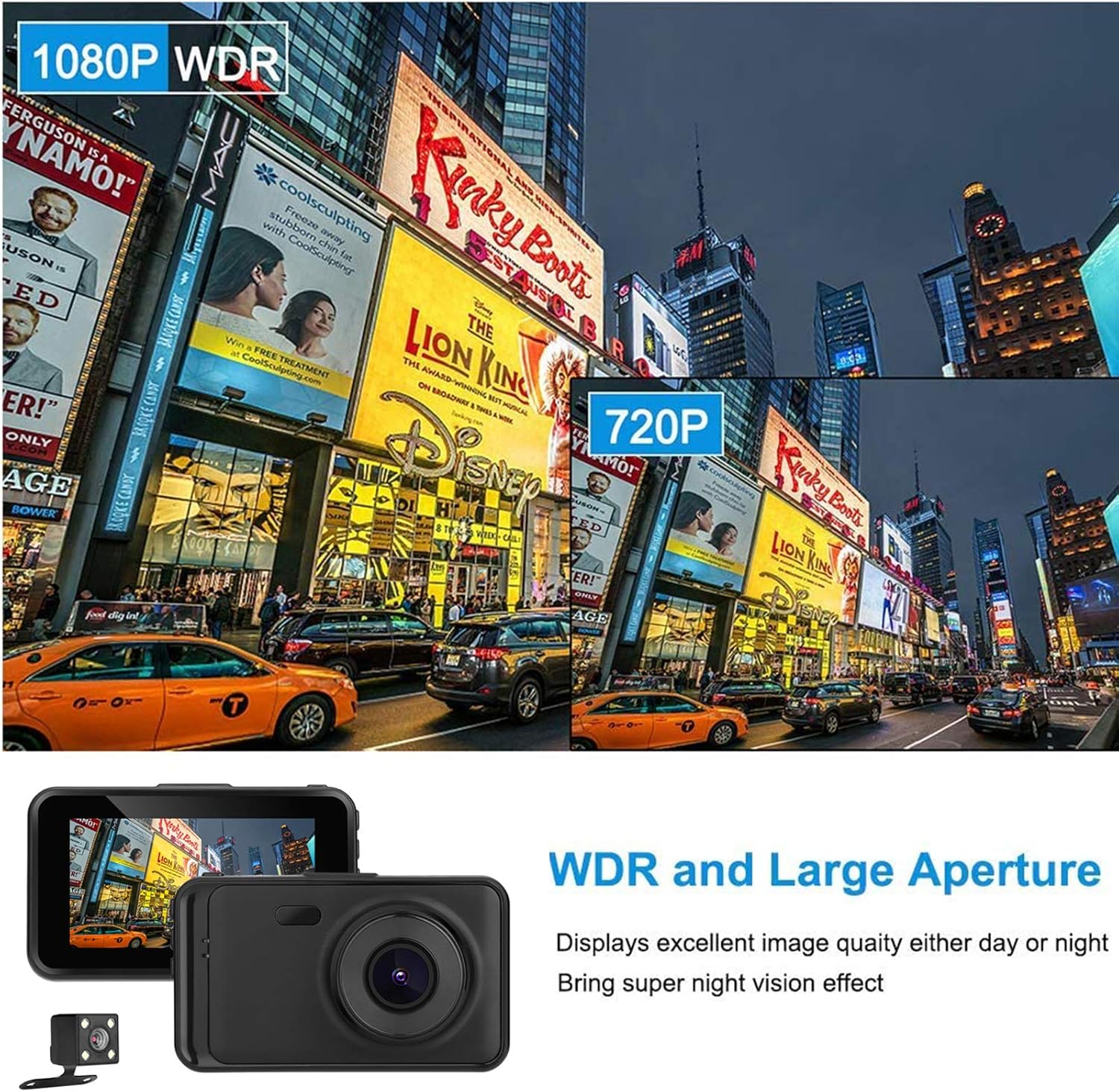
Descrizione dell'immagine: An image illustrating the effect of WDR (Wide Dynamic Range) technology. It shows a scene with varying light levels, demonstrating how WDR improves visibility in both bright and dark areas of the image.
Descrizione del video: This video showcases actual footage from the MYPIN CE0318-26 Dual Dash Cam. It includes a segment demonstrating daylight recording quality (starting around 0:11) and another segment showing night recording quality (starting around 1:56), highlighting the camera's performance in different lighting conditions.
Manutenzione
- Pulizia: Utilizzare un panno morbido e asciutto per pulire l'obiettivo e lo schermo della fotocamera. Evitare detergenti abrasivi o solventi.
- Magazzinaggio: If not in use for an extended period, store the dash cam in a cool, dry place away from direct sunlight.
- Aggiornamenti del firmware: Controllare il produttore webperiodicamente il sito per verificare la disponibilità di eventuali aggiornamenti del firmware, al fine di garantire prestazioni ottimali.
- Scheda di memoria: Format the Micro SD card regularly (e.g., once a month) to prevent data corruption and ensure smooth operation.
Risoluzione dei problemi
- La fotocamera non si accende: Ensure the car charger is properly connected and the vehicle's power outlet is functioning. Check the dash cam's internal battery charge.
- La registrazione si interrompe inaspettatamente: The Micro SD card may be full or corrupted. Format the card or replace it with a new Class 10 or higher card.
- Scarsa qualità video: Pulisci l'obiettivo della fotocamera. Assicurati che la pellicola protettiva sia stata rimossa dall'obiettivo. Controlla le impostazioni di risoluzione video.
- La telecamera posteriore non funziona: Verify the rear camera cable is securely connected to both the main unit and the rear camera.
- Dash cam freezes: Press the reset button (if available) or disconnect and reconnect the power supply.
Specifiche
| Caratteristica | Dettaglio |
|---|---|
| Numero di modello | CE0318-26 |
| Risoluzione di acquisizione video | Formato: 1080p |
| Dimensioni dello schermo | 3 Inches (Note: Product description states 3", specifications state 4". Using 3" as per product title.) |
| Grandangolo | 170° |
| Caratteristiche speciali | Loop Recording, Night Vision, G-Sensor, Parking Monitor, WDR |
| Tecnologia di connettività | USB |
| Tipo di montaggio | Supporto di aspirazione |
| Metodo di controllo | Pulsanti |
| Peso dell'articolo | 13.1 once |
| Dimensioni del pacco | 5.59 x 4.57 x 3.5 pollici |
| Batterie | 1 batterie ai polimeri di litio necessarie (incluse) |
Garanzia e supporto
For warranty information, technical support, or service inquiries, please refer to the contact details provided on the product packaging or the official MYPIN websito. Conservare la ricevuta d'acquisto come prova d'acquisto per eventuali reclami in garanzia.