
1. Introduzione
This manual provides instructions for the Macally BTDYNAMOUSE Wireless Bluetooth Mouse. This device is designed for comfortable and quiet operation across various platforms.
The Macally BTDYNAMOUSE is a slim, ambidextrous Bluetooth mouse featuring silent click buttons and adjustable DPI settings. It connects wirelessly to compatible devices, offering a clutter-free workspace.
2. Cosa c'è nella scatola
- Macally BTDYNAMOUSE Wireless Bluetooth Mouse
- 2 batterie AAA
3. Caratteristiche del prodotto
- DPI regolabile: Switch between 800, 1200, and 1600 DPI for precise cursor control.
- Pulsanti silenziosi: Designed for quiet operation, reducing click noise by 90% compared to traditional mice.
- Slim and Ambidextrous Design: Comfortable for both left and right-handed users, with a low-profile Fattore di forma.
- Connettività senza fili Bluetooth: Connects wirelessly up to 10 meters (30 feet).
- Batteria a lunga durata: Two AAA batteries provide up to 3 months of use (based on 8 hours daily use). Battery life may vary.
- Compatibilità: Funziona con i sistemi operativi Windows e macOS.
4. Istruzioni per l'installazione
4.1. Installare le batterie
1. Locate the battery compartment on the underside of the mouse.
2. Aprire il coperchio del vano batteria.
3. Insert two AAA batteries, ensuring correct polarity (+/-).
4. Chiudere il coperchio del vano batterie.

Figura 1: Installazione della batteria
4.2. Accoppiamento Bluetooth
1. Turn on the mouse using the ON/OFF switch located on the underside.
2. Press and hold the Bluetooth pairing button (usually a small button near the ON/OFF switch or sensor) for 2-3 seconds until the LED indicator starts blinking, indicating it's in pairing mode.
3. On your computer or device (Mac, Windows, iPad, Tablet):
- Vai alle impostazioni Bluetooth.
- Cercare nuovi dispositivi.
- Select "Macally BTDYNAMOUSE" from the list of available devices.
- Seguire le istruzioni visualizzate sullo schermo per completare il processo di associazione.
Once successfully paired, the LED indicator on the mouse will stop blinking and remain solid or turn off, depending on the mouse model.

Figure 2: Mouse with Laptop, indicating multi-device compatibility
5. Istruzioni per l'uso
The Macally BTDYNAMOUSE features a standard 3-button layout with a scroll wheel for intuitive navigation.
- Clic sinistro: Primary action, typically used for selecting items or opening links.
- Clic destro: Secondary action, typically used to open context menus.
- Rotella di scorrimento: Utilizzato per lo scorrimento verticale attraverso i documenti e web pages. The scroll wheel can also be pressed for a middle-click action, depending on software configuration.

Figura 3: Design ergonomico per un utilizzo confortevole

Figure 4: Quiet Click Buttons in Action
6. Regolazione DPI
The mouse features a DPI switch button to adjust cursor sensitivity. This allows you to fine-tune the mouse's responsiveness to your preference.
To change the DPI setting, press the small button located behind the scroll wheel. Each press cycles through the available DPI levels: 800, 1200, and 1600.
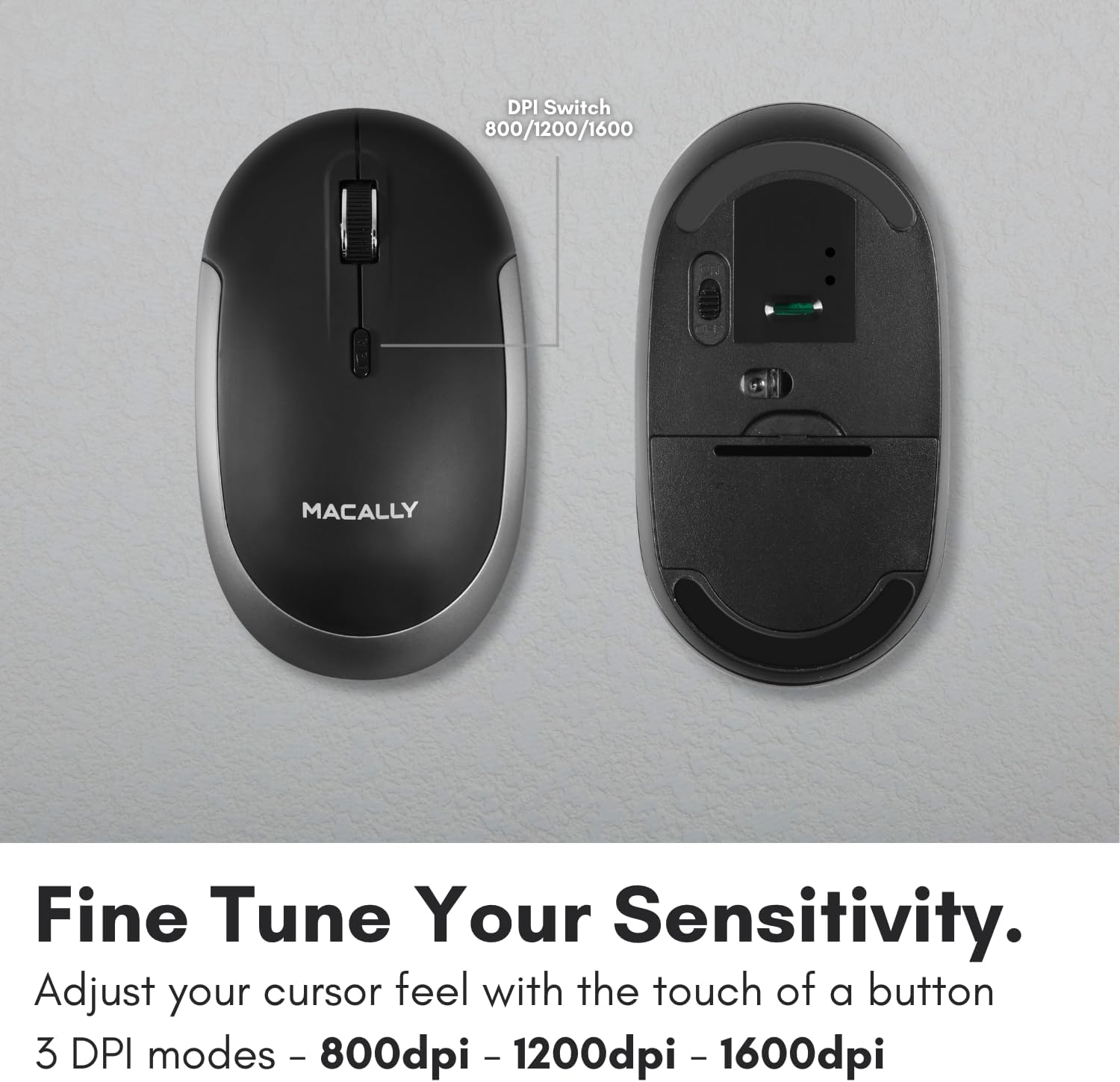
Figure 5: DPI Switch Location
7. Informazioni sulla batteria
The Macally BTDYNAMOUSE uses two AAA batteries. For optimal performance and battery life, it is recommended to use high-quality alkaline batteries.
- Tipo di batteria: 2 batterie AAA
- Durata stimata della batteria: Up to 3 months (based on 8 hours of daily use). Actual battery life may vary based on usage patterns and computing conditions.
When the battery level is low, the mouse's LED indicator may flash or change color to alert you. Replace batteries promptly to ensure uninterrupted use.
8. Manutenzione
To ensure the longevity and optimal performance of your Macally BTDYNAMOUSE, follow these maintenance guidelines:
- Pulizia: Utilizzare un panno morbido e asciutto per pulire il mouse. Per lo sporco ostinato, un panno leggermenteamp È possibile utilizzare un panno, ma assicurarsi che non penetri umidità nel dispositivo.
- Evitare i liquidi: Non esporre il mouse a liquidi o a umidità eccessiva.
- Magazzinaggio: Quando non si utilizza il mouse per lunghi periodi, conservarlo in un luogo fresco e asciutto.
- Sostituzione della batteria: Replace batteries as needed. Dispose of old batteries according to local regulations.
9. Risoluzione Dei Problemi
| Problema | Possibile causa | Soluzione |
|---|---|---|
| Il mouse non si connette tramite Bluetooth | Mouse is off or batteries are low. Not in pairing mode. Device's Bluetooth is off. | Ensure mouse is on and batteries are fresh. Put mouse in pairing mode. Check device's Bluetooth settings. Try re-pairing. |
| Cursor is erratic or unresponsive | Dirty optical sensor. Mouse used on unsuitable surface. Low battery. | Clean the optical sensor. Use a mouse pad or a smooth, non-reflective surface. Replace batteries. |
| Mouse clicks are not silent | This mouse is designed for 90% noise reduction, not complete silence. | The mouse provides a significantly quieter click than standard mice, but a faint sound may still be audible. |
| Durata breve della batteria | Frequent usage. Low-quality batteries. | Use high-quality alkaline batteries. Turn off the mouse when not in use for extended periods. |
10. Specifiche
| Caratteristica | Dettaglio |
|---|---|
| Marca | mally |
| Nome del modello | BTDYNAMOUSE |
| Tecnologia di connettività | Bluetooth, senza fili |
| Tecnologia di rilevamento del movimento | Ottico |
| Impostazioni DPI | 800/1200/1600 |
| Pulsanti | 4 (Sinistra, Destra, Scorrimento, Cambio DPI) |
| Orientamento della mano | Ambidestro |
| Dispositivi compatibili | Laptop, Personal Computer (Windows, macOS) |
| wireless Range | Fino a 10 m (30 piedi) |
| Tipo di batteria | 2 x AAA (incluse) |
| Durata della batteria | Fino a 3 mesi (stimato) |
| Peso dell'articolo | 73 grammi |
| Materiale | Silicone (Enclosure) |
| Colore | Nero |
11. Video ufficiali dei prodotti
11.1. Bluetooth Optical Silent Click Mouse - White
Questo video fornisce un overview of the Macally BTDYNAMOUSE, highlighting its slim design, ambidextrous body, simple 3-button layout, 90% noise reduction, and easy DPI adjustability (800/1200/1600).
11.2. Macally Wireless Bluetooth Mouse for Windows PC and Mac
This video demonstrates the Macally BTDYNAMOUSE's features, including its Bluetooth wireless technology, comfortable ambidextrous design, simple 3-button/scroll wheel layout, silent click buttons, and easy DPI adjustability.
12. Garanzia e supporto
Per informazioni sulla garanzia e supporto tecnico, fare riferimento al sito ufficiale Macally websito o contattare il servizio clienti. Conservare la ricevuta d'acquisto per eventuali reclami in garanzia.