
1. Introduzione
The OWON B41T+ is a high-precision 4 1/2 digit (21999 counts) True RMS digital multimeter designed for accurate electrical measurements. It features Bluetooth connectivity, allowing seamless integration with Android (4.3+) and iOS (7.0+) smartphones and tablets. This device supports various measurement functions including voltage, current, resistance, capacitance, frequency, duty cycle, and temperature. Advanced features include standalone data logging, graphical display of measurements on connected smart devices, and Japanese voice output for readings.
2. Informazioni sulla sicurezza
Please read and understand all safety instructions before operating the OWON B41T+ Digital Multimeter. Failure to follow these instructions may result in electric shock, fire, or damage to the device.
- Prima di collegare i puntali di prova a un circuito, assicurarsi sempre che il multimetro sia nella modalità di funzionamento corretta.
- Non superare i limiti massimi di input per nessun intervallo di misurazione.
- Controllare i puntali per verificare la presenza di eventuali danni prima di ogni utilizzo. Sostituire immediatamente i puntali danneggiati.
- Evitare di utilizzare il multimetro in ambienti umidi o durante temporali.
- Scollegare sempre l'alimentazione dal circuito sottoposto a test prima di misurare la resistenza, la capacità o la continuità.
- Prestare attenzione quando si lavora con voltagsuperiori a 30 V CA RMS, 42 V di picco o 60 V CC, poiché rappresentano un rischio di scossa elettrica.
3. Prodotto finitoview e componenti
The OWON B41T+ Digital Multimeter is designed for ease of use and durability. Below are the main components and included accessories.
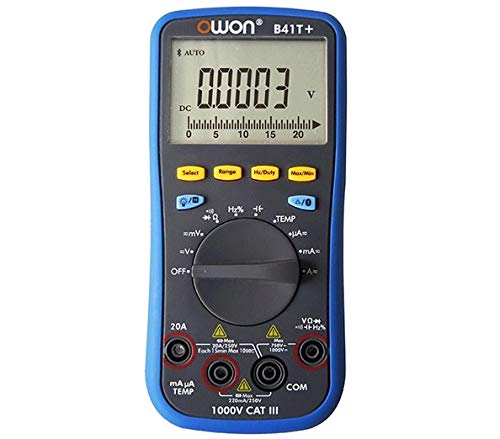
Figura 3.1: Davanti e di lato view of the OWON B41T+ Digital Multimeter, showing the display, function dial, and input jacks.
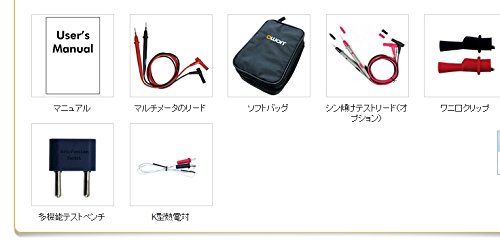
Figura 3.2: Included accessories: User's Manual, Multimeter test leads, Soft bag, K-type thermocouple (temperature probe), and a multi-function test bench adapter.
4. Impostazione
4.1 Installazione della batteria
The OWON B41T+ is powered by batteries. To install or replace batteries:
- Assicurarsi che il multimetro sia spento.
- Individuare il coperchio del vano batteria sul retro del dispositivo.
- Utilizzare un cacciavite per aprire il vano batteria.
- Inserire le batterie necessarie, rispettando la polarità corretta.
- Chiudere saldamente il coperchio del vano batterie.
4.2 Installazione dell'app e associazione Bluetooth
To utilize the smart device connectivity features, download the OWON multimeter application from your device's app store (compatible with Android 4.3+ and iOS 7.0+).
- Download and install the official OWON multimeter app on your smartphone or tablet.
- Turn on the OWON B41T+ multimeter.
- Abilita il Bluetooth sul tuo dispositivo smart.
- Open the OWON app and follow the on-screen instructions to search for and pair with your B41T+ device. The Bluetooth icon on the multimeter display will indicate a successful connection.
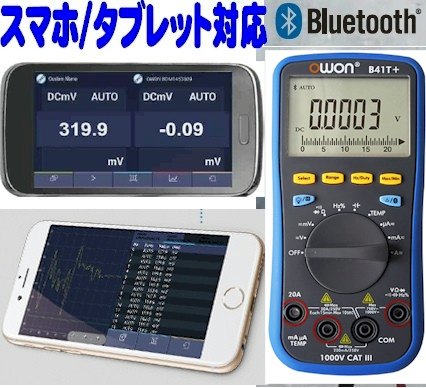
Figura 4.1: The OWON B41T+ multimeter displaying a measurement, with a smartphone screen showing the corresponding app interface.
5. Istruzioni per l'uso
The OWON B41T+ offers a wide range of measurement functions. Use the central rotary dial to select the desired measurement mode.
5.1 Misurazioni di base
To perform a basic measurement:
- Select the appropriate function (e.g., V for voltage, A for current, Ω for resistance) using the rotary dial.
- Connect the test leads to the correct input jacks on the multimeter (e.g., COM and VΩmA for voltage/resistance, COM and 20A or mAμA for current).
- Collegare i puntali di prova al circuito o al componente in prova.
- Read the measurement value on the multimeter's display.
5.2 Advanced Features with Bluetooth Connectivity
When connected to a smartphone or tablet via Bluetooth, the OWON B41T+ provides enhanced functionality:
- Registrazione dei dati: Record measurement data over time directly to your smart device.
- Visualizzazione grafica: View real-time measurement trends and historical data in graphical format.
- Uscita vocale: The device can announce measurement readings in Japanese, allowing for hands-free operation.
- Gestione dei dati: Save, store, print, and email measurement data (CSV format) directly from the app.
- Connessione multi-dispositivo: Connect two OWON B41T+ units simultaneously to your smart device to monitor two different parameters (e.g., voltage and current, or voltage and resistance) on a dual-screen display.
- Funzionamento a distanza: Utilize remote desktop applications like TeamViewer to control the connected smartphone/tablet from anywhere, enabling remote monitoring and operation of the multimeter.

Figura 5.1: Illustration of advanced features including simultaneous measurement with two multimeters, data logging, graphical display, and voice output.
6. Specifiche
The following table details the technical specifications of the OWON B41T+ Digital Multimeter.

Figura 6.1: Detailed specifications including measurement ranges, resolution, and accuracy.
| Parametro | Allineare | Risoluzione | Precisione |
|---|---|---|---|
| Volume DCtage(V) | 220 mV, 2.2 V, 22 V, 220 V, 1000 V | 0.01mV, 0.1mV, 1mV, 10mV, 0.1V | ±(0.05%+10dig) a ±(0.8%+25dig) |
| Volume ACtage(V) | 220 mV, 2.2 V, 22 V, 220 V, 750 V | 0.01mV, 0.1mV, 1mV, 10mV, 0.1V | ±(1.0%+25cifra) |
| Corrente CC (A) | 220μA, 2200μA, 22mA, 220mA, 20A | 0.01μA, 0.1μA, 1μA, 10μA, 1mA | ±(0.8%+10dig) a ±(2.0%+25dig) |
| Corrente AC (A) | 220μA, 2200μA, 22mA, 220mA, 20A | 0.01μA, 0.1μA, 1μA, 10μA, 1mA | ±(1.5%+25dig) a ±(2.5%+35dig) |
| Resistenza (Ω) | 220Ω, 2.2kΩ, 22kΩ, 220kΩ, 2.2MΩ, 22MΩ, 220MΩ | 0.01Ω, 0.1Ω, 1Ω, 10Ω, 100Ω, 1kΩ, 10kΩ | ±(0.4%+5dig) a ±(5%+10dig) |
| Capacità (F) | 2.2nF, 22nF, 220nF, 2.2μF, 22μF, 220μF, 2.2mF, 22mF | 1pF, 10pF, 100pF, 1nF, 10nF, 100nF, 1μF, 10μF | ±(2.5%+15cifra) |
| Frequenza (Hz) | 220Hz, 2.2kHz, 22kHz, 220kHz, 2.2MHz, 22MHz | 0.01Hz, 0.1Hz, 1Hz, 10Hz, 100Hz, 1kHz | ±(0.1%+4cifra) |
| Ciclo di lavoro | 0.1% - 99.9% (>1kHz) | 0.1% | ±(1.2%+3cifra) |
| Temperatura (°C / °F) | da -50°C a 400°C, da -58°F a 752°F | 0.1°C, 0.1°F | ±(2.5%+3dig) a ±(1.2%+8dig) |
| Conteggio massimo | 21999 | ||
| Visualizza Sampmolva | 3 volte / secondo | ||
| Auto Range | SÌ | ||
| Registratore dati | 10 hours, 10,000 points | ||
| Vero RMS | SÌ | ||
| Retroilluminazione | SÌ | ||
| Test diodi | SÌ | ||
| Test di continuità | SÌ | ||
| Protezione da sovracorrente | CAT III 1000 V, CAT IV 600 V | ||
| Fonte di alimentazione | 3V (1.5V x 2) AA Alkaline Batteries | ||
| Bluetooth | Android 4.3 +, iOS 7.0 + | ||
| Dimensioni | Dimensioni: 85 mm x 185 mm x 30 mm | ||
| Peso | Circa 320 g | ||
7. Manutenzione
Proper maintenance ensures the longevity and accuracy of your OWON B41T+ Digital Multimeter.
- Pulizia: Pulire il dispositivo con un panno asciutto e morbido. Non utilizzare detergenti abrasivi o solventi.
- Sostituzione della batteria: Replace batteries promptly when the low battery indicator appears on the display. Refer to Section 4.1 for battery installation instructions.
- Magazzinaggio: Conservare il multimetro in un luogo fresco e asciutto, lontano dalla luce solare diretta e da temperature estreme. Se lo si conserva per periodi prolungati, rimuovere le batterie per evitare perdite.
- Puntali di prova: Regularly inspect test leads for any signs of wear, cuts, or damage. Replace them if necessary to ensure safe and accurate measurements.
8. Risoluzione Dei Problemi
If you encounter issues with your OWON B41T+ Digital Multimeter, refer to the following common problems and solutions:
| Problema | Possibile causa | Soluzione |
|---|---|---|
| Il dispositivo non si accende. | Batterie scariche o installate in modo errato. | Sostituire le batterie assicurandosi che la polarità sia corretta. |
| Nessuna lettura o 'OL' (sovraccarico) visualizzato. | Funzione selezionata non corretta, circuito aperto o misurazione fuori portata. | Select the correct function. Check for proper circuit connection. Switch to a higher range if available. |
| La connessione Bluetooth non riesce. | Bluetooth not enabled, app not running, or device out of range. | Ensure Bluetooth is on for both devices. Restart the app. Move devices closer. Check app compatibility with OS version. |
| Letture imprecise. | Damaged test leads, environmental interference, or incorrect measurement technique. | Inspect and replace test leads if damaged. Ensure proper connection. Avoid strong electromagnetic fields. |
9. Garanzia e supporto
For warranty information and technical support, please refer to the documentation included with your purchase or visit the official OWON website. If you require further assistance, contact OWON customer service through their designated support channels.