
1. Introduzione
The Samson AirLine 99m AH9 Headset Wireless System is a compact and versatile wireless microphone solution designed for active performers, presenters, and educators. This system provides high-definition audio transmission without the need for cables or belt packs, offering freedom of movement and ease of use. It operates on a frequency-agile UHF band, ensuring reliable performance across 100 selectable channels.
The system comprises three main components:
- AH9 Micro Transmitter: A lightweight, rechargeable transmitter integrated into the headset.
- AR99m Micro Receiver: A compact receiver with multiple output options for versatile connectivity.
- DE10x Headset Microphone: Un low-profile, comfortable headset microphone designed for clear vocal reproduction.
2. Componenti del sistema oltreview

Figura 2.1: The complete Samson AirLine 99m AH9 Headset Wireless System, showing the AR99m receiver, AH9 micro transmitter, and DE10x headset microphone.

Figura 2.2: Avvicinamento view of the AH9 micro transmitter integrated with the DE10x headset microphone. The green light indicates power status.

Figura 2.3: Superiore view of the AR99m micro receiver, showing the volume knob, SET button, channel display, and status indicators (READY, IR, PEAK).
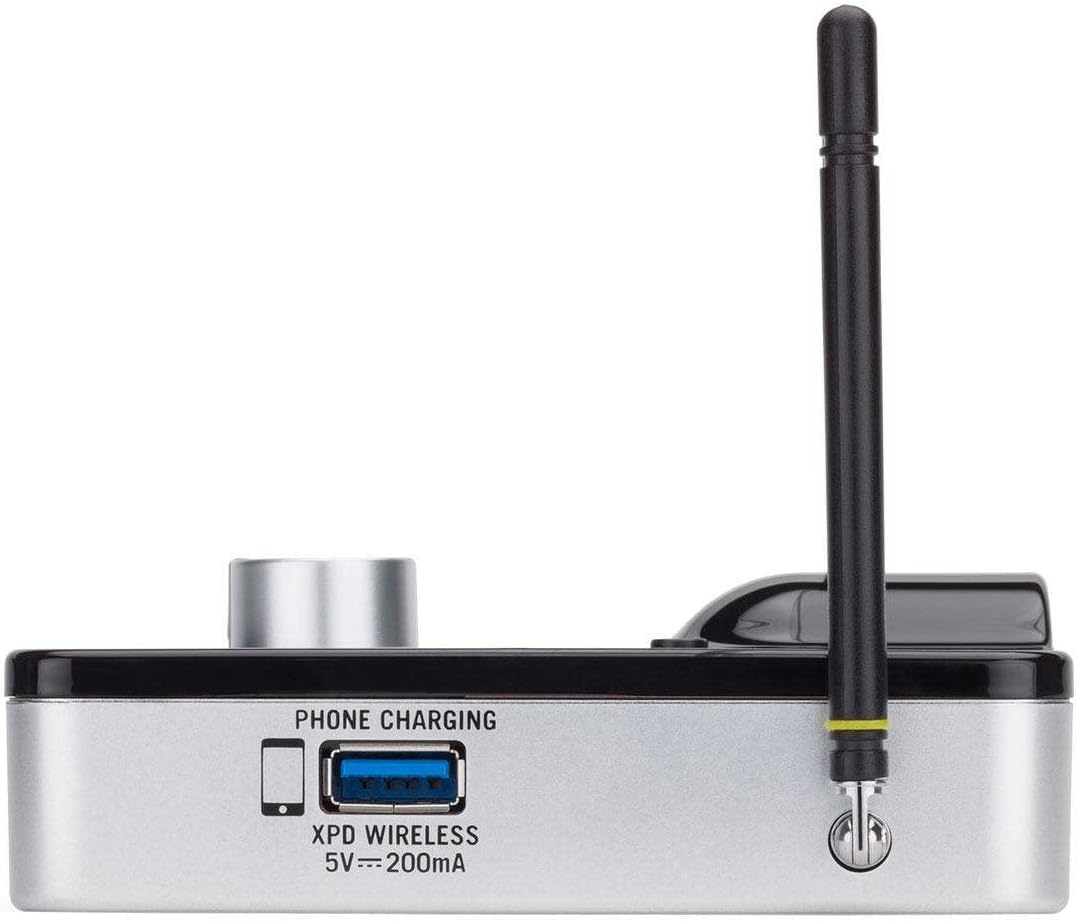
Figura 2.4: Lato view of the AR99m micro receiver, highlighting the 'PHONE CHARGING' USB port (5V --- 200mA) and antenna connection.

Figura 2.5: Angolato view of the AR99m micro receiver, showing the DC IN port, 1/8" unbalanced output, and XLR balanced output.

Figura 2.6: Posteriore view of the AH9 micro transmitter, showing the charging contacts and the integrated headset cable connection.

Figura 2.7: Posteriore view of the AR99m micro receiver, detailing the DC IN (15V === 600mA), 1/4" unbalanced output, and XLR balanced output ports.

Figura 2.8: The DE10x headset microphone, showing its lightweight design and adjustable ear hooks.
3. Istruzioni per l'installazione
3.1. Charging the AH9 Micro Transmitter
- Connect the supplied USB charging cable to the AH9 micro transmitter.
- Collegare l'altra estremità del cavo USB a un adattatore di alimentazione USB standard (non incluso) o a una porta USB alimentata.
- The LED indicator on the AH9 will show charging status. A full charge provides up to 8 hours of operation.
3.2. Connecting the AR99m Micro Receiver
- Connect the included power adapter to the DC IN port (15V === 600mA) on the AR99m receiver.
- Collegare l'adattatore di corrente a una presa CA.
- Connect the AR99m receiver to your audio mixer, PA system, or recording device using one of the following outputs:
- Uscita XLR bilanciata: Per apparecchiature audio professionali.
- Unbalanced 1/4" Output: For standard instrument inputs or line-level inputs.
- Unbalanced 1/8" Output: For consumer-grade audio devices or computer inputs.
- Extend the antennas on the AR99m receiver for optimal signal reception.
3.3. Wearing the DE10x Headset Microphone
- Carefully place the headset over your ears, ensuring a comfortable and secure fit.
- Position the microphone element approximately 1-2 inches from the corner of your mouth for best sound quality.
- Use the included windscreens to reduce plosives and wind noise, if necessary.
4. Istruzioni per l'uso
4.1. Accensione/Spegnimento
- AH9 Micro Transmitter: Press and hold the power button on the transmitter until the LED illuminates. Press and hold again to power off.
- AR99m Micro Receiver: Turn the VOLUME knob clockwise to power on. Turn counter-clockwise until it clicks to power off.
4.2. Selezione e associazione dei canali
The AirLine 99m system features 100 operating channels across a 24MHz bandwidth.
- Turn on the AR99m receiver. The channel display will show the current channel.
- Premere il tasto IMPOSTATO button on the AR99m receiver to cycle through available channels. Select a clear channel with no interference.
- Once a channel is selected on the receiver, turn on the AH9 transmitter.
- The AH9 transmitter will automatically scan and pair with the receiver on the selected channel. The 'READY' indicator on the receiver will illuminate when a successful connection is established.
4.3. Regolazione del volume
Utilizzare il VOLUME knob on the AR99m receiver to adjust the output level of the wireless system. Start with a low volume and gradually increase it to avoid sudden loud audio.
4.4. Monitoring Signal Status
- Indicatore PRONTO: Illuminates when the transmitter and receiver are successfully paired and receiving a signal.
- Indicatore PEAK: Illuminates when the audio input from the transmitter is too high, indicating potential clipping. Reduce the input gain on your mixer or adjust the microphone position if this occurs.
- Indicatore IR: Used during initial setup for infrared pairing (if applicable, though this model typically auto-pairs).
5. Manutenzione
- Pulizia: Use a soft, dry cloth to clean the surfaces of the transmitter and receiver. Avoid using abrasive cleaners or solvents.
- Cura della batteria: Recharge the AH9 transmitter regularly. For long-term storage, ensure the battery is partially charged (around 50%) to prolong its lifespan.
- Magazzinaggio: Conservare il sistema in un luogo fresco e asciutto, lontano dalla luce solare diretta e da temperature estreme.
- Parabrezza: Replace windscreens on the DE10x headset microphone as needed to maintain hygiene and acoustic performance.
6. Risoluzione Dei Problemi
| Problema | Possibile causa | Soluzione |
|---|---|---|
| Nessun suono dal ricevitore |
|
|
| Interferenze o interruzioni |
|
|
| Audio distorto |
|
|
| Durata breve della batteria |
|
|
7. Specifiche
| Caratteristica | Dettaglio |
|---|---|
| Numero di modello | SW9A9SDE10-K |
| Canali di funzionamento | 100 (across 24MHz bandwidth) |
| Campo di funzionamento | Fino a 300 piedi (linea di vista) |
| AH9 Transmitter Battery Life | Up to 8 hours (Lithium-Ion, rechargeable) |
| AR99m Receiver Outputs | Balanced XLR, Unbalanced 1/4", Unbalanced 1/8" |
| Tipo di microfono | DE10x Headset Microphone |
| Accessori inclusi | 4 Windscreens, USB charging cable, Power adapter |
| Peso dell'articolo | 1 libbra |
| Dimensioni del prodotto | 3 x 3 x 3 pollici |
| Tipo di materiale | Plastica |
| Fonte di alimentazione | Alimentato a batteria |
| Dispositivi compatibili | Mixers, Audio Interfaces, PA Systems, Computers, Recording Devices |
8. Garanzia e supporto
For warranty information and technical support, please refer to the official Samson Technologies webo contattare direttamente il servizio clienti. Conservare la ricevuta d'acquisto come prova d'acquisto per eventuali reclami in garanzia.
Risorse online: Visitare il Samson Brand Store on Amazon per ulteriori informazioni e supporto sul prodotto.