
1. Introduzione
This manual provides essential information for the safe and efficient operation of your Strong SRT 32HB3003 32-inch HD LED TV. Please read these instructions carefully before using the television and retain them for future reference.
2. Informazioni sulla sicurezza
Per evitare scosse elettriche, incendi o danni al televisore, osservare sempre le seguenti precauzioni di sicurezza:
- Non esporre il televisore alla pioggia o all'umidità.
- Non aprire la TV casing; affidare ogni intervento di manutenzione a personale qualificato.
- Garantire un'adeguata ventilazione intorno al televisore.
- Scollegare il televisore durante i temporali o quando non viene utilizzato per lunghi periodi.
- Tenere il televisore lontano da fonti di calore e dalla luce solare diretta.
3. Contenuto della confezione
Verificare che tutti gli articoli siano presenti nella confezione:
- Strong SRT 32HB3003 LED TV
- Telecomando
- 2 batterie AAA
- Supporto della televisione
- Manuale d'uso

Image: The Strong SRT 32HB3003 TV packaging, highlighting key features such as DVB-T2/C/S2 tuner, HDMI, USB, and Dolby Audio.
4. Impostazione
4.1 Installazione dello stand
Per installare il supporto TV:
- Posizionare con cautela il televisore a faccia in giù su una superficie morbida e pulita per evitare di danneggiare lo schermo.
- Allineare le basi del supporto con le fessure corrispondenti nella parte inferiore del televisore.
- Fissare i supporti utilizzando le viti fornite.
4.2 Connessioni
Collega i tuoi dispositivi esterni al televisore utilizzando le porte appropriate.
- Antenna/cavo: Connect your DVB-T2 or DVB-C antenna/cable to the 'ANT IN' port.
- Satellitare: Connect your satellite dish to the 'SATELLITE IN' port for DVB-S2 reception.
- Dispositivi HDMI: Use HDMI ports for high-definition devices like Blu-ray players, game consoles, or set-top boxes. HDMI 1 supports ARC (Audio Return Channel).
- Dispositivi USB: Insert USB drives into the USB 2.0 ports for media playback.
- Modulo CI+: Insert a CI+ module (Common Interface) into the CI+ slot for encrypted channels.
- Uscita audio: Use the Headphone jack for private listening or the Digital Optical Output (TOS-Link) for external audio systems.
- INGRESSO AV: Per i dispositivi più vecchi, utilizzare la porta AV IN.

Immagine: Posteriore view of the Strong SRT 32HB3003 TV, illustrating the placement of connection ports including HDMI, USB, and antenna inputs.

Image: A diagram detailing the Common Interface (CI) slot and other connectivity options such as USB, headphone jack, AV IN, HDMI 1, HDMI 2, Satellite IN, and S/PDIF (digital optical audio out).
4.3 Prima installazione
After connecting the power cable and turning on the TV, the First Time Installation wizard will guide you through initial setup steps, including language selection, country, and channel scanning for DVB-T2, DVB-C, or DVB-S2.
5. Operativo
5.1 Controllo remoto finitoview
Il telecomando consente di accedere a tutte le funzioni del televisore. Inserire le due batterie AAA nel telecomando, prestando attenzione alla corretta polarità.

Image: The remote control for the Strong SRT 32HB3003 TV, featuring buttons for power, numerical input, volume control, channel selection, menu access, source input, and media playback functions.
5.2 Funzioni di base
- Energia: Premere il tasto pulsante di accensione rosso to turn the TV on or off.
- Volume: Utilizzare il volume +/- Pulsanti per regolare il volume.
- Canale: Utilizzare il CH +/- pulsanti per cambiare canale.
- Disattiva audio: Premere il tasto MUTE pulsante per disattivare temporaneamente l'audio.
5.3 Selezione della sorgente
Premere il tasto FONTE button on the remote control to select the desired input source (e.g., HDMI 1, HDMI 2, DVB-T2, DVB-C, DVB-S2, AV).
5.4 Navigazione nel menu
Premere il tasto MENU button to access the main menu. Use the arrow buttons to navigate and OK per confermare le selezioni. Il INDIETRO button returns to the previous menu or exits the current menu.
5.5 Riproduzione multimediale (USB)
Insert a USB storage device into one of the USB ports. The TV supports playback of photos, videos, and music files. Access the media player through the main menu or by selecting the USB source.
5.6 Guida elettronica ai programmi (EPG)
Premere il tasto EPG pulsante per view the Electronic Program Guide, which displays program schedules for digital channels.
5.7 Modalità Hotel
The TV features a Hotel Mode, which allows for restricted access to certain settings and functions, ideal for hospitality environments. Consult the advanced settings menu for Hotel Mode configuration.
6. Manutenzione
6.1 Pulizia
- Scollegare sempre la TV prima di pulirla.
- Utilizzare un panno morbido e asciutto per pulire lo schermo e il telaio.
- Per segni ostinati, leggermente dampPulire il panno con acqua o con un detergente delicato e non abrasivo, specificamente studiato per i dispositivi elettronici.
- Never spray cleaning liquids directly onto the TV.
6.2 Conservazione
If storing the TV for an extended period, ensure it is kept in a cool, dry place, protected from dust and extreme temperatures. It is recommended to use the original packaging for storage.
7. Risoluzione Dei Problemi
Se riscontri problemi con la tua TV, fai riferimento alle seguenti soluzioni comuni:
| Problema | Possibile causa/soluzione |
|---|---|
| Nessun potere | Check if the power cable is securely connected. Ensure the power outlet is functional. |
| Nessuna immagine, ma l'audio è presente | Controllare la selezione della sorgente di ingresso. Assicurarsi che i dispositivi esterni siano accesi e collegati correttamente. |
| Nessun suono, ma l'immagine è presente | Check volume level and mute status. Verify audio settings in the menu. |
| Il telecomando non funziona | Check and replace batteries. Ensure no obstructions between remote and TV sensor. |
| Qualità dell'immagine scadente | Check antenna/cable connection. Adjust picture settings in the menu. |
8. Specifiche
Detailed technical specifications for the Strong SRT 32HB3003 HD LED TV:
| Caratteristica | Specificazione |
|---|---|
| Numero di modello | SRT32HB3003 |
| Dimensioni dello schermo | 32 pollici (80 cm) |
| Risoluzione | 1366 x 768 pixels (HD-Ready) |
| Tecnologia di visualizzazione | GUIDATO |
| Frequenza di aggiornamento | Frequenza 60 Hz |
| Tecnologia sintonizzatore | DVB-C, DVB-S2, DVB-T2 |
| Porte HDMI | 2 (1x HDMI ARC) |
| Porte USB 2.0 | 2 |
| Altre interfacce | Headphone, Digital Optical Out (TOS-Link), CI+ interface, AV IN |
| Caratteristiche speciali | Electronic Program Guide (EPG), USB Media Playback, Parental Control, Hotel Mode |
| Consumo energetico | 50 Watt |
| Classe di efficienza energetica | A+ |
| Consumo energetico annuale | 45 kWh / anno |
| Dimensioni del prodotto (L x A x P) | Dimensioni: 73.2 x 43.5 x 7.78 cm |
| Peso | 4.15 kg |

Image: The energy efficiency label for the Strong SRT 32HB3003, indicating an A+ rating and an annual energy consumption of 45 kWh.
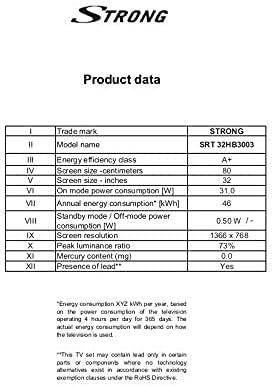
Image: A product data table providing detailed specifications for the Strong SRT 32HB3003, including screen size, resolution, and power consumption.
9. Garanzia e supporto
Your Strong SRT 32HB3003 TV comes with a limited warranty. For specific warranty terms and conditions, please refer to the warranty card included in your product packaging or visit the official Strong website. For technical support, troubleshooting assistance, or service inquiries, please contact Strong customer service through their official channels.
Per ulteriore assistenza, visitare il sito Strong official websito.