
1. Introduzione
The Bewinner Tiger 911 is a wired telephone voice auto-dialer designed to enhance the security of your home or office. This system integrates with existing alarm hosts or independent sensors to automatically dial pre-programmed telephone numbers when an alarm is triggered, providing immediate notification. Its microcomputer design ensures reliable operation and intelligent judgment for various security needs.

Image 1.1: The Bewinner Tiger 911 Telephone Voice Dialer, a compact device for automated alarm calls.
2. Prodotto finitoview e Caratteristiche
The Tiger 911 voice dialer is engineered with advanced features to provide robust security notifications.
- Microcomputer Design: Features a microcomputer for automatic dial-up assistance. It supports N.C. (Normally Closed), N.O. (Normally Open), or voltage input triggers, adaptable to various alarm systems.
- Funzionalità di controllo remoto: Can be integrated with anti-theft hosts or independent sensors. Allows for remote control via telephone for convenient and efficient management.
- Memorizzazione delle informazioni: Capable of storing up to 4 groups of telephone or mobile phone numbers, each with a maximum of 16 digits. Includes two levels of password protection. Stored numbers and voice recordings are retained even after power loss.
- Intelligent Judgment: Incorporates an all-round boot and self-detection function to prevent failures. Features an automatic voice recording IC for direct recording or playback via microphone and speaker.
- Sicurezza della password: Equipped with a password feature, allowing users to stop an accidental or triggered dialing alarm directly through the panel keys.

Image 2.1: The voice dialer shown alongside a smartphone, illustrating its function to store and dial up to 4 groups of telephone numbers.
3. Impostazione
Proper setup is crucial for the effective operation of your Bewinner Tiger 911 voice dialer.
3.1 Componenti Oltreview
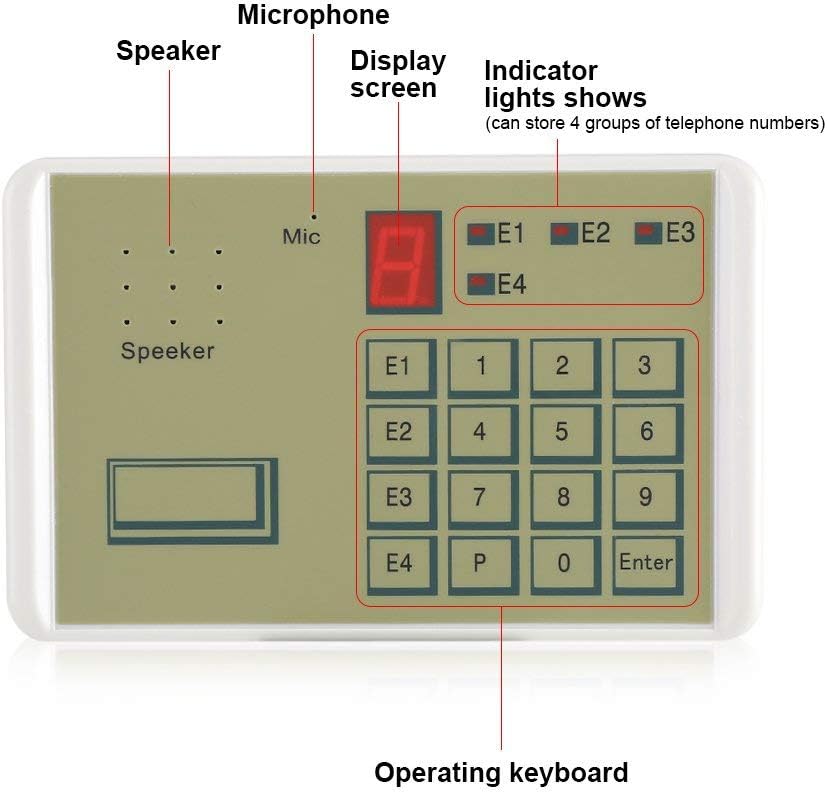
Image 3.1: A detailed diagram highlighting the key components of the voice dialer: Speaker, Microphone, Display Screen, Indicator Lights (E1-E4), and Operating Keyboard.
3.2 Connecting to an Alarm Host
The voice dialer acts as an intermediary between your alarm host and your phone.
- Connect Alarm Host: Connect the alarm host's output to the designated input terminals on the voice dialer. The dialer supports N.C. (Normally Closed), N.O. (Normally Open), or voltage input triggers. Refer to your alarm host's manual for its output type.
- Collegare la linea telefonica: Plug a standard telephone line into the dialer's telephone line crystal jack.
- Collegamento elettrico: Connect the 12V power adapter to the dialer and a power outlet.

Image 3.2: Connection diagram illustrating how the voice dialer integrates with an alarm host and a telephone line to notify the user's mobile phone.

Image 3.3: Close-up of the wiring connections for the voice dialer, including the telephone line connector and bare wires for alarm input.
4. Istruzioni per l'uso
Follow these steps to configure and operate your voice dialer.
4.1 Recording Voice Alarm
The dialer can store a 20-second voice message that will play when an alarm is triggered.
- Premere il tasto Documentazione button (if available, or follow specific manual instructions for recording mode).
- Speak clearly into the built-in microphone (Mic) for up to 20 seconds.
- Premere il tasto Fermare button (or equivalent) to end recording.
- The recorded message will play automatically when the dialer activates.

Image 4.1: The microphone area of the dialer, indicating its voice recording alarm capability for a 20-second message.
4.2 Storing Telephone Numbers
You can program up to 4 telephone numbers for the dialer to call during an alarm event. Each number can be up to 16 digits long.
- Enter programming mode (refer to the specific manual for key sequence, typically involving a password).
- Select one of the four groups (E1, E2, E3, E4) using the corresponding button on the operating keyboard.
- Input the desired telephone number using the numeric keypad.
- Premere Entrare to save the number for that group.
- Repeat for other groups as needed.

Image 4.2: The operating keyboard highlighting the E1-E4 buttons used for storing and accessing the four groups of alarm telephone numbers.
4.3 Stopping an SOS Dial
If the dialer is accidentally triggered or you wish to stop an ongoing alarm call, you can do so using the password.
- Enter your private password directly using the numeric keypad.
- Premere Entrare. The dialing sequence will cease.

Image 4.3: The numeric keypad, indicating its use for entering a password to stop an accidental or triggered SOS dial.
5. Manutenzione
To ensure the longevity and optimal performance of your Bewinner Tiger 911 voice dialer, follow these maintenance guidelines:
- Pulizia: Use a soft, dry cloth to clean the exterior of the device. Avoid using abrasive cleaners or solvents, which can damage the surface.
- Ambiente: Keep the device in a dry environment, away from direct sunlight, extreme temperatures, and high humidity.
- Alimentazione elettrica: Ensure the device is connected to a stable 12V power supply. Unplug the device during electrical storms or when not in use for extended periods.
- Integrità del cavo: Regularly inspect all connected cables (telephone line, alarm input, power) for any signs of wear or damage. Replace damaged cables immediately.
6. Risoluzione Dei Problemi
If you encounter issues with your voice dialer, refer to the following common troubleshooting steps:
| Problema | Possibile causa | Soluzione |
|---|---|---|
| Il dispositivo non si accende. | Nessuna alimentazione, adattatore difettoso o collegamento allentato. | Check power adapter connection and wall outlet. Ensure the adapter is functioning correctly. |
| Dialer does not make calls when triggered. | Incorrect alarm input wiring, no phone numbers stored, or telephone line issue. | Verify alarm input wiring (N.C./N.O./voltage). Ensure phone numbers are correctly programmed. Check telephone line connection and functionality. |
| Il messaggio vocale registrato non è chiaro o non viene riprodotto. | Recording error or microphone issue. | Re-record the voice message, speaking clearly and at an appropriate volume. Ensure the microphone is not obstructed. |
| Cannot stop dialing with password. | Password inserita non corretta. | Ensure the correct password is being entered. If forgotten, refer to the full manual for password reset procedures (if available). |
For more complex issues, please consult the full product manual or contact customer support.
7. Specifiche
Detailed technical specifications for the Bewinner Tiger 911 Wired Telephone Voice Dialer.
| Caratteristica | Dettaglio |
|---|---|
| Marca | Vincitore |
| Numero di modello | Tigre 911 |
| Fonte di alimentazione | Elettrico con cavo |
| Voltage | 12 Volt |
| Tecnologia di connettività | Cablato |
| Dispositivi compatibili | Smartphone (for receiving calls) |
| Tipo di avviso | Iscrizione |
| Metodo di controllo | Remote (via phone call) |
| Componenti inclusi | Remote Control (functionality, not a physical remote) |
| Peso dell'articolo | 0.09 chilogrammi (circa 3.17 once) |
| Tecnologia | Motion Sensor (compatible with, not built-in) |
| Durata della registrazione vocale | 20 secondi |
| Phone Number Storage | 4 groups, up to 16 digits each |
| Dimensioni del prodotto | Circa 14 cm x 9 cm x 3 cm (5.51 pollici x 3.54 pollici x 1.18 pollici) |

Image 7.1: A visual representation of the product specifications, including operating voltage, alarm receiving mode, voice recording length, and dimensions.
8. Video del prodotto
Guarda questo breve video per una rapida panoramicaview of the Bewinner Tiger 911 Voice Alarm Dialer.
Video 8.1: An 8-second overview of the Bewinner Tiger 911 Voice Alarm Dialer, demonstrating its physical appearance and basic components.
9. Garanzia e supporto
Bewinner is committed to providing quality products and a pleasant shopping experience.
- Qualità del prodotto: Each product undergoes careful inspection from production to delivery to ensure quality.
- Assistenza clienti: For any questions, technical assistance, or support needs, please refer to the contact information provided with your purchase or visit the official Bewinner store page.