
1. Introduzione
This manual provides instructions for the Zerone Universal Remote Control, designed as a replacement for various Haier TV models. It is compatible with Haier HTR-A18M, 55D3550, 40D3500M, and 48D3500 series televisions. This remote control offers direct access to digital TV functions without complex programming.

Image 1.1: The Zerone Universal Remote Control in use, demonstrating its compatibility with Haier HTR-A18M, 55D3550, 40D3500M, and 48D3500 TV models.
2. Impostazione
2.1 Installazione della batteria
Il telecomando richiede due (2) batterie AAA (non incluse) per funzionare. Seguire questi passaggi per installare le batterie:
- Individuare il vano batterie sul retro del telecomando.
- Premere il fermo e far scorrere il coperchio della batteria per rimuoverlo.
- Inserire due batterie AAA, assicurandosi che i terminali positivo (+) e negativo (-) siano allineati correttamente con le marcature all'interno del vano.
- Far scorrere il coperchio della batteria in posizione finché non scatta in modo sicuro.
The remote is ready for use immediately after battery installation; no additional programming is required for compatible Haier TV models.

Immagine 2.1: Dettagliata view of the remote control, highlighting the battery compartment for AAA battery installation.
3. Istruzioni per l'uso
3.1 Funzioni di base
This remote control provides standard functions for your Haier TV. Point the remote directly at your television's infrared receiver for optimal performance.
- Pulsante di accensione (U): Accende o spegne la TV.
- Ingresso: Seleziona le sorgenti di ingresso video (HDMI, AV, ecc.).
- Pulsanti numerici (0-9): Selezione diretta del canale.
- volume +/-: Regola il volume su o giù.
- CH +/-: Cambia canale in su o in giù.
- MUTE: Disattiva o riattiva l'audio della TV.
- MENU: Accede al menu principale del televisore.
- Pulsanti di navigazione (Su, Giù, Sinistra, Destra, OK): consente di navigare nei menu e di confermare le selezioni.
- INDIETRO / USCITA: Ritorna alla schermata precedente o esce dal menu corrente.
- DISPLAY: Mostra le informazioni sul canale corrente.
- SAP / AUDIO: Selects audio language or mode.
- SONNO: Imposta il timer di spegnimento.
- PICTURE / WIDE: Adjusts picture mode or aspect ratio.
- CH.LIST / FAVORITE: Accesses channel list or favorite channels.
- Media Control Buttons (Play, Pause, Fast Forward, Rewind): Controlla la riproduzione multimediale.
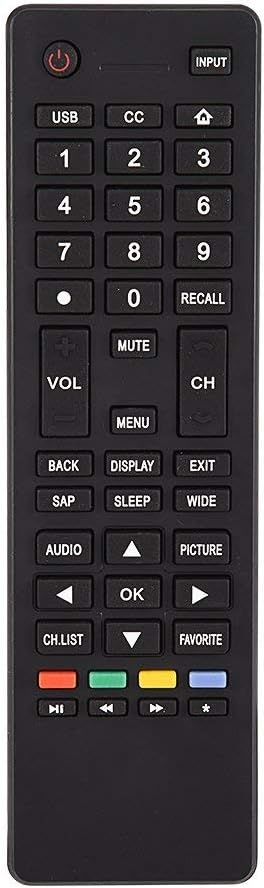
Immagine 3.1: Passoview of the remote control's button layout for easy identification of functions.
3.2 Intervallo operativo
The remote control has a stable signal transmission distance of up to 10 meters (33 feet). Actual remote distance may vary depending on environmental factors and the specific model of your TV.
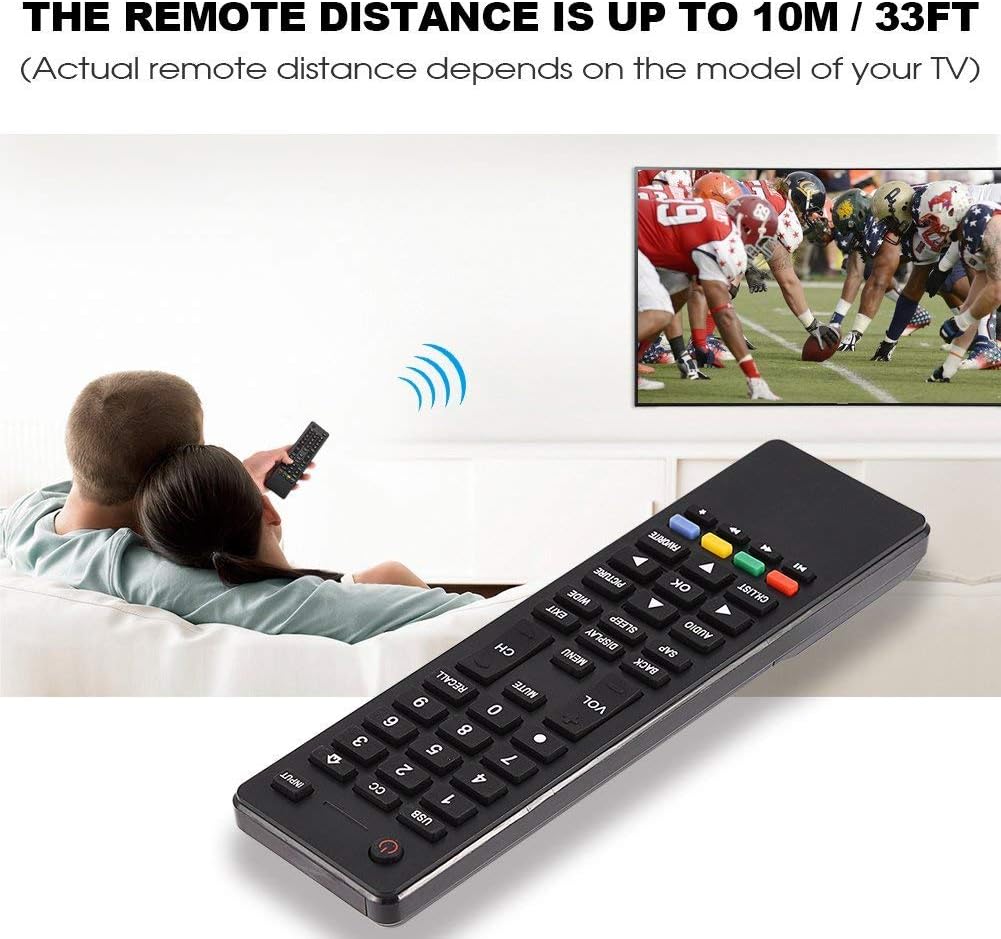
Image 3.2: Visual representation of the remote control's effective operating distance to the television.
4. Manutenzione
4.1 Pulizia
Per pulire il telecomando, utilizzare un panno morbido e asciutto. Per lo sporco ostinato, strofinare leggermenteampen the cloth with water or a mild cleaning solution. Avoid using harsh chemicals or abrasive cleaners, as these can damage the remote's surface or internal components.
4.2 Cura della batteria
- Sostituire le batterie quando la risposta del telecomando diventa lenta o smette di funzionare.
- Non mischiare batterie vecchie e nuove o diversi tipi di batterie.
- Rimuovere le batterie se il telecomando non viene utilizzato per un periodo prolungato per evitare perdite.
- Smaltire le batterie usate in modo responsabile secondo le normative locali.
5. Risoluzione Dei Problemi
5.1 Il telecomando non risponde
- Controllare le batterie: Ensure batteries are inserted correctly with the correct polarity (+/-) and are not depleted. Replace with fresh AAA batteries if necessary.
- Linea di vista: Make sure there are no obstructions between the remote control and the TV's infrared sensor.
- Distanza: Confirm you are within the effective operating range (up to 10 meters / 33 feet).
- Compatibilità TV: Verify that your TV model is listed as compatible (Haier HTR-A18M, 55D3550, 40D3500M, 48D3500).
5.2 I pulsanti non funzionano correttamente
- Pulisci remoto: Dust or debris under buttons can cause malfunction. Refer to the Maintenance section for cleaning instructions.
- Controllo della batteria: Weak batteries can lead to inconsistent button responses. Replace batteries.
6. Specifiche
| Caratteristica | Dettaglio |
|---|---|
| Marca | Zerone |
| Dispositivi compatibili | Haier HTR-A18M, 55D3550, 40D3500M, 48D3500 TVs |
| Tecnologia di connettività | Infrarossi |
| Portata massima | 10 metri (33 piedi) |
| Tipo di batteria | 2 x AAA (non incluso) |
| Tipo di controllore | Controllo dei pulsanti |
| Materiale | addominali |
| Numero di modello | Zerone9rnag3b5y4-cr |
| Codice UPC | 647213811490 |

Image 6.1: Physical dimensions of the Zerone Universal Remote Control.
7. Informazioni sulla garanzia
Questo prodotto è offerto come articolo Amazon Renewed. I prodotti Amazon Renewed sono ispezionati e testati professionalmente per garantire il funzionamento e l'aspetto come nuovi. Se non sei soddisfatto del tuo acquisto, i prodotti rinnovati possono essere sostituiti o rimborsati tramite la Garanzia Amazon Renewed.
Additionally, the manufacturer provides a Garanzia limitata di 90 giorni. For specific details regarding the terms and conditions of this warranty, please refer to the documentation provided at the time of purchase or contact customer support.
8. Assistenza clienti
If you encounter any issues or have questions regarding your Zerone Universal Remote Control that are not addressed in this manual, please contact the seller or Amazon Renewed customer service for assistance.
For Amazon Renewed Guarantee claims, please visit the Amazon Renewed program page or contact Amazon customer support directly.