
1. Introduzione
Thank you for choosing the Proscenic M7 Robot Vacuum Cleaner. This device is designed to provide efficient and thorough cleaning for your home, featuring advanced laser navigation, powerful suction, and intelligent mopping capabilities. Please read this manual carefully before using the product to ensure proper operation and maintenance.
2. Importanti istruzioni di sicurezza
- Leggere tutte le istruzioni prima di utilizzare questo apparecchio.
- Non permettere ai bambini di utilizzare il robot aspirapolvere. Sorvegliare i bambini e gli animali domestici quando il robot è in funzione.
- Ensure the charging dock is placed against a wall on a level surface, away from water or heat sources.
- Prima dell'uso, rimuovere eventuali cavi allentati, piccoli oggetti o elementi fragili dal pavimento per evitare che si aggroviglino o si danneggino.
- Non utilizzare il robot aspirapolvere in ambienti umidi o per aspirare liquidi.
- Do not use the robot vacuum near open flames or flammable materials.
- Utilizzare esclusivamente l'adattatore di alimentazione e la base di ricarica originali forniti dal produttore.
- Spegnere il robot e scollegare la base di ricarica prima di effettuare qualsiasi operazione di manutenzione o pulizia.
3. Prodotto finitoview
3.1 Caratteristiche principali
- Laser Navigation (LDS): Scans your home in 360 degrees to create real-time maps for efficient cleaning paths.
- App & Alexa Control: Manage cleaning modes, schedules, virtual no-go zones, and spot cleaning via the ProscenicHome app or Alexa voice commands.
- Mopping a Y: Emulates manual mopping for thorough dirt and grime removal with a 500ml electronically controlled water tank.
- Aspirazione potente: Up to 2000Pa suction power with three adjustable modes for various floor types.
- Ricarica e Riprendi: Automatically returns to the charging dock when the battery is low and resumes cleaning from where it left off.
3.2 Componenti del robot
Familiarize yourself with the main components of your Proscenic M7 robot vacuum.

Image: Proscenic M7 Robot Vacuum highlighting its navigation and safety features like SLAM, Anti-Collision, LDS, Anti-falling, and Jam-resistant technology. A map overlay illustrates its ability to plan cleaning routes.
- LDS Sensor: Located on top for 360-degree scanning and mapping.
- Paraurti: Front bumper with anti-collision sensors.
- Spazzole laterali: Two side brushes to sweep debris into the main brush path.
- Spazzola principale: Underside brush for deep cleaning.
- Pattumiera/serbatoio dell'acqua: Removable compartments for dry vacuuming and wet mopping.
- Contatti di ricarica: Nella parte inferiore, per il collegamento alla base di ricarica.
- Sensori di caduta: On the underside, to prevent falling down stairs.
4. Guida all'installazione
4.1 Ricarica del robot
- Posizionare la base di ricarica contro una parete in un'area aperta, assicurandosi che non vi siano ostacoli entro 1 metro (3 piedi) ai lati e 2 metri (6 piedi) davanti.
- Collegare l'adattatore di alimentazione alla base di ricarica e inserirlo in una presa a muro.
- Place the robot onto the charging dock, ensuring the charging contacts align. The robot will begin charging. Allow it to fully charge before first use (approximately 5 hours).
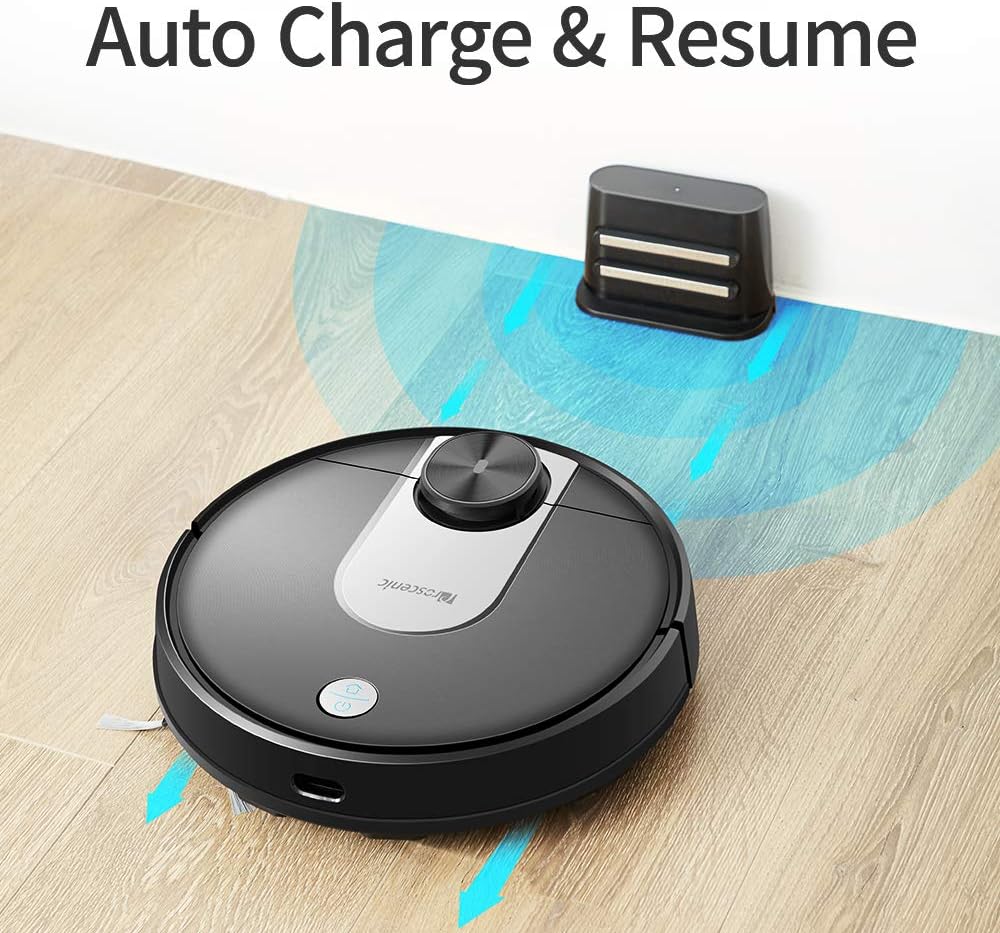
Image: The Proscenic M7 robot vacuum approaching its charging station, demonstrating its auto-charge and resume function.
4.2 Installing the ProscenicHome App
The ProscenicHome app allows you to control your robot vacuum remotely and access advanced features.
- Download the "ProscenicHome" app from the App Store (iOS) or Google Play Store (Android).
- Registra un account e accedi.
- Follow the in-app instructions to add your Proscenic M7 device. Ensure your phone is connected to a 2.4GHz Wi-Fi network, as the robot does not support 5GHz networks.
- During the binding process, ensure the robot is fully charged and near your Wi-Fi router for optimal connection. If you encounter issues, try restarting your router or moving the robot closer.

Image: A smartphone screen displaying the ProscenicHome app interface. It shows a generated cleaning map, current cleaned area, battery level, and cleaning time. Icons for scheduling, map saving, zoned cleaning, mopping, no-go zones, spot cleaning, and remote control are visible, along with compatibility logos for Alexa, Android, and iPhone.
5. Istruzioni per l'uso
5.1 Avvio di un ciclo di pulizia
- Avvio manuale: Premere una volta il pulsante di accensione del robot per avviare un ciclo di pulizia completo.
- Controllo app: Open the ProscenicHome app and tap "Start" to initiate cleaning.
- The robot will use its laser navigation to map your home and plan an efficient cleaning path.
5.2 modalità di pulizia
The Proscenic M7 offers various cleaning modes accessible via the ProscenicHome app:
- Pulizia automatica: The robot intelligently cleans the entire accessible area.
- Pulizia spot: Indica al robot di pulire intensamente una piccola area specifica.
- Pulizia a zone: Define a rectangular area on the app's map for the robot to clean. This requires a saved map.
- Pulizia dei bordi: The robot cleans along the perimeter of your rooms.
- Modalità di lavaggio: Attach the water tank and mopping pad for wet cleaning.
5.3 Funzione di lavaggio
The M7 features a Y-shaped mopping pattern for effective wet cleaning.
- Fill the 500ml electronically controlled water tank with clean water.
- Fissare saldamente il panno per la pulizia al serbatoio dell'acqua.
- Replace the dustbin with the filled water tank assembly.
- Select "Mopping Mode" in the app or allow the robot to detect the water tank and switch automatically.
- Adjust the water flow level via the app if desired.

Immagine: un primo piano view of the Proscenic M7 robot vacuum, showcasing its large 500ml water tank, designed for extensive mopping coverage.

Immagine: una vista dall'alto view of the Proscenic M7 robot vacuum on a wooden floor, illustrating its Y-shaped mopping movement pattern with arrows.
5.4 Map Management and Virtual Walls
- Map Memorization: After completing a full cleaning cycle and successfully returning to the charging dock, the robot will save the generated map. Ensure this feature is enabled in the app.
- Zone virtualmente vietate: Use the app to draw virtual boundaries or "no-go lines" on the map to prevent the robot from entering specific areas.
- Pulizia dell'area: Once a map is saved, you can define specific areas for cleaning.
6. Manutenzione
Una manutenzione regolare garantisce prestazioni ottimali e prolunga la durata del tuo robot aspirapolvere.
6.1 Pulizia del contenitore della polvere e del filtro
- Premere il pulsante di rilascio della pattumiera e rimuovere la pattumiera.
- Svuotare il contenuto del bidone della spazzatura in un contenitore per i rifiuti.
- Remove the filter and tap it gently to dislodge dust. Rinse the filter with water if necessary, ensuring it is completely dry before reinstallation.
- Pulisci l'interno del cestino con un panno asciutto.
- Reinstallare il filtro e il contenitore della polvere.
6.2 Pulizia del serbatoio dell'acqua e del panno per la pulizia
- Rimuovere il serbatoio dell'acqua dal robot.
- Svuotare l'acqua rimanente dal serbatoio.
- Remove the mopping pad and rinse it thoroughly with water. Allow it to air dry.
- Pulisci il serbatoio dell'acqua con adamp cloth and allow it to dry completely before storage or refilling.
6.3 Pulizia di spazzole e sensori
- Spazzola principale: Rimuovere il coperchio della spazzola principale e sollevare la spazzola. Utilizzare l'apposito strumento di pulizia (se in dotazione) per rimuovere peli e detriti.
- Spazzole laterali: Periodically check side brushes for tangled hair or debris. Remove and clean them as needed. Replace if worn.
- Sensori: Gently wipe the LDS sensor, anti-drop sensors, and charging contacts with a clean, dry cloth to ensure they are free of dust and debris.
7. Risoluzione Dei Problemi
If you encounter issues with your Proscenic M7, refer to the following common problems and solutions.
| Problema | Possibile causa | Soluzione |
|---|---|---|
| Il robot non si avvia o non risponde. | Batteria scarica; interruttore di alimentazione spento. | Ensure the robot is fully charged; Check if the main power switch is on. |
| Il robot si blocca spesso. | Obstacles (cables, rugs, furniture); Drop sensors dirty. | Clear the cleaning area of obstacles. Use virtual no-go zones for problematic areas. Clean drop sensors. |
| App connection issues (Binding Error). | Incorrect Wi-Fi band (5GHz); Weak Wi-Fi signal; Robot not fully charged. | Ensure your phone is on a 2.4GHz Wi-Fi network. Move the robot closer to the router. Ensure the robot is fully charged before binding. Try restarting your router. |
| Il robot non ritorna alla base di ricarica. | Charging dock obstructed; Charging contacts dirty. | Ensure the charging dock area is clear. Clean the charging contacts on both the robot and the dock. |
| Scarsa efficienza di pulizia. | Cestino pieno; Spazzole aggrovigliate; Filtro intasato. | Empty the dustbin. Clean the main and side brushes. Clean or replace the filter. |
| Mopping leaves streaks or misses spots. | Mopping pad dirty or dry; Water tank empty; Water flow setting too low. | Clean or wet the mopping pad. Refill the water tank. Adjust water flow in the app. |
| Map not saving or virtual walls not working. | First full cleaning cycle not completed; App glitch. | Ensure the robot completes a full cleaning cycle and returns to the dock successfully to generate and save the map. Restart the app or robot if issues persist. |
8. Specifiche
| Caratteristica | Dettaglio |
|---|---|
| Marca | Proscenico |
| Nome del modello | M7 |
| Caratteristica speciale | No-Go Zone |
| Colore | Nero |
| Componenti inclusi | Batteria |
| Tipo di filtro | Cartuccia |
| Durata della batteria | Up to 1.5 Hours (3200mAh capacity) |
| Capacità del bidone della spazzatura | 0.5 litri |
| Capacità del serbatoio dell'acqua | 500ml |
| Fonte di alimentazione | Alimentato a batteria |
| Metodo di controllo | Voice (Alexa), App |
| Dispositivi compatibili | Amazon Echo (Alexa) |
| Fattore di forma | Robotico |
| Dimensioni del prodotto | 16.5 x 13.4 x 5.5 pollici |
| Peso dell'articolo | 12.62 libbre |
| Raccomandazione di superficie | Moquette, pavimenti duri |
9. Garanzia e supporto
For warranty information or technical support, please refer to the warranty card included with your product or visit the official Proscenic website. You may also contact Proscenic customer service directly for assistance with product operation, maintenance, or troubleshooting beyond this manual.