Introduzione
This manual provides essential instructions for the installation, operation, and maintenance of your Pioneer AVIC-W6500NEX in-dash navigation receiver. This unit features a 6.2-inch touchscreen, DVD/CD playback, Bluetooth connectivity, Apple CarPlay, and integrated navigation capabilities. Please read this manual thoroughly before using the product to ensure proper and safe operation.
Informazioni sulla sicurezza
Per garantire un funzionamento sicuro ed evitare danni, osservare le seguenti precauzioni:
- Do not operate the system in a way that distracts you from safe driving. Always prioritize road safety.
- Assicurarsi che tutti i collegamenti elettrici siano sicuri e adeguatamente isolati per evitare cortocircuiti.
- Consult a professional for installation if you are unsure about any steps. Incorrect installation can lead to damage or malfunction.
- Evitare di esporre l'unità a temperature estreme, alla luce solare diretta per periodi prolungati o a umidità eccessiva.
- Non tentare di smontare o modificare l'unità. Ciò potrebbe invalidare la garanzia e causare danni.
Contenuto della confezione
Verificare che tutti i componenti siano presenti nella confezione:
- Pioneer AVIC-W6500NEX Receiver Unit
- Cablaggio elettrico
- Antenna GPS
- Microfono
- Hardware di montaggio
- Manuale dell'utente (questo documento)
Configurazione e installazione
The AVIC-W6500NEX is designed for double-DIN (4-inch tall) dash openings. Proper installation is crucial for optimal performance and safety. It is highly recommended to have this unit installed by a qualified professional car audio technician.
Considerazioni chiave sull'installazione:
- Cablaggio: Connect the wiring harness according to your vehicle's specifications and the provided wiring diagram. Ensure all connections are secure and properly insulated.
- Antenna GPS: Montare l'antenna GPS in una posizione con una vista libera view of the sky, free from obstructions, to ensure accurate navigation.
- Microfono: Install the microphone in a position that allows for clear voice pickup during hands-free calls and voice commands.
- Cavo del freno di stazionamento: Connect the parking brake wire as instructed. This safety feature prevents video playback while the vehicle is in motion.
After installation, perform a functional check of all features, including audio, video, navigation, and Bluetooth connectivity.
Istruzioni per l'uso
This section details the primary functions and features of your Pioneer AVIC-W6500NEX receiver.
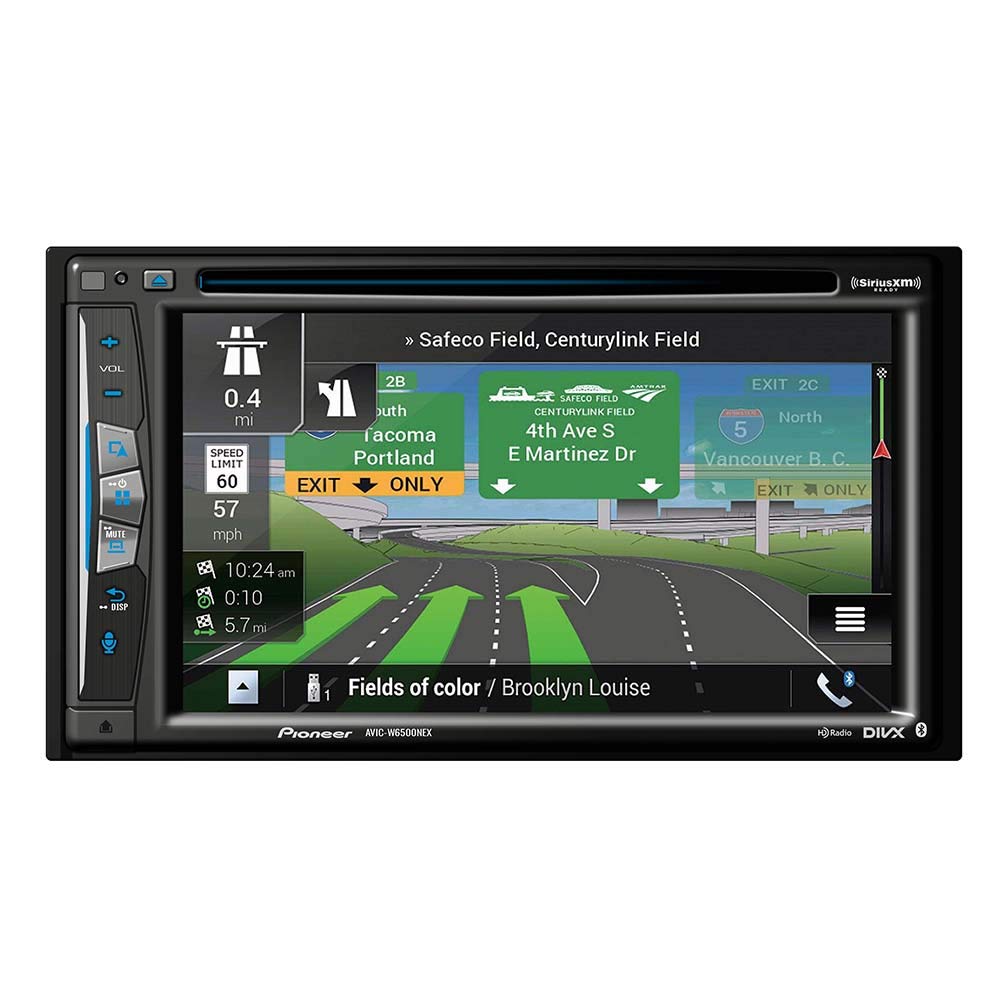
Figura 1: Davanti view of the Pioneer AVIC-W6500NEX receiver displaying the Apple CarPlay interface with icons for Phone, Music, Maps, Messages, Now Playing, NEX, Podcasts, and Audiobooks. Physical buttons for volume, mute, and display are visible on the left side.
1. Comandi di base e funzionamento del touchscreen
- Schermo tattile: The 6.2-inch resistive touchscreen allows for intuitive control. Tap icons, swipe to navigate menus, and use pinch-to-zoom gestures where applicable (e.g., on maps).
- Controllo del volume: Utilizzare il fisico VOL+ E VOL- buttons on the left side of the unit to adjust audio output level.
- Disattiva audio: Premere il tasto MUTE button to temporarily silence audio. Press again to restore sound.
- Visualizzazione (DISP): IL DISP button allows you to cycle through display modes or turn the display off for reduced distraction during night driving.
- Pulsante Home: The circular button at the bottom left of the screen (or a physical button if present) typically returns you to the main menu or Apple CarPlay home screen.
2. Supporto Apple CarPlay
The AVIC-W6500NEX supports both wireless and wired Apple CarPlay. Connect your iPhone to access navigation, make calls, send messages, and listen to music directly from the receiver's display.
- CarPlay senza fili: Ensure Bluetooth and Wi-Fi are enabled on your iPhone. Follow the on-screen prompts on the receiver to pair your device.
- CarPlay cablato: Collega il tuo iPhone alla porta USB dell'unità tramite un cavo USB certificato.
- Controllo vocale: Use Siri for hands-free operation by pressing the voice command button on the unit or steering wheel (if connected).
3. Funzionalità di navigazione
The integrated navigation system provides detailed maps and guidance.
- Map Coverage: Includes maps of the United States, Canada, and Puerto Rico.
- Punti di interesse (POI): Access a database of 12.4 million POIs to find restaurants, gas stations, and other destinations.
- Traffic Updates: Receive free traffic updates in major metropolitan areas to help avoid congestion.
- Testo-a-voce: Announces actual street names for clear turn-by-turn directions.
- Indicatore di corsia: Provides visual cues for appropriate lanes when approaching exits or turns.
- Speed Limit Warnings: Displays current speed limits and alerts you if you exceed them.
4. Riproduzione audio/video
- Riproduzione disco: Supports CD and DVD media. Insert discs into the slot behind the detachable face.
- Unità USB: Collega dispositivi di archiviazione USB per riprodurre audio e video files. Supports lossless FLAC audio files up to 192kHz/24-bit.
- Sintonizzatore AM/FM: Access local radio stations. The unit also features HD Radio.
- Audio Bluetooth: Riproduci musica in streaming senza fili dal tuo smartphone o da altri dispositivi dotati di Bluetooth.
5. Pronto per SiriusXM
The AVIC-W6500NEX is SiriusXM Ready. To access SiriusXM satellite radio, a separate SiriusXM SXV300 Tuner (sold separately) and a subscription are required.
- Supports Tune Mix, Traffic & Weather Now, and Sports Flash features with a SiriusXM subscription.
6. WebCollegamento
WebLink provides in-dash control of select applications, including YouTube and Yelp (Apple devices only). Refer to the WebLink application for compatible devices and setup instructions.
Manutenzione
Una corretta manutenzione garantisce la longevità e le prestazioni ottimali del ricevitore.
- Pulizia dello schermo: Utilizzare un panno morbido, asciutto e privo di lanugine per pulire delicatamente il touchscreen. Per le macchie ostinate, strofinare leggermenteampPulisci il panno con acqua o con un detergente per schermi specifico per dispositivi elettronici. Evita prodotti chimici aggressivi o materiali abrasivi.
- Detachable Face: Handle the detachable face with care. Store it in a protective case when removed to prevent scratches or damage.
- Pulizia generale: Mantenere l'unità libera da polvere e detriti. Utilizzare una spazzola morbida o aria compressa per pulire le prese d'aria e le fessure dei pulsanti.
Risoluzione dei problemi
Se riscontri problemi con il tuo AVIC-W6500NEX, fai riferimento alle seguenti soluzioni comuni:
| Problema | Possibile causa/soluzione |
|---|---|
| Nessuna alimentazione / L'unità non si accende. | Controllare i collegamenti elettrici e la scatola dei fusibili del veicolo. Assicurarsi che l'accensione sia inserita. |
| Nessun suono. | Check volume level, mute status, and speaker connections. Verify amplifier (se esterno) è acceso. |
| Navigazione non funzionante o imprecisa. | Assicurarsi che l'antenna GPS abbia una visuale libera view of the sky. Check antenna connection. Perform a system reset if necessary. |
| Apple CarPlay not connecting. | For wireless: Ensure Bluetooth and Wi-Fi are on, and the device is paired. For wired: Use a certified USB cable and check the USB connection. Restart your iPhone and the receiver. |
| Il touchscreen non risponde. | Perform a soft reset (refer to the unit's specific reset procedure, usually a small reset button). If persistent, contact support. |
If the problem persists after attempting these solutions, please contact Pioneer customer support or your authorized dealer.
Specifiche
| Caratteristica | Dettaglio |
|---|---|
| Numero di modello | AVICW6500NEX |
| Dimensioni dello schermo | 6.2 pollici |
| Dimensioni del prodotto | 9.64 x 11.06 x 6.38 pollici |
| Peso dell'articolo | 4.86 libbre |
| Tecnologia di connettività | Bluetooth |
| Input dell'interfaccia umana | Schermo tattile |
| Modalità di uscita audio | Stereo, Surround |
| Tipo di mappa | City Tour (Integrated Navigation) |
| Componenti inclusi | Ricevitore |
| Tipo di montaggio | Dashboard Mount (Double-DIN) |
Garanzia e supporto
Pioneer products are designed for reliability and performance. For specific warranty details, please refer to the warranty card included with your product or visit the official Pioneer website. For technical support, troubleshooting assistance, or service inquiries, please contact Pioneer customer support through their official channels.
Risorse online: For the most up-to-date information, firmware updates, and additional support documents, visit the official Pioneer support websito.