
Introduzione
This manual provides essential instructions for the setup, operation, and maintenance of your KOAMTAC KDC470Ci-BLE 2D Imager Barcode Sled Scanner combined with the Apple iPhone 7/8Plus SmartSled Charging Case. Please read this manual thoroughly before using the device to ensure proper functionality and to prevent damage.
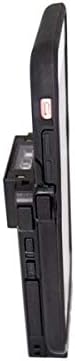
Image: The KOAMTAC KDC470Ci-BLE 2D Imager Barcode Sled Scanner integrated with an Apple iPhone 7/8Plus via the SmartSled Charging Case. This side view highlights the compact design and the connection points between the scanner and the smartphone case.
Prodotto finitoview
The KOAMTAC KDC470Ci-BLE is a robust 2D CMOS Imager Barcode Sled Scanner designed for mobile data collection. When paired with the Apple iPhone 7/8Plus SmartSled Charging Case, it transforms your smartphone into a comprehensive barcode scanning solution. Key features include:
- 2D CMOS Imager: Capable of reading various 2D barcodes.
- SmartSled Design: Allows for easy integration and removal of the iPhone 7/8Plus.
- Ricarica simultanea: The SmartSled case enables simultaneous charging of both the KDC470Ci-BLE scanner and the iPhone 7/8Plus via a Micro USB cable or charging cradle.
- Costruzione durevole: Grado di protezione IP65 per la resistenza alla polvere e all'acqua, con specifiche per cadute da 5 metri.
- Durata prolungata della batteria: Advanced power management features, including a hibernation mode, extend battery life beyond an average work shift. The built-in rechargeable battery can also serve as an external power source for the iPhone.
- Compatibilità software: Includes KT Sync keyboard wedging software and an SDK for Android, Blackberry, iOS, and Windows platforms.
Istruzioni di installazione
- Disimballaggio: Carefully remove all components from the packaging. Verify that you have the KDC470Ci-BLE scanner, the Apple iPhone 7/8Plus SmartSled Charging Case, and any included cables or accessories.
- Insert iPhone: Gently slide your Apple iPhone 7/8Plus into the SmartSled Charging Case until it is securely seated. Ensure all connectors align properly.
- Attach Scanner: Connect the KDC470Ci-BLE scanner to the SmartSled Charging Case. The scanner is designed to seamlessly attach to the back of the case, forming a single integrated unit.
- Carica iniziale: Before first use, fully charge the integrated unit. Connect the Micro USB cable to the SmartSled Charging Case and then to a power source. The scanner and iPhone will charge simultaneously.
- Installazione del software:
- For basic keyboard wedging functionality, install the KT Sync software on your host device (e.g., iPhone).
- For custom application development, utilize the provided SDK for your specific operating system (iOS in this case).
- Bluetooth Pairing (if not using direct connection):
- Power on the KDC470Ci-BLE scanner.
- On your iPhone, navigate to Bluetooth settings and search for available devices.
- Select the KDC470Ci-BLE from the list to pair. Follow any on-screen prompts.
Istruzioni per l'uso
Scansione di codici a barre
- Accensione: Ensure the KDC470Ci-BLE scanner is powered on.
- Target Barcode: Point the scanner's imager window at the barcode you wish to scan.
- Activate Scan: Press the scan button located on the side of the KDC470Ci-BLE. A red aiming beam will appear.
- Conferma scansione: Once the barcode is successfully read, the scanner will typically emit an audible beep and/or vibrate, and the data will be transmitted to your connected iPhone application.
Caricamento del dispositivo
The SmartSled Charging Case allows for convenient charging of both the KDC470Ci-BLE scanner and the iPhone 7/8Plus simultaneously.
- Connect a Micro USB cable to the charging port on the SmartSled case.
- Collegare l'altra estremità del cavo USB a un adattatore di alimentazione USB compatibile o alla porta USB di un computer.
- Alternatively, place the SmartSled unit into a compatible KOAMTAC charging cradle (sold separately) for simultaneous charging.
Gestione dell'alimentazione
The KDC470Ci-BLE features advanced power management to conserve battery life. When not actively in use, the scanner enters a "hibernation mode" to extend operational time. To reactivate, simply press the scan button or interact with the device via your iPhone application.
Manutenzione
- Pulizia: Utilizzare un panno morbido e privo di lanugine leggermente dampened with water or a mild cleaning solution to clean the exterior of the scanner and case. Avoid harsh chemicals or abrasive materials. Do not spray liquids directly onto the device.
- Magazzinaggio: Conservare il dispositivo in un luogo fresco e asciutto, lontano dalla luce solare diretta e da temperature estreme.
- Cura della batteria: To prolong battery life, avoid fully discharging the battery frequently. If storing for an extended period, ensure the battery is charged to approximately 50%.
- Aggiornamenti del firmware: Periodically check the KOAMTAC website for firmware updates for your KDC470Ci-BLE scanner. Keeping the firmware updated ensures optimal performance and access to new features.
Risoluzione dei problemi
| Problema | Possibile causa | Soluzione |
|---|---|---|
| Lo scanner non si accende. | Batteria scarica o scarica. | Charge the device using the Micro USB cable or charging cradle. |
| Unable to scan barcodes. | Barcode damaged or unreadable; scanner not aimed correctly; incorrect symbology settings. | Ensure the barcode is clear. Aim the red beam directly across the barcode. Check scanner settings for supported symbologies. |
| No data transmitted to iPhone. | Bluetooth connection lost; application not configured correctly; iPhone not securely seated in SmartSled. | Verify Bluetooth connection. Restart the scanning application. Re-seat the iPhone in the SmartSled case. |
| Il dispositivo non si carica. | Faulty cable or power adapter; charging port obstruction; iPhone not properly connected. | Try a different Micro USB cable and power adapter. Inspect the charging port for debris. Ensure the iPhone is fully seated in the SmartSled. |
Specifiche
- Numero modello: 381150 (KDC470Ci-BLE)
- Tipo di scanner: Imager CMOS 2D
- Compatibilità: Apple iPhone 7/8Plus (with SmartSled Case), Desktop, Laptop, Smartphone
- Connettività: Bluetooth Low Energy (BLE), USB Cable
- Fonte di energia: Alimentato a batteria, cavo USB
- Valutazione ambientale: Grado di protezione IP65
- Specifica di goccia: 5 piedi (1.5 metri)
- Peso dell'articolo: 8.8 once (circa 249 grammi)
- Dimensioni della confezione: 6.1 x 4.2 x 1.5 pollici (circa 15.5 x 10.7 x 3.8 cm)
- Produttore: KOAMTAC
- Primo disponibile: 13 novembre 2018
Garanzia e supporto
For warranty information and technical support, please refer to the official KOAMTAC website or contact KOAMTAC customer service directly. Keep your purchase receipt as proof of purchase for warranty claims.
- Produttore: KOAMTAC
- Websito: www.koamtac.com
- Contatto: Refer to the KOAMTAC websito per informazioni di contatto e risorse di supporto.