
Fanimation MAD7912BBN
Fanimation Levon Custom DC Motor Ceiling Fan
Manuale d'uso
Model: MAD7912BBN
Introduzione
This manual provides detailed instructions for the safe installation, operation, and maintenance of your Fanimation Levon Custom DC Motor Ceiling Fan, model MAD7912BBN. The Levon Custom series offers a versatile design with various optional blade and finish combinations, allowing for a personalized aesthetic. This fan is designed for indoor use and features a DC motor for efficient performance, along with Wi-Fi compatibility and fanSync Bluetooth for modern control options.
Informazioni sulla sicurezza
Si prega di leggere attentamente tutte le istruzioni prima di iniziare l'installazione. Il mancato rispetto di queste istruzioni potrebbe causare scosse elettriche, incendi o lesioni personali.
- Assicurarsi che il sito di installazione sia strutturalmente solido e in grado di sostenere il peso del ventilatore (circa 19 libbre).
- All electrical connections must be made in accordance with local codes, ordinances, and the National Electric Code (NEC). If you are unfamiliar with electrical wiring, consult a qualified electrician.
- Disconnect power at the main circuit breaker before attempting any installation or maintenance.
- Non utilizzare il ventilatore se il cavo di alimentazione o la spina sono danneggiati.
- Tenere mani, capelli e vestiti lontani dalle pale del ventilatore in movimento.
- Questo ventilatore è progettato solo per uso interno.
Contenuto della confezione
Carefully unpack all components and ensure you have received all items listed below. If any parts are missing or damaged, contact Fanimation customer support immediately.
- DC Motor Assembly (Fanimation Levon Custom)
- Staffa di fissaggio
- Verga
- Baldacchino
- Pacchetto hardware (viti, rondelle, dadi per cavi)
- fanSync Bluetooth Receiver
- Manuale di istruzioni
- Note: Fan blades and optional LED Light Kit are sold separately.
Configurazione e installazione
Installation of the Fanimation Levon Custom ceiling fan requires basic electrical knowledge. If you are unsure about any steps, please consult a qualified electrician.
1. Preparare il sito di installazione
Ensure the electrical box is securely mounted to the building structure and is rated for fan support. The fan requires a 120V AC power supply.
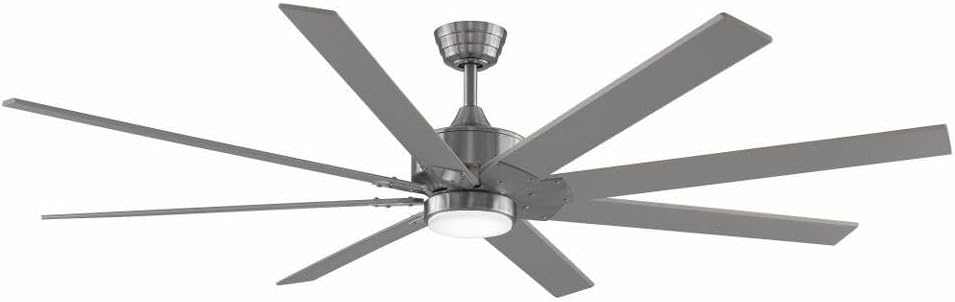
Figure 1: Assembled Fanimation Levon Custom DC Motor Ceiling Fan. This image shows the complete fan unit, including the motor housing, downrod, and a set of eight fan blades (sold separately), all in a brushed nickel finish.
2. Mount the Bracket and Downrod
Attach the mounting bracket to the electrical box. Secure the downrod to the fan motor assembly, ensuring all pins and screws are tightened.
3. Collegamenti elettrici
Connect the fan's electrical wires to the household wiring according to the wiring diagram provided in the separate detailed installation guide. Ensure proper grounding. The fanSync Bluetooth receiver should be wired in line as per instructions for remote and smart control functionality.

Figura 2: lato view of the Fanimation Levon Custom DC Motor Ceiling Fan. This perspective highlights the sleek profile of the motor housing and the angle of the fan blades, demonstrating its modern design.
4. Attach Fan Blades and Light Kit (Optional)
Securely attach the fan blades (sold separately) to the motor housing. If installing the optional LED light kit (sold separately), follow its specific installation instructions.

Figura 3: primo piano view of the Fanimation Levon Custom DC Motor Ceiling Fan's central housing. This image focuses on the brushed nickel finish of the motor unit and the integrated light fixture, which is part of the optional LED light kit.
Istruzioni per l'uso
Your Fanimation Levon Custom fan can be controlled via the included fanSync Bluetooth remote or through a compatible Wi-Fi enabled smart device (with required controls sold separately).
- Accensione/spegnimento: Use the designated button on your remote or smart device interface to turn the fan on or off.
- Controllo della velocità: The fan offers 3 distinct power levels. Adjust the fan speed using the speed control buttons on your remote or the slider/buttons in your smart application.
- Light Control (if applicable): If an optional LED light kit is installed, use the light control buttons on your remote or smart device to turn the light on/off and adjust brightness (if dimmable).
- Connettività Wi-Fi: For Wi-Fi control, ensure you have the necessary Wi-Fi compatible controls and follow their specific pairing instructions to connect your fan to your home network.
Manutenzione
Una manutenzione regolare garantirà la longevità e le prestazioni ottimali del tuo ventilatore da soffitto.
- Pulizia: Per pulire la ventola, strofinare con un panno morbido eamp cloth. Do not use abrasive cleaners or solvents, as these may damage the finish or blades.
- Ispezione della lama: Periodically check the blade attachments for tightness. Loose blades can cause wobbling and noise.
- Lubrificazione del motore: Il motore a corrente continua è permanentemente lubrificato e non necessita di ulteriore lubrificazione.
- Collegamenti elettrici: Annually inspect all electrical connections for any signs of wear or loosening. Ensure power is disconnected before inspection.
Risoluzione dei problemi
If you experience issues with your Fanimation Levon Custom ceiling fan, refer to the following common problems and solutions:
| Problema | Possibile causa | Soluzione |
|---|---|---|
| La ventola non si avvia | Nessuna alimentazione al ventilatore; Collegamenti dei cavi allentati; Batteria del telecomando scarica. | Controllare l'interruttore automatico e l'interruttore a parete. Assicurarsi che tutti i collegamenti dei cavi siano ben saldi. Sostituire le batterie del telecomando. |
| La ventola traballa | Viti delle lame allentate; Lame sbilanciate; Staffa di montaggio allentata. | Tighten all blade screws. Use a balancing kit (not included) to balance blades. Ensure mounting bracket is securely fastened. |
| Funzionamento rumoroso | Viti allentate; ronzio del motore; le lame urtano un ostacolo. | Check and tighten all screws. A slight motor hum is normal for DC motors. Ensure nothing is obstructing the blade path. |
| Il telecomando non funziona | Low battery; Not paired correctly; Obstruction between remote and receiver. | Replace batteries. Refer to fanSync pairing instructions. Ensure clear line of sight. |
Specifiche
Detailed technical specifications for the Fanimation Levon Custom DC Motor Ceiling Fan (Model MAD7912BBN).
| Marca | Fananimazione |
| Nome del modello | Levon Custom DC Motor - BN |
| Numero di modello | MAD7912BBN |
| Colore | Nichel spazzolato |
| Progettazione di ventilatori elettrici | Ventilatore a soffitto |
| Fonte di alimentazione | Elettrico con cavo |
| Caratteristica speciale | Wi-Fi Enabled (with separate controls) |
| Tipo di finitura | Finito |
| Capacità del flusso d'aria | 8244 CFPH |
| Voltage | 120.0 Volt |
| Peso dell'articolo | 18.96 libbre (circa 8.6 kg) |
| Dimensioni del prodotto | 52 x 52 x 15.58 pollici (circa 132 x 132 x 39.6 cm) |
| Uso interno/esterno | Al chiuso |
| Materiale della lama | Plastic (if purchased separately) |
| Numero di livelli di potenza | 3 |
| Codice UPC | 840506087224 |
Informazioni sulla garanzia
The Fanimation Levon Custom DC Motor Ceiling Fan is backed by a Garanzia a vita limitata. This warranty covers defects in materials and workmanship under normal use. For specific terms, conditions, and limitations, please refer to the warranty documentation included with your purchase or visit the official Fanimation websito.
Assistenza clienti
If you have any questions, require technical assistance, or need to report a missing or damaged part, please contact Fanimation customer support. Have your model number (MAD7912BBN) and purchase information ready when contacting support.
For the most up-to-date contact information and additional resources, please visit the official Fanimation websito: www.fanimation.com
Ask a question about this manual
Ask about setup, troubleshooting, compatibility, parts, safety, or missing instructions. Manuals+ will review the question and use this page’s manual context to help answer it.