
PER SEMPRE KW-300
Manuale utente dello smartwatch FOREVER KW-300
Model: KW-300 (GSM036547)
Introduzione
This manual provides comprehensive instructions for the operation, maintenance, and troubleshooting of your FOREVER KW-300 Smartwatch. Please read this manual carefully before using the device to ensure proper functionality and to maximize its lifespan.

Figure 1: FOREVER KW-300 Smartwatch - Front View
The image displays the pink FOREVER KW-300 Smartwatch, highlighting its square display and the two-tone pink and red strap design. A button is visible on the right side of the watch face.
Contenuto della confezione
Dopo aver aperto la confezione, verificare che tutti i componenti siano presenti e in buone condizioni:
- FOREVER KW-300 Smartwatch
- Cavo di ricarica USB
- Small Screwdriver (for SIM card tray access, if applicable)
- Manuale dell'utente (questo documento)

Figure 2: Smartwatch and Included Accessories
This image shows the pink FOREVER KW-300 Smartwatch alongside its USB charging cable and a small screwdriver, which are typically included for setup and maintenance.
Impostare
1. Carica del dispositivo
Before initial use, fully charge the smartwatch. Connect the magnetic charging cable to the charging pins on the back of the watch and plug the USB end into a compatible USB power adapter (not included) or a computer's USB port.
- Una carica completa richiede in genere circa 2-3 ore.
- Lo schermo indicherà lo stato di carica.
2. Accensione/Spegnimento
To power on the smartwatch, press and hold the power button (located on the side) for a few seconds until the screen illuminates. To power off, press and hold the power button until the power-off option appears on the screen, then confirm.
3. Initial Configuration and App Pairing
The KW-300 Smartwatch requires pairing with a smartphone application for full functionality, including GPS tracking, communication, and settings management. Refer to the quick start guide included in the box for specific app download instructions (e.g., "Seeme" app).
- Download the official companion application from your smartphone's app store.
- Create an account and follow the on-screen prompts to register your device.
- Scan the QR code displayed on the smartwatch screen or enter the device ID manually to pair.
- Configure essential settings such as time zone, emergency contacts, and GPS tracking frequency within the app.
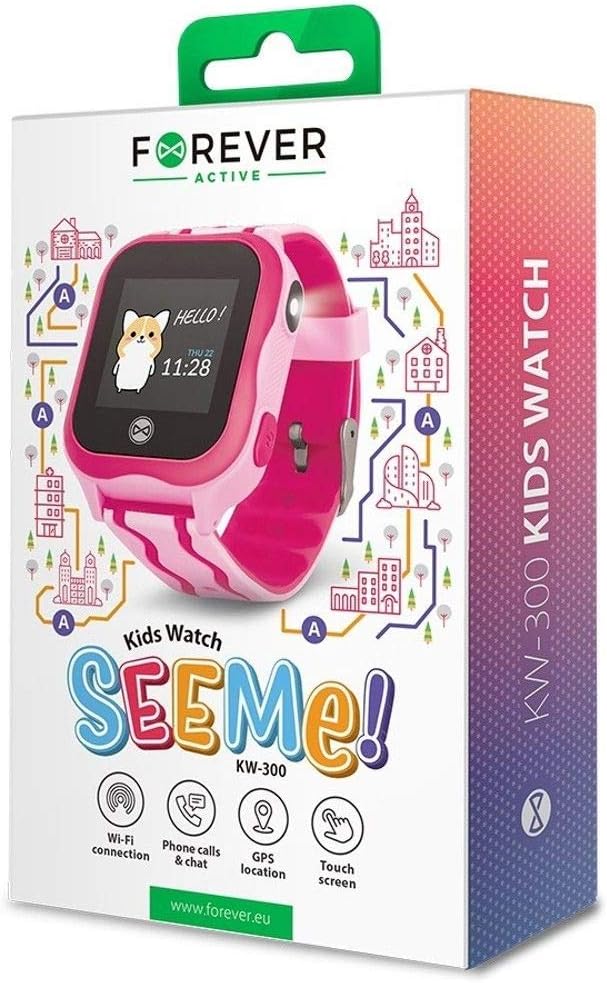
Figure 3: Product Packaging Highlighting Key Features
The product box for the FOREVER KW-300 Kids Watch "SEEMe!" displays icons for Wi-Fi connection, Phone calls & chat, GPS location, and Touch screen, indicating the smartwatch's primary functionalities.
Istruzioni per l'uso
Navigazione nell'interfaccia
The KW-300 features a touch screen display. Swipe left/right or up/down to navigate through menus and applications. Tap to select an option.
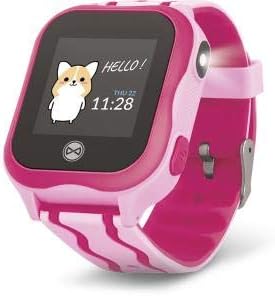
Figure 4: Smartwatch Display Example
This image shows the smartwatch display with a friendly "Hello!" message, a cartoon character, and the current time and date (Thursday, 11:28).
Effettuare e ricevere chiamate
Once a SIM card is properly installed (if applicable) and contacts are synced via the app, the smartwatch can make and receive calls to pre-approved numbers.
- Effettuare una chiamata: Navigate to the "Contacts" or "Dialer" app on the watch, select a contact, and tap to call.
- Ricevere una chiamata: When a call comes in, the watch will ring and display the caller ID. Tap the green icon to answer or the red icon to decline.
Tracciamento GPS
The integrated GPS module allows for real-time location tracking. This feature is primarily managed through the companion smartphone application.
- View the watch's current location on a map within the app.
- Set up geofences (safe zones) and receive alerts when the watch enters or exits these areas.
- Review location history.
Funzione SOS
The smartwatch is equipped with an SOS button for emergencies. When pressed and held, it will automatically dial pre-set emergency contacts and send location alerts.
- Configure SOS contacts in the companion application.
- Ensure the watch has network connectivity for the SOS function to work.
Manutenzione
Pulizia
Pulisci regolarmente il tuo smartwatch per mantenerne l'aspetto e la funzionalità.
- Pulire lo schermo e il corpo con un panno morbido e privo di lanugine.
- Per macchie ostinate, leggermente dampLavare il panno con acqua. Evitare prodotti chimici aggressivi o materiali abrasivi.
- Ensure the charging pins are clean and free of debris.
Magazzinaggio
When not in use for extended periods, store the smartwatch in a cool, dry place away from direct sunlight and extreme temperatures. It is recommended to charge the device to about 50% before long-term storage to preserve battery health.
Risoluzione dei problemi
| Problema | Possibile causa | Soluzione |
|---|---|---|
| L'orologio non si accende. | Batteria scarica; dispositivo bloccato. | Charge the watch for at least 30 minutes. If still unresponsive, perform a forced restart (refer to specific model instructions or hold power button for 10-15 seconds). |
| Impossibile effettuare/ricevere chiamate. | No SIM card; SIM card not active; poor network signal; contacts not synced. | Ensure SIM card is correctly inserted and active. Check network signal strength. Verify contacts are synced via the companion app. |
| La posizione GPS non è precisa. | Poor GPS signal (indoors/dense areas); device not connected to network. | Move to an open outdoor area. Ensure the watch has a stable network connection. |
| Impossibile effettuare l'associazione con l'app per smartphone. | Bluetooth/Wi-Fi off; incorrect pairing code; app issues. | Ensure Bluetooth/Wi-Fi is enabled on both devices. Re-enter pairing code. Restart both devices and try again. Reinstall the app if necessary. |
Specifiche
| Caratteristica | Dettaglio |
|---|---|
| Nome del modello | KW-300 |
| Numero di modello | GSM036547 |
| Marca | PER SEMPRE |
| Tecnologia di connettività | GPS, Bluetooth |
| Caratteristiche speciali | GPS |
| Dispositivi compatibili | Smartphone |
| Forma | Girare |
| Dimensioni articolo (L x P x A) | 13 x 4 x 8 centimetri |
Garanzia e supporto
Information regarding the specific warranty period and terms for your FOREVER KW-300 Smartwatch is typically provided with the product packaging or available on the manufacturer's official websito. Conservare la prova d'acquisto per eventuali reclami in garanzia.
Assistenza clienti
For technical assistance, troubleshooting beyond this manual, or warranty inquiries, please contact FOREVER customer support through their official channels. Visit the FOREVER websito per informazioni di contatto e domande frequenti.
Nota: nel presente manuale non sono forniti dettagli di contatto specifici.
Ask a question about this manual
Ask about setup, troubleshooting, compatibility, parts, safety, or missing instructions. Manuals+ will review the question and use this page’s manual context to help answer it.