
Introduzione
This manual provides essential information for the proper use and maintenance of your Easytry123 replacement remote control. This remote is designed to function with various Hitachi 3LCD projector models, offering a convenient way to control your projector's features. Please read these instructions carefully before use.
Compatibilità
This replacement remote control is compatible with the following Hitachi 3LCD Projector models:
- CP-X275WA
- CP-X300
- CP-X301
- CP-X3010
- CP-X308
- CP-X320W
- CP-X325W
- CP-X3010EN
- CP-X3010Z
- CP-X3011N
Note: While designed for broad compatibility, some advanced or specific functions of your original projector remote may not be fully supported by this replacement unit.
Contenuto della confezione
Il tuo pacco dovrebbe contenere i seguenti articoli:
- 1 x Easytry123 Replacement Remote Control
Le batterie non sono incluse e devono essere acquistate separatamente.
Impostare
Installazione delle batterie
- Individuare il vano batterie sul retro del telecomando.
- Far scorrere il coperchio del vano batteria verso il basso oppure premere il fermo e sollevarlo per aprirlo.
- Inserire due (2) batterie AA, assicurandosi che i terminali positivo (+) e negativo (-) siano allineati correttamente con i segni all'interno del vano.
- Richiudere il coperchio del vano batteria facendolo scorrere in posizione finché non scatta in posizione.

Image: The remote control with its battery cover removed, revealing the two AA battery slots. Observe the correct polarity markings (+/-) inside the compartment for proper battery insertion.
After installing the batteries, the remote control is ready for use. No additional pairing or programming is typically required for this replacement unit.
Istruzioni per l'uso
Point the remote control directly at the infrared receiver on your Hitachi projector. Ensure there are no obstructions between the remote and the projector.
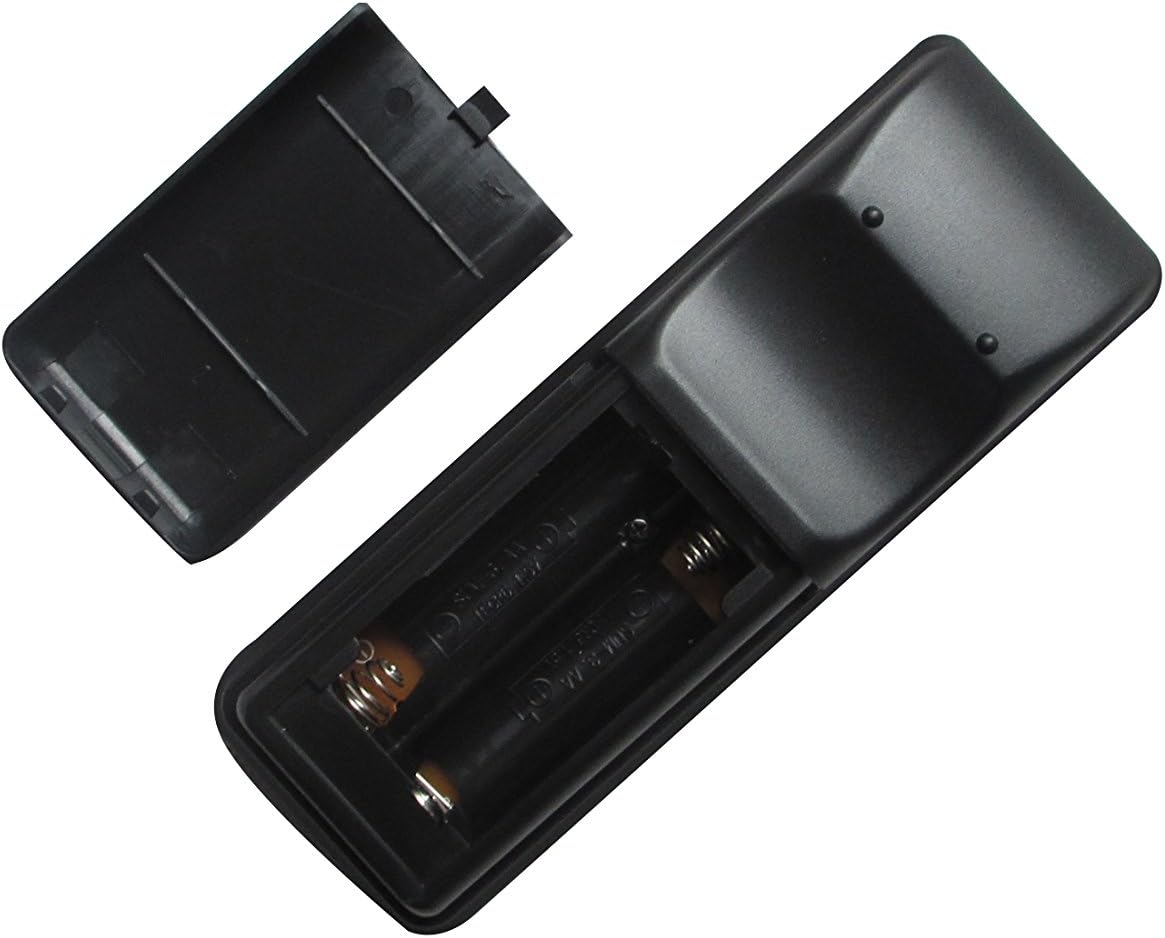
Immagine: Frontale view of the Easytry123 replacement remote control, displaying its array of function buttons for projector operation.
Funzioni di base:
- Accensione/spegnimento: Premere il tasto ENERGIA per accendere o spegnere il proiettore.
- Selezione input: Utilizzare il INGRESSO or dedicated input buttons (e.g., HDMI, VGA) to cycle through available input sources.
- Navigazione nel menu: Utilizzare il MENU button to access the projector's on-screen display (OSD) menu. Use the arrow keys (SU GIÙ SINISTRA DESTRA) per navigare e INVIO/OK per confermare le selezioni.
- Controllo del volume: If your projector supports audio output, use the Volume+ E vol- Pulsanti per regolare il volume.
- Proporzioni: Some remotes include an ASPETTO button to change the display aspect ratio.
Manutenzione
Pulizia del telecomando
Per pulire il telecomando, strofinare delicatamente la superficie con un panno morbido e asciutto. Per lo sporco ostinato, strofinare leggermenteampImmergere il panno in acqua. Evitare l'uso di prodotti chimici aggressivi, detergenti abrasivi o umidità eccessiva, poiché potrebbero danneggiare il telecomando.
Sostituzione della batteria
Replace the batteries when the remote control's responsiveness decreases or it stops functioning. Always replace both batteries at the same time with new AA batteries. Do not mix old and new batteries, or different types of batteries.
Magazzinaggio
When not in use for extended periods, remove the batteries from the remote control to prevent leakage and potential damage. Store the remote in a cool, dry place away from direct sunlight and extreme temperatures.
Risoluzione dei problemi
- Il telecomando non risponde:
- Controllare che le batterie siano inserite correttamente, rispettando la polarità corretta.
- Sostituisci le batterie con batterie nuove.
- Assicurarsi che non vi siano ostacoli tra il telecomando e il ricevitore IR del proiettore.
- Verificare che il telecomando sia puntato direttamente verso il proiettore.
- Alcune funzioni non funzionano:
- This replacement remote may not support all advanced or specific functions of your original projector remote. Refer to your projector's original manual for specific function requirements.
- Projector turns on/off unexpectedly:
- Ensure no other infrared devices are interfering with the projector's receiver.
Specifiche
- Marca: Easytry123
- Dispositivi compatibili: Hitachi 3LCD Projectors (listed models)
- Tecnologia di connettività: Infrarossi (IR)
- Tipo di controller: Controllo dei pulsanti
- Fonte di energia: 2 batterie AA (non incluse)
- Caratteristica speciale: Design ergonomico

Immagine: Posteriore view of the Easytry123 replacement remote control, showing its ergonomic shape and battery compartment.