
Introduzione
This instruction manual provides essential information for the setup, operation, and maintenance of your Superior Electronics Universal Remote Control, model SUPTRB016. This remote is designed as a direct replacement for Telefunken televisions, including Smart TV models, and requires no programming for immediate use. Its ergonomic design and durable construction ensure comfortable and reliable control of your TV.
Impostare
1. Inserimento delle batterie
The remote control requires two (2) AAA batteries (not included). Follow these steps to insert them:
- Individuare il coperchio del vano batterie sul retro del telecomando.
- Per aprirlo, far scorrere il coperchio verso il basso oppure premere il fermo.
- Inserire due batterie AAA, assicurandosi che i terminali positivo (+) e negativo (-) siano allineati correttamente con le marcature all'interno del vano.
- Richiudere il coperchio del vano batteria, facendolo scorrere in posizione finché non scatta in posizione.

Figure 1: Inserting AAA batteries into the remote control.
2. Utilizzo iniziale
Once batteries are inserted, the remote control is ready for immediate use. No additional programming or code entry is required. Simply point the remote at your Telefunken TV and begin operating it.
Istruzioni per l'uso
The Superior Electronics SUPTRB016 remote control replicates the functions of your original Telefunken TV remote. Ensure a clear line of sight between the remote control and your TV's infrared receiver for optimal performance.

Figure 2: Remote control layout with streaming service buttons.
Funzioni chiave:
- Pulsante di accensione: Accende o spegne la TV.
- Tasti numerici (0-9): Per la selezione diretta del canale.
- Volume su/giù: Regola il volume del televisore.
- Canale su/giù: Cambia canale TV.
- Tasto muto: Disattiva o riattiva l'audio della TV.
- Tasti di navigazione (OK, Su, Giù, Sinistra, Destra): Utilizzato per la navigazione e la selezione del menu.
- Indietro/Esci: Ritorna alla schermata precedente o esce da un menu.
- Pulsanti Smart TV: Dedicated buttons provide quick access to popular streaming applications such as Netflix, YouTube, and Prime Video (functionality depends on your TV model and internet connection).
- Fonte/Input: Seleziona la sorgente di ingresso (HDMI, AV, ecc.).
- Menù/Informazioni: Accesses TV menus and displays information.
The remote operates effectively within a maximum range of 10 meters, provided there are no obstructions between the remote and the TV's infrared sensor.
Manutenzione
Per garantire la longevità e le prestazioni ottimali del tuo telecomando, segui queste semplici linee guida per la manutenzione:
- Pulizia: Wipe the remote control with a soft, dry cloth. Avoid using liquid cleaners or abrasive materials, as these can damage the surface or internal components.
- Sostituzione della batteria: Sostituisci le batterie quando la risposta del telecomando diventa lenta o smette di funzionare. Sostituisci sempre entrambe le batterie contemporaneamente con batterie AAA nuove. Non mischiare batterie vecchie e nuove o tipi diversi di batterie.
- Magazzinaggio: Conservare il telecomando in un luogo fresco e asciutto, lontano dalla luce solare diretta e da temperature estreme.
- Evitare gocce: While constructed with durable materials, excessive drops or impacts can cause damage.
Risoluzione dei problemi
Se riscontri problemi con il telecomando, consulta le seguenti soluzioni comuni:
| Problema | Possibile causa | Soluzione |
|---|---|---|
| Il telecomando non funziona affatto. | Batterie scariche o inserite in modo errato. | Controllare l'orientamento delle batterie. Sostituirle con batterie AAA nuove. |
| Il telecomando funziona a intermittenza. | Batterie scariche, ostruzioni o telecomando troppo lontano dalla TV. | Replace batteries. Ensure clear line of sight to TV. Move closer to the TV (within 10 meters). |
| Alcuni pulsanti specifici non rispondono. | Button malfunction or TV not supporting the function. | Ensure your TV model supports the specific function (e.g., Smart TV apps). If other buttons work, the specific button might be faulty. |
| La TV non risponde al telecomando. | TV's IR sensor blocked or TV is not a Telefunken model. | Clear any obstructions in front of the TV's IR sensor. Verify that your TV is a Telefunken brand. |
Specifiche
- Modello: SUPTRB016
- Marca: Elettronica superiore
- Dimensioni: Dimensioni: 5 x 1.5 x 19 cm
- Peso: 90 grammi
- Batterie richieste: 2 x AAA (1.5 V)
- Batterie incluse: NO
- Tecnologia di connettività: Infrarossi
- Portata massima: 10 metri
- Dispositivi compatibili: Telefunken Televisions (LED, LCD, OLED, Smart TV models)
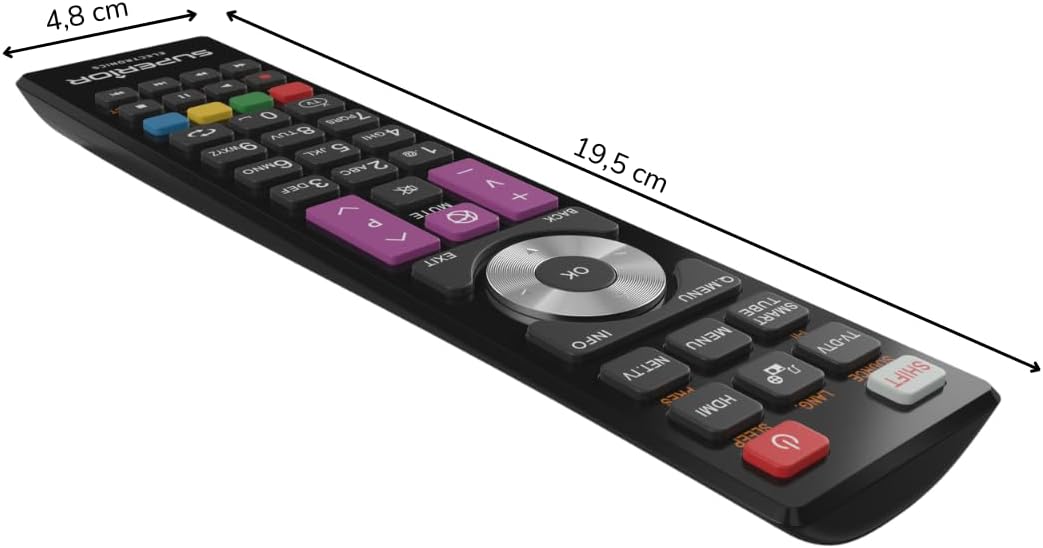
Figura 3: Dimensioni del telecomando.
Garanzia e supporto
For warranty information, please refer to the terms and conditions provided by your retailer at the time of purchase or contact Superior Electronics directly. For additional support or inquiries, you may visit the official Superior Electronics store on Amazon: