
1. Introduzione
This manual provides instructions for the Easytry123 XD7247 replacement remote control, designed for use with various Pioneer Audio/Video (AV) receivers. This remote offers essential functions for controlling your compatible Pioneer receiver. Please note that as a replacement unit, some advanced or specific functions of your original remote may not be fully supported.
2. Compatibilità
The Easytry123 XD7247 replacement remote control is compatible with the following Pioneer AV receiver models:
- Pioneer VSX-D510S
- Pioneer VSX-D510
- Pioneer VSX-D411
- Pioneer VSX-D511
- Pioneer VSX-D209
- Pioneer VSX-D409
- Pioneer VSX-D709RDS
- Pioneer VSX-D3
To ensure proper functionality, verify that your receiver model is listed above. This remote is specifically designed for these models and may not operate other Pioneer devices or models not listed.
3. Impostazione
3.1 Installazione della batteria
The Easytry123 XD7247 remote control requires two (2) AA batteries for operation. Batteries are not included with the remote control and must be purchased separately.
- Individuare il vano batterie sul retro del telecomando.
- Per aprire il coperchio del vano batteria, farlo scorrere verso il basso o verso l'esterno.
- Inserire due batterie AA, assicurandosi che i terminali positivo (+) e negativo (-) siano allineati correttamente con le marcature all'interno del vano.
- Riposizionare il coperchio del vano batteria finché non scatta in posizione.

Immagine: Indietro view of the Easytry123 XD7247 remote control, highlighting the battery compartment for installation.
Once batteries are installed, the remote is ready for use with your compatible Pioneer AV receiver. No additional programming is typically required.
4. Utilizzo del telecomando
The Easytry123 XD7247 remote control is designed for straightforward operation. Point the remote directly at your Pioneer AV receiver and press the desired function button.
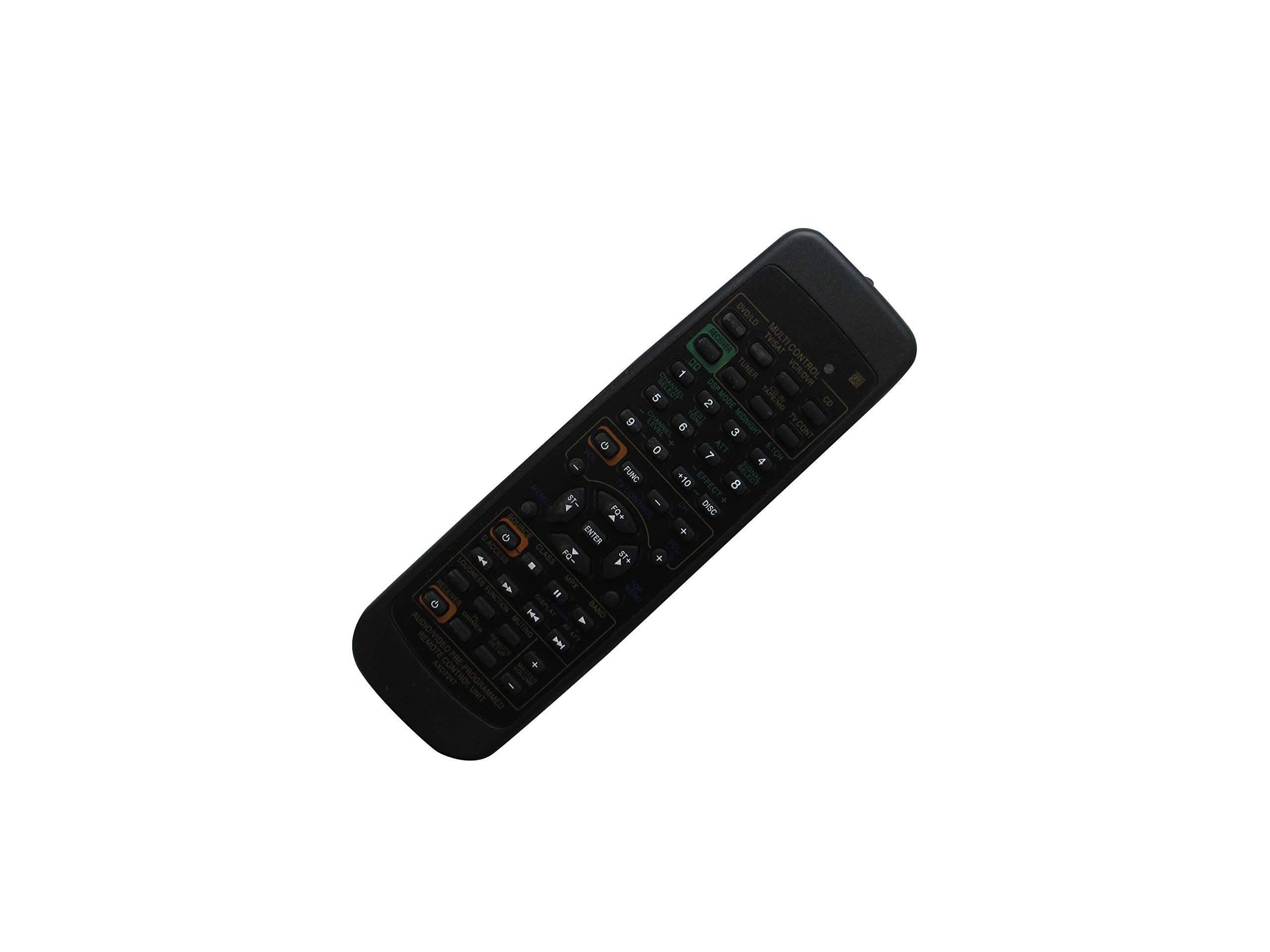
Immagine: Frontale view of the Easytry123 XD7247 remote control, showing the layout of various control buttons.
4.1 Funzioni di base
- Pulsante di accensione: Accende o spegne il ricevitore.
- Volume su/giù: Regola il livello di uscita audio.
- Selezione input/sorgente: Cycles through available audio/video inputs (e.g., CD, DVD, Tuner).
- Tasto muto: Disattiva temporaneamente l'uscita audio.
- Channel/Track Selection: For tuner or disc player control, if applicable.
- Pulsanti di navigazione: (Up, Down, Left, Right, Enter) for menu navigation on compatible receivers.
Nota: As a replacement item, this remote may not support all functions or advanced features present on your original Pioneer remote control. Functionality may vary depending on the specific Pioneer receiver model.
5. Manutenzione
Per garantire la longevità e il corretto funzionamento del tuo telecomando, segui queste semplici linee guida per la manutenzione:
- Pulizia: Pulisci il telecomando con un panno morbido e asciutto. Evita di utilizzare detergenti liquidi, solventi o materiali abrasivi, poiché potrebbero danneggiare la superficie o i componenti interni.
- Sostituzione della batteria: Sostituisci le batterie quando la risposta del telecomando diventa lenta o smette di funzionare. Sostituisci sempre entrambe le batterie contemporaneamente con batterie nuove dello stesso tipo (AA).
- Magazzinaggio: If the remote will not be used for an extended period, remove the batteries to prevent leakage, which can cause damage. Store the remote in a cool, dry place away from direct sunlight.
- Evitare gocce: Proteggere il telecomando dagli urti fisici, poiché le cadute possono danneggiare i circuiti interni.
6. Risoluzione Dei Problemi
If you encounter issues with your Easytry123 XD7247 remote control, refer to the following troubleshooting steps:
- Il telecomando non risponde:
- Controllare che le batterie siano inserite correttamente con la polarità corretta (+/-).
- Sostituisci le vecchie batterie con nuove batterie AA.
- Assicurarsi che non vi siano ostacoli tra il telecomando e il sensore a infrarossi del ricevitore.
- Confirm you are pointing the remote directly at the receiver.
- Funzionalità limitate:
- As a replacement remote, it may not replicate all functions of the original Pioneer remote. This is expected for certain advanced features.
- Verify that your Pioneer receiver model is listed in the compatibility section of this manual.
- Funzionamento intermittente:
- Ciò potrebbe indicare che la batteria è scarica. Sostituire le batterie.
- Ensure no strong light sources (like direct sunlight or fluorescent lights) are interfering with the infrared signal.
7. Specifiche
- Marca: Easytry123
- Modello: XD7247 (Replacement Remote Control)
- Dispositivi compatibili: Pioneer AV Receivers (Specific models listed in Section 2)
- Tecnologia di connettività: Infrarossi (IR)
- Fonte di energia: 2 batterie AA (non incluse)
- Numero massimo di dispositivi supportati: 1 (The connected Pioneer AV Receiver)
- Caratteristica speciale: Design ergonomico
- Produttore: Easytry123
- ASIN: B07PYPX6FC
8. Garanzia e supporto
Specific warranty information for the Easytry123 XD7247 replacement remote control is not provided in the product details. For any support inquiries or further assistance, please refer to the seller or retailer from whom the product was purchased.