
1. Introduzione
This manual provides essential information for the safe and efficient use of your SHNITPWR 24V 3A DC Power Supply Adapter. This adapter converts AC 100V-240V input to a stable DC 24V output with a maximum current of 3A (72W). It is designed for various applications including LED strip lights, 3D printers, CCTV systems, and LCD monitors. Please read this manual thoroughly before operation.
2. Informazioni sulla sicurezza
Per evitare danni al dispositivo o lesioni personali, osservare le seguenti precauzioni di sicurezza:
- Ingresso volumetage: Assicurarsi che l'ingresso AC voltage is within the specified range of 100V-240V, 50/60Hz.
- Corrente di uscita: The adapter provides a maximum of 3A. Do not connect devices that draw more than 3A, as this will damage the power supply and potentially the connected device. If your device requires less than 3A (e.g., 500mA, 1A, 2A), the adapter will supply only the required current.
- Protezione da sovraccarico: The unit features automatic overload cut-off, over voltage cut-off, automatic thermal cut-off, and short circuit protection. However, continuous overloading should be avoided.
- Not a Charger: This product is an AC to DC adapter, not a charger. It cannot be used to charge electronic devices with batteries, such as laptops. Doing so may damage your device.
- Ambiente operativo: Operate in a well-ventilated area. Avoid extreme temperatures, humidity, or direct sunlight.
- Consulenza professionale: For optimal performance and longevity, it is recommended to use the power supply at no more than 80% of its full load capacity. For a 72W adapter, this means powering devices up to approximately 57W.
- Certificazioni: This product is certified by FCC, CE, and ROHS, ensuring compliance with safety and environmental standards.

Figura 2.1: Built-in Safety Protections. The image displays icons representing various safety features: Short circuit protection, Over voltage protection, Overcurrent protection, Over temperature protection, Electromagnetic wave protection, and a Quality microchip. Below these icons, a circuit board design is visible, emphasizing the internal safety components.
3. Contenuto della confezione
Verificare che tutti gli articoli siano presenti nel pacco:
- 1 x SHNITPWR 24V 3A Power Supply Adapter
- 1 x cavo di alimentazione CA.
- 1 x DC Female Connector (5.5x2.5mm)

Figura 3.1: Product Details. This image illustrates the standard 3-prong wall plug, the super quality copper power cord, and the 5.5mm x 2.5mm universal DC plug. A detailed view of the AC input socket on the adapter is also shown, highlighting its robust design.
4. Istruzioni per l'installazione
- Collegare il cavo di alimentazione CA: Insert the AC power cord into the adapter's AC input port. Ensure it is firmly seated.
- Collegare l'uscita CC: Connect the DC output plug (5.5mm x 2.5mm) to your compatible 24V device. If your device requires a different DC connector, use the provided DC female connector to screw wires onto it, ensuring correct polarity.
- Collegare alla presa a muro: Plug the AC power cord into a standard 100V-240V wall outlet.
- Verifica connessione: A green LED indicator on the adapter will illuminate when power is supplied, indicating proper operation.
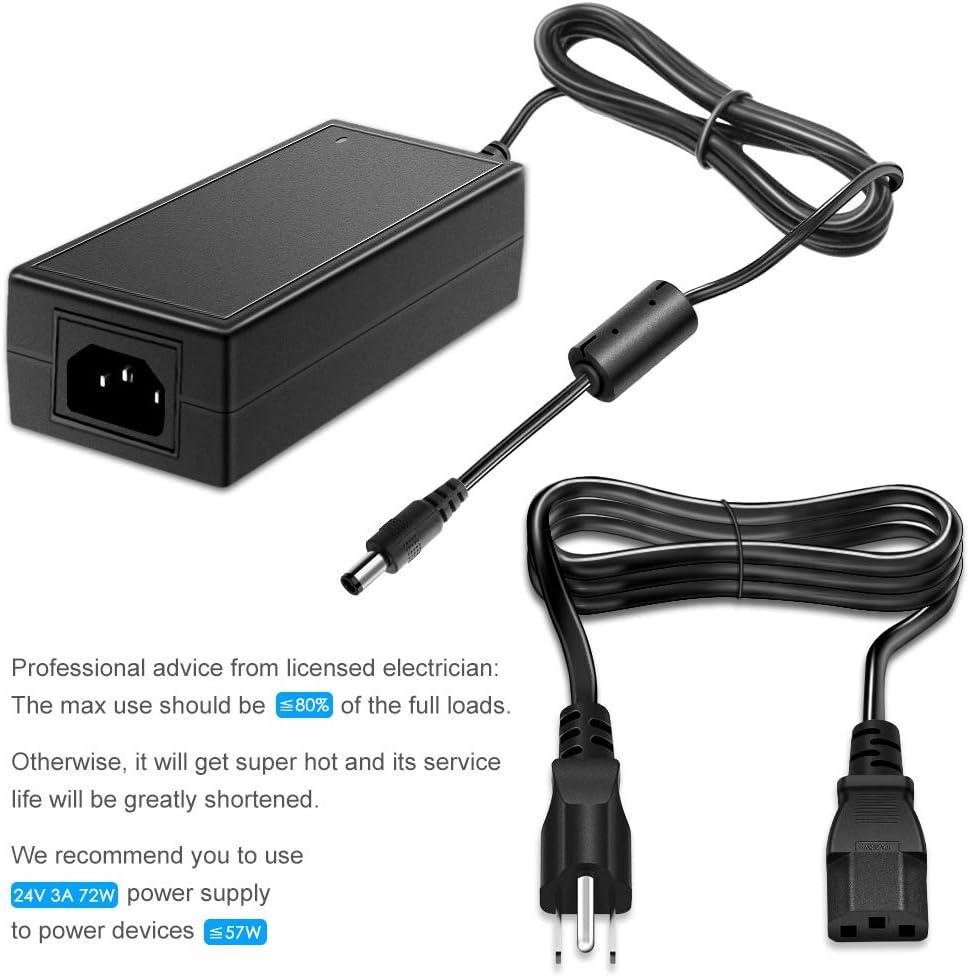
Figura 4.1: Power Supply Connection and Usage Recommendation. This image illustrates the power adapter connected to a wall outlet and its DC output connected to a device. It also includes a text overlay advising that the maximum use should be less than or equal to 80% of the full load (e.g., for a 24V 3A 72W supply, power devices up to 57W) to prevent overheating and extend service life.
5. Istruzioni per l'uso
Once connected, the power supply will provide stable 24V DC power to your device. Ensure your device is compatible with 24V DC input and does not exceed the 3A current limit.
- Compatibilità: This adapter is suitable for devices such as 5050/3528 24V LED Strip Lights, Wireless Routers, ADSL Cats, HUBs, Security Cameras, Audio/Video Power Supplies, 3D Printers, LED Drivers, CCTV Security Systems, LCD Monitors, and Webcam Routers that require 24V DC power.
- Indicatore di alimentazione: The green LED on the adapter indicates that it is receiving AC input and providing DC output.

Figura 5.1: Broad Compatibility. This image displays the SHNITPWR AC/DC adapter alongside several compatible devices, including 5050/3528 LED Strip Lights, Wireless Routers, Home Gateway, 3D Printers, LED Drivers, CCTV Security Systems, and LCD Monitors, illustrating its versatile application.
6. Manutenzione
- Pulizia: Disconnect the power supply from the wall outlet and the device before cleaning. Use a dry, soft cloth to wipe the surface. Do not use liquid cleaners.
- Magazzinaggio: Store the adapter in a cool, dry place when not in use. Avoid wrapping the cord too tightly.
- Ispezione: Periodically inspect the power cord and adapter for any signs of damage, such as frayed wires or cracks. Discontinue use if damage is found.
7. Risoluzione Dei Problemi
| Problema | Possibile causa | Soluzione |
|---|---|---|
| Nessuna potenza in uscita / Indicatore LED spento |
|
|
| Adapter gets excessively hot |
|
|
| High-pitched whining sound |
|
|
8. Specifiche
| Caratteristica | Dettaglio |
|---|---|
| Numero di modello | SNT-2403 |
| Ingresso volumetage | CA 100 V-240 V, 50/60 Hz |
| Volume di uscitatage | CC 24V |
| Max Corrente di uscita | 3A |
| Potenza massima Wattage | 72W |
| DC Connector Size | 5.5 mm x 2.5 mm |
| Dimensioni del prodotto | 106.69 x 1.97 x 1.18 pollici (corpo adattatore) |
| Peso dell'articolo | 9.2 once |
| Certificazioni di sicurezza | Certificazione FCC, CE, ROHS |

Figura 8.1: Product Size. This image provides detailed dimensions of the power adapter unit (approximately 11cm/4.3in long, 5cm/1.9in wide, 3cm/1.1in high) and the total cable length (approximately 242.5cm/95.4in), including the AC input cable and DC output cable with a 5.5mm x 2.5mm plug.
9. Garanzia e supporto
SHNITPWR products are designed for reliability and performance. For any issues or questions regarding your power supply, please contact SHNITPWR customer support. Refer to your purchase documentation for specific warranty terms and contact information.
Informazioni sui contatti: Please refer to the seller's contact details on the platform where the product was purchased or visit the official SHNITPWR websito di supporto.